


How to enable iSER in StarWind Virtual SAN
- December 07, 2017
- 3 min read
INTRODUCTION
In addition to the industry-standard uplink protocols, StarWind Virtual SAN supports iSER, the topnotch data transfer extension of iSCSI for RDMA. The protocol has low latency and CPU utilization. What is more, it has inherited from iSCSI its security and simplicity advantages. With RDMA protocol suite, iSER supplies higher bandwidth for block storage transfers. These features are crucial for building virtualized or cloud environments, where the protocol allows boosting VMs’ migration and data replication.
This guide is intended for experienced StarWind users, Windows system administrators, and IT professionals who would like to enable the iSER feature in StarWind Virtual SAN.
A full set of up-to-date technical documentation can always be found here, or by pressing the Help button in the StarWind Management Console.
For any technical inquiries, please, visit our online community, Frequently Asked Questions
page, or use the support form to contact our technical support department.
Pre-Configuring the Servers
Please note that this guide assumes that you have already configured your server and StarWind according to the following technical paper:
Enabling iSER support
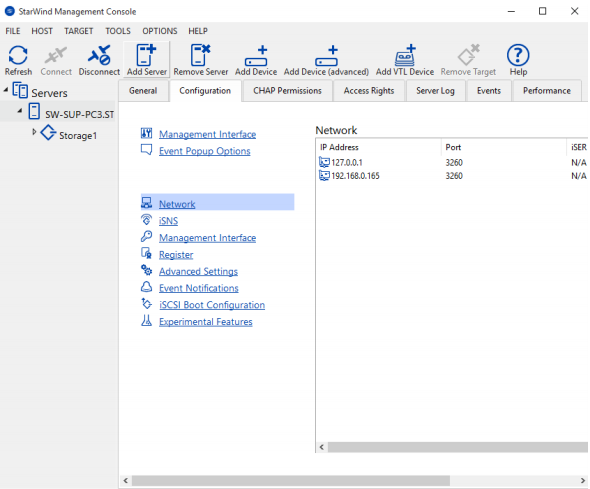
1. Select the StarWind server where you intend to enable iSER support.
2. Press the Configuration button.
3. Navigate to the Network tab.
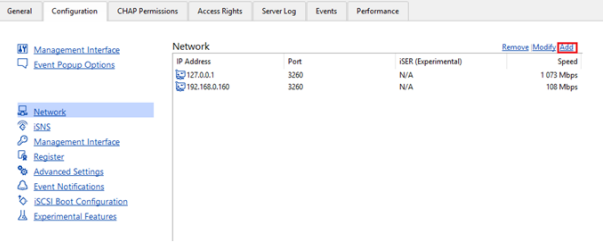
4. Click Add to append new network connections.
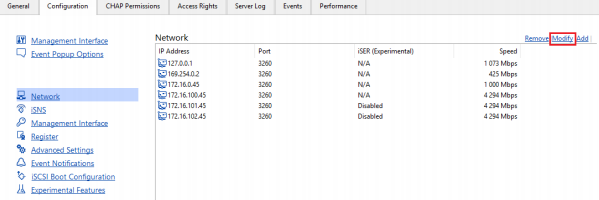
5. Select the network interface on which you want to enable iSER.
6. Click the Modify button.
7. The Network Interface tab will appear.
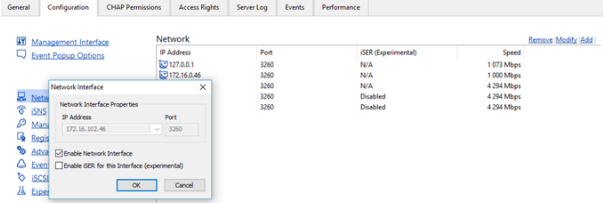
8. Select Enable iSER for this Interface (experimental).
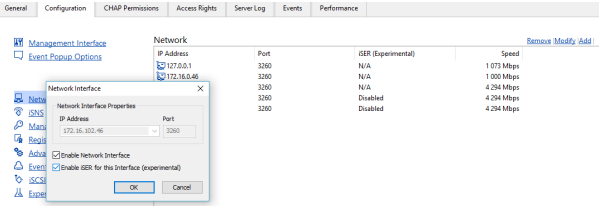
Click OK.
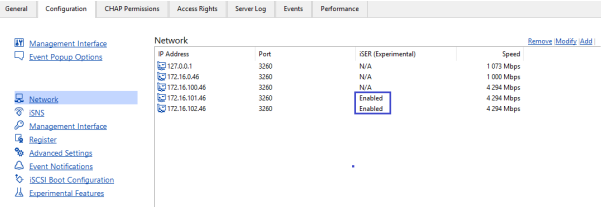
9. Check whether the iSER feature has been Enabled successfully.
CONCLUSION
When it comes to virtualized or cloud environments, storage network is the most crucial factor in their overall performance and stability. Enabling iSER allows increasing the speed of VM migration, data and VM replication. Apart from that, iSER provides all the advantages of the iSCSI protocol while adding low latency and direct memory access, allowing to configure a high performing and redundant system.
