












Join the Technical Preview Program.
See how NVMe-oF removes iSCSI bottlenecks in your HCI. Join
Search

What is Hyperconverged Infrastructure (HCI)?

Hyperconverged Infrastructure (HCI) is a Software-Defined (SDx), consolidated platform that converges all the essential ‘building blocks’ of a conventional data center, which are compute, storage, networking, monitoring, and management. HCI, or hyperconvergence, solves the common issues associated with legacy data center technology, such as elevated procurement and upkeep costs, challenging monitoring and management, and excessive power consumption.

Hyperconverged Infrastructure Components

Hyperconverged Infrastructure (HCI) relies on software-defined components that virtualize and integrate compute, storage, and networking resources to simplify their management, improve scalability, and efficiency.
Software-Defined Storage (SDS)

Software-Defined Storage (SDS)

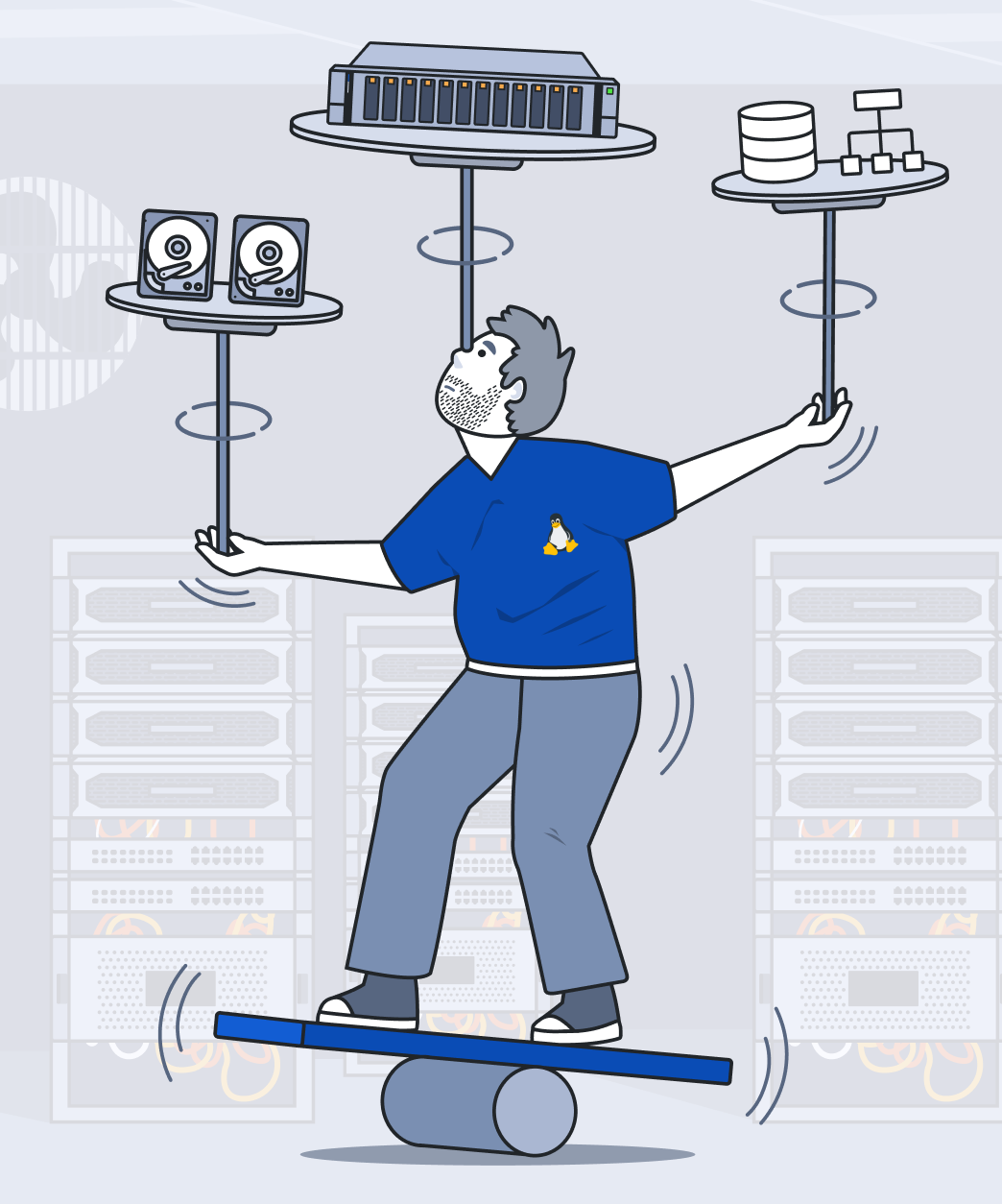
Software-Defined Storage (SDS) is a modern approach to data center tech that abstracts storage resources from hardware. This opens the door to greater managerial flexibility, better power efficiency, boosted performance, and basically unlimited scalability by running what used to be firmware on top of Commercial Off-The-Shelf (COTS) servers. To sweeten the deal, SDS trims down storage solution costs since commodity hardware is way cheaper than proprietary stuff.

Software-Defined Compute (SDC)

Software-Defined Compute (SDC)

Software-Defined Compute (SDC) is another example of a modern data center approach. SDC provides the management of computing resources entirely through software abstraction. It separates the handling of physical components like CPUs, GPUs, and memory from the actual hardware, enabling a more flexible, nearly infinitely scalable, high-performing, and fully automated computational environment. This approach significantly reduces overall costs by optimizing hardware utilization.

Software-Defined Networking (SDN)

Software-Defined Networking (SDN)

Software-Defined Networking (SDN) is yet one more modern data center approach, this time for networks. SDN disassociates the routing process (control plane) from the packet-forwarding process (data plane) by spinning up virtual networks that operate alongside the physical network. It enables code-driven control, centralized management, and versatile reconfiguration of hardware resources to enhance flexibility and overall efficiency.

Software-Defined Data Center (SDDC)

Software-Defined Data Center (SDDC)

Software-Defined Data Center (SDDC) is the culmination of integrating Software-Defined Storage (SDS), Software-Defined Compute (SDC), along with Software-Defined Networking (SDN). Together, these components create a fully virtualized IT infrastructure where all key elements of a modern data center – storage, compute, and networking – are abstracted, pooled, scaled, and managed entirely through software. This comprehensive software-driven approach provides organizations with agility, efficiency, and the ability to adapt quickly to changing business needs, all within a unified and centrally managed environment.

What Problem HCI Solves?

Operational challenges are a major pain point for many businesses operating traditional IT infrastructures. These environments are often complex, costly to maintain, and difficult to scale. Imagine trying to balance your workload while managing a collection of disparate hardware and software components from various vendors, all at once. The lack of cohesion creates significant operational friction, leading to inefficiencies, higher costs, and increased downtime risks.

So, what are the key issues we need to address to improve traditional IT infrastructures? And how can businesses overcome these challenges?

Hyperconverged Infrastructure (HCI) relies on software-defined components that virtualize and integrate compute, storage, and networking resources to simplify their management, improve scalability, and efficiency.

What Problem HCI Solves?

Excessive Hardware Footprint

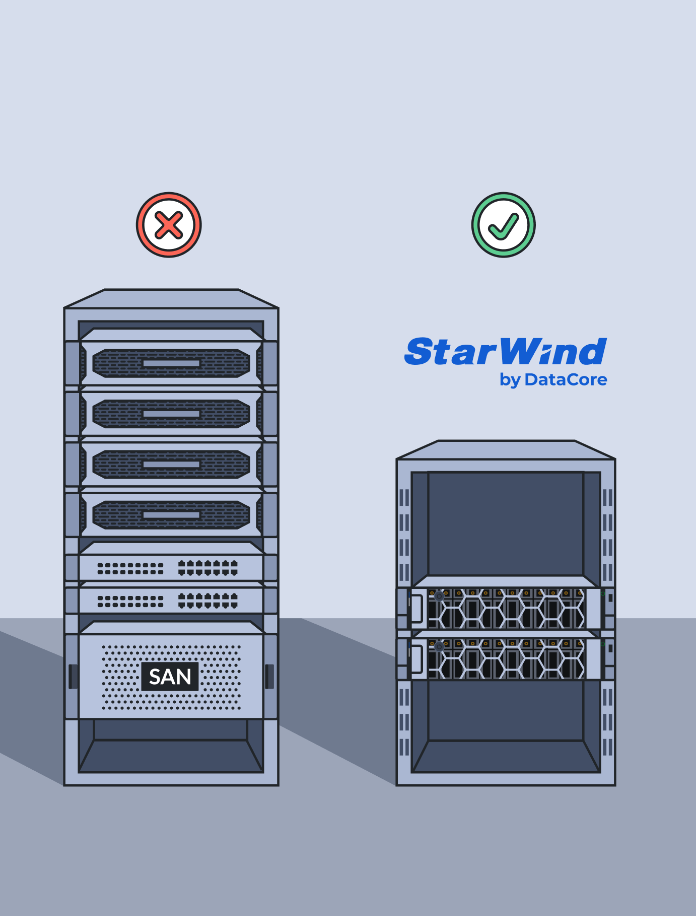
Physical servers, storage arrays, and networking equipment require extensive data center space and racking. This hardware volume drives high power and cooling costs, inflating expenses. Managing these components is labor-intensive, demanding dedicated IT staff and complex procedures. The sheer quantity of hardware increases failure risks and parts inventory, creating a large, expensive overhead.

Increased Management Complexity

Traditional data centers are a combination of disparate components: compute, storage, and networking, each managed by siloed teams and systems. This fragmentation creates operational inefficiencies and slows down problem-solving. A storage team, for instance, focuses solely on storage hardware, while server and network teams operate independently. This separation hinders collaboration and adds layers of complexity.

Overly Complex Scaling

The sheer volume of data is expanding exponentially, and applications demand ever-increasing compute power. Traditional infrastructure struggles to keep pace, leading to bottlenecks and delays. IT departments are under immense pressure to provision resources instantly, while also ensuring the infrastructure can scale seamlessly to handle unpredictable growth spurts. This constant need for rapid, flexible scaling is a major pain point.

How does HCI work?

Traditional IT infrastructure, with its separate compute, storage, and networking components, creates complexity, increases costs, and requires extensive manual management. These siloed systems demand specialized hardware and frequent maintenance, making scaling and optimization difficult.

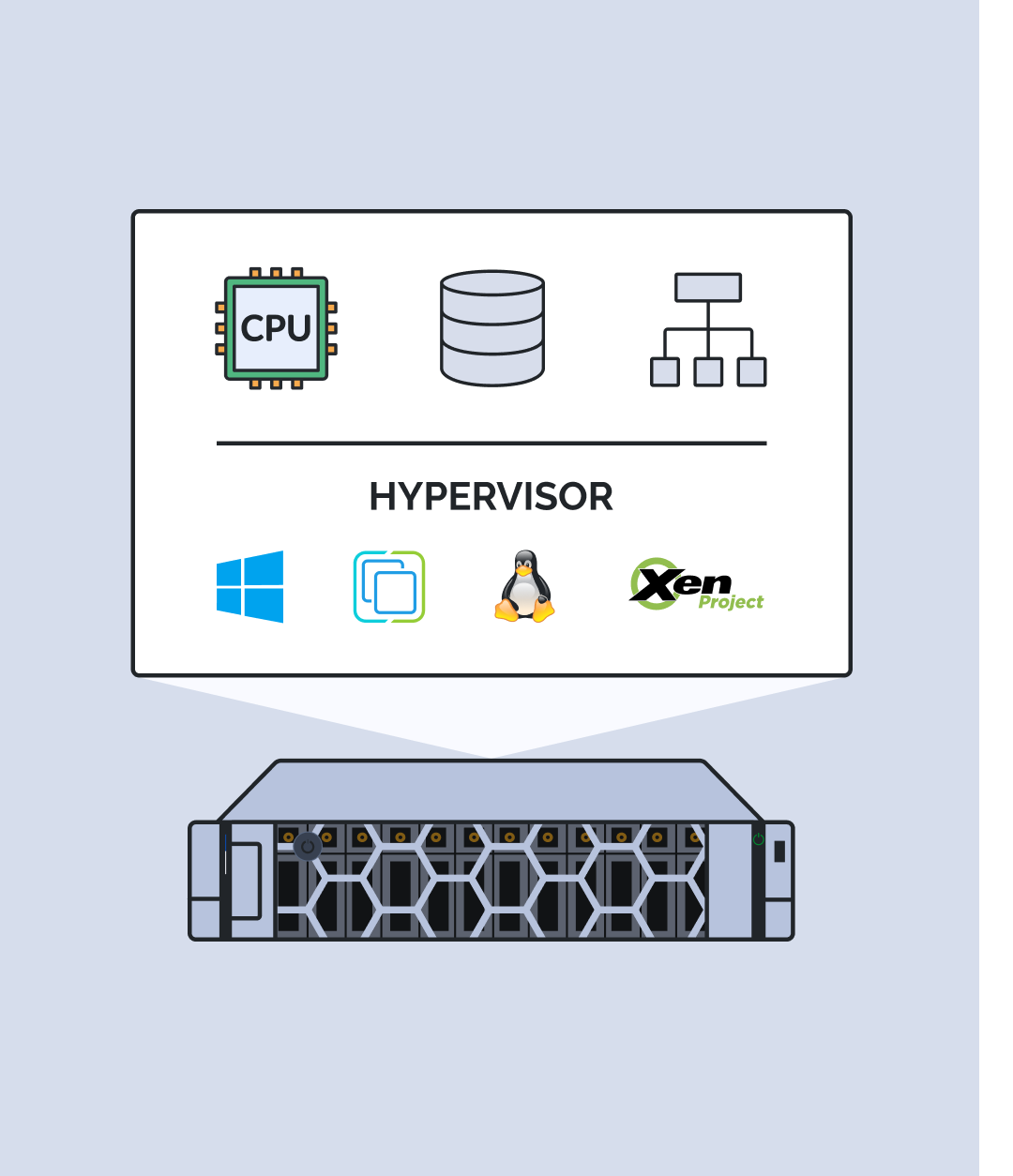
Hyperconverged Infrastructure (HCI) solves these challenges by integrating all IT resources into a unified Software-Defined Data Center (SDDC). This approach replaces rigid hardware dependencies with a software-driven model, automating management, improving scalability, and optimizing resource utilization.
How does HCI work?

Software-Defined Data Center

Hyperconverged Infrastructure (HCI) uses SDDC principles to abstract and combine available components and their resources across a cluster of servers. This consolidation simplifies infrastructure management, reduces hardware footprint, and helps lower both capital and operational expenses.

Virtualization and Resource Pooling

One of the main powers of HCI and the major feature of SDDC is virtualization layer. It abstracts underlying hardware, enabling fast resource provisioning, data protection features, and high availability (HA). Instead of managing individual components, such as compute, storage and networking, administrators deal with a unified resource pool. Such an approach enables:

  • Dynamic resource allocation to virtual machines, containers, or apps.
  • Automated failover for HA and load balancing for better resource usage.
  • Replication and erasure coding for even stronger data protection.

The result? Fewer manual tasks, faster response times, and less firefighting — making life easier for admins and business owners.

Simplified and Straightforward Scalability

With HCI approach scaling is straightforward: add nodes, and the software automatically rebalances resources and ensures redundancy. This "scale-out" architecture allows for granular capacity increases.

HCI simplifies data center management, delivers substantial cost savings, and brings cloud-like agility to your on-premises infrastructure. Perfect for optimizing dynamic workloads and future-proofing your IT.

What are HCI benefits?

Simplicity and Consolidation

Simplicity and Consolidation

HCI combines compute, storage, and networking into a single system managed through a unified software interface, eliminating the need to manage separate silos. In contrast, traditional data centers rely on multiple specialized hardware and software stacks, resulting in increased management complexity and higher associated costs. For example, deploying an all-flash SAN can be an extremely costly project, often requiring significant investment in specialized hardware, complex configurations, and ongoing maintenance. These expenses can quickly add up, especially when factoring in the proprietary nature of traditional SAN systems.

Cost efficiency

Cost efficiency

With HCI, scaling is as simple as adding more nodes to the cluster. Resources are automatically rebalanced, and new capacity is seamlessly integrated, and traditional infrastructures may require complex upgrades, such as expanding SANs or configuring new networking hardware. Independent scaling of compute by adding production servers, separate storage and data networks, and actual storage systems is neither simple nor cost-effective. Each component introduces additional complexity, procurement challenges, and significant expenses, making it a cumbersome approach compared to integrated solutions like HCI.

Ease of Deployment and Management

Ease of Deployment and Management

HCI systems are highly automated and straightforward to deploy, featuring centralized management tools for provisioning, scaling, and monitoring. In contrast, traditional setups often require lengthy manual configurations and involve multiple, often costly, experts with specialized knowledge across various domains. For instance, maintaining a Fibre Channel infrastructure isn’t just about the expensive hardware, it also requires a dedicated team to handle FC storage management, monitoring, and all the associated tasks, which adds significant operational overhead.

Faster Time-to-Market (T2M)

Faster Time-to-Market (T2M)

HCI reduces deployment times significantly, allowing organizations to roll out new workloads or applications faster. Traditional environments often involve complex procurement and configuration cycles. With traditional infrastructure, compute, storage, and networking must be deployed separately, each requiring its own setup while ensuring they all integrate seamlessly, a process that can be both time-consuming and complex. In contrast, HCI naturally combines all these elements into a single platform, providing a unified plane that simplifies deployment and management right out of the box.

Infinite Scalability

Infinite Scalability

With HCI, scaling is as simple as adding more nodes to the cluster. Resources are automatically rebalanced, and new capacity is seamlessly integrated, and traditional infrastructures may require complex upgrades, such as expanding SANs or configuring new networking hardware. Independent scaling of compute by adding production servers, separate storage and data networks, and actual storage systems is neither simple nor cost-effective. Each component introduces additional complexity, procurement challenges, and significant expenses, making it a cumbersome approach compared to integrated solutions like HCI.

Improved resource utilization/>

Improved resource utilization

HCI pools resources across the entire cluster, maximizing CPU, memory, and storage utilization, and in traditional data centers, resources are often underutilized due to rigid allocation and isolated hardware silos. Separate hardware silos are inherently difficult to fully utilize due to their isolated design. Each silo operates independently, often leading to resource overprovisioning in one area while others remain underutilized, creating inefficiencies that are hard to avoid.

High Availability (HA) and Resilience

High Availability (HA) and Resilience

HCI includes built-in redundancy and failover mechanisms, ensuring data and workloads remain available even during hardware failures. Traditional data centers often require additional components like dedicated backup or clustering software to achieve the same level of resilience. Of course, the traditional approach can achieve HA as well, but with HCI, it’s all handled in a single platform. In a traditional setup, you need separate HA configurations for compute, network, and storage, increasing complexity and management costs.

Flexibility and agility

Flexibility and agility

HCI is highly adaptable to modern workloads, whether it’s running virtual machines, containers, or cloud-native applications, while traditional setups are less agile and may struggle to keep up with rapidly evolving application demands. While it’s certainly possible to run both virtual machines and containers on non-HCI installations, it’s significantly more challenging because scaling compute power, storage capacity, and network bandwidth must be managed separately.

Integrated Data Protection

Integrated Data Protection

Features like snapshots, replication, and disaster recovery (DR) are built into HCI solutions, making data protection straightforward. Traditional systems, on the other hand, often require third-party software and extra hardware designed to achieve similar capabilities. Backup solutions provided by the HCI vendor are deeply integrated and optimized for their platform, ensuring seamless operation and greater efficiency compared to those third-party options that often require in-depth configurations for similar system functionality.

Cloud-Readiness

Cloud-Readiness

HCI is designed to integrate seamlessly with private, public, or hybrid cloud environments, supporting dynamic and scalable architectures, and traditional data centers may require significant rework to achieve similar levels of cloud integration. Public clouds are typically built on HCI-based architectures, often using the same hypervisor as on-premises HCI systems. This alignment means migrating workloads to and from the public cloud requires significantly less effort compared to moving them from a non-HCI configuration. The compatibility and uniformity of HCI streamline the process, reducing complexity and potential downtime.

Why StarWind?

StarWind has been bringing enterprise-quality storage virtualization and hyperconvergence benefits in minimalistic form to the average business for well over a decade. We don’t believe in gatekeeping and don’t practice vendor lock-in. Hyperconverged infrastructure solutions from StarWind are built to deliver white-glove HCI experience at reasonable price and minimum effort.

HCI Appliance

HCI Appliance

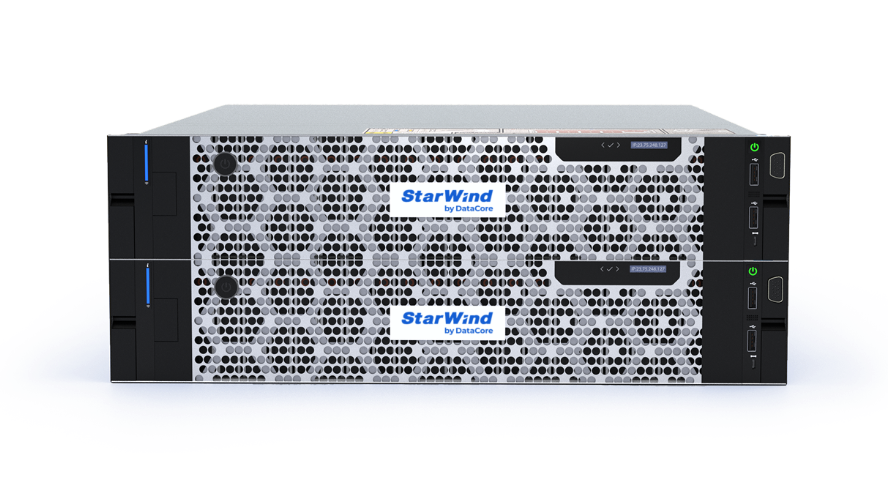
StarWind HCI Appliance is a modern data center building block. It converges compute, storage, networking, virtualization software, and management into a single hyperconverged platform. StarWind replaces tangled and expensive legacy data center infrastructure consisting of servers, segregated compute and storage networks, and network storage.

Book a demo

Virtual SAN

Virtual SAN

StarWind Virtual SAN is a “software replaces hardware” for SAN, application that eliminates a requirement in a physical shared storage. It’s a major cost saver and labor reducer! StarWind VSAN is a remedy for small and medium-sized businesses (SMBs) who are struggling with IT budget cuts and staffing shortages.

Download

What are HCI's ideal use cases?

Enabling ROBO and Edge

Enabling ROBO and Edge

HCI offers a compact, efficient solution for ROBO environments, enabling centralized management, and reducing the need for extensive on-site IT resources, which streamlines operations, and cuts down overall IT expenditures.

Edge Computing

Edge Computing

HCI's flexibility and scalability make it well-suited for edge deployments, addressing limited physical space and the need for centralized management. It’s ideal for running applications on limited hardware, ensuring efficient resource utilization.

Virtual Desktop Infrastructure (VDI)

Virtual Desktop Infrastructure (VDI)

HCI's scalability and performance make it a perfect fit for Virtual Desktop Infrastructure deployments, providing a seamless user experience alongside simplified management for both administrators and end users.

Private Cloud

Private Cloud

HCI is an excellent foundation for on-premises private cloud. It cuts installation and operational costs, improves efficiency and security, and offers built-in automation and data protection for consistent performance and high availability.

Databases and Big Data

Databases and Big Data

HCI simplifies management and scales effortlessly to handle growing data while delivering high performance for demanding workloads, making it ideal for critical databases and various Big Data applications.

Hybrid Cloud

Hybrid Cloud

HCI enables seamless operation and migration of both virtual machines and containers across on-premises, public cloud, and edge environments, making it an effective, easily scalable hybrid cloud solution.

Converged vs Hyperconverged. CI vs HCI: Who’s the Winner?

Converged Infrastructure (CI) and Hyperconverged Infrastructure (HCI) both aim to simplify IT environments, but they go about it in very different ways. The main difference comes down to integration. CI combines pre-validated but separate hardware components to improve compatibility, while HCI takes it further by offering a fully software-defined stack that brings compute, storage, and networking under one roof. That shift has big consequences for how systems are managed, maintained, and scaled.

Converged vs Hyperconverged

Unified Management Advantage

CI maintains the separation of compute, storage, and networking components. Consequently, each layer requires independent management tools, which can complicate administration and troubleshooting. HCI, on the other hand, unifies these components under a single software layer and single user interface, simplifying management and reducing operational complexity.

Effortless Infrastructure Maintenance

CI solutions create larger physical footprint through discrete hardware components, leading to inefficient rack space utilization and scalability limitations when expanding infrastructure. In contrast, HCI consolidates resources to minimize hardware sprawl, thereby reducing power and cooling costs while streamlining maintenance processes.

Seamless and Flexible Scalability

The reliance on dedicated hardware in CI translates to significant capital expenditure and operational expenses. The deployment and ongoing maintenance of numerous physical devices contribute to increased costs. HCI enables a more flexible, pay-as-you-grow approach, allowing organizations to scale seamlessly by adding new nodes without complex hardware integrations.

In essence, CI improves interoperability by pre-integrating hardware, but it stops short of true software-defined convergence. This leaves organizations with a partially simplified environment, still burdened by the complexities and constraints of traditional infrastructure.

Hardware vs Software HCI Deployment

When considering Hyperconverged Infrastructure, one of the first decisions to make is whether to go with hardware-integrated appliances or a software-only approach running on commodity hardware. Each option comes with its own strengths and trade-offs, influencing everything from how quickly you can deploy, to how easily you can scale down the line. To make the choice clearer, we’ve put together a side-by-side comparison that highlights the core differences between hardware and software HCI deployments — covering deployment speed, scalability, performance, and more.

Hardware HCI Software HCI
Deployment Pre-built and preconfigured appliance from the vendor. This enables rapid infrastructure deployment. Software stack installed on existing hardware. This takes more time, but enables wider deployment options.
Scenario Perfect for greenfield environments or replacing legacy systems. Focuses on operational simplicity and guaranteed performance, saves time on hardware sourcing and testing. Best for brownfield deployments leveraging current hardware. Fits cases where vendor hardware is unavailable due to compliance requirements or other restrictions.
Hardware Limited number of vendor-supplied building blocks (SKUs) to select from. A wide choice of vendor-supported hardware with an ability to source and fine-tune specific components.
Software HCI software is tightly coupled and thoroughly tested with vendor-issued hardware. Software updates and technical support are rigidly controlled by vendor. HCI software is deployed on client’s commodity hardware. Offers flexible configuration and variable updates, but requires extra expertise and hands-on management.
Scalability Node-based scaling with vendor-defined hardware configurations, leading to less flexibility in resource ratios. Node-based scaling with greater flexibility in hardware configurations, allowing for more tailored resource ratios.
Performance Consistent, expectable performance, verified by vendor. Performance depends on underlying hardware and the skill set of a particular system administrator.
Management Unified appliance management, often with simplified workflows for integrated hardware and software. Provides unified management of HCI resources. Specific features requiring tighter integration may be unavailable.

Hardware HCI is all about consistency and simplicity — great if you want predictable performance, less setup hassle, and a unified appliance experience, but it comes with tighter vendor control and less flexibility. Software HCI flips that: it’s better for teams that value customization, cost control, and reusing existing hardware, but it demands a bit more effort upfront and some know-how to optimize performance. Your choice comes down to what you value more.

Related materials

Hyperconverged Infrastructure FAQ

Hyperconverged Infrastructure (HCI) relies on software-defined components that virtualize and integrate compute, storage, and networking resources to simplify their management, improve scalability, and efficiency.

What is hyperconverged infrastructure (HCI)?

HCI is a software-defined platform that combines compute, storage, and networking into a single system managed from one interface. It replaces the traditional three-tier architecture with commodity x86 nodes and a distributed software layer that handles replication, failover, and resource management automatically.

How does HCI differ from traditional data center architecture?

Traditional setups separate compute, storage, and networking into independent silos, each with its own tools, specialists, and failure domains. HCI combines all three layers into one system, eliminating dedicated SAN hardware and licensing, reducing cabling complexity, and simplifying the management and maintenance.

Is scaling with HCI easier than with a traditional SAN?

Significantly. Adding a node automatically increases both compute and storage capacity, with resources rebalancing across the cluster in the background. Traditional SAN expansion requires separate procurement cycles for compute and storage, complex Fibre Channel reconfiguration, and often vendor-specific support.

How does HCI improve resource utilization?

HCI pools all CPU, memory, and storage across every node and allocates resources dynamically where workloads need them. Traditional architectures trap capacity in isolated silos: storage overprovisioned on one tier, compute idle on another. With HCI, the entire cluster’s capacity is available to any workload at any time.

Does HCI provide built-in high availability?

Yes. Data is synchronously replicated across multiple nodes, so if a node or drive fails, workloads continue running without manual intervention. Achieving equivalent HA in a traditional environment requires separate compute clustering, dedicated SAN redundancy, and third-party failover software, each adding its own complexity and cost.

Why is HCI considered a cloud-ready infrastructure solution?

Public clouds are architecturally built on hyperconverged principles: pooled, software-defined resources managed through a single control plane. On-premises HCI mirrors that model, making workload mobility between a private data center and public cloud far simpler than migrating from a traditional SAN-backed environment.

What hypervisors does StarWind Virtual SAN support?

StarWind Virtual SAN supports Microsoft Hyper-V, VMware vSphere/ESXi, XCP-ng, Proxmox VE, and other KVM’s. Organizations can bring existing hypervisor licenses (BYOL) or choose the StarWind HCI Appliance with the hypervisor pre-integrated. This flexibility makes StarWind a practical option for mixed environments and for teams moving away from a single hypervisor platform.

Can StarWind HCI Appliance run on just two nodes?

Yes, StarWind supports native two-node clusters with synchronous mirroring and automatic failover, no external witness device required. This makes it a cost-effective choice for remote offices, branch offices, and edge sites where a third node is not practical.

How does StarWind HCI Appliance compare to other HCI solutions on the market?

The HCI market spans a wide range: from enterprise-only platforms with high licensing barriers to SMB-focused products with limited hypervisor choice. StarWind is purpose-built for SMB, ROBO, and edge: two-node native support, full hypervisor flexibility, and significantly lower TCO in a single platform designed to be managed without a dedicated storage team.