
Introduction
NVMe/TCP carries native NVMe commands across a standard TCP/IP network, so you can deploy shared NVMe storage without pulling in Fibre Channel or building an RDMA-capable fabric.
You’ll find NVMe/TCP showing up across enterprise virtualization, hyperconverged infrastructure, private cloud, edge deployments, and disaggregated storage. Whether it fits your environment depends on your workload profile, where your bottlenecks actually are, what your platform supports, how your network is designed, and what availability targets you’re committing to.
What is NVMe over TCP (NVMe/TCP)?
NVMe/TCP is a standardized NVMe over Fabrics (NVMe-oF) transport. It maps NVMe queues, commands, capsules, and data delivery onto TCP connections. A host initiator connects over an IP network to an NVMe/TCP target, and the target exposes remote namespaces as block storage.
NVMe/RDMA uses RDMA-capable networking to cut data-path latency and CPU work. NVMe/TCP doesn’t. It runs over the conventional TCP/IP stack, which makes it routable, familiar to network teams, and deployable on standard Ethernet. The trade-off is real: you give up some of the latency win that RDMA delivers, and you pay more CPU per I/O.
The current NVMe over TCP Transport Specification, Revision 1.2, defines the transport mapping and includes optional enhancements such as header and data DIGEST protection and TLS.
Assessing the need for NVMe/TCP in modern enterprises RDMA hardware adoption is increasing, but not universal RDMA-capable adapters are easier to find than they were five years ago. Buying one doesn’t finish the job, though. A production deployment also needs compatible drivers, firmware, switches, target ports, and a correctly configured fabric. The teams who monitor and troubleshoot it need to understand the operational model too.
NVMe/TCP is still a practical production choice when standard IP networking, routing, familiar monitoring, and lower operational complexity matter more than shaving the last microsecond off latency. When you compare the two, look at CPU cost per IOPS or per GB/s, routing requirements, hardware compatibility, deployment complexity, and whether your team can actually operate the fabric day to day. See also this overview of RDMA architecture and deployment considerations.
Legacy hardware and tiered storage utilization
Brownfield environments often have Ethernet gear that’s still serviceable. You can move that hardware into secondary storage, test, backup, edge, or lower-tier roles instead of retiring it. That extends hardware life and reduces the disruption of a full modernization project.
Reuse isn’t the same as suitability, though. NIC capabilities, CPU headroom, switch bandwidth, overprovisioning ratios, firmware, packet loss, and end-to-end latency all need to be checked. A standard Ethernet network can give you connectivity while still delivering poor tail latency under congestion. Run representative workloads across multiple active hosts and measure the path end to end.
Replacing iSCSI for improved performance
The architectural difference is straightforward: iSCSI carries SCSI commands over TCP/IP, while NVMe/TCP carries native NVMe commands over TCP/IP. NVMe was designed around parallel queues and modern flash media, so NVMe/TCP makes better use of flash parallelism and multicore CPUs, particularly with small block sizes, higher queue depths, and highly concurrent workloads.
iSCSI isn’t obsolete. It remains a mature, broadly integrated protocol that meets application requirements in plenty of environments. A migration only makes sense when measured performance gains or future platform requirements justify the effort and any loss of feature parity you take on.
NVMe/TCP vs. Other transport protocols
If you’re evaluating NVMe/TCP, it’s worth comparing it with the other common options before drilling into the details of each protocol.
| Transport | Best fit | Main strength | Main trade-off |
|---|---|---|---|
| NVMe/TCP | Ethernet-based shared storage | Standard IP networking and easier adoption | Higher CPU cost and latency than RDMA |
| NVMe/RDMA | Latency-sensitive workloads | Very low latency and lower CPU overhead | Requires RDMA-capable infrastructure & relatively complex network configuration |
| NVMe/FC | Existing Fibre Channel environments | Familiar and predictable SAN model | Requires FC hardware and knowledge |
| iSCSI | Basic block-level sharing: SMB, ROBO, Home Labs. | Broad support, easy to setup | Limited by the SCSI command model and not designed for NVMe-style parallelism |
Each transport balances performance, infrastructure requirements, and operational complexity differently. The sections below take a closer look at how NVMe/TCP compares with each option and where the trade-offs are most likely to bite.
NVMe/TCP vs. NVMe/RDMA
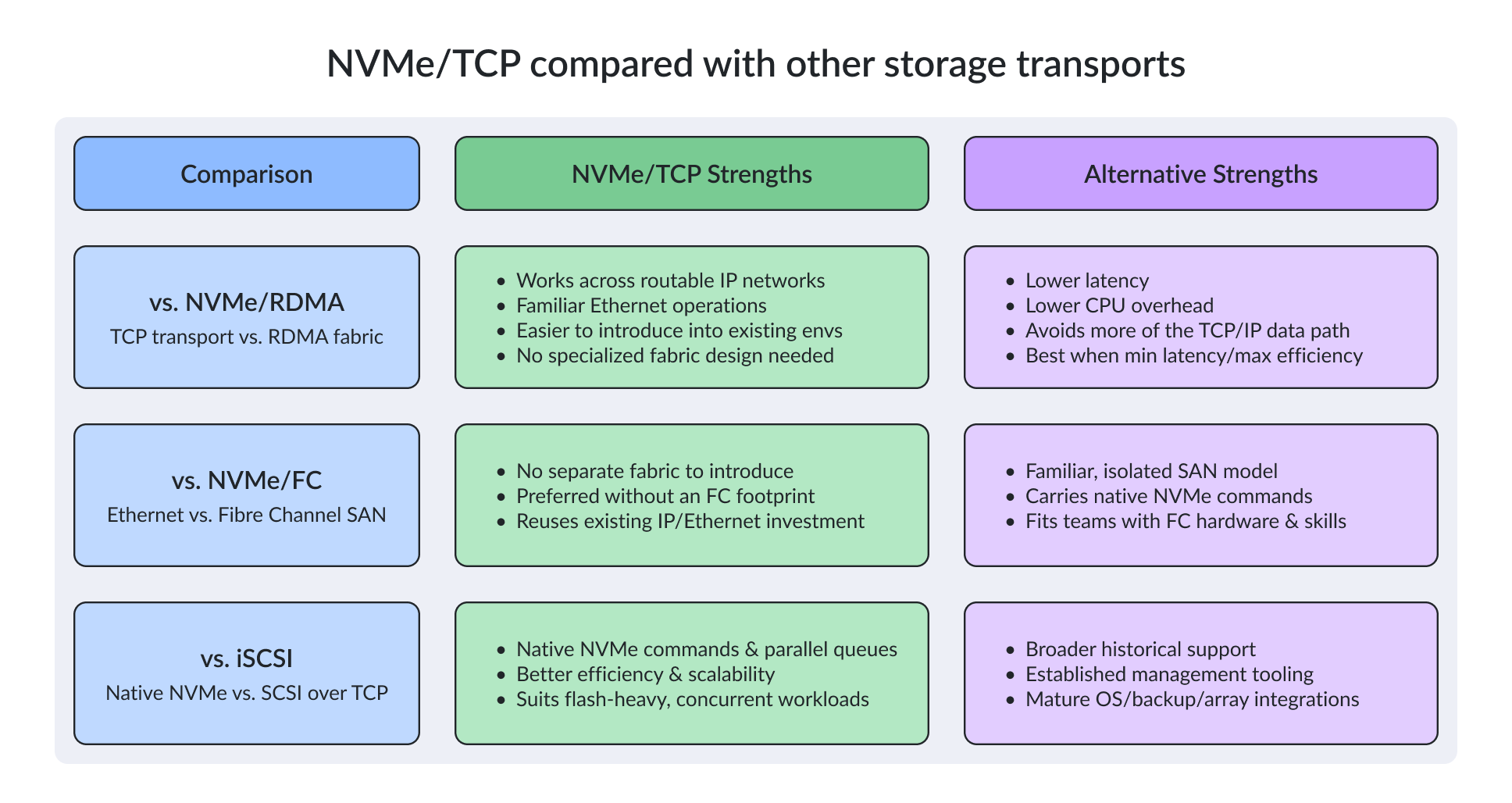
NVMe/RDMA delivers lower latency and lower CPU overhead because it skips most of the conventional TCP/IP data path. It works well when minimum latency and maximum CPU efficiency justify the network design it requires.
NVMe/TCP usually costs more host CPU and adds latency, but it runs across routable IP networks and relies on familiar Ethernet operations. That often makes it easier to drop into existing environments. When you compare the two, look beyond raw latency: include CPU cost per IOPS or per GB/s, routing requirements, hardware compatibility, deployment complexity, and your team’s ability to operate and troubleshoot the storage fabric.
NVMe/TCP vs. NVMe/FC
NVMe over Fibre Channel is a logical choice for organizations that already operate a Fibre Channel SAN and have the hardware, management tools, and skills to run it. It preserves a familiar, isolated SAN model while carrying native NVMe commands.
If you don’t have an FC footprint, NVMe/TCP lets you avoid introducing a separate fabric. The choice usually comes down to what you’ve already invested in operationally and what platforms you’re standardizing on, not the protocol name itself.
NVMe/TCP vs. iSCSI
NVMe/TCP uses native NVMe commands and parallel queues. iSCSI relies on the SCSI command model over TCP. NVMe/TCP scales better for flash-heavy, highly concurrent workloads. iSCSI has broader historical support, established management tooling, and mature integrations across operating systems, backup products, and storage arrays.
The transport doesn’t decide outcomes on its own – that’s the trap most teams walk into. Array design, the media type, caching, data services, host drivers, queue depth, path count, wire congestion, and your real workload pattern can each outweigh the protocol choice, and some of them matter a lot more than you’d expect. So before you commit, run NVMe/TCP and whatever you’re comparing it to on identical hardware, an identical network, and an identical workload. Different switch, different HBA, different workload. Anything else is guesswork dressed up as benchmarking.
Is migrating from iSCSI to NVMe/TCP worth it?
Worth testing when iSCSI holds you back. That’s usually IOPS, CPU efficiency, latency, VM provisioning, clone speed, or the quiet knowledge that you’ll outgrow the current setup in two years. It’s especially attractive for new Ethernet-based storage where both the host platform and the array offer full, certified NVMe/TCP support – so you’re not cobbling it together with hope and a driver flag.
Sticking with iSCSI makes more sense when current performance is fine, the integrations are stable, and you don’t want to spend six months revalidating something that already works. A migration should solve a measured problem, not just swap one protocol for a newer name.
Performance considerations and limitations
Benchmarks don’t tell you much on their own. Before you plan anything, you need to know which factors actually move the needle in your environment – and which ones only look good in a vendor’s PDF.
- Network bandwidth: NVMe/TCP doesn’t require 25GbE. A well-built 10GbE network can be plenty for smaller setups, though once you stack multiple hosts, paths, namespaces, and concurrent workloads, you’ll want 25GbE or faster to keep your headroom.
- CPU overhead: NVMe/TCP runs through the TCP/IP stack, so the protocol itself burns more CPU than NVMe/RDMA. Don’t compare absolute CPU percentages between the two – compare CPU time per IOPS or per GB/s. A faster protocol can finish more work and still show a higher total CPU number, which trips people up constantly.
- Latency: Track both average and tail latency (p95, p99). Congestion, retransmits, backup windows, path failover events, and multiple concurrent hosts will create spikes you simply won’t see in a single-host benchmark – and your database will see every one of them.
- MTU: Jumbo frames are optional but generally a good idea. If you turn them on, the MTU has to match across host interfaces, switches, routed interfaces, and storage target ports. One mismatch and you’ll spend a weekend chasing mysterious drops that don’t reproduce on demand.
- Security: Depending on the implementation, NVMe/TCP can do DIGEST, DH-HMAC-CHAP, and TLS. DIGEST gives you integrity but not confidentiality. Check which combinations are actually supported by your initiator, target, OS, and firmware build – and measure the performance hit from the production security config, not a lab setup with auth turned off.
NVMe/TCP multipathing, ANA, and storage HA
Path availability isn’t the same as storage availability. Multipathing gives you alternate routes between a host and a namespace, and Asymmetric Namespace Access (ANA) helps the initiator tell which paths are optimized and which aren’t so it can pick a sensible route.
Two logical paths can still share a switch, a router, a target controller, a storage node, or a power feed. Multipathing alone doesn’t give you a second copy of your data. Depending on what your SLA actually says, you’ll also want redundant controllers or clustered targets, synchronous replication, quorum or split-brain protection, and automatic failover – and even then, “automatic” doesn’t mean “instant”.
| Capability | What it provides | What it does not guarantee |
|---|---|---|
| Multipathing | Alternative host-to-namespace paths | Independent switches, controllers, or data copies |
| ANA | Optimized and non-optimized path awareness (similar to ALUA in SCSI-based storage) | Storage-node redundancy |
| Redundant controllers or targets | Continued target service after a controller failure | A second current copy of data unless replication is used |
| Synchronous replication | Current data copies on separate storage nodes | Application-transparent recovery unless failover is also configured |
| Automatic failover | Service transition after a detected failure | Zero pause for every workload or failure mode |
The table makes a design point that vendors love to gloss over: these capabilities layer on top of each other. Multipathing improves connectivity, ANA improves path selection, replication protects the data, and failover keeps the service alive. Production-grade availability usually combines several of them – rarely just one.
A quick note on topic: NVMe/TCP became generally available in StarWind Virtual SAN (build 20089). It can act as the storage layer in NVMe/TCP environments, with synchronous replication (High Availability), and automatic failover included. As always, check the deployment guidance for your specific hypervisor and product build before you commit. You’ll find the StarWind technical papers here.
NVMe/TCP implementation strategies and best practices
A successful migration starts well before the first namespace connects. Begin with a performance baseline of your current storage: IOPS, throughput, host CPU use, average latency, p95/p99 latency, and application-level results like VM boot time, database transaction latency, and clone duration. Without that baseline, you won’t be able to tell whether the migration actually helped or just produced prettier numbers.
Next, validate the whole stack. Check host, initiator, NIC, drivers, firmware, switches, storage target, and operating system compatibility. Every component can be supported on its own and still fail to be certified as a complete configuration – this happens more than vendors like to admit.
For production, use genuinely independent storage paths whenever your availability targets demand it. Configure discovery, access control, authentication, multipathing, and persistent reconnect, then confirm that namespaces come back correctly after host reboots, network blips, or temporary target failures.
Don’t stop at “it reconnects.” Simulate failures while the system is under real I/O. Yank a NIC. Disable a switch port. Kill a target port. Power off a storage controller, then a whole storage node. Record failover time, I/O errors, recovery behavior, and how the application responds. A path that eventually reconnects can still blow past an app timeout or a cluster’s failover threshold – and that’s the difference between a HA story and a 3 a.m. page.
Finally, when you compare iSCSI against NVMe/TCP, keep block size, queue depth, read/write ratio, path count, protection settings, data services, and security configuration identical across both. Focus on latency and CPU efficiency alongside IOPS instead of treating peak throughput as the only important number.
Platform support and feature parity
Basic connectivity isn’t enough for production. You also need to verify persistent reservations, clustering, snapshots, thin provisioning, space reclamation, vVols, replication, controller failover, backup integration, maximum initiators, namespace limits, and supported security functions – because the gap between “I can mount it” and “I can run a cluster on it” is enormous.
- VMware vSphere: Confirm the exact ESXi or VCF release, array model, firmware, VASA provider, multipathing model, and VMware Compatibility Guide status. vSphere supports NVMe/TCP natively and ships a built-in software initiator, but certification is what actually protects you when something goes sideways.
- Proxmox VE: Linux can attach to NVMe/TCP targets through the kernel NVMe stack and nvme-cli, but how well that integrates depends on your Proxmox release and storage vendor. Proxmox VE 9.x includes vendor guidance for NVMe/TCP with ANA, while older releases may need command-line attachment or a third-party integration. Validate persistence, cluster behavior, volume management, backup workflows, and who actually owns the support ticket when something breaks at 2 a.m.
Verify that your Windows Server release supports the initiator you want, MPIO, clustering, persistent reservations, and the failover model you depend on. StarWind NVMe-oF Initiator works as a production option for connecting Windows hosts to NVMe/TCP storage, but you still need to confirm feature support and certification against your specific Windows version and storage platform before you commit.
When does NVMe/TCP make sense
NVMe/TCP fits a lot of Ethernet-based storage deployments, but it isn’t the right choice for every environment. You’ll get the most out of it when one of the following is true
If your iSCSI deployment is hitting real limits – performance, scalability, VM density, or any combination – and you can measure the gap, NVMe/TCP is a reasonable upgrade path. If you’re designing a new shared-storage platform from scratch and can specify NVMe/TCP end-to-end, that’s the better fit. Virtualization and HCI workloads that lean on NVMe queue parallelism and faster flash will benefit most, especially when standard IP operations still matter
Edge and ROBO sites often need compact shared storage without pulling in a separate FC fabric. Private cloud and disaggregated designs need routable block access across an IP network, and NVMe/TCP delivers that. Test and development environments can finally get production-like NVMe-oF without buying into RDMA infrastructure – a clear win for smaller teams that don’t have RDMA budgets, and it isn’t a small thing
Conclusion
NVMe/TCP has moved past the “cheaper cousin of NVMe/RDMA” label. It’s a production transport for shared NVMe storage now, with native NVMe semantics on top of routable IP networking. That combination makes it a good fit for enterprise virtualization, HCI, private cloud, edge, and a lot of brownfield environments
Before you commit, basic checks are really important. Measure your existing bottlenecks (throughput, IOPS, tail latency) before you start the comparison. Verify feature parity across the platform. Test the full data path under active I/O. Watch what happens when a path fails. Once those are clean, you’ll find NVMe/TCP balances performance, scalability, and operational simplicity better than most teams expect. It’s not a hard protocol to live with day-to-day
FAQ
What is the main advantage of NVMe/TCP?
It carries native NVMe commands across standard TCP/IP networks. Organizations can deploy shared NVMe storage without introducing a Fibre Channel fabric or building a complete RDMA-capable network.
Is NVMe/TCP always faster than iSCSI?
By design – yes. NVMe/TCP is better aligned with flash parallelism and highly concurrent workloads. However, the actual result depends on the array, network, host stack, data services, and application. Test both protocols with equivalent settings and representative workloads.
Does NVMe/TCP require 25GbE?
No. A 10GbE network can be sufficient for smaller environments. Faster links provide more headroom for multiple hosts, paths, and NVMe devices, but good design and congestion control matter at every link speed.
Do multipathing and ANA provide storage high availability?
They improve path availability and path selection. They do not create a second copy of data or guarantee independent storage controllers and nodes. Storage HA may also require redundant targets, synchronous replication, and automatic failover.
When is an iSCSI-to-NVMe/TCP migration worth testing?
Test migration when iSCSI limits performance, CPU efficiency, VM provisioning, clone operations, or future scalability, and when the target platform supports all required production features. Keep iSCSI when it already meets requirements or when NVMe/TCP lacks a critical integration.