
What is RDMA and how remote direct memory access works
High latency and CPU bottlenecks are real problems for anyone moving large data sets, running high I/O rates, or running distributed workloads. Remote Direct Memory Access (RDMA) is one answer: it lets a compatible network adapter transfer data directly between registered memory regions on different systems, which keeps the CPU and operating system out of the active data path.
The “bypasses the CPU” framing is a useful shorthand, but it hides what actually happens. To understand RDMA, you have to look at how it handles memory, queues, network adapters, and the data transfers themselves.
What is RDMA?
Remote Direct Memory Access (RDMA) is a communication model that lets one system access registered memory on another system across a network with minimal involvement from the remote CPU and operating system.
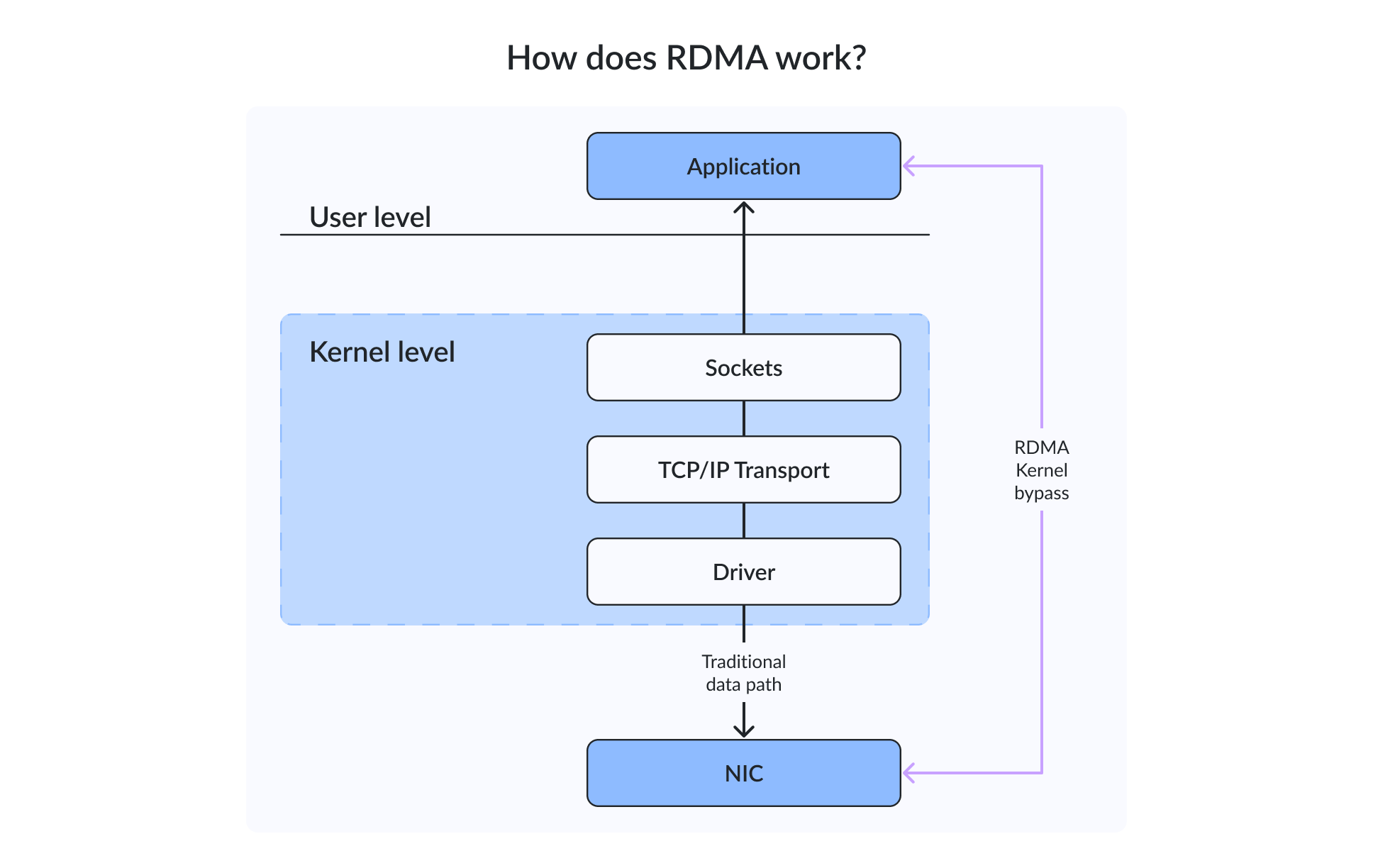
Traditional network communication normally passes data through several layers of the operating system and networking stack. Depending on the workload and implementation, this can involve kernel processing, network buffers, memory copies, protocol handling, and CPU scheduling. RDMA moves much of this work to the network adapter. Instead of repeatedly copying data between application memory and intermediate network buffers, an RDMA-capable adapter can place data directly into a memory region that has been registered for RDMA access.
This model combines several techniques:
- Kernel bypass: the data path can avoid much of the operating system’s networking stack after the connection and resources have been established.
- Direct data placement: the network adapter places incoming data directly into a registered memory buffer.
- Reduced memory copying: data doesn’t need to pass through the same sequence of intermediate buffers used by conventional networking.
- Network adapter offload: the RDMA-capable NIC (commonly called an RNIC or HCA depending on the technology) performs much of the transport and data-movement work.
One important distinction: RDMA isn’t a single network protocol. It’s a communication model that can be delivered through different network technologies, including InfiniBand, RDMA over Converged Ethernet (RoCE), and iWARP.
RDMA originated in the 1990s as the industry looked for more efficient ways to move data between systems. InfiniBand became an important platform for RDMA-based high-performance computing, while RoCE and iWARP brought RDMA capabilities to Ethernet-based networks.
As of 2024, RDMA shows up in storage, virtualization, high-performance computing, AI and machine learning, distributed databases, and other workloads where network latency and CPU overhead can become significant performance constraints.
How RDMA works
When an application actually uses RDMA, the process splits into two related parts: the control path and the data path.
The control path prepares the resources required for communication. The data path is where RDMA delivers its performance advantage by moving application data with much lower CPU and kernel involvement.
The RDMA control path
Before an application can perform RDMA operations, it has to prepare the communication environment. The setup work includes creating RDMA communication objects, allocating and registering memory regions, establishing permissions for those memory regions, creating queue pairs and completion queues, establishing communication between the endpoints, preparing work requests, and handling connection state and errors.
The local CPU still performs these tasks. RDMA reduces CPU involvement during active data transfers, but it doesn’t eliminate it.
Once the resources are prepared, the application can submit work requests to the appropriate queue. The RDMA-capable network adapter then processes those requests.
The RDMA data path
The data path is where RDMA differs significantly from conventional TCP/IP networking. An application registers a memory region with the RDMA subsystem. Registration tells the adapter which memory it’s allowed to access and what operations are permitted. The application then creates a work request describing the operation. The request is placed into an RDMA queue, and the RNIC or HCA processes it.
Depending on the operation, the adapter can read from or write to registered memory on the local or remote system. When the operation finishes, the adapter places a completion entry into a completion queue. This design reduces the amount of work performed by the CPU during each data transfer, and it’s the reason RDMA latencies typically land in the low microseconds while conventional TCP/IP on the same hardware runs an order of magnitude higher.
You’ll often see RDMA described as zero-copy networking. The term is useful, but it needs some qualification. In practice, zero-copy generally means avoiding unnecessary intermediate kernel buffers and memory copies during data movement. It doesn’t mean that memory allocation, registration, synchronization, queue management, or CPU processing disappear. That distinction becomes important when you evaluate an RDMA deployment. The technology reduces overhead; it doesn’t remove all overhead.
Core components of RDMA architecture
RDMA relies on several components working together. Understanding them makes it much easier to troubleshoot an RDMA environment later.
| Component | What it does |
|---|---|
| RDMA application | Uses an RDMA-aware API or an RDMA-capable storage or networking protocol |
| RNIC or HCA | Processes RDMA operations and transfers data across the network |
| Registered memory region | Memory that the RDMA adapter is permitted to access |
| Memory key | Controls access to a registered memory region |
| Queue pair | Contains a send queue and a receive queue |
| Work request | Describes an operation submitted to a queue |
| Completion queue | Reports completed or failed operations |
| RDMA Connection Manager | Establishes and manages RDMA connections |
| RDMA verbs | API model used to create and control RDMA resources and operations |
The terminology can vary between RDMA implementations, but the underlying concepts are similar. A storage application may submit an operation to a queue pair, while the RDMA adapter performs the corresponding data transfer and reports completion through a completion queue. This separation is one of the reasons RDMA can handle large numbers of operations efficiently.
One-sided vs. two-sided RDMA operations
RDMA communication generally falls into one-sided and two-sided operations. One-sided operations allow an endpoint to access a permitted remote memory region without requiring the remote application to process a corresponding message for every transfer.
The main one-sided operations are:
- RDMA READ: reads data from a remote registered memory region.
- RDMA WRITE: writes data directly into a remote registered memory region.
- Atomic operations perform supported updates to remote memory.
Two-sided communication uses SEND and RECEIVE operations. The sender submits a message, while the receiver prepares a matching receive buffer.
| Operation | How it works | Typical use |
|---|---|---|
| RDMA READ | Reads from remote registered memory | Remote data retrieval |
| RDMA WRITE | Writes into remote registered memory | Direct data placement |
| SEND/RECEIVE | Exchanges messages through matching queues | Commands and notifications |
| Atomic operation | Updates remote memory atomically where supported | Counters, locks, coordination |
The distinction matters because one-sided operations can reduce the amount of work required from the remote CPU. They also demand careful management of memory registration, permissions, and remote memory keys.
Benefits of RDMA
RDMA offers several advantages when the workload can take advantage of its communication model.
Lower latency
RDMA reduces processing in the active data path by moving much of the data-transfer work to the network adapter. The latency improvement over conventional TCP/IP on the same hardware can be substantial – often the difference between tens of microseconds and single-digit microseconds for small messages. The actual numbers depend on the adapter, transport, network topology, message size, queue depth, application, and workload.
Higher throughput
RDMA is designed for efficient high-speed data movement. By reducing CPU and memory-copy overhead, it helps applications make better use of high-bandwidth network links. This matters when the network is fast enough that CPU processing and software overhead would otherwise become a bottleneck.
Reduced CPU utilization
An RDMA-capable adapter handles much of the data movement and protocol processing. The CPU therefore has fewer networking tasks to perform during the active data path. For storage and virtualization workloads, this leaves more CPU capacity available for applications and virtual machines.
Fewer memory copies
Direct placement reduces the need for intermediate buffers and unnecessary memory copies. This is especially important for workloads moving large volumes of data or processing many small I/O operations.
Better use of high-speed links
As Ethernet and InfiniBand speeds continue to increase, conventional software networking can require substantial CPU resources to process high packet and message rates. RDMA helps applications use high-speed links without placing the same processing burden on the host CPU.
More predictable performance under intensive I/O
RDMA reduces software overhead and processing variability in latency-sensitive workloads. Predictable performance still depends on network congestion, queue management, CPU and NUMA placement, memory registration, topology, and application behavior.
Scalability
RDMA scales effectively across large distributed environments, but it isn’t automatically immune to scaling problems. Fabric congestion, queue management, memory-registration overhead, topology, switch configuration, and application design can all become limiting factors as the environment grows. RDMA can also be unnecessary when the existing TCP/IP network already meets the application’s performance requirements.
RDMA limitations and trade-offs
RDMA can provide substantial benefits, but it introduces additional infrastructure and operational requirements.
First, the endpoints need compatible RDMA-capable adapters, drivers, firmware, and operating system support. The application or protocol also needs to know how to use RDMA. Installing an RDMA-capable NIC doesn’t make ordinary TCP/IP applications use RDMA automatically – iSCSI without iSER still runs over TCP even on a RoCE NIC.
Memory registration also introduces overhead. Applications may need to register memory regions before they can be used for RDMA operations, and operating systems may require appropriate locked-memory limits.
Network configuration can become another consideration. RoCE environments, in particular, may require careful congestion-control and QoS design. Incorrect configuration can result in packet loss, pause propagation, queue buildup, or unstable latency.
Troubleshooting RDMA can also be more involved than troubleshooting a conventional TCP connection. Administrators may need to inspect the adapter, firmware, driver, RDMA state, queue behavior, switch configuration, congestion counters, PFC statistics, and application behavior.
Finally, RDMA isn’t always the best choice. If network utilization is low, storage is the bottleneck, application processing dominates the workload, or TCP already meets the required latency and throughput targets, RDMA may provide little practical benefit.
RDMA use cases
RDMA is most useful when applications move substantial amounts of data or exchange messages at high rates. Its use cases span several areas.
Storage
Storage is one of the most important RDMA use cases. Technologies such as NVMe over Fabrics (NVMe-oF) can use RDMA transports to connect hosts to remote NVMe storage with low protocol overhead.
RDMA is also used with iSER (iSCSI Extensions for RDMA), which extends iSCSI to use RDMA for data transfers.
In distributed storage systems, RDMA can also accelerate synchronous replication and other east-west data transfers between storage nodes.
These technologies are particularly useful when local NVMe performance is high enough that traditional network processing becomes part of the storage latency budget.
Windows Server and SMB Direct
Microsoft Windows Server supports RDMA through SMB Direct, allowing SMB traffic to use RDMA-capable network adapters. Current Microsoft documentation lists SMB Direct support for Windows Server 2025, as well as earlier Windows Server releases.
SMB Multichannel detects RDMA-capable adapters and can establish multiple RDMA connections for an SMB session. If an RDMA path is unavailable, SMB can use TCP/IP instead.
This makes RDMA useful for:
- Hyper-V over SMB
- SQL Server workloads using SMB storage
- Storage Spaces Direct
- Azure Local
- Scale-out file servers
- High-performance Windows file services
For hyperconverged environments, RDMA can improve the efficiency of storage traffic between cluster nodes.
High-performance computing
HPC systems have used RDMA for many years because distributed applications frequently exchange data between compute nodes.
MPI implementations can use RDMA transports to reduce communication overhead between nodes running scientific simulations, computational fluid dynamics, weather models, and other parallel workloads.
AI and machine learning
Modern AI clusters generate enormous amounts of east-west traffic between GPUs and compute nodes. RDMA is therefore used by technologies such as NVIDIA Collective Communications Library (NCCL) and NVIDIA GPUDirect RDMA to reduce communication overhead during distributed training.
GPUDirect RDMA allows supported network adapters to exchange data with GPU memory without requiring the same CPU-mediated copying path used by conventional networking.
RDMA can also work with GPUDirect Storage, where supported storage and networking components allow data to move efficiently between storage and GPU memory.
Financial services and real-time analytics
Financial systems can benefit from low and predictable communication latency, particularly in workloads where applications exchange large numbers of small messages.
Real-time analytics and other latency-sensitive distributed applications can use RDMA when network processing becomes a significant part of the overall response time.
Databases
Databases can use RDMA-enabled storage and networking to reduce the overhead of remote data access and replication. The benefit depends heavily on the database architecture. RDMA won’t compensate for inefficient queries, slow storage, locking contention, or insufficient compute resources.
Virtualization and cloud infrastructure
Virtualized environments can use RDMA for storage traffic, SMB Direct, and other supported networking operations. RDMA can also participate in VM migration scenarios, but this shouldn’t be treated as a universal capability. Support depends on the hypervisor, host networking, virtual NIC configuration, SR-IOV or device pass-through, and the protocol used by the migration workflow.
InfiniBand, RoCE, and iWARP
RDMA can run over a few different network technologies. The three big ones are InfiniBand, RoCE, and iWARP.
InfiniBand
InfiniBand is a complete network architecture with native RDMA support. It uses specialized Host Channel Adapters (HCAs), InfiniBand switches, and an InfiniBand fabric. You’ll still find it in HPC systems and large AI clusters where high-performance node-to-node communication is a core requirement.
The upside is a purpose-built fabric designed around high-performance communication. The trade-off is that you’re now running a dedicated networking architecture with its own adapters, switches, management tools, and operational practices.
RDMA over Converged Ethernet (RoCE)
RDMA over Converged Ethernet (RoCE) brings RDMA to Ethernet networks. RoCE v1 operates at Ethernet Layer 2, which limits it to a Layer 2 domain. RoCE v2 encapsulates RDMA transport in UDP/IP and supports routed Layer 3 networks. That’s why RoCE v2 is the more flexible choice for modern data-center topologies.
RoCE deployments commonly use congestion-management and QoS technologies such as Priority Flow Control (PFC) and Explicit Congestion Notification (ECN). The exact design depends on the hardware, operating system, switch configuration, and whether the deployment is lossless, semi-lossless, or lossy. NVIDIA documents multiple RoCE deployment models.
iWARP
iWARP provides RDMA over TCP/IP. Because iWARP uses TCP, it can operate across conventional routed IP networks without requiring the same lossless Ethernet design that’s commonly associated with RoCE.
That doesn’t mean iWARP requires no specialized hardware. The endpoints still need compatible RDMA support, either through an RDMA-capable adapter or an appropriate software implementation.
iWARP can be attractive when an organization wants RDMA while keeping a more conventional IP networking model and avoiding the operational complexity that comes with configuring a lossless RoCE fabric.
InfiniBand vs. RoCE vs. iWARP
Which RDMA transport should you choose? There’s no universal winner. The decision depends on the existing network infrastructure, workload requirements, platform support, and the team’s operational experience.
| Technology | Network foundation | Routable | Main strength | Main trade-off | Common use |
|---|---|---|---|---|---|
| InfiniBand | Native InfiniBand fabric | Yes, within IB architecture | Very low latency and dedicated RDMA fabric | Separate adapters, switches, and management model | HPC and AI clusters |
| RoCE v1 | Ethernet Layer 2 | No | RDMA over Ethernet with low latency | Limited to the same Layer 2 domain | Local data-center fabrics |
| RoCE v2 | UDP/IP over Ethernet | Yes | Routed RDMA over Ethernet | Congestion and QoS design can be complex | Storage, AI, and data centers |
| iWARP | TCP/IP over Ethernet | Yes | Works across standard routed IP networks | TCP-based transport can add overhead compared with other RDMA transports | Enterprise storage and SMB Direct |
For a dedicated HPC or AI fabric, InfiniBand can be a natural choice. For organizations standardizing on high-speed Ethernet, RoCE v2 provides routed RDMA. For environments where conventional routed TCP/IP networking is a priority, iWARP may be easier to integrate.
RoCE v1 vs. RoCE v2
RoCE v1 and RoCE v2 use the same basic RDMA model but operate differently within the network.
RoCE v1 operates at Ethernet Layer 2 and therefore stays within the same Layer 2 domain. RoCE v2 uses UDP/IP and can cross Layer 3 networks. That’s what makes it the more flexible choice for routed data-center infrastructure.
RoCE v2 still requires compatible endpoints and an appropriate congestion-control design. Routing alone doesn’t remove the need to understand how the Ethernet fabric handles congestion.
RoCE congestion control and Ethernet configuration
If you deploy RoCE, network configuration deserves particular attention. Several Data Center Bridging (DCB) technologies can participate in an Ethernet RDMA design.
Priority Flow Control (PFC) pauses traffic for a selected priority class instead of pausing the entire Ethernet link. This lets administrators treat RDMA traffic differently from ordinary best-effort traffic. Explicit Congestion Notification (ECN) allows network devices to mark packets when congestion develops so endpoints can react before queues overflow and packets are dropped. ECN is used with RoCE v2 because it operates at the IP layer. Enhanced Transmission Selection (ETS) allocates bandwidth between traffic classes so one workload can’t consume all available bandwidth during congestion. Data Center Bridging (DCB) provides the framework for technologies such as PFC and ETS in Ethernet data centers.
PFC isn’t a universal mandatory requirement for every RoCE v2 deployment. The appropriate configuration depends on the fabric, switches, NICs, traffic model, and vendor-supported architecture. NVIDIA documentation, for example, describes lossless PFC-based configurations as well as other RoCE configurations. The important point is that the configuration must be consistent across the path.
Incorrect QoS or congestion configuration can lead to packet loss, excessive PFC pause frames, and pause propagation.
- Head-of-line blocking
- Unstable latency
- Queue buildup
- Reduced throughput
- Difficult-to-diagnose application behavior
For production deployments, use the configuration guidance provided for the specific NICs and switches.
RDMA vs. traditional TCP/IP networking
RDMA and TCP/IP solve different problems, so you shouldn’t treat them as direct replacements for one another. Modern TCP/IP has also evolved. RSS, checksum offload, segmentation offload, and zero-copy APIs let today’s systems move large amounts of data efficiently. The real difference is the communication model.
| Area | Traditional TCP/IP | RDMA |
|---|---|---|
| Data path | Passes through the kernel networking stack | Uses direct placement into registered memory |
| CPU use | CPU processes more of the network stack | Adapter offloads much of the transfer |
| Memory copies | May use intermediate buffers | Reduces intermediate copies |
| Application support | Works with almost any network application | Requires an RDMA-aware application or protocol |
| Hardware | Standard Ethernet NICs | Commonly requires RDMA-capable adapters |
| Network setup | Familiar IP and Ethernet configuration | Can require transport-specific configuration |
| Best fit | Broad compatibility and moderate workloads | High-throughput or latency-sensitive workloads |
For many applications, TCP gives you exactly the combination of compatibility, reliability, and performance you need. RDMA becomes interesting when CPU overhead, message rate, network latency, or storage performance is the limiting factor.
RDMA hardware and software requirements
At minimum, for an RDMA deployment you should verify:
- RDMA-capable adapters at both endpoints
- Matching RDMA transport support
- Supported firmware
- Compatible drivers
- Operating system RDMA stack
- RDMA-aware application or protocol
- Compatible switch capabilities where switches are involved
- Consistent MTU configuration
- Correct NUMA placement
- Sufficient PCIe bandwidth
- Appropriate locked-memory limits
- Redundant network paths where required
The endpoints must also use compatible RDMA transports. A RoCE-only endpoint can’t establish an RDMA connection with an iWARP-only endpoint. Microsoft explicitly documents this requirement for Azure Local: RDMA adapters must implement the same RDMA protocol. It’s an easy detail to overlook when you’re picking network adapters for a new cluster.
RDMA security and isolation
RDMA provides direct access to registered memory, so memory protection is an important part of the architecture. An RDMA adapter can access only registered memory regions for which it has the appropriate permissions. Memory keys control access to those regions. Applications must protect remote memory keys, invalidate them correctly, and avoid keeping sensitive buffers registered for longer than necessary.
RDMA itself doesn’t provide one universal encryption mechanism. Encryption depends on the application protocol, operating system, and network architecture. Microsoft documents SMB encryption support alongside SMB Direct on current Windows Server versions. SMB Direct can therefore provide RDMA-based transport while retaining SMB’s security capabilities.
Network isolation still matters. RDMA traffic should be designed with the same attention to segmentation, access control, monitoring, and failure domains applied to other high-performance infrastructure traffic.
How to test and troubleshoot RDMA
RDMA troubleshooting starts by confirming that the basic communication path is working. You’ll want to verify adapter capability on both endpoints, confirm that both sides support the required RDMA transport, check driver and firmware compatibility across both systems, make sure RDMA is enabled and the expected interfaces are active, confirm the adapter negotiates the expected link speed, verify NUMA locality so the NIC and workload sit on appropriate nodes, check that MTU settings are consistent across the intended path, inspect congestion counters (ECN marks, queue statistics, and other indicators), look at PFC statistics for excessive pause frames or unexpected activity, check packet drops and errors on both adapters and switches, verify whether RDMA is actually reducing host CPU utilization, and confirm that the application or protocol is using RDMA rather than silently falling back to TCP.
Performance testing should compare RDMA and TCP using the same environment and workload. Measure factors such as:
- Latency
- Bandwidth
- Message size
- Queue depth
- Read/write direction
- CPU utilization
- Sustained throughput
- Behavior under congestion
- Failover performance
Don’t quote a single RDMA latency or throughput figure without describing the hardware, transport, link speed, message size, queue depth, workload, and test methodology. RDMA performance is highly configuration-dependent.
Conclusion
Remote Direct Memory Access changes the way systems move data across a network. It lets compatible network adapters place data directly into registered memory with reduced kernel processing and fewer intermediate memory copies. The result can be lower latency, higher throughput, and lower CPU utilization for workloads designed to use RDMA.
At the same time, RDMA isn’t a universal replacement for TCP/IP. Its benefits depend on the application, transport, network adapter, topology, memory configuration, and workload. It also introduces additional requirements around drivers, firmware, congestion management, network configuration, and troubleshooting.
The transport you pick matters too. InfiniBand still wins for dedicated HPC and AI fabrics. RoCE brings RDMA to high-speed Ethernet and shows up everywhere in storage, AI, and data-center setups. iWARP runs RDMA over TCP/IP and fits the environments where routed IP networking and plain Ethernet operation matter most.
If you’re sizing up RDMA for storage, virtualization, HPC, AI, or another high-performance workload, start by finding the actual bottleneck. RDMA pulls real weight when network latency, CPU overhead, message processing, or data movement is what’s slowing the application down.
FAQ
What is Remote Direct Memory Access (RDMA)?
It’s a communication model. One computer reads or writes registered memory on another system across a network, with the CPU and OS staying mostly out of the way during the data transfer. RDMA-capable adapters move bytes directly between application memory regions – that’s where the latency win comes from.
Is RDMA a network protocol?
No. It’s a model, not a protocol. The transport is one of InfiniBand, RoCE, or iWARP.
What is the difference between RDMA and TCP/IP networking?
Standard TCP/IP pushes every byte through the OS networking stack and several memory buffers. RDMA lets the adapter drop data straight into registered application memory. Less copying, lower CPU use, noticeably lower latency – on the workloads that actually support it.
Does RDMA require special hardware?
Yes, both ends need RDMA-capable adapters. Depending on the transport, you’ll also need matching firmware, drivers, OS support, switches, and an application or protocol that knows how to use RDMA.
What is the difference between InfiniBand, RoCE, and iWARP?
InfiniBand is its own networking fabric with RDMA baked in. RoCE runs RDMA over Ethernet. iWARP runs RDMA over standard TCP/IP. Which one wins depends on what you already have, how tight your latency budget is, and how your ops team prefers to run things.
Is RoCE better than iWARP?
Not universally. RoCE is the usual pick for low-latency Ethernet. iWARP is easier to drop into existing routed IP networks because it doesn’t need a lossless Ethernet fabric. Pick based on the workload and the network you already operate.
Does RDMA eliminate CPU usage?
No. It cuts CPU involvement during active transfers, but the CPU still handles memory registration, connection setup, synchronization, and completion events.
Can every application use RDMA?
No. The app has to be written for RDMA, or sit on top of an RDMA-aware protocol like SMB Direct, NVMe-oF, or iSER. Slapping an RDMA NIC into a server won’t automatically speed up your existing TCP application, because the kernel’s TCP stack still owns the I/O path and doesn’t know the NIC underneath is capable of bypassing the whole thing.