
IT infrastructure failures in healthcare aren’t measured in downtime percentages. They are measured in canceled appointments, delayed care, and halted production lines. Standard high-availability approaches can break down here because the environment is uniquely unforgiving, with complex interface chains such as Health Level Seven International (HL7) and Fast Healthcare Interoperability Resources (FHIR), strict regulatory oversight, and no IT staff on site at many remote locations.
When a recovery plan misses the mark, a simple hardware hiccup can quickly become a serious business problem. Clinics face missed billing windows and idle staff on payroll, while patients experience frustrating delays that can damage trust and push them toward competitors. Let’s break down how to engineer true resilience for clinics, diagnostic labs, imaging centers, and manufacturing floors where server downtime is simply not an option.
What is healthcare IT, and why does uptime matter?
Healthcare IT is the technology chain connecting people and equipment to data. When a clinician opens an Electronic Health Record (EHR), the request depends on the entire transaction path, from identity and DNS to storage and network. A lab analyzer similarly relies on middleware and interface engines before results reach the Laboratory Information System (LIS). If any link fails, the service can remain technically online while still being unusable.
Cloud hosting changes where components run, but the dependency chain remains. A SaaS EHR still requires local internet access and authentication, while a cloud archive needs a Digital Imaging and Communications in Medicine (DICOM) gateway and reliable bandwidth. Patient-facing touchpoints like mobile apps and portals extend the chain further, requiring authentication and duplicate handling before data reaches the patient record.
Applications typically exchange this data via HL7 standards, with HL7 v2 used for clinical interfaces and FHIR providing web-oriented APIs. Both provide structure for data exchange, but neither guarantees correct patient matching or a functioning interface.
For downtime planning, workloads generally fall into three buckets: those that stop operations immediately, those that allow a degraded manual workflow, and those that can queue data for later synchronization. This behavior determines the recovery target and helps you decide which systems need local failover and which can wait for a standard restore.
Core components of healthcare IT infrastructure
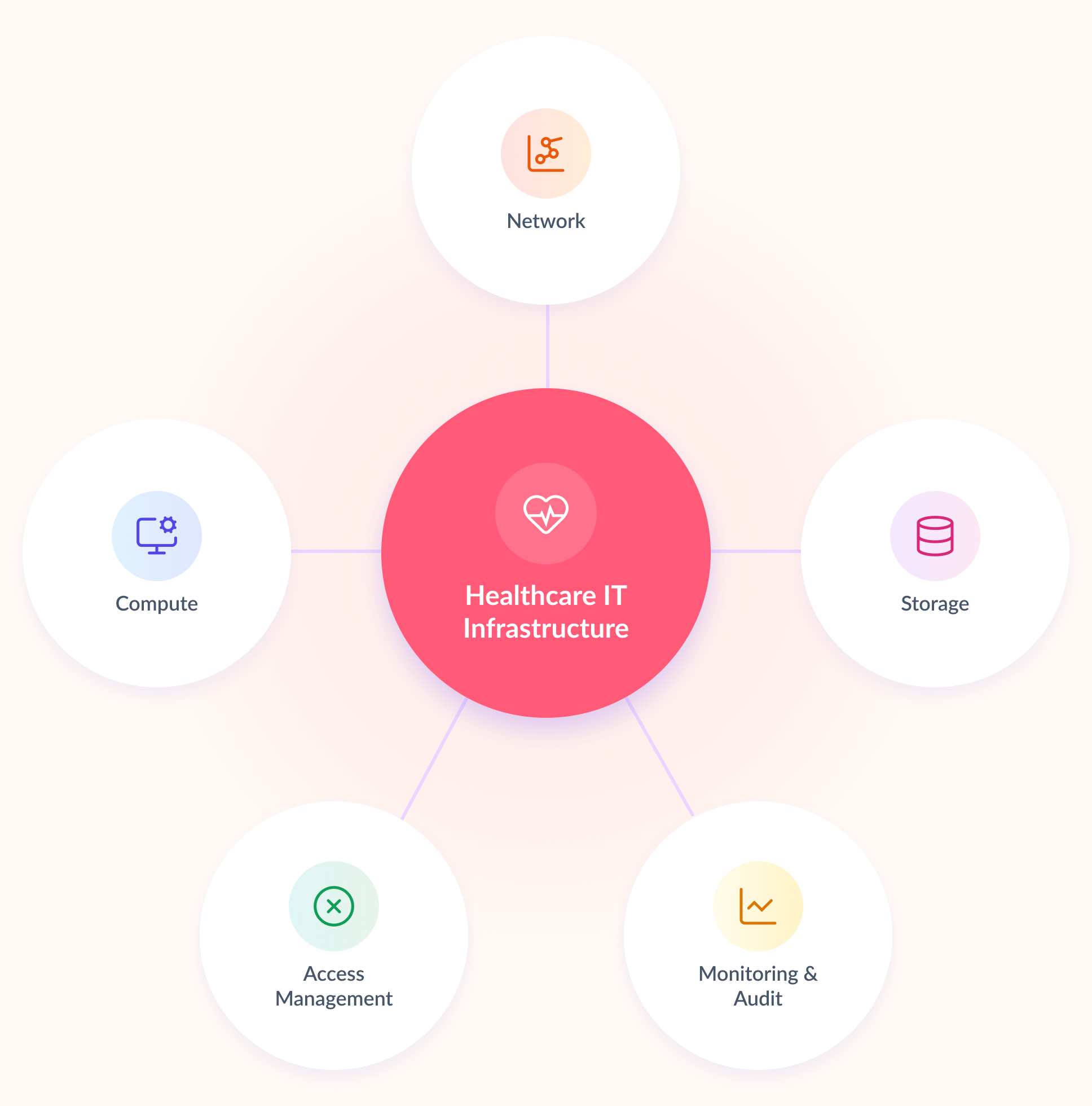
A resilient design starts with understanding what each infrastructure layer needs during normal operation and during a failure. As you build or review the environment, look at each layer from the perspective of a failure and ask what the rest of the workflow depends on.
Network paths need to be defined by failure domain, not convenience. When you map these paths, separate clinical access, management traffic, storage replication, and backups so they do not compete for the same pipe. Segment networks to limit lateral movement, encrypt data in transit, and log everything that touches protected health information (PHI).
Compute includes physical hosts, hypervisors, and VMs running the EHR, interface engines, communications, and specialist systems. When you size HA, assume that one host is unavailable and verify that the surviving host can carry the priority workload on its own.
Storage includes primary volumes, synchronized replicas, archives, and backups, each serving a different recovery purpose. When you review your storage design, make sure replication is complemented by versioned or immutable copies. Encrypt data at rest, because live replication alone does not provide a reliable recovery point if corrupted or encrypted data is replicated to the other copy.
Identity and access management determines who can see or change clinical data. This includes directory services, role-based permissions, service accounts, multifactor authentication for administrators, and controlled emergency access.
Monitoring and auditing cover the remaining operational requirements. Infrastructure telemetry tracks latency, capacity, failed paths, and resynchronization load. Audit logs record access and changes for incident review and regulatory evidence.
On-premises, cloud, or hybrid?
The deployment model affects the failure domains you need to account for. On-premises infrastructure keeps device-facing services local and reduces WAN dependence. Cloud services reduce local hardware management, but provider availability, identity, connectivity, and data location become part of the failure model. Hybrid designs commonly keep equipment gateways on site while hosting EHR, analytics, or archives elsewhere.
When you compare these models, look at where each dependency sits and what happens when connectivity to that location is lost. Deployment location does not establish HIPAA compliance. Under the U.S. Department of Health and Human Services (HHS) cloud guidance, a provider handling ePHI on behalf of a covered entity or business associate is a business associate, and a compliant Business Associate Agreement (BAA) is required. Selection should therefore follow recovery targets, WAN tolerance, data-location rules, and operational responsibility.
Healthcare IT use cases by industry
The same uptime target can lead to very different infrastructure designs depending on the workload. To see how these differences affect infrastructure decisions, you can map each healthcare environment to the workflow at risk, the dependency teams often overlook, and the design decision that follows.
| Healthcare environment | Critical workflow | Downtime impact | Design focus |
|---|---|---|---|
| Clinics and hospitals | EHR access, medication, and orders | Staff lose access to clinical workflows | Protect identity and interfaces; size for peak load |
| Diagnostic laboratories | Specimen-to-result path | Results cannot be matched or reported | Test analyzer buffering and the full interface path |
| Medical imaging centers | PACS ingest, retrieval, and reporting | Studies queue or prior images disappear | Size for ingest, archive growth, and resynchronization |
| Medical research | Study data and audit records | Data entry stops or record state is uncertain | Use controlled recovery with retained audit trails |
| Pharmaceutical manufacturing | MES, batch records, and quality status | Production or batch review pauses | Validate failover and infrastructure changes |
| Distributed and remote sites | Local clinical services | Staff wait for remote repair | Standardize two-node deployments and monitoring |
The table highlights an important point: recovering the server is only one part of restoring the workflow. The actual recovery target should be tied to the business or clinical process that depends on that server.
A laboratory recovery test does not end when the LIS server boots back up. It ends when a test result successfully maps to the correct patient MRN. When you test a laboratory recovery scenario, measure the buffer depth against your actual test volume: how many hours of data the analyzer can hold locally before overwriting data or overwhelming the interface engine with a large backlog.
Imaging represents a heavy storage workload because a single node often handles three concurrent jobs: serving active studies, ingesting new ones, and rebuilding a replica after failover. This simultaneous load can saturate disk IOPS and expose limitations that daily-average capacity figures do not show. If you size the environment using only daily-average figures, you can easily underestimate the load during failover.
Research and pharmaceutical systems introduce another compliance requirement: recovery must preserve a controlled record state. Under FDA guidelines for electronic records and data integrity, failover evidence matters just as much as raw recovery speed. You need to be able to demonstrate what happened during recovery and verify that the resulting records remain trustworthy.
At distributed sites, architecture is closely tied to supportability. If you manage multiple remote locations, standardization becomes especially important because your central team needs to troubleshoot the same architecture remotely. A standardized cluster and monitoring setup allows a central team to manage dozens of locations, while a unique stack at every site makes remote diagnostics, maintenance, and spare-parts planning much harder.
What causes healthcare IT downtime?
The failed component is not always the obvious server. Identity and DNS outages can make several healthy applications inaccessible at once. A bad virtual-switch change can isolate every VM on a host. Storage latency can look like an application problem. Interface engines, certificate services, and database connections often sit outside the workload inventory used for HA planning.
Maintenance introduces its own failure modes. An update can change a driver, a firewall rule can block an interface, or a certificate can expire after the team has tested only the application login and not the interfaces behind it.
When you review your HA plan, make sure these dependencies are included in the failure model, not just the servers and VMs. After any change in the EHR path, check the complete workflow:
- Can a clinician open a chart and place an order, not just reach the login screen?
- Is the interface engine routing messages end to end, not just showing a green “connected” status?
- Did any firewall or network access control list (ACL) change block a port that an interface or service account depends on?
- Are certificates still valid on every hop, not only the one the team remembered to check?
- Does the failover path still complete within the RTO when tested with production-representative load?
Cyberattacks and site loss create different recovery problems. Ransomware can damage every synchronized copy that is reachable with the same credentials. Fire, flood, or a prolonged power failure can remove both cluster nodes at once. Those events move the response from local failover to backup or disaster recovery.
Why is backup not enough?
Backup cannot take over a live workload when a host fails. The data must be restored to working compute, the application must start, and its dependencies must reconnect. That recovery process can take longer than a clinical or production workflow can tolerate.
HA and backup address different failure scenarios, and treating them as interchangeable creates gaps in the recovery plan. When you review your recovery strategy, it helps to look at what each layer can actually recover from:
| HA (synchronous replication) | Immutable / air-gapped backup | |
|---|---|---|
| Protects against | Host, disk, or network hardware failure | Ransomware, accidental deletion, data corruption |
| Recovery point | Seconds (current state) | Depends on backup schedule (hours to a day, typically) |
| Recovery time | Automatic failover, usually minutes | Manual restore, potentially hours |
| What it can’t stop | A bad or malicious write replicates to both copies instantly | A slow-burn hardware failure over weeks |
Synchronous replication preserves the current state, including an accidental deletion, a corrupt write, or ransomware encryption. Two healthy replicas are therefore not two recovery points. Critical workloads still need backups isolated from production credentials and failure domains, on media that the HA cluster’s own admin credentials can’t access.
RTO should include the full service recovery, not just the time required to copy data. RPO should reflect the point to which the application can be returned without breaking its workflow or record obligations. Restore order matters too: identity and DNS may need to return before the database, followed by the application and its interfaces.
This is why a backup test can look successful while the actual service recovery fails. Testing one VM in isolation may produce a clean backup report, but it does not prove that the complete application stack can be restored and brought back into service within the required RTO.
How does a two-node HA cluster work?
In a two-node design, each server provides compute and local storage. Synchronous replication maintains matching data copies across the nodes and presents them as shared storage to the virtualization cluster. If one host fails, its VMs restart on the surviving host using the available storage copy.
The replication network becomes a critical part of this design. Synchronous writes add a network dependency because both copies need to commit the write before it is acknowledged. As a rule of thumb, sync replication between cluster nodes requires round-trip latency in the low single-digit milliseconds, commonly around 2-3 ms or better. As latency increases beyond that range, write latency on every VM can also increase, including during normal operation.
Replication links need to maintain that low latency consistently, along with enough bandwidth for production traffic and resynchronization after a node returns. When you size these links, account for the rebuilding state as well as normal workload traffic.
Quorum logic prevents both nodes from serving conflicting copies after communication breaks. The exact mechanism may use heartbeat channels, a witness, or node-majority logic. Where the witness lives matters more than many designs account for. If you place it in the same rack, on the same power circuit, or on the same physical host as one of the two nodes, a single event, such as a tripped breaker or rack switch failure, can take out a node and the witness together.
The surviving node can then lose quorum as well, and a cluster that should have failed over may stop with otherwise healthy hardware sitting idle. When you design a two-node cluster, treat witness placement as part of the failure-domain design.
Capacity is set by the failed state, not the normal one. One node must run the priority VMs and still meet application response targets. A technically successful failover that leaves Picture Archiving and Communication System (PACS) retrieval or LIS transactions too slow hasn’t met the operational requirement, regardless of what the uptime dashboard reports.
Failure mechanics: quorum, storage, and network design
Network partition and split brain
In a two-node cluster, a failed heartbeat or replication path can leave both servers powered on but unable to see each other. If both sides continue serving the same workload, their storage state can diverge. Quorum prevents this outcome by allowing only the partition with a majority of votes to keep clustered workloads online.
The witness holds a vote, not clinical data, which is why its placement is a network and power design decision. iSCSI, SMB Direct, and RDMA carry storage traffic; none of them determine quorum. Forcing both partitions online defeats the protection and can create conflicting writes.
When you plan the network, keep the quorum path and storage path in mind separately. A high-performance storage network does not compensate for poor quorum design, and a healthy witness does not fix an overloaded replication link.
PACS: archive size, burst traffic, and cache
DICOM is structured, but PACS storage behaves more like a large-object workload than a conventional transactional database. Daily acquisition may be predictable. A bulk migration, archive restore, or node resynchronization rarely is and can introduce a much larger sustained stream.
With synchronous replication, a foreground write is acknowledged only after both copies commit it. If a PACS import shares disks or links with EHR and LIS workloads, a large transfer can raise latency across the whole cluster. Write-back cache can absorb a short burst, but once the cache fills, throughput falls to the rate of the slower replica or network path.
For this reason, capacity tests should combine clinical reads, peak image ingest, and full resynchronization instead of benchmarking each workload in isolation. Keep recent or frequently read studies on the active HA tier. Move older DICOM objects to a PACS- or VNA-supported archive tier when retention and retrieval targets allow it.
When you plan archive migrations, throttle bulk transfers and verify that the archive remains searchable before removing the source copy. This gives you a practical recovery and availability check.
Storage and replication network
Separate client, management, cluster, storage, and backup traffic using physical paths, dedicated VLANs, and QoS. For iSCSI, use dedicated adapters or HBAs with MPIO. If iSCSI crosses a router, thoroughly test latency, packet loss, MTU, and failover across the entire path.
For a busy two-node storage cluster, 10GbE is a practical starting point, while 25GbE becomes appropriate once PACS ingest, VM writes, and resynchronization traffic saturate lower speeds. Always size links for the failed or rebuilding state rather than average daytime utilization.
Jumbo Frames require matching MTUs on every NIC and switch. SMB Direct needs RDMA-capable adapters and SMB Multichannel, while RoCE requires appropriate DCB and PFC configuration. Always run load tests with active replication and monitor latency, retransmissions, dropped packets, and queue depth.
The important part is to test these conditions together. A network can perform well under a synthetic bandwidth test and still struggle when VM writes, PACS ingest, and storage resynchronization compete for the same resources.
External SAN vs. 2-node HCI
For local HA storage under a healthcare workload, organizations typically choose between a dedicated SAN array and synchronous replication across local server disks, without a separate storage array.
A SAN can fit a large data center with dedicated storage admins, but it becomes more difficult to operate across a distributed clinic network. Each site with an external array introduces specialized hardware, firmware, support contracts, and additional failure modes into locations that may not have dedicated IT staff.
Two-node HCI collapses this complexity. Each server carries its own storage, replicates synchronously to its pair, and presents shared storage to the hypervisor without a separate SAN appliance or storage team.
StarWind implements this model in two ways. Virtual SAN (VSAN) runs on existing server storage for teams with in-house management skills. Alternatively, HCI Appliance (HCA) delivers pre-integrated compute, storage, virtualization, and support as a single box, ideal for multi-location rollouts where standardization outweighs hardware reuse.
Ultimately, the choice for distributed clinics comes down to operational overhead. Reusing servers can save money upfront, but it can also require more engineering time later when teams have to troubleshoot different hardware and software stacks across multiple sites. Standardized hardware with a single vendor escalation path can be easier to operate and support over a multi-year deployment.
When you compare the options, look beyond the initial hardware cost. Consider who will troubleshoot a failed component at 2 a.m., how quickly replacement parts can reach a remote site, and whether the central IT team can apply the same recovery procedure at every location.
Regardless of the storage approach, the protected unit remains the virtualized workload on the cluster. WAN services, SaaS availability, medical devices, and site-level disaster recovery remain separate design considerations.
How to control healthcare IT infrastructure costs
Cost control starts by matching protection to the workload instead of buying the same availability tier for every application. HA belongs where the operational cost of waiting for a restore exceeds the cost of redundant infrastructure. Lower-priority systems can use standard backup and recovery.
When you evaluate existing infrastructure, look at the failed-state requirements first. Existing servers are economical only if they can carry the failed-state load and have enough supported life left to justify the integration work. Cloud estimates also need to include redundant connectivity, data transfer, backup, monitoring, security tooling, and support, not just the compute line item.
Across remote sites, repeatable configurations and central monitoring can save more over time than a small discount on one-off hardware. If you manage multiple locations, standardization also reduces the time your team spends troubleshooting different configurations and planning replacement parts.
Healthcare security and regulatory requirements
Regulations do not prescribe a two-node cluster or a particular storage product. They shape the controls and evidence around the systems that store or process regulated records. Your infrastructure design therefore needs to support the required security and compliance controls without treating the HA platform itself as proof of compliance.
For covered entities and business associates, the current HIPAA Security Rule requires safeguards for the confidentiality, integrity, and availability of electronic protected health information. Its contingency-planning provisions cover backup, disaster recovery, emergency-mode operations, and plan testing. HA can support the availability component, but the compliance record comes from the broader risk and control program.
The CMS Emergency Preparedness Rule applies only to designated Medicare- and Medicaid-participating provider and supplier types, with requirements that vary by category. The CLIA program focuses on accurate, reliable, and timely human laboratory testing. For FDA-regulated research and manufacturing, Part 11, CGMP, validation, and data-integrity requirements may apply, depending on the system and records involved.
In you operate in the EU, GDPR governs personal-data processing, and NIS2 may impose cybersecurity and incident-reporting duties on healthcare entities within scope. Software that qualifies as a medical device falls under the EU MDR; IEC 62304 provides a lifecycle-process standard for medical device software. These requirements do not apply to every healthcare application or provider, so you need to check the applicable scope and obligations case by case.
Encryption keys and backup isolation
Security planning should continue down to the key-management level. An architecture record should clearly separate encryption at rest from encryption in transit. For a Windows cluster using BitLocker-protected volumes, key protectors sit at the volume and cluster layer, and recovery material must be escrowed outside the two-node failure domain. If replication uses TLS or IPsec, session keys exist for the connection, while long-lived credentials remain in the protected host keystore or an external KMS or HSM selected by the platform.
Your design should document where these keys and credentials are stored, who administers them, how rotation and revocation are handled, and what happens during failover if the key service becomes unavailable. NIST SP 800-57 provides the key-management framework; the exact implementation remains product- and hypervisor-specific.
Backup isolation is equally important. A two-node cluster does not provide an air gap or an immutable backup. Both replicas are online and receive the same authorized writes, so ransomware, deletion, or corruption can reach both. Cyber-recovery copies need a separate security and failure domain, separate credentials, and immutable retention or offline media.
CISA recommends offline backups, and NIST distinguishes replication from immutable and point-in-time recovery. When you test recovery, verify that the isolated copy can restore the complete application workflow, not just a single file.
An infrastructure review should connect each technical control to evidence: approved architecture, access rules, change records, backup results, failover tests, restore tests, and assigned owners. Product redundancy supports this work, but the surrounding processes and evidence still need to be maintained.
Conclusion
Planning for healthcare downtime means looking at workflows instead of isolated servers, whether the workload involves clinic access, lab results, or imaging queues. A two-node cluster can be a good fit when a failed host can’t wait for a rebuild, a single node can carry the operational load, and site recovery is managed separately.
As you plan your environment, define the protection boundary clearly. Use local HA to protect against on-site hardware and storage failures, while backups, network resilience, and documented recovery procedures address the failure scenarios that HA cannot cover. You need to keep the workflow running and make sure the recovery process works when the infrastructure is under pressure.
Frequently asked questions
How often should failover be tested in a clinical environment?
Test after any material infrastructure or application change and on a regular, risk-based schedule. A test is only complete when clinicians or staff can successfully finish the affected workflow, not simply when the virtual machine boots back up.
Who should participate in a healthcare recovery test?
At a minimum, IT, the application owner, and clinical, laboratory, or manufacturing staff who rely on the system daily should participate. Include compliance or security teams whenever regulated records or cyber-recovery scenarios are part of the test.
What belongs in a healthcare downtime runbook?
Include clear steps for who declares the outage, how clinical and operational workflows continue during the disruption, the exact order in which critical services must return, and how queued data or paper records will be reconciled once systems are back online.
Your runbook should also identify the people responsible for each step and the escalation path if recovery takes longer than the defined RTO. Keep it specific enough that someone who does not normally operate the environment can follow it during an incident.