
If your business runs on SQL Server, downtime means lost revenue. SQL Server gives you two main ways to keep databases available: Always On Availability Groups (AG) and Always On Failover Cluster Instances (FCI). Both require Windows Server Failover Clustering (WSFC), both protect against hardware and software failures, but they work at different levels and make different trade-offs.
This article covers how each one works, where they differ, and which one fits what scenario. We’re not covering log shipping, storage-level replication, or other mechanisms here – just AG and FCI head to head.
One naming note before we start: Microsoft’s official term is AG, not AAG or AOAG. You’ll see the other abbreviations in the wild, but AG is correct.
Always On availability groups
Always On Availability Groups work at the database level. You pick a set of databases, group them together, and AG replicates them from a primary replica to up to eight secondary replicas. The grouped databases fail over together as a unit.
Each replica is a separate SQL Server instance on its own WSFC node. The primary handles all reads and writes. Secondaries receive transaction log data from the primary and apply it to stay in sync. There’s no witness role like the old Database Mirroring setup – quorum is handled entirely by WSFC, and every node in the cluster participates regardless of whether it hosts a replica.
Speaking of Database Mirroring – it’s technically still present in SQL Server 2022, but it’s deprecated. Microsoft’s recommendation is to move to AG.
Synchronous vs. asynchronous commit
This is the choice that determines whether you’re building HA or DR. In synchronous-commit mode, the primary waits for the secondary to confirm it has hardened the log records before acknowledging the transaction to the client. No data loss on failover, but you pay for it in transaction latency – every write has to round-trip to at least one secondary. For write-heavy workloads, that latency penalty is constant and unavoidable. This mode supports automatic failover.
In asynchronous-commit mode, the primary doesn’t wait. Transactions commit locally and log records ship to the secondary in the background. Lower latency, but some data loss is possible if the primary goes down before the secondary catches up. This is your DR option – useful for replicas across geographic distance where network latency makes synchronous commit impractical. Failover is manual and forced.
You can mix modes: up to five replicas (including primary) in synchronous mode, and the rest asynchronous. Most production setups use synchronous for a local HA pair and asynchronous for a remote DR replica.
What AG requires
AG runs on top of WSFC – there’s no way around that on Windows. Each AG gets its own cluster role with a virtual network name (listener) that clients connect to. The listener redirects traffic to whichever node is currently primary, so applications don’t need to know which server is active.
A side note: there are clusterless AGs (“read-scale” AGs), but these only support manual failover and are not an HA or DR solution. There’s also AG on Linux using Pacemaker, but this article focuses on Windows deployments.
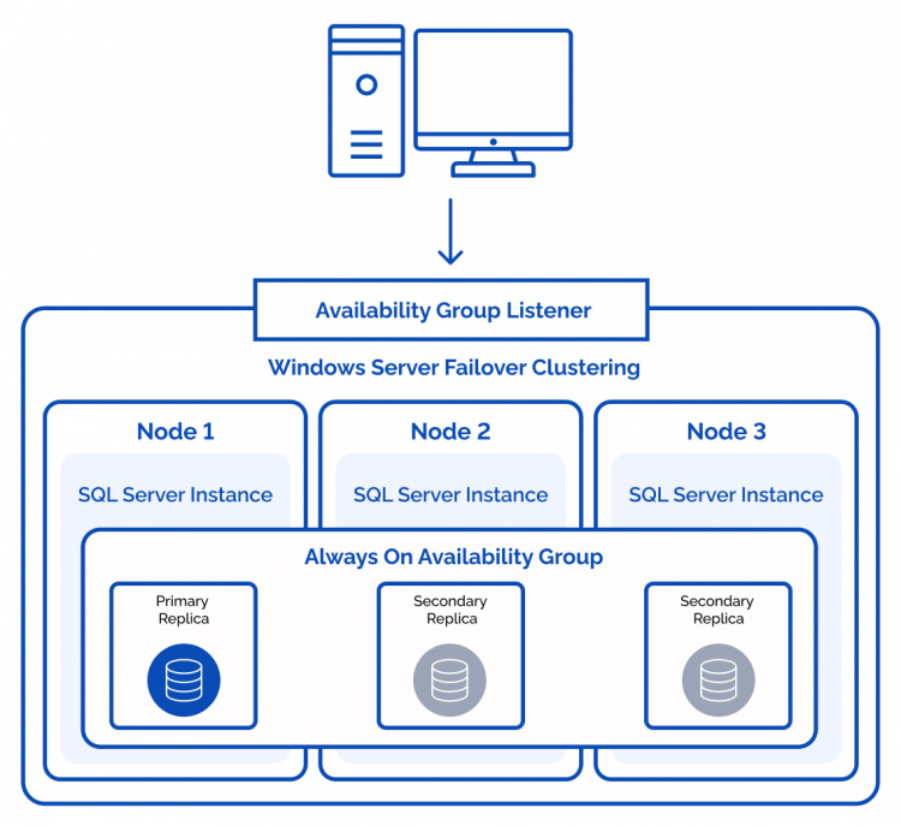
What you gain with Always On Availability Groups
Up to nine replicas (1 primary + 8 secondary) give you flexibility. You can set secondaries to active and use them for read-only queries or backups, so your secondary hardware isn’t just idle. AG supports both automatic failover (synchronous mode) and manual/forced failover (asynchronous mode). It handles both HA and DR in a single technology.
AG also has built-in corruption detection. Data is copied and applied in sequence with integrity checks. If a page is corrupted on the primary, AG can retrieve a clean copy from a secondary.
Restrictions of Always On Availability Groups
AG’s biggest management headache has historically been server-level objects. AG replicates databases, not the instance. That means SQL Server logins, linked servers, SQL Agent jobs, and anything else stored in master or msdb don’t come along for the ride. In a traditional AG setup, DBAs had to manually script and deploy these to every secondary – and keep them in sync. Miss a login or get a SID mismatch, and your application breaks on failover.
SQL Server 2022 addressed this with Contained Availability Groups, which create their own master and msdb databases inside the AG. Logins and jobs created through the AG listener replicate automatically. This is a significant improvement, though it requires restructuring how you manage the instance – and any objects created outside the AG listener still won’t sync.
The synchronous-commit latency tax is the other cost. Every committed transaction pays a network round-trip to at least one secondary before the client gets an acknowledgment. For read-heavy reporting workloads, this doesn’t matter. For write-intensive OLTP environments, it adds measurable latency to every operation. Asynchronous mode avoids this, but then you accept possible data loss on failover.
AG requires Enterprise Edition for most features (Standard Edition AGs are limited to a single database per group), and you should not use Failover Cluster Manager to move AGs – use the SQL Server tools instead.
Additionally, all replicas must be in the same WSFC, you’re limited to five synchronous replicas.
Failover Cluster Instances
FCI works at the instance level. Instead of replicating individual databases, you install a single SQL Server instance across multiple WSFC nodes. Only one node is active at a time. If it fails, the entire instance – databases, logins, agent jobs, everything – moves to another node.
The key difference from AG: FCI uses shared storage. Database files live on storage that’s accessible to all cluster nodes (iSCSI SAN, Fibre Channel, Storage Spaces Direct, StarWind Virtual SAN, or SMB file shares), and failover moves ownership of that storage from one node to another. Because there’s a single authoritative copy of the data, there’s zero replication lag and zero data loss – always, regardless of failover mode. No synchronous-commit overhead, no async risk window.
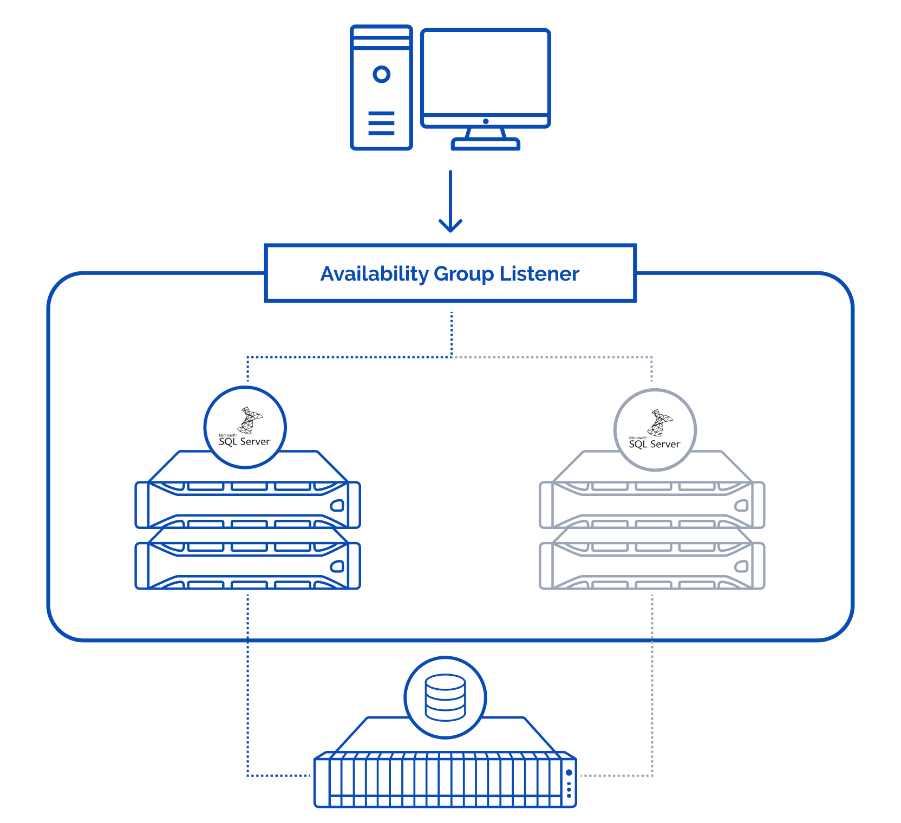
What you gain with FCI
FCI’s core advantage is that it protects the entire SQL Server instance as a single unit. Databases, logins, linked servers, Agent jobs, server-level configurations – everything fails over together without any extra synchronization logic. There’s no SID mismatch risk, no forgotten login on a secondary, no Agent job that runs on the wrong replica. What runs on node A will run identically on node B.
This makes FCI operationally straightforward. DBAs manage one SQL Server instance, not a primary plus secondaries with replication health to monitor. For organizations running dozens of SQL instances, that simplicity compounds – there’s meaningfully less operational surface area to maintain.
FCI works with SQL Server Standard Edition, which has a real impact on licensing costs. AG requires Enterprise Edition for most of its features (readable secondaries, multiple databases per group, more than two replicas). For mid-size environments, the licensing difference between Standard and Enterprise can be substantial.
Clients connect to a virtual network name, so applications don’t need reconfiguration during failover.
And because FCI doesn’t replicate data at the SQL layer, there’s no commit latency penalty. Every write goes directly to storage with no round-trip to a secondary node. For write-heavy OLTP workloads, this means FCI delivers the same write performance in an HA configuration as a standalone instance.
Shared storage: solving the single point of failure
The traditional criticism of FCI is that shared storage creates a single point of failure. If the SAN goes down, the cluster goes with it. This was a valid concern when shared storage meant a single physical SAN appliance.
Modern software-defined storage changes that equation. Solutions like StarWind Virtual SAN replicate storage at the block level between cluster nodes, presenting a mirrored volume as shared storage to the failover cluster. Each node has its own local disks, and StarWind synchronously mirrors data between them. If a node (and its disks) fails, the other node already has a complete copy. There’s no external SAN to fail – the storage layer has its own redundancy built in.
This eliminates the SAN-as-SPOF argument entirely. You get the operational simplicity of FCI (instance-level protection, zero replication lag, no commit latency) with storage-level fault tolerance that’s at least as resilient as AG’s database-level replication. In many cases, it’s simpler to manage because the storage replication is transparent to SQL Server – it just sees a regular disk.
Restrictions of Failover Cluster Instances
Failover is slower than AG. SQL Server has to stop on the active node, start on the passive node, and run crash recovery on every database. Typical failover takes 30-60 seconds for a moderately sized instance. Very large instances with hundreds of gigabytes of buffer pool can take longer, but that’s the exception rather than the rule.
No readable secondaries means the passive nodes sit idle from a SQL perspective until a failover happens. If you need to offload read traffic, AG is the option for that.
FCI on its own provides local HA but it is not well-suited for geographic DR. For cross-site protection, you can combine FCI with AG – use FCI for local instance-level failover and an asynchronous AG replica at a remote site for DR.
What’s New in SQL Server 2022 & 2025 for High Availability
Both AG and FCI have seen improvements in recent releases. Here’s what matters for the decision.
Contained Availability Groups (Introduced in 2022)
One of the biggest historical pain points of AGs was the lack of synchronization for server-level objects. DBAs had to manually script and copy logins, permissions, and SQL Agent Jobs to every secondary replica. Contained Availability Groups solve this by creating specialized master and msdb databases that live inside the AG. Now, when you create a user or a job via the listener, it automatically replicates across all nodes.
Configurable AG Commit Time & Scaling (Introduced in 2025)
SQL Server 2025 takes performance tuning a step further. It introduces a configurable AG Commit Time (previously hardcoded to 10ms). Administrators can now fine-tune this value at the server level to optimize latency in synchronous-commit mode. Furthermore, SQL Server 2025 Standard Edition now scales up to 32 cores and 256 GB RAM (up from 24 cores/128 GB), making AGs on Standard Edition significantly more viable for mid-to-large workloads without the immediate need for an Enterprise license.
Feature comparison across versions:
| Feature | SQL Server 2019 | SQL Server 2022 | SQL Server 2025 |
|---|---|---|---|
| Availability Groups | Standard AGs | Contained AGs (system DBs replicated) | Faster failover + diagnostics |
| AG Commit Time | Fixed (10ms) | Fixed (10ms) | Configurable (server-level) |
| Standard Ed. Limits | 24 cores / 128 GB | 24 cores / 128 GB | 32 cores / 256 GB |
| Login/Job Sync | Manual | Automatic (Contained AGs) | Automatic (Contained AGs) |
AG vs. FCI: head-to-head comparison
| Always On AG | FCI | |
|---|---|---|
| Protection level | Database | Entire instance |
| Storage | Non-shared (local per node) | Shared (SAN, S2D, VSAN, SMB) |
| Readable secondaries | Yes | No |
| Write latency impact | Higher (sync commit round-trip) | None (direct to storage) |
| Failover speed | Sub-second (typical) | 30-60 seconds (typical) |
| Failover modes | Automatic, manual, forced | Automatic, manual |
| HA + DR | Both | HA (combine with AG for DR) |
| Data loss risk | None (sync) / possible (async) | None |
| Licensing | Enterprise (full features) | Standard or Enterprise |
| Management complexity | Higher | Lower |
| Instance-level coverage | Databases only (logins, jobs need extra setup) | Full (everything fails over together) |
Practical considerations from personal experience
The AG vs. FCI decision comes down to what you need to protect, what your write profile looks like, and how much operational complexity you’re willing to manage.
Choose AG when you need geographic DR to a remote site, when you need readable secondaries for reporting or backup offloading, or when your workload is read-heavy and the synchronous commit latency is acceptable.
Choose FCI when you need instance-level protection (logins, jobs, server config – everything), when your workload is write-intensive and you can’t afford the latency of synchronous replication, when you want simpler day-to-day management with less operational surface area, or when Standard Edition licensing fits your budget better. With software-defined storage like StarWind VSAN providing storage-level redundancy, the traditional shared-storage SPOF concern no longer applies.
Combine both when you need the best of each. FCI handles local instance-level HA with zero data loss and zero commit overhead. AG adds cross-site DR with an asynchronous replica at a remote location. This hybrid approach is common in production and covers both local failures and site-level disasters.
Whichever you choose, consistency in deployment is what really matters. If you’re configuring across multiple nodes – automate it. Manual setup increases your chances to deal with configuration drift and human error. And in HA, a misconfiguration doesn’t show up until failover happens and something just doesn’t work.
Pair your cluster with proper monitoring. Track quorum status, storage latency, and synchronization health continuously. An unexpected failover that you catch in real time is an incident. One that you find out about from users is an outage.
Conclusion
AG and FCI solve the same problem differently, and neither is universally better than the other.
AG gives you database-level granularity, sub-second failover, readable secondaries, and built-in DR capability. The cost is higher operational complexity, Enterprise Edition licensing for full features, and a write latency penalty from synchronous commit. Contained AGs in SQL Server 2022 reduced the management gap, but AG setups still require more ongoing attention.
FCI gives you complete instance-level protection – databases, logins, jobs, everything fails over as a unit. Administration is simpler, it works with Standard Edition, and there’s no write latency overhead from replication. Paired with software-defined storage like StarWind VSAN, the storage layer gets its own redundancy, eliminating the traditional single-point-of-failure concern and delivering a fully resilient HA solution with less complexity than AG.