
As system administrators and techies, we all know the pain of managing privileged access across dozens, hundreds, or thousands of servers, databases, cloud instances, and network devices. Direct SSH keys scattered everywhere, shared admin passwords, no real auditing, and the constant fear of a breach from a compromised credential. It’s a nightmare that keeps us up at night. We need something that put an order into it.
Enter JumpServer – a popular open-source Privileged Access Management (PAM) platform that acts as a bastion host/jump server with full session recording, fine-grained controls, and multi-protocol support. It’s been battle-tested in production environments for years and offers a transparent, self-hosted alternative to expensive commercial tools like CyberArk.
In this post, I’ll walk you through what JumpServer is, why it matters for sysadmins, how to get it running quickly, key features with real-world usage tips, and some deployment considerations. If you’re responsible for infrastructure security, compliance (think ISO 27001, GDPR, or local equivalents), or just want better control over who accesses what, this should be useful.
Why Consider a Bastion Host / PAM Solution?
Before diving into JumpServer specifics, let’s recall the classic problems:
- Credential sprawl: Admins have root passwords or SSH keys on laptops, shared drives, or password managers (which get breached).
- No visibility: Who logged in as root at 3 AM and ran what commands?
- Compliance headaches: Auditors want proof of least-privilege access, session recordings, and immutable logs.
- Multi-cloud and hybrid mess: Managing access to AWS, Azure, on-prem Linux/Windows, K8s pods, and databases uniformly is tough.
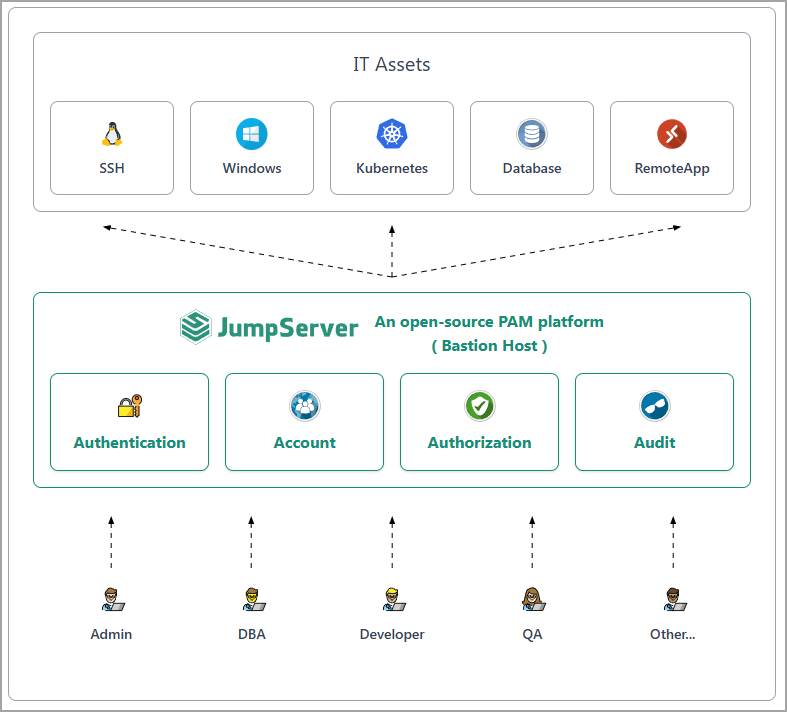
A proper jump server / PAM centralizes access through a controlled gateway. Users never see direct credentials; everything is proxied, recorded, and auditable. JumpServer does this exceptionally well in an open-source package.
What is JumpServer?
JumpServer is an open-source platform for secure, audited access to assets. It supports SSH, RDP (web or native), databases (MySQL, PostgreSQL, Oracle, etc.), Kubernetes, web apps, and more – all through a clean web interface with HTML5 terminals. No client agents required on target systems in most cases.
Key pillars:
- Authentication: Integrates with LDAP/AD, supports SSO (OIDC, SAML, OAuth), MFA (TOTP, WebAuthn).
- Authorization: Granular RBAC, asset groups, just-in-time (JIT) access via tickets/approvals.
- Account Management: Centralized vault with automated password/key rotation.
- Audit: Full session video recording, keystroke logging, command filtering/blocking, searchable logs.
It’s 100% open source (GPL-3.0) with an active community and optional Enterprise X-Pack for advanced multi-tenancy, extra DB support, etc.
The enterprise option can also be installed via offline package. Community edition has a one-liner for deployment so you’ll need a machine connected to the internet.jumpserver.com
Quick Installation (Get It Running in Minutes)
JumpServer is refreshingly easy to deploy. The recommended quickstart uses a one-liner on a clean Linux server (Ubuntu/Debian or RHEL-based recommended, 4+ cores, 8GB+ RAM).
Basic steps (always check current docs for your version):
1. Prepare a dedicated server/VM. Avoid running it on a domain controller or critical production host.
2. Log in as root (or sudo user) and switch to /opt:
cd /opt

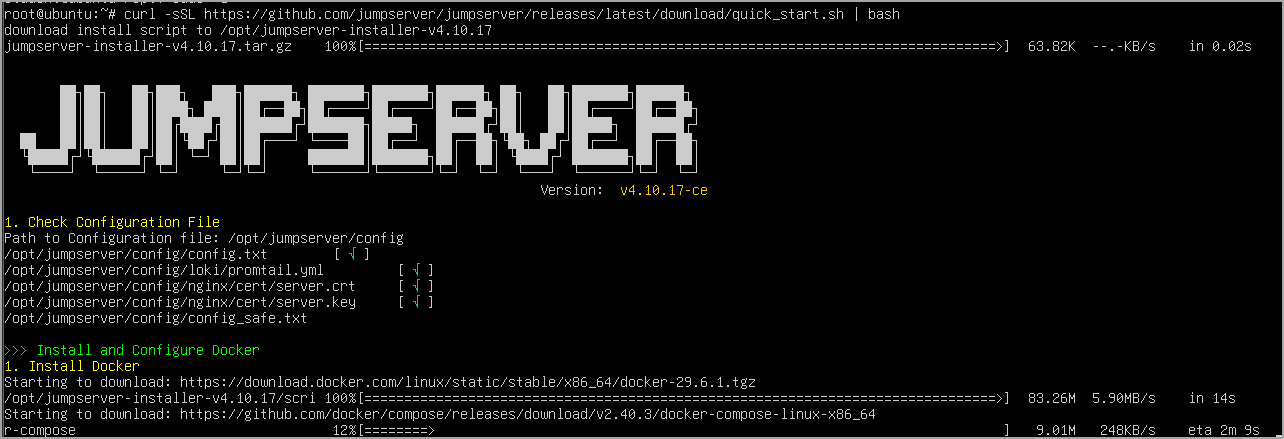
3. Run the quick install script:
curl -sSL https://github.com/jumpserver/jumpserver/releases/latest/download/quick_start.sh | bash

This pulls the latest community edition, sets up Docker Compose (or standalone), and gets everything running. Access it at http://your-ip/ with default admin/ChangeMe credentials (change immediately!).
For production, consider:
- Offline installation packages for air-gapped environments.
- Kubernetes/Helm for larger scales.
- Separate storage for recordings (object storage like MinIO or S3-compatible).
- Proper firewalling (expose only necessary ports; use reverse proxy like Nginx with TLS).
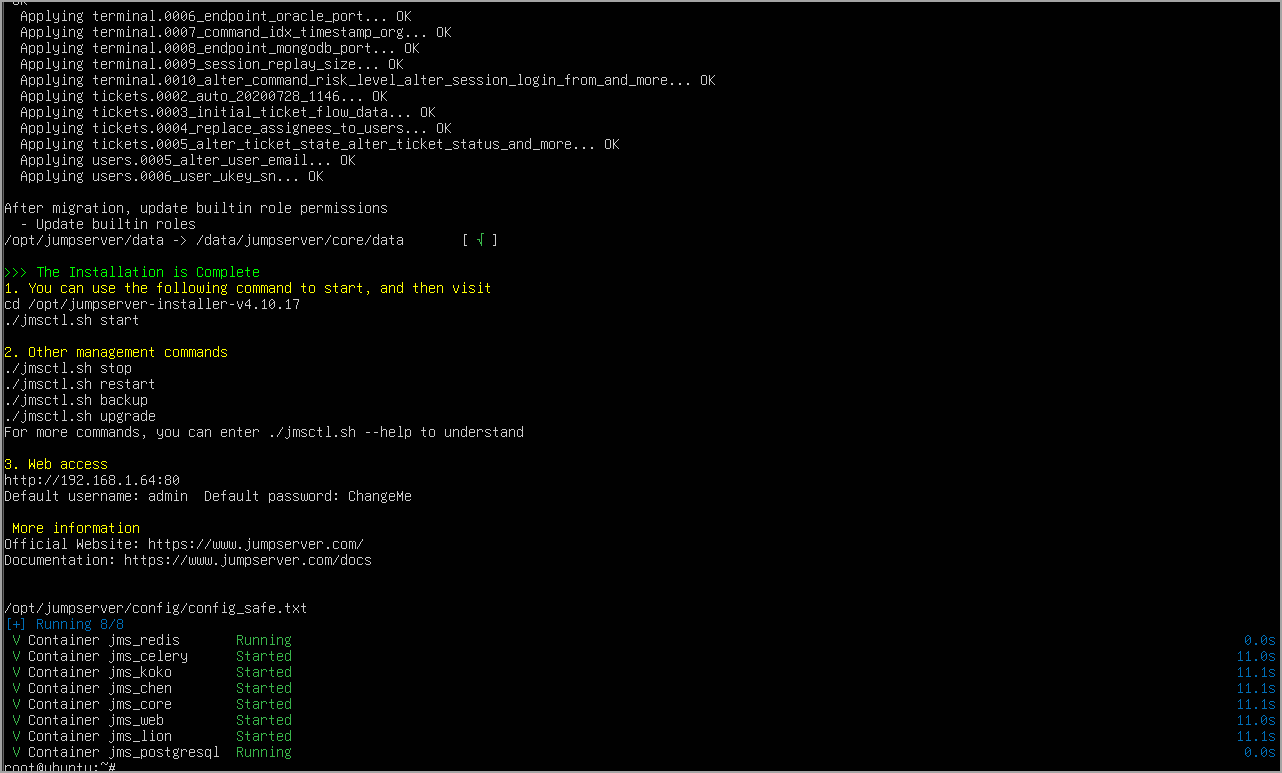
Pro tip: Use Docker Compose for easier upgrades and backups. Always follow security best practices – run behind a WAF/reverse proxy, enable MFA from day one, and don’t expose it directly to the internet without strong controls.
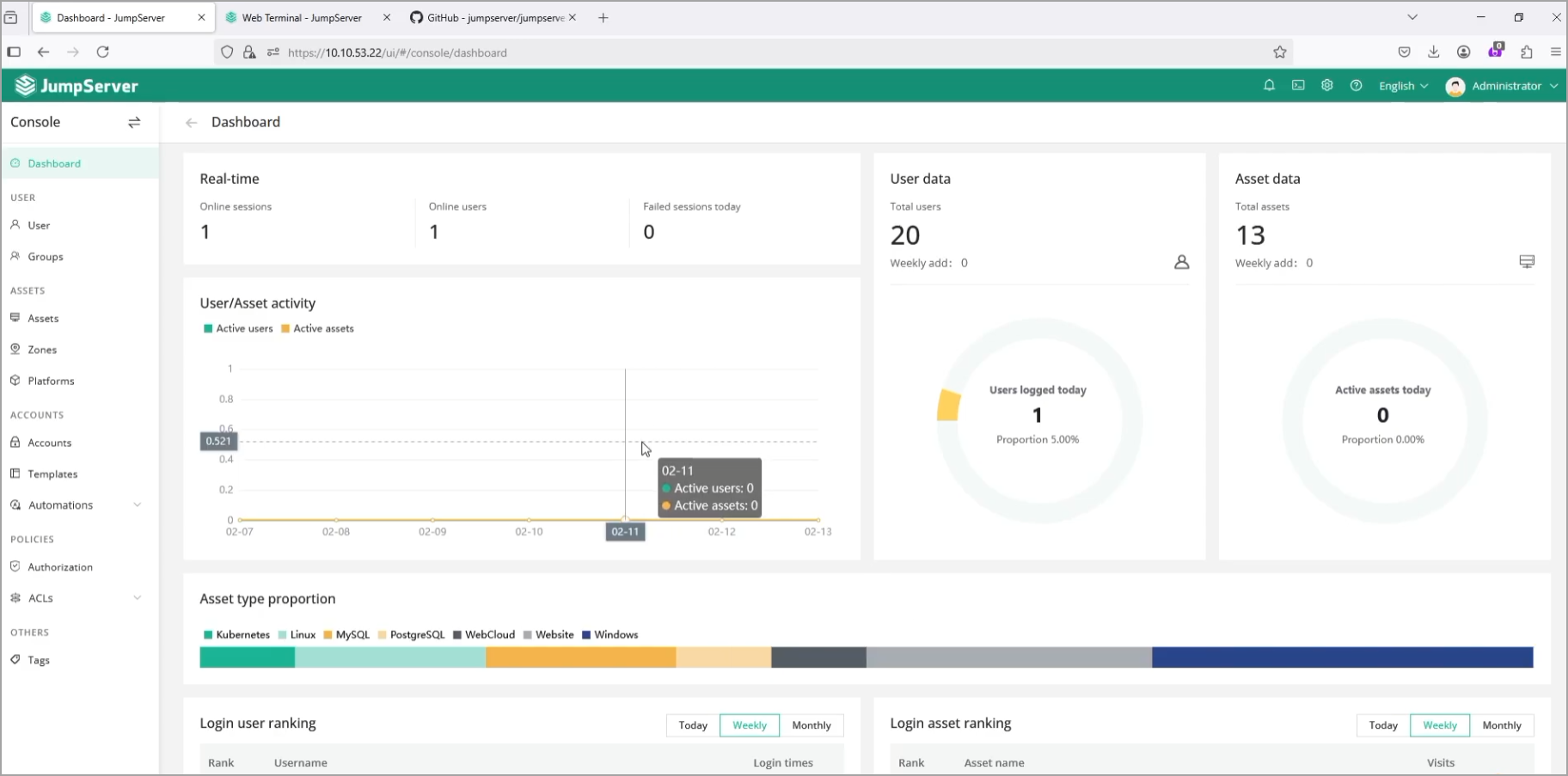
After install, the web UI is intuitive: Assets, Users, Permissions, Sessions, etc.
Core Features and Sysadmin Tips
Asset Management
Add Linux/Windows servers, network devices, databases, and cloud resources. Auto-discovery is available in enterprise editions. Group assets logically (e.g., “Prod-DBs”, “Dev-K8s”).
Tip: Use system users (the actual credentials stored securely in JumpServer) and separate them from login users. This way, you rotate passwords centrally without touching every admin’s config.
Connecting to Assets
- SSH: Web terminal (great for quick access from anywhere) or native client.
- RDP: Browser-based or native with signing options for security.
- Databases: Web SQL client-like access.
- K8s: Direct pod access.
Everything is recorded. You can replay sessions like a video, search commands across all sessions.
Real-world usefulness: Contractors or junior admins get temporary access without giving them full SSH keys. Command filtering can block dangerous commands like rm -rf / or shutdown.
Permissions and RBAC
Define roles, asset permissions, and approval workflows. JIT access via tickets is excellent – user requests access, approver (you or manager) grants time-boxed permission.
Tip for techies: Combine with LDAP sync for automatic user provisioning. Implement least privilege strictly – most users should only have access to specific assets for specific times.
Auditing and Compliance
This is where JumpServer shines. Every login, command, and session is logged. Real-time alerts for suspicious activity (configurable). Export reports for audits.
Pro tip: Store recordings on immutable storage. Integrate with SIEM if needed for advanced correlation.
Deployment Models and Scaling
- All-in-one: Fine for small teams/labs.
- Distributed: Separate components (core, web, celery tasks, recording storage) for high availability and performance.
- Multi-tenant: Enterprise feature for MSPs or large orgs with isolated departments.
For large environments, plan for Redis, MySQL/PostgreSQL backend, and sufficient CPU/RAM for concurrent sessions. Monitor with Prometheus or your existing tools.
High availability notes: Use load balancers, clustered databases, and replicated storage. Test failover thoroughly.
Comparison to Commercial Tools
Many teams migrate from legacy PAM solutions to JumpServer for cost savings (no per-user licensing), transparency, and flexibility. You get core PAM capabilities without vendor lock-in. Enterprise support is available if you need SLAs.
You can watch an quick install video which shows you quickly the 5 necessary steps to understand this cool environment.
It’s not perfect – documentation can be stronger in some areas for non-Chinese speakers, and some advanced features require the paid edition – but the community version covers 80-90% of needs for most organizations.
Potential Gotchas and Best Practices
- Security first: Treat JumpServer itself as a critical asset. Harden the host, regular updates, backups of config and DB.
- Performance: Session recording can consume disk I/O. Plan storage accordingly.
- Backup strategy: Regular DB dumps + asset configs + recordings.
- Testing: Start with a pilot for a non-prod environment. Train your team on the workflows.
- Integrations: API is powerful for automation (Python, Go examples available). Great for custom ticketing or CI/CD pipelines.
From a sysadmin perspective, the biggest win is regaining control and visibility without massive overhead.
Final Words
Is JumpServer Right for You? If you’re a sysadmin or DevOps engineer tired of ad-hoc access methods and looking for a robust, auditable solution that scales from a few servers to enterprise hybrid clouds, JumpServer is worth serious evaluation. It’s practical, feature-rich, and community-driven. I like it!
Deploy it in your lab today – the quickstart really does take under 30 minutes. Play with asset addition, permissions, and session replay. You’ll quickly see how it can tighten your security posture while making daily operations smoother. For the latest installation guides, features, and release notes, head to the official site: https://www.jumpserver.com/ and documentation.
FAQ
What is JumpServer?
JumpServer is an open-source Privileged Access Management (PAM) platform that acts as a bastion host for secure and audited access to infrastructure. It centralizes privileged access and records user activity instead of relying on scattered SSH keys or shared administrator credentials.
What systems and protocols does JumpServer support?
JumpServer supports SSH, RDP, databases such as MySQL, PostgreSQL, and Oracle, Kubernetes, web applications, network devices, and other infrastructure assets. Users can access many resources through its web interface and HTML5 terminals.
Does JumpServer require agents on target servers?
In most cases, no client agent is required on target systems. Connections are managed through the JumpServer gateway, which proxies and audits access to infrastructure resources.
What authentication and access controls does JumpServer provide?
JumpServer can integrate with LDAP and Active Directory and supports SSO through OIDC, SAML, and OAuth. MFA options include TOTP and WebAuthn. Access can be controlled through granular RBAC, asset groups, approvals, and just-in-time access workflows.
Can JumpServer record administrator sessions?
Yes. JumpServer can record complete sessions, log commands and keystrokes, filter or block commands, and provide searchable audit logs. Recorded sessions can later be replayed for investigation or compliance reviews.
Does JumpServer support just-in-time privileged access?
Yes. Administrators can configure ticket-based approval workflows that grant users access to selected assets for a limited period. This can be used for contractors, junior administrators, or other users who should not receive permanent privileged credentials.
How is JumpServer installed?
The Community Edition provides a quick installation method for Linux servers. The article describes deployment on a dedicated Ubuntu, Debian, or RHEL-based server and notes that Docker Compose can be used for easier upgrades and backups.
Can JumpServer be used in large environments?
Yes. Small environments can use an all-in-one deployment. Larger installations can separate core services, web components, task processing, databases, and recording storage. High-availability deployments can use load balancers, clustered databases, and replicated storage.
What should be planned before deploying JumpServer in production?
The article recommends treating JumpServer itself as a critical security asset, keeping it updated, protecting it behind appropriate network controls, enabling MFA, planning storage capacity for session recordings, backing up databases and configuration, and testing the platform first in a non-production environment.