


Well, yes and no. At least not without “breaking some eggs”. Let me explain possible paths and solutions for admins willing to get out the Microsoft Eco-system with Active Directory (AD) and EntraID (if cloud use).
For years, Microsoft was a Goto solution for centralized management of users, rights, and shares within an SMB or enterprise environments. It works great and Microsoft got into what we call a Monopoly position over the decades. Other solutions, so far, were present much less. Times are changing now with many geopolitical events happening all around the world and there are some pressures coming to administrators to find an alternative. Usually this is an Open-Source alternative.
The reason to leave Microsoft might be the higher and higher costs or the overall national political strategy to reduce dependency on US software as we can see in Europe and other parts of the world.
There has not been better time to think of such a move or plan for this move to happen in a near future. In this post I’ll try to show a possible alternative, but it is not an easy topic because of complexity of IT within organizations. Sometimes migrations are easy and sometimes not. Important factor is the “what do we win if we migrate”?
The Cost of Microsoft
Let me show you an example of an approximative cost per Windows Server with 50 users connecting to it. (a typical small business size in Europe).
Total Estimated Cost: For a single 16-core server with 50 users, the total license cost is approximately $3,070 to $4,176 (Standard Edition) or $8,155 to $9,771 (Datacenter Edition).
As I said, the cost is typically not the only factor which pushes organizations to change system. There must be something else. In my honest opinion, a dependency to US software giants is a very good reason to switch. We’ve seen recently that whole governmental administrations in France are moving out (slowly) from Microsoft applications (Teams, M365 etc….) to alternatives. So why not domain controllers, file servers, DNS/DHCP services? Those roles are typically “sitting” on DCs as they are easy to deploy at the same time.
Linux Alternative to Microsoft
There is one Linux alternative from Zentyal which works, and has support for different size of a company. Since 2008, Zentyal has developed an overlay with extension (scripts), which offers equivalent functionality to what Windows Server is currently configured for. Think of it as an alternative for your core network and directory services, including certificates (if used), and file shares.
Zentyal runs Ubuntu distro and offers:
- Active Directory compatibility
- Mail server
- Gateway & infrastructure
- Centralized management
- DNS/DHCP/Shares
Zentyal can be installed on the top of Ubuntu (Server or desktop) or you can directly download the whole ISO from Zentyal website. They have 15 days FREE trial of their commercial solution, or Community Edition (with support via forums).
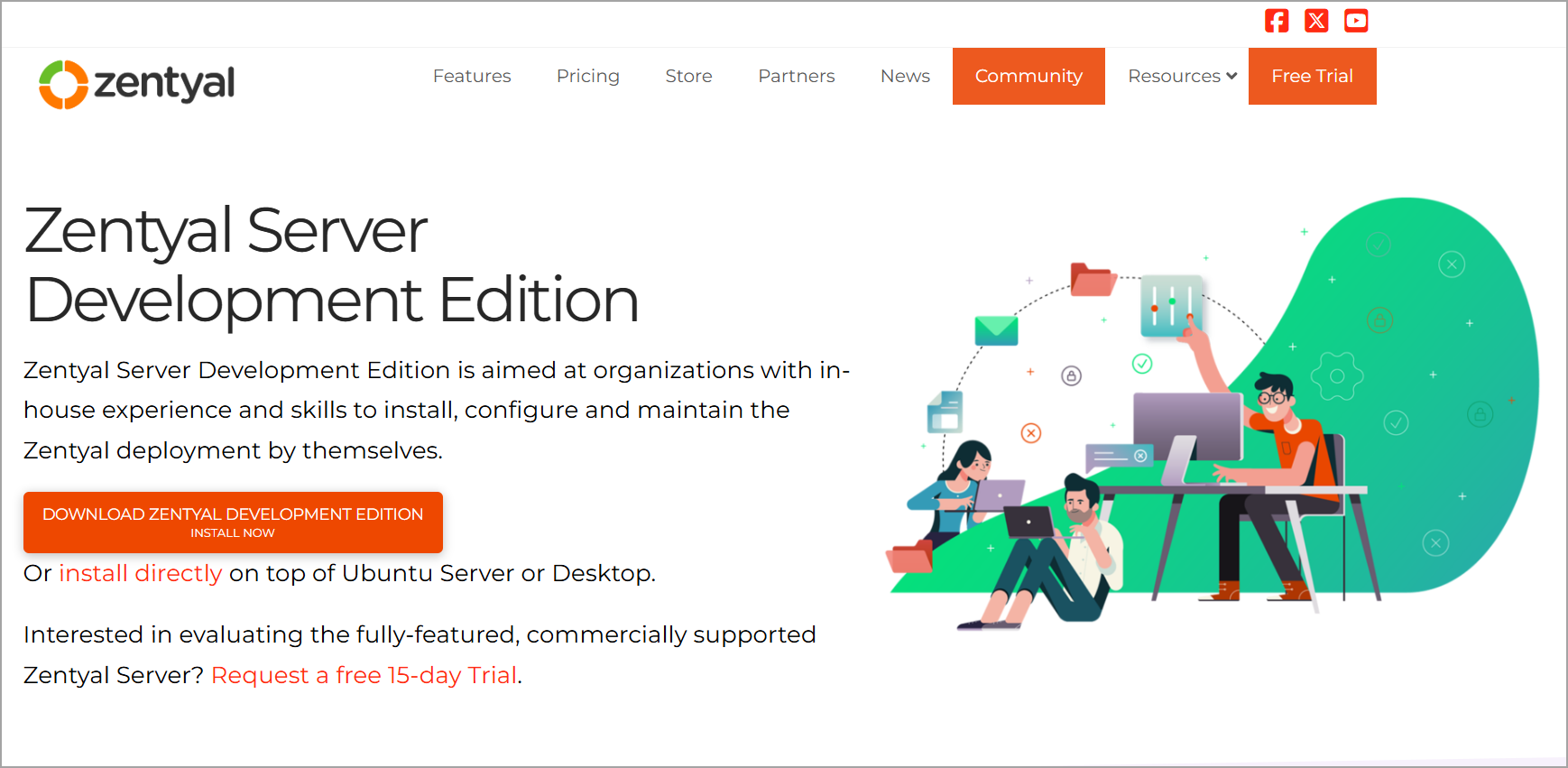
You can set up Zentyal as a stand-alone server or additional DC of a Windows domain, Manage GPOs with RSAT. It is Inexpensive as it doesn’t require CALs. You only pay the subscription.
Zentyal is built and preconfigured with Samba 4 and is designed to function as a domain controller compatible with Windows AD. The official migration path involves first introducing the Zentyal server as an additional domain controller in your existing Windows domain.
Replacing Microsoft Active Directory with Samba 4 involves migrating the Flexible Simple Master Operations (FSMO) roles from the Windows Domain Controller to the Linux Samba server, then demoting the Windows server.
Flexible Single Master Operations (FSMO) roles in Active Directory are five specific functions assigned to designated domain controllers to prevent conflicts and ensure data integrity, as standard AD replication uses a “last write wins” model that is unsuitable for certain critical operations.
Once it is synchronized, you can use Zentyal’s ad-migrate script to transfer all FSMO roles from the Windows Server to the Zentyal server. After the transfer is complete, you can demote and decommission the Windows server.
Zentyal offers an easy-to-use Windows Server alternative. It comes with native compatibility with Microsoft Active Directory allowing you to join Windows clients to the domain and manage them easily, causing no disruption to your users.
However, with Zentyal, this process is most seamless if the existing AD environment is Windows Server 2012 or earlier as newer versions (2016+) lack a direct, seamless migration path and often require manual reconstruction or complex LDAP-based transfers.
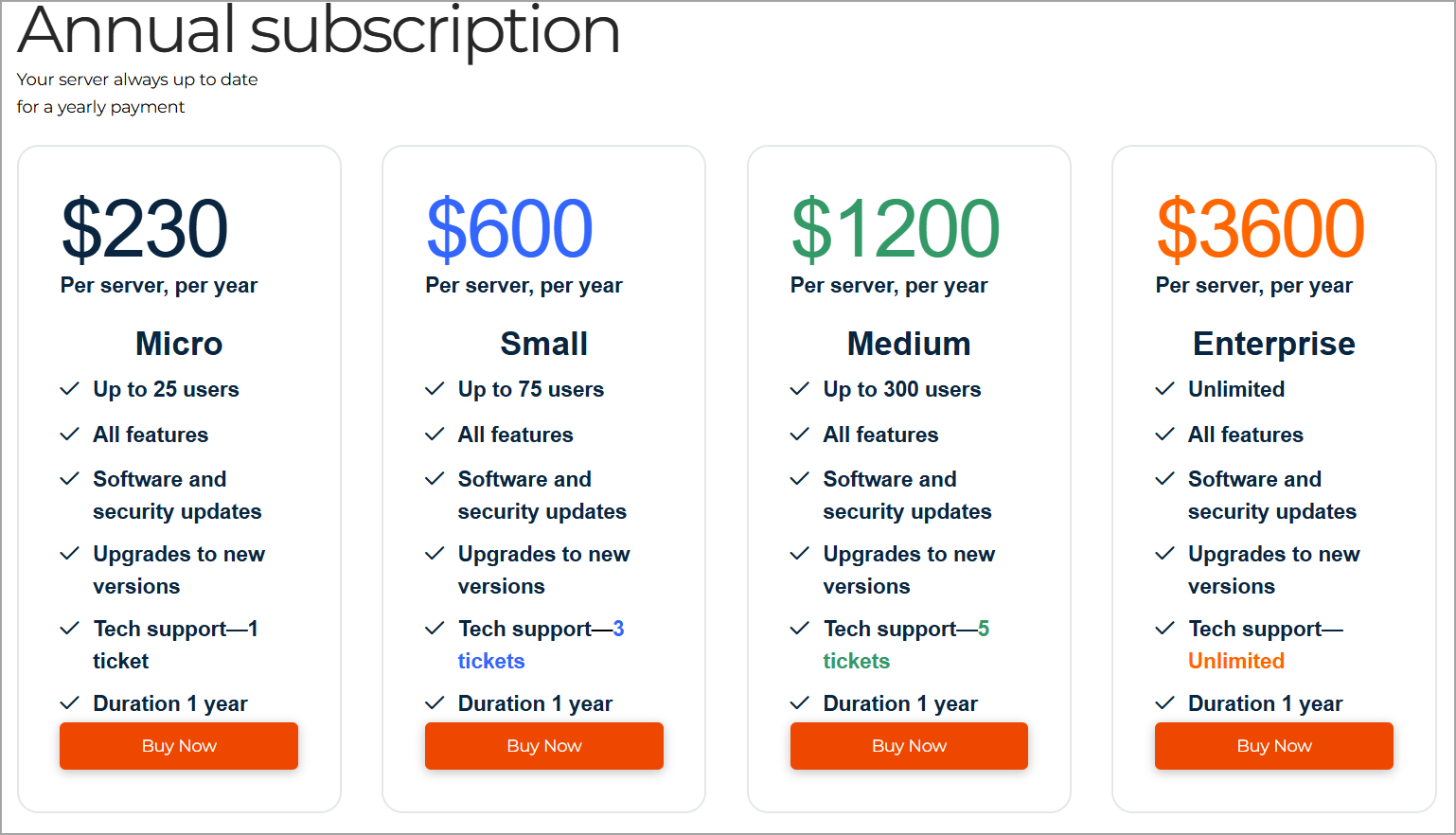
Zentyal subscribtion can be as low as $230/per year for a small, 25 user organization.
Windows Server 2012 is no longer receiving regular security patches, as its extended support ended on October 10, 2023. However, critical security updates are still available through the Extended Security Updates (ESU) program, which runs for three years until October 13, 2026.
After October 13, 2026, no further security updates will be released for Windows Server 2012 or 2012 R2.
Key Steps for Migration
Preparation: Ensure the Samba 4 server is installed and configured as a Domain Controller with the same domain name and realm. It is critical to configure POSIX attributes (using the –use-rfc2307 flag during provisioning) so that Unix user and group information is stored in the directory, enabling Linux clients to authenticate correctly.
Role Transfer: Introduce the Samba server to the existing domain as a Backup Domain Controller (BDC) to allow replication. Once synchronized, use the Windows dcpromo tool or Active Directory Users and Computers to transfer FSMO roles from the Windows server to the Samba server.
Demotion and Switch: After all, FSMO roles are transferred and replication is confirmed, demote the Windows server using dcpromo to downgrade it to a member server or standalone machine. Update DNS and DHCP settings on the Linux side to handle dynamic entries and ensure clients are pointed to the new Samba DC for authentication.
Important Considerations
Group Policy Objects (GPOs): GPOs created on Windows servers may not fully translate to Samba. You may need to reconfigure policies for Windows clients using RSAT tools connected to the Samba DC, or accept that some advanced Windows-specific policies will not function.
Mixed Environments: If you intend to keep Windows clients, Samba acts as a compatible DC, but management tools differ. For pure Linux environments, FreeIPA is often recommended over Samba for identity management, though Samba is superior if you need to maintain compatibility with existing Windows AD schemas and client behaviors.
Licensing: Migrating to Samba eliminates Windows Server licensing costs for Domain Controllers, allowing you to use Linux for DNS, DHCP, and file services while minimizing remaining Windows infrastructure to just the necessary application servers.
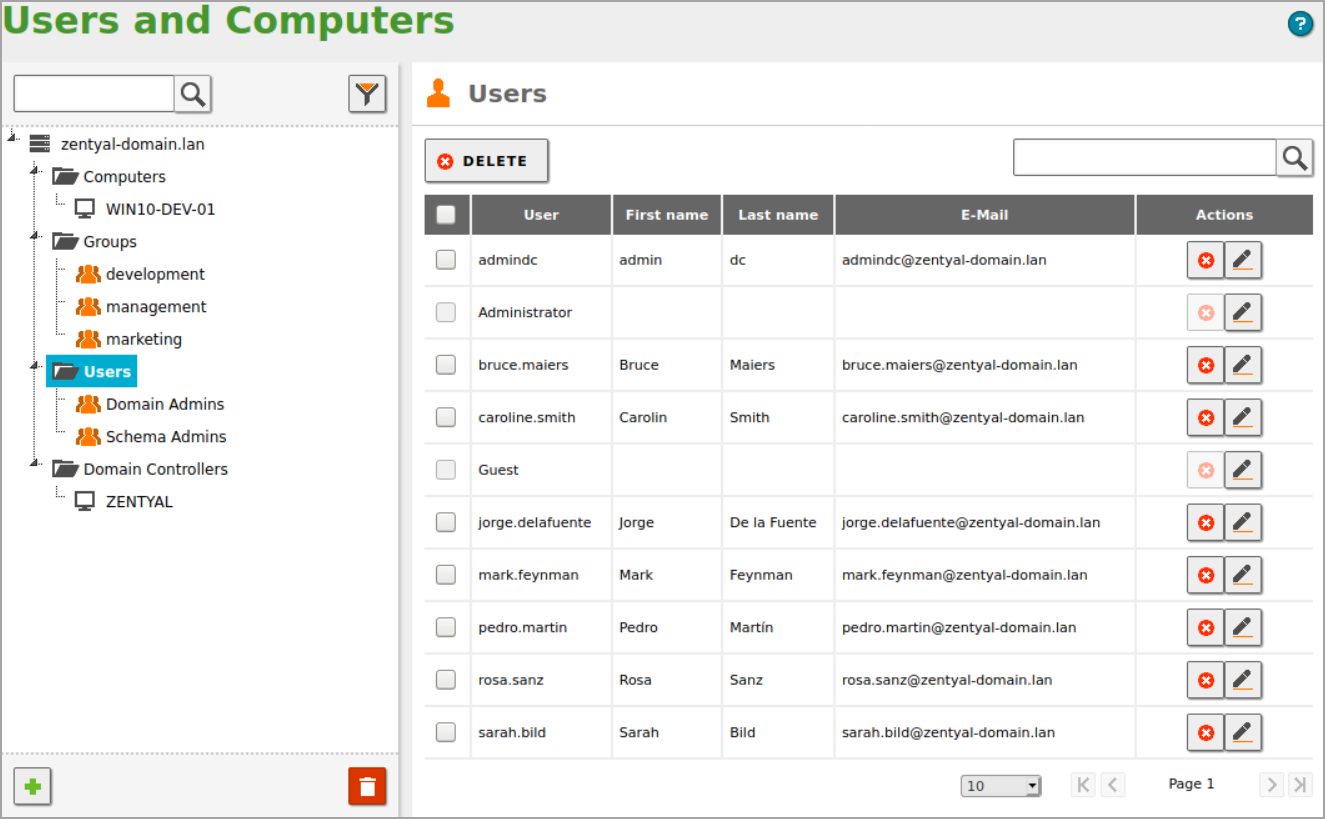
Example of the Users and computers Active Directory view in Zentyal. Looks clean, but less polished than we use to Microsoft.
How to build a Proof of concept (POC) for tests?
It is very important to do a POC for your environment. Typically, while it takes some time, it saves money later.
Use Physical to Virtual (P2V) conversion tools to virtualize your Windows Server. Like this, you will keep your production server untouched. Then you could, within this isolated virtual environment, install Zentyal as a secondary domain controller (DC) transfer the roles and see what happens.
Note: If your DC is already virtualized, you can simply create a clone and run the tests in an isolated sandbox side by side with Zentyal.
Migrating from, let’s say, a modern Windows Server 2019 presents specific hurdles. A Microsoft Q&A post details a failed attempt to promote a Windows 2019 server into a domain controlled by Zentyal, encountering an ADPrep error (“The server is unwilling to process the request”).
You know that ADPrep/Forestprep commands are usually used when updating AD schema to higher level. When your environment is small (running a single Domain Controller only) this should not be a showstopper, but definitely try this in an isolated environment, before you do it in production.
Therefore, while the standard procedure is to join Zentyal as a secondary DC and seize the roles, the success of this migration from a Windows Server 2019 environment is not assured and may require careful planning, thorough testing in a non-production environment, and potentially manual intervention and support request to resolve compatibility issues.
With Zentyal Support you are not alone!
If you’re standalone admin or small IT team working for small organization, don’t worry. You are not alone in this. If you purchase a Zentyal Subscription (you can start with a small one first, then scale), you get access to technical support via the online support platform. The support team can help you with migration issues, including moving from Windows Server AD to Zentyal, depending on your subscription level and available support tickets.
Pros of Migrating to Zentyal/Samba
- Cost Savings: Eliminates the need for expensive Windows Server licenses, potentially saving hundreds of dollars per server.
- Open Source & Control: Provides full control over the infrastructure with an open-source stack, avoiding vendor lock-in.
- Integrated Services: Zentyal offers a user-friendly web interface to manage not just the domain controller, but also firewall, email, and file services from a single pane of glass.
- POSIX Compatibility: Seamlessly integrates with Linux clients by storing Unix user and group attributes (UIDs, GIDs) within the directory service.
Cons of Migrating to Zentyal/Samba
- Complex Migration from Modern Windows: Migrating from Windows Server 2019 is particularly challenging and may not be seamless, with potential ADPrep errors during schema updates. However, Zentyal has commercial support and those guys they know what they are doing.
- Limited Support & Expertise: Community support is available, but professional, timely support can be lacking, and finding administrators skilled in Samba AD can be difficult.
- Group Policy Limitations: While functional, Group Policy management for Windows clients might be not as mature or feature-complete as native Windows Server, potentially requiring manual workarounds (additional scripting).
- Stability and Maturity: While Samba 4 is robust, it is still considered by many to be less stable and battle-tested than Windows Server AD for large, complex, or mission-critical enterprise environments.
Final Words
Migrating to Zentyal is a strategic move to reduce dependence on Microsoft and US-based software, enhancing your organization’s digital sovereignty. By adopting this open-source platform, you gain control over your IT infrastructure, free from the constraints and potential geopolitical risks associated with proprietary, single-vendor ecosystems. The transparent nature of open source allows for independent auditing of the code, ensuring it meets your security and compliance requirements without relying on a foreign corporation’s policies or update schedules. This shift fosters long-term resilience and autonomy, allowing you to manage, modify, and maintain your systems with greater independence.
Zentyal has been in the business since its founding in 2008, making it a well-established player in the open-source IT management space for over 18 years.
While the core development began as an open-source project in 2004, the company Zentyal S.L. was officially founded in 2008 by Heidi Vilppola, Ricardo Muñoz Fernández, Ignacio Correas, and José Antonio Calvo. This long history reflects its maturity and deep expertise in providing Linux-based solutions compatible with Microsoft Active Directory.
FAQ
Can Linux fully replace Windows Server AD?
Yes, but not without effort. Zentyal + Samba 4 handles the core – domain controller, DNS/DHCP, file shares, GPOs. The smoother the migration, the older your Windows Server version.
What is Zentyal?
A Linux server platform (Ubuntu + Samba 4) that acts as a drop-in AD replacement. Manages users, domains, file shares, and firewall from one web interface – no Windows licenses needed.
How much does Zentyal cost?
From $230/year for up to 25 users. Compare that to $3,000-$4,200+ for a single Windows Server Standard license with CALs.
What are FSMO roles and why do they matter?
Five special AD functions (like PDC Emulator, RID Master) that must be transferred from Windows DC to Samba before you can shut Windows down. Skip this step and things break.
Will my GPOs survive the migration?
Basic ones – yes. Advanced Windows-specific policies may need manual rework. Always test in a sandbox first.
Can I test without touching production?
Yes. Clone your Windows DC into a VM, spin up Zentyal beside it, test everything in isolation. Only then touch production.
Will it work with Windows Server 2019?
It’s possible but not guaranteed. You may hit ADPrep schema errors. Zentyal support can help, but plan extra time and test thoroughly.
Is Zentyal good for enterprise?
Best fit: SMB and mid-size orgs. Large enterprises with complex AD should evaluate carefully – or consider FreeIPA for pure Linux environments.
