


If you’ve worked in IT for more than a week, you’ve heard of RAID. It’s a storage virtualization technology that groups several disks together to appear as one or more logical volumes to the system, such as a server. The acronym has been around since the late eighties. The math underneath hasn’t changed much since then.
RAID is still the default protection for on-premises databases, virtualization hosts, and edge devices where you can’t afford to wait for a cloud restore. Drive types and controller speeds have changed, but the trade-offs haven’t. Understanding what is the right RAID level for your workload matters as today as it did a decade ago.
This is Part 1 of a two-part blog article, covering RAID 0, RAID 1, RAID 10, and RAID 01. Part 2 covers RAID 5, RAID 6, RAID 50, and RAID 60 – the parity-based levels suited to capacity-dense or archival workloads.
What is RAID?
RAID stands for Redundant Array of Independent Disks. It combines two or more physical disks (HDD, SSD, or NVMe) – into a single logical volume. Data is either distributed or replicated across them to improve performance, reliability, or both. David Patterson, Garth Gibson, and Randy Katz formalized the concept in 1988 at UC Berkeley in a paper that defined the levels we still use today. (The original paper called them ‘Inexpensive’ disks, but vendors quickly preferred ‘Independent’.)
We’ll usually explain RAID to new admins as a balancing act between speed, usable capacity, and fault tolerance. No single level maximizes all three at once. That’s not a bug – it’s a feature.
How does RAID work?
RAID configurations are built from three fundamental techniques, used alone or in combination.
Striping
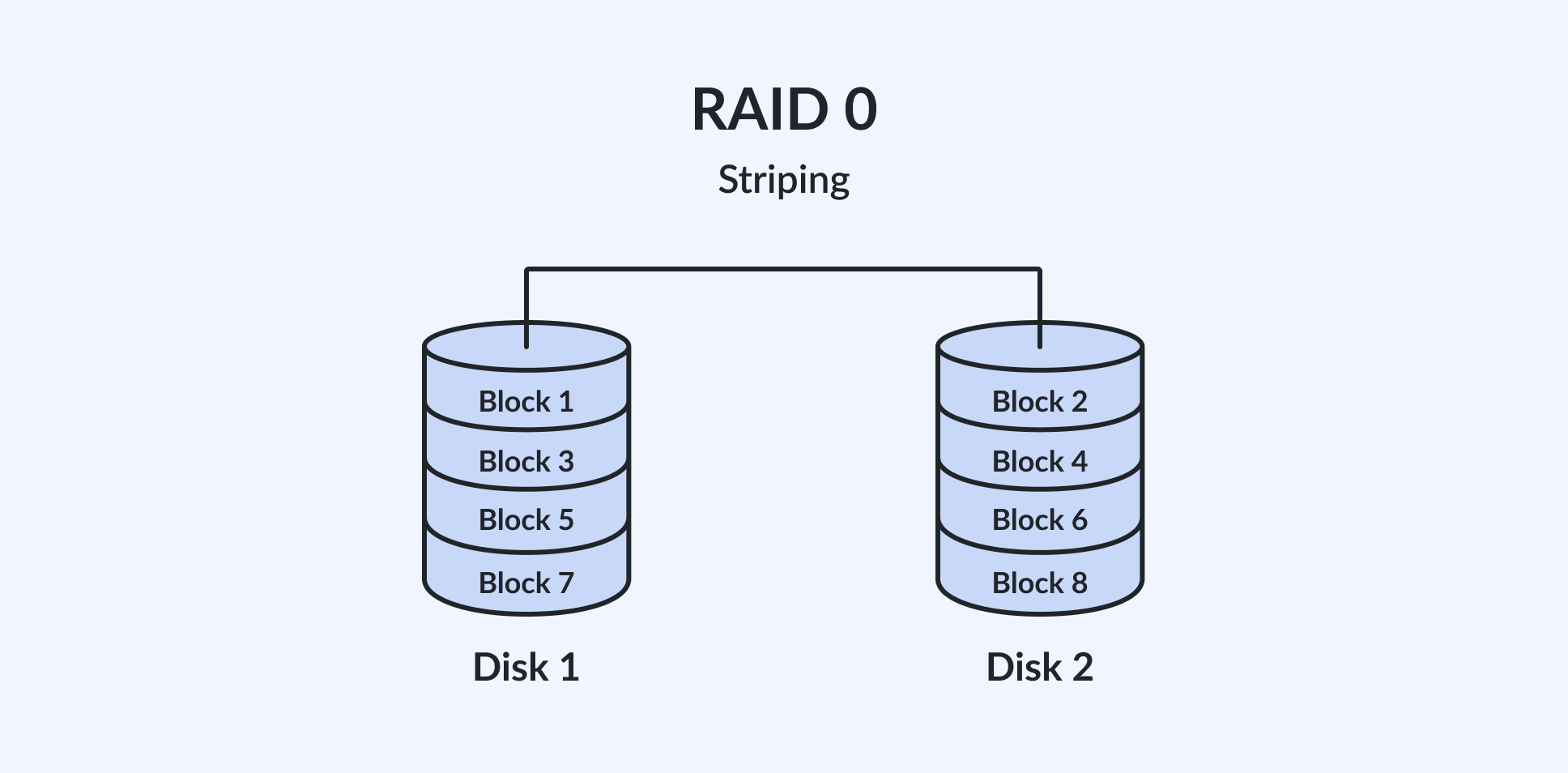
Striping splits data into fixed-size blocks (the stripe width) and writes each block to a different drive in round-robin order. Because multiple drives are read from or written to in parallel, throughput scales with the number of disks in the array. The major trade-off is that there is no redundancy – if any single drive fails, all data is lost.
Mirroring
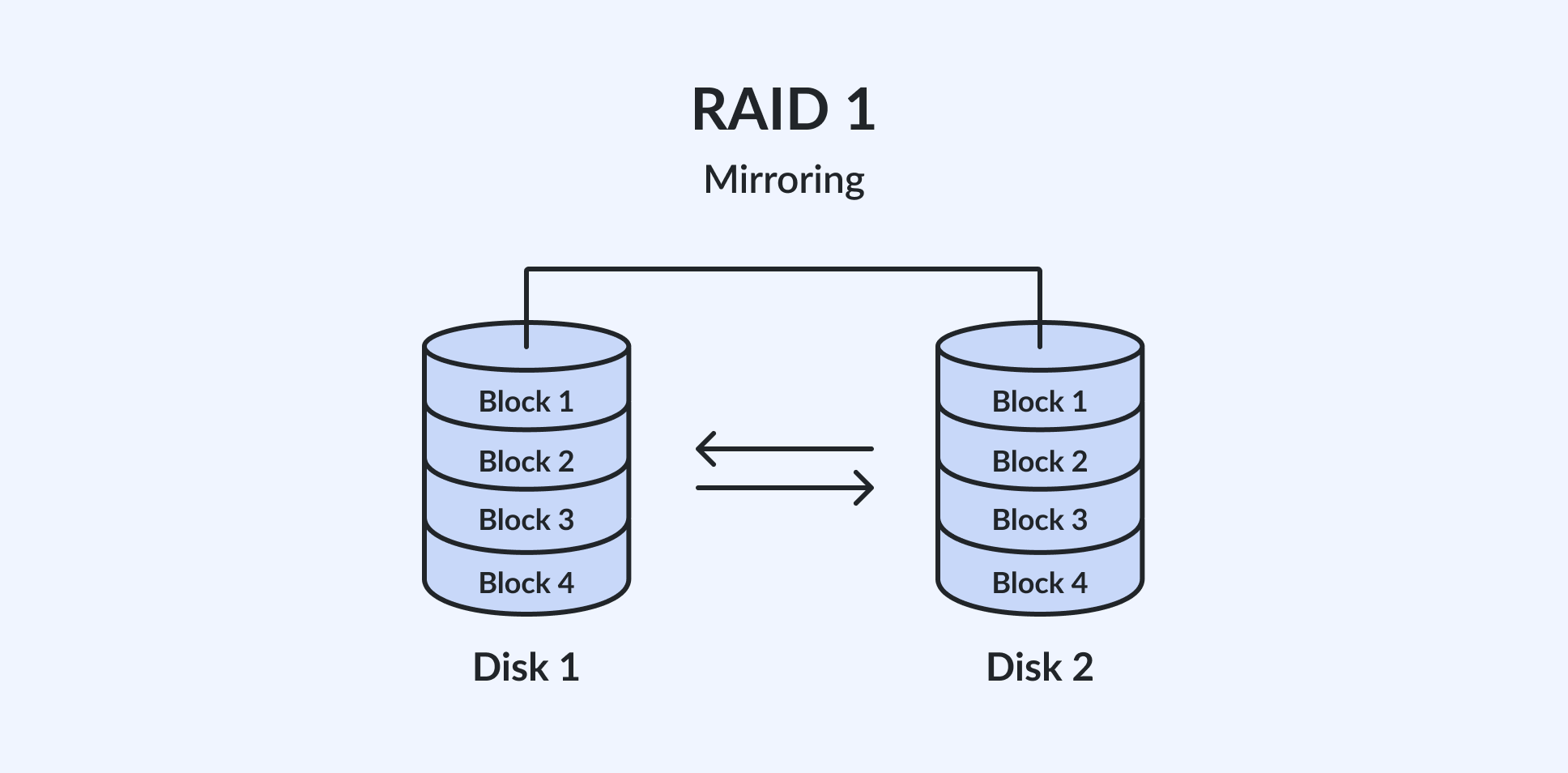
Mirroring writes identical data to two or more drives simultaneously. Every drive in a mirrored pair is an exact copy of the other, so the array survives a drive failure with no data loss. The trade-off is that usable capacity is exactly half (or less) of raw capacity.
Parity
Parity calculates a mathematical checksum from the data blocks across multiple drives and stores that value on a separate drive (or distributes it across all drives). If one drive fails, the missing data can be reconstructed from the surviving drives and the parity information. Parity-based levels such as RAID 5 and RAID 6 are covered in Part 2 of this article.
RAID can be implemented in firmware on a dedicated hardware controller (usually called HW RAID), in software by the operating system (Software RAID), or at the file-system level (such as ZFS). Regardless of implementation, the OS and applications always see the array as a single logical disk.
RAID 0 (Striping): Speed without protection
RAID 0, often referred to as striping, is an array configuration that involves dividing data into blocks and spreading them evenly across two or more disks. This method significantly improves both read and write performance because multiple drives are accessed simultaneously.
Advantages of RAID 0
The primary advantage of RAID 0 is its ability to maximize both performance and storage capacity. By utilizing multiple disks, RAID 0 effectively combines the storage space of the drives involved.
Capacity and performance
Usable capacity is simple: multiply the size of the smallest drive by the number of drives. For n drives of size S, usable capacity = n x S. There is no write penalty – RAID 0 has the lowest possible write overhead of any RAID level because no redundant data is computed or stored.
One important caveat: scaling becomes sublinear beyond approximately 4 drives (NVMe) on most platforms, or once throughput reaches the limits of your HW controller. CPU processing overhead and PCIe lane contention begin to cap aggregate throughput, so a six-drive NVMe RAID 0 will rarely deliver 6x the throughput of a single drive in practice.
Drawbacks of RAID 0
It is crucial to note that RAID 0 does not provide data redundancy. This means that if one disk fails, all data in the array is lost. Therefore, RAID 0 is best suited for situations where speed is crucial, and the data can be easily reproduced or backed up externally.
Practical use cases
- Video editing scratch and render caches – speed is critical, and the data is re-creatable.
- AI/ML staging areas – fast staging of training datasets before ingestion into a distributed pipeline.
- Software build caches and CI scratch volumes – ephemeral data with high throughput demands.
RAID 1 (Mirroring): Full redundancy at half the capacity
RAID 1, known as mirroring, involves copying identical data onto two or, rarely, more disks. This is a straightforward approach to creating a highly reliable data storage environment because it provides the highest data redundancy.
Advantages of RAID 1
Each disk in a RAID 1 setup is an exact mirror of the other. If one disk fails, the system can instantly switch to the other without any loss of data, offering a robust fault tolerance. This setup is ideal for critical data storage where reliability is more important than capacity.
Performance
Write performance carries a small penalty: data must be committed to all mirrors before the write is acknowledged, which adds a small amount of latency compared to a single drive.
Read performance, however, can scale. Some hardware RAID controllers and software RAID implementations distribute reads across mirrors (read balancing, reading from 2 or more disks). Others serve all reads from a single drive. Always check your controller/software documentation to confirm the behavior.
Drawbacks of RAID 1
While RAID 1 can double read speed because two disks serve the same data, write speeds are generally slightly slower because data must be written to both disks simultaneously. Additionally, the total storage capacity is effectively halved, as each disk contains an exact copy of the data.
Practical use cases
- OS and boot volumes for vSphere, Hyper-V, and Proxmox environments where a drive failure should not take the hypervisor offline.
- Small but critical configuration datasets such as certificate stores, domain controller volumes, and edge device state information.
- Any workload where simplicity and immediate failover outweigh the 50% capacity cost.
What are RAID 10 (1+0): Speed and redundancy combined
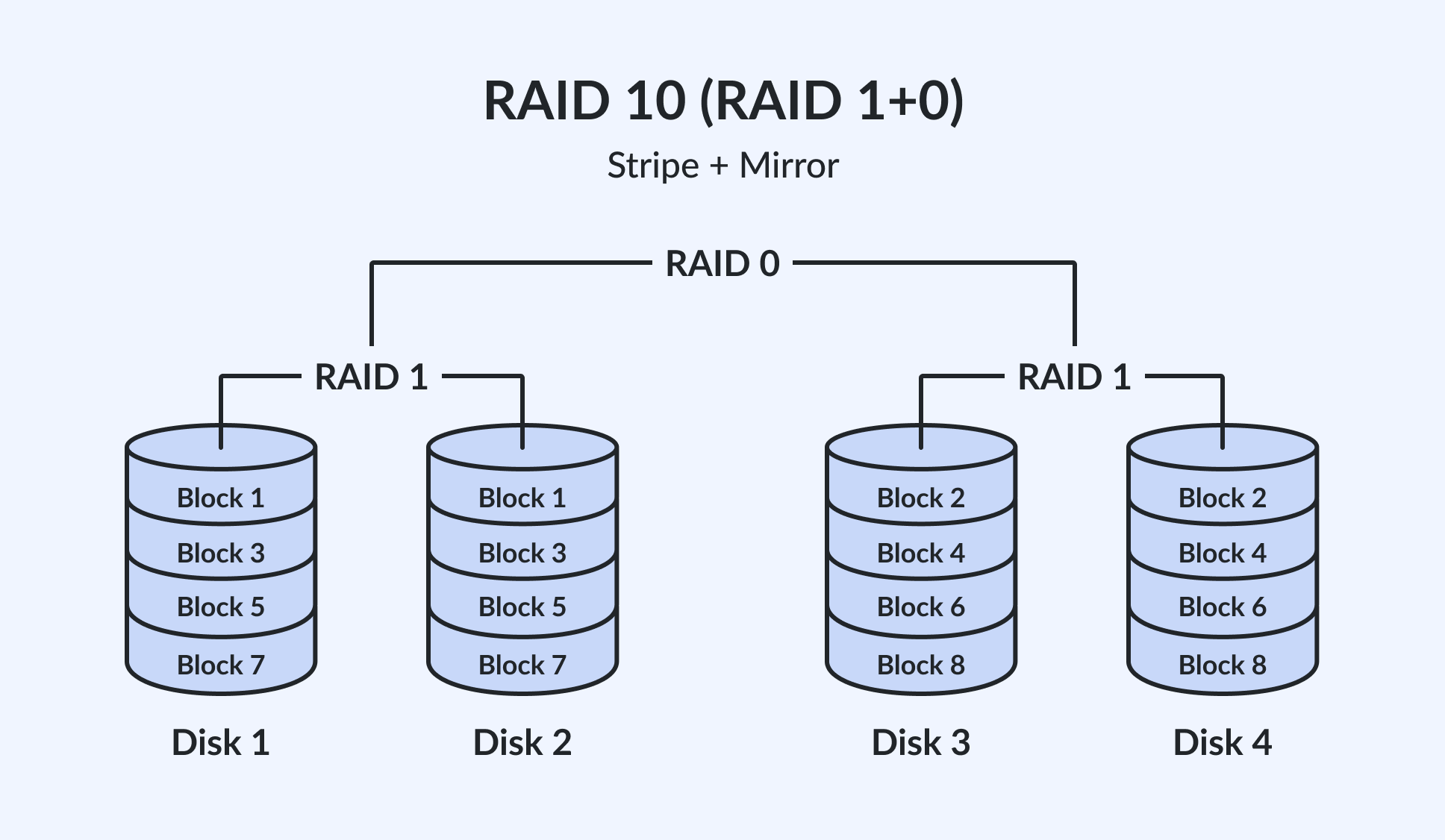
RAID 10, also known as RAID 1+0, combines the techniques of RAID 1 and RAID 0. It first mirrors the data across pairs of disks for redundancy and then stripes across these mirrored pairs for improved performance.
How it works
The array is built in two stages. First, drives are grouped into mirrored pairs: drive 1 mirrors drive 2, drive 3 mirrors drive 4, and so on. Each pair acts like a RAID 1 set (also known as SPAN).
Second, the RAID controller stripes data across those mirrored pairs exactly as RAID 0 stripes across individual drives. The result is a single array that delivers both the throughput advantages of striping and the redundancy benefits of mirroring.
Minimum drives and usable capacity
RAID 10 requires a minimum of four drives (two mirrored pairs/spans). Usable capacity is always 50% of raw capacity: for four 4 TB drives, usable capacity is 8 TB. Additional drive pairs can be added in multiples of two, but the 50% capacity ratio is fixed by the mirroring requirement.
Failure tolerance
RAID 10 can survive the loss of one drive in every mirrored pair/span simultaneously. In a four-drive array, that means up to two drives can fail, but only if each failed drive belongs to a different mirrored pair/span. If both drives in the same mirrored pair/span fail, the entire array fails.
In practice, six- or eight-drive RAID 10 arrays provide robust protection against multiple simultaneous failures while maintaining high performance.
Advantages of RAID 10
This setup provides both speed and redundancy, making it an excellent choice for environments where both are critical. RAID 10 is well-suited for databases and other applications requiring consistently high read and write speeds, coupled with a high level of data security.
Where RAID 10 shines
- Production OLTP databases (SQL Server, Oracle, PostgreSQL) – heavy random read/write workloads with near-zero tolerance for downtime.
- VMware vSphere, Microsoft Hyper-V, and Proxmox production datastores – multiple VMs sharing a high-IOPS storage pool.
- Microsoft Exchange – transaction logs and database volumes under mixed read/write load.
- Any workload that would otherwise use RAID 0 for performance but also requires the highest protection against drive failure.
Real-world example
A production Microsoft SQL Server instance uses four 3.84 TB NVMe drives in RAID 10. The database engine sees 7.68 TB of usable storage.
During a peak transaction period, drive 2 fails. The controller immediately continues serving reads and writes from drive 1 (its mirror) without interrupting the application. A replacement drive is inserted by the IT team, the mirror rebuilds in the background, and no data is lost. Clients see nothing and don’t feel performance degradation.
RAID 01 (0+1): Why it is almost never used today
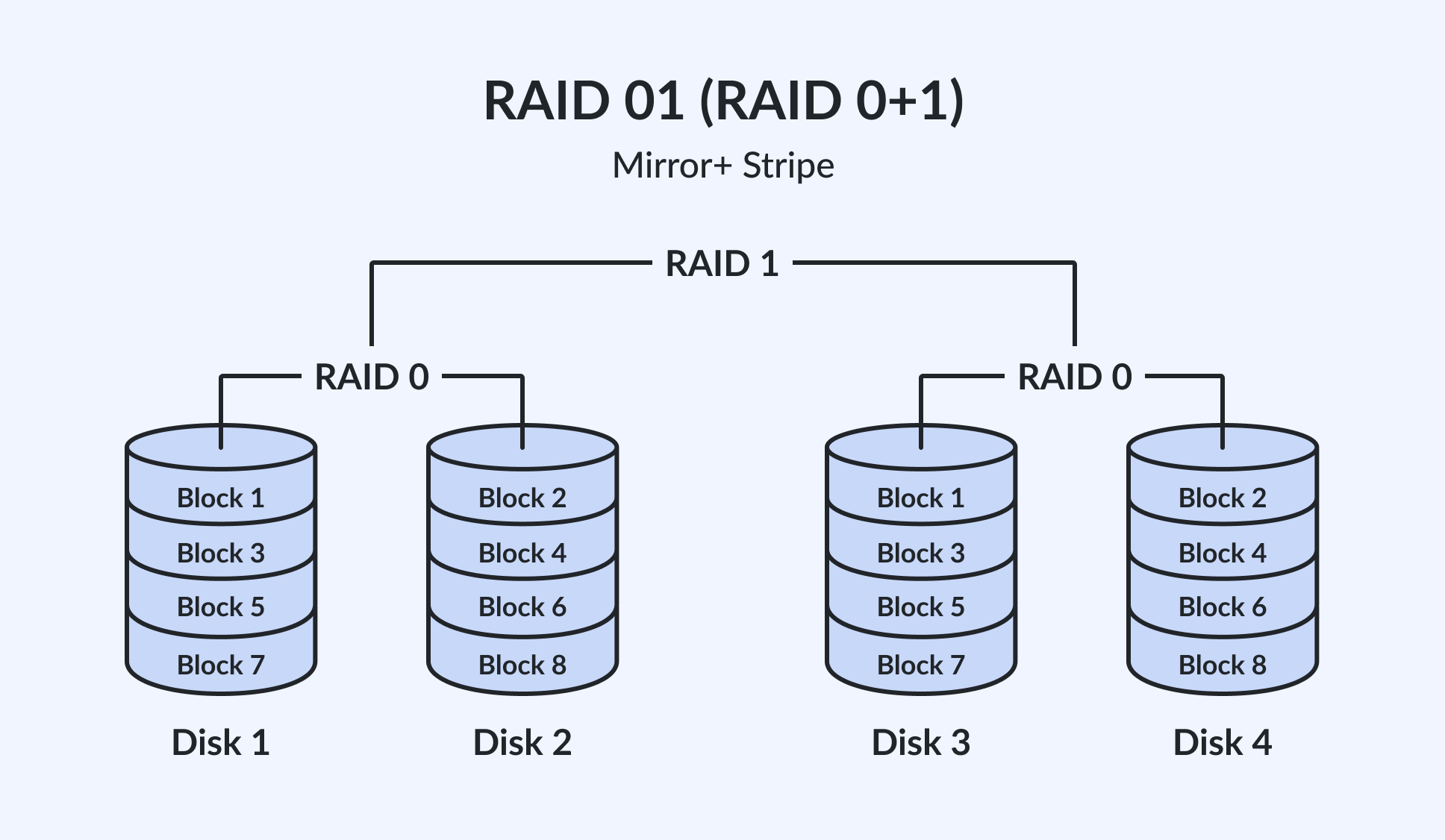
RAID 01, or RAID 0+1, is the reverse of RAID 10. It first stripes the data across multiple disks and then mirrors that striped set to another set of disks.
The failure problem
Consider a four-drive RAID 01 array: drives 1 and 2 form a stripe set, and that stripe set is mirrored to drives 3 and 4.
If drive 1 fails, the entire left stripe set (drives 1 and 2) becomes unavailable. The array is now running entirely on the right mirror (drives 3 and 4) with no remaining redundancy. A single additional drive failure – either drive 3 or drive 4 – destroys the array.
In a RAID 10 array of the same size, drive 1 failing would degrade only the first mirrored pair. Drives 3 and 4 would remain unaffected and still individually redundant.
RAID 10 is almost always the correct choice over RAID 01 for this reason: RAID 10’s failure domains are smaller and more independent.
When RAID 01 still appears
RAID 01 survives in legacy environments where older hardware RAID controllers support RAID 0 and RAID 1 as primitives but do not natively implement RAID 10. If you are evaluating a system that offers only RAID 01, treat it as a signal to replace the controller hardware before expanding the array.
Quick comparison: RAID 0 vs 1 vs 10 vs 01
The table below summarizes the key characteristics of the RAID level covered in this article.
| RAID Level | Min. Drives | Usable Capacity | Fault Tolerance | Write Penalty | Best Use Case |
| RAID 0 | 2 | n x drive size | None | None | Scratch, cache, staging |
| RAID 1 | 2 | 50% of raw capacity | 1 drive failure per mirror | Low (dual-write) | OS/boot, critical config |
| RAID 10 | 4 | 50% of raw capacity | 1 drive per mirrored pair/span | Low (dual-write) | Databases, VMs, Exchange |
| RAID 01 | 4 | 50% of raw capacity | Weak (stripe span failure) | Low (dual-write) | Usually legacy |
Hardware RAID vs Software RAID vs ZFS
Hardware RAID
A dedicated RAID controller – either a PCIe add-in card or an onboard chipset – manages the array in firmware, independent of the host CPU.
Hardware controllers typically include a battery-backed or flash-backed write cache, which absorbs write bursts and safely flushes them to drives asynchronously. This makes hardware RAID fast and consistent under mixed workloads.
The downsides are cost, vendor lock-in (especially with legacy controllers), and the possibility that recovering an array may require an identical controller model if the original hardware fails.
Software RAID
The host operating system’s RAID layer (Linux mdadm, Windows Storage Spaces, etc) manages the array using host CPU resources.
Software RAID is generally free, controller-independent, and portable across hardware platforms. Array metadata travels with the drives, allowing arrays to be moved between compatible systems with minimal disruption.
The trade-offs are modest CPU overhead and increased exposure to power-loss-related corruption unless combined with a UPS and properly configured journaling.
ZFS and OpenZFS dRAID
ZFS implements RAID at the file-system level, combining storage pooling, per-block checksumming, copy-on-write snapshots, and RAID-Z (a variant of RAID 5/6) or the newer dRAID (declustered RAID) into a single integrated stack.
Unlike traditional RAID implementations, ZFS detects and self-heals silent data corruption. Its dRAID variant dramatically reduces resilver times on large arrays by distributing spare space across all drives in the pool.
ZFS is the recommended choice for NAS appliances, backup repositories, and any environment where data integrity verification matters as much as raw throughput.
When traditional RAID is no longer enough
At scale, RAID-based storage gives way to architectures that distribute data and redundancy across many nodes or entire data centers.
Erasure coding
Erasure coding (EC), commonly used in object storage systems, splits an object (data) into “k” data fragments and “m” parity fragments, then distributes all “k + m” fragments across different drives (like parity RAID) or nodes (cluster). The original object can be reconstructed from any “k” fragments out of the total “k + m.”
Platforms like Amazon S3, MinIO, and Ceph use erasure coding by default because it delivers better usable-capacity ratios than mirroring at the petabyte scale while tolerating multiple simultaneous failures at the object level.
Declustered RAID / dRAID
Traditional RAID rebuilds concentrate all I/O on a single spare drive, which can take many hours or even days for large drives and dramatically increases the risk of a second failure during the rebuild window.
Declustered RAID (used in IBM Storage Scale and OpenZFS dRAID) spreads spare capacity and rebuild I/O across all drives in the pool, cutting resilver times from hours to minutes on large arrays.
Node-level replication in HCI
Hyperconverged infrastructure platforms such as StarWind VSAN, VMware vSAN, and Nutanix can replicate data synchronously across multiple host nodes at the hypervisor layer. Each host contributes local storage to a shared pool, and the software ensures that each data block has at least one (StarWind) or two (Nutanix, VMware vSAN) copies on separate physical node(s). A complete server failure, not just a drive failure, can be survived without data loss, something no single-server RAID configuration can provide.
Choosing the right RAID level: A practical decision guide
Use the criteria below as a starting point. The right answer always depends on your specific read/write ratio, criticality, and recovery time and recovery point objectives, not just on capacity maths.
- For OLTP database (SQL Server, Oracle, PostgreSQL), go with RAID 10. High random IOPS and mixed read/write workloads require both performance and redundancy.
- For VMware vSphere, Proxmox, or Hyper-V production datastore, go with RAID 10. Multiple VMs compete for storage performance under continuous uptime requirements.
- For OS or boot volumes for a server or hypervisor, go with RAID 1. Simplicity and fast failover are more important than capacity efficiency.
- For video editing scratch or AI staging volume (with daily backup), consider RAID 0. Maximum throughput, data is re-creatable or backed up elsewhere.
- For cold archive, large sequential read, or capacity-dense workload, see Part 2 of this article: RAID 6 or RAID 60 for parity-based capacity efficiency.
RAID is not a backup
After reading all the above, you might have thoughts on if RAID array alone is enough to protect all my data? The answer is NO.
RAID protects against physical drive failure, nothing more. It does not protect against accidental file deletion, ransomware encryption, file-system corruption, RAID controller failure, or site-wide disaster. A ransomware attack that encrypts your data will encrypt every drive in the array simultaneously. A mis-typed rm -rf removes files from all mirrors at once.
Always follow the 3-2-1 rule: maintain at least three copies of your data, on two different media types, with one copy stored off-site or in an air-gapped location. RAID is a resilience tool; backup is a recovery tool. You need both.
FAQ
Can RAID 0 recover data after a drive failure?
No. Because data is striped across all drives with no redundancy, the loss of any single drive makes the entire array unreadable. There is no recovery path within RAID 0 itself, and you must restore from backup.
How many drives can fail in a RAID 10 array?
RAID 10 can survive the loss of one drive in each mirrored pair/span. In a 4-drive array (two pairs/spans), that means up to two drives can fail, provided each failed drive is in a different pair/span. If both drives in the same pair fail, the array fails.
Is RAID 1 the same as a backup?
No. RAID 1 mirrors data in real time, which means any write, including a ransomware encryption or accidental deletion, is immediately replicated to both drives. A true backup creates point-in-time copies that are separate from the live array.
Does RAID 10 double my write performance?
RAID 10 stripes across mirrored pairs/spans, so write throughput scales with the number of pairs/spans. A 4-drive RAID 10 (two pairs/spans) offers roughly the write throughput of a two-drive RAID 0. Read throughput can be higher still if the controller performs read balancing across mirrors.
When should I use hardware RAID instead of software RAID?
Modern hardware RAID controllers with a battery-backed or flash-backed write cache are the better choice for write-intensive workloads (databases, transaction logs) because the cache safely absorbs write bursts. Software RAID is a reasonable choice for read-heavy or mixed workloads where portability and cost matter more than peak write throughput.
Can I mix drive sizes in a RAID array?
Technically yes, but the array capacity is limited by the smallest drive in the array, and larger drives contribute only as much space as the smallest member. Mixing drive sizes wastes capacity in classic (block) RAID levels and is generally not recommended.
Does RAID protect against silent data corruption?
Standard RAID levels (0, 1, 10, 5, 6) do not detect silent data corruption. A drive returning corrupted data due to a firmware bug or aging media will silently replicate that corruption across all mirrors. ZFS, with per-block checksums, is the recommended solution when silent corruption is a concern.
Is RAID still relevant now that NVMe SSDs are so fast?
Yes, for different reasons. NVMe SSDs are fast individually, but they still fail. RAID 1 or RAID 10 across NVMe drives provides both the performance headroom of modern flash and protection against drive failure, which remains a real and common event regardless of media type. There are multiple modern RAID engines that are specifically designed for NVMe and provide both performance and reliability (for example, GRAID).
Conclusion
We tell our clients the same thing: start with RAID 10. It’s boring, it’s expensive in disk count, and it’s exactly what you need when a drive suddenly decides to die on a Sunday night. Pair it with a real backup, test your restores, and don’t let anyone sell you RAID 01.
