

StarWind x Proxmox SAN Integration Services: Installation Guide
- April 23, 2026
- 11 min read
- Download as PDF
Annotation
Relevant products
StarWind x Proxmox SAN Integration Services.
Purpose
This document outlines what StarWind x Proxmox SAN Integration Services is, its architecture and how to configure it. The guide includes steps to add StarWind repository, install package and configure shared block storage (iSCSI, NVMe-oF, and FC) for clustering.
Audience
This technical guide is intended for storage and virtualization of architects, system administrators, and partners designing Proxmox virtualized environments with block shared storage (iSCSI, NVMe-oF, FC).
Expected result
The expected result of following this guide is a fully configured shared storage system set up for Proxmox hosts.
Overview
StarWind x Proxmox SAN Integration Services provides a custom Proxmox VE storage plugin (StarLvmPlugin) designed to enable virtual machine snapshots on shared SAN storage using Thin LVM technology. The solution supports Proxmox VE versions 8 and 9.
In native Proxmox functionality, there are several limitations:
- LVM storage supports shared storage on SAN LUNs, which allows VM migration between cluster nodes, but does not support snapshots in PVE 8. Since Proxmox VE 9, snapshots as a volume chain have been available for VMs.
- LVM-Thin storage supports snapshots but does not support shared storage because it relies on a single Thin Pool used by multiple VMs, which is unsafe for clustered access.
StarWind starlvm plugin (StarLvmPlugin) resolves these limitations by combining the advantages of both approaches: it enables snapshot-capable storage while maintaining safe shared access across Proxmox cluster nodes.
Architecture Concept
| Storage Type | LVM (raw) | LVM-Thin | LVM + QCOW2 overlay | StarWind StarLvm | |||
|---|---|---|---|---|---|---|---|
| PVE Version | PVE 8 | PVE 9 | PVE 8 | PVE 9 | PVE 9 | PVE 8 | PVE 9 |
| Shared storage Support | ✔ | ✔ | ✖ | ✖ | ✔ | ✔ | ✔ |
| Snapshot Support | ✖ | ✖ | ✔ | ✔ | ✔* | ✔ | ✔ |
| Thin provisioning Support | ✖ | ✖ | ✔ | ✔ | ✖ | ✔ | ✔ |
| Implementation Method | Native LVM volumes (block-level) | Shared thin pool (metadata shared) | QCOW2 external snapshots on LVM (“volume-chain”) | Dedicated Thin LVM per VM (block-level) | |||
| Cluster-aware operations | ✔ | ✔ | ✖ | ✖ | ⚠ (complex) | ✔ | ✔ |
| Production Ready | ✔ | ✔ | ✔ (local only) | ✔ (local only) | ✖ (preview) | ✔ | ✔ |
| Key Trade-offs | No snapshots | Not safe for clustering | Performance, consistency, merge overhead | Clean architecture, no layering penalties | |||
*While the Snapshots as Volume-Chain feature provides snapshot availability in QCOW2 format, VMs running Windows OS and TPM migh have limited snapshot functionality depending on the PVE version. Please review the latest official PVE documentation for details.
There are known limitations for QCOW2 overlay:
- High performance impact: QCOW2 overhead results in 30% to 90% performance degradation.
- Data consistency and security risks: Uninitialized devices can cause QCOW2 to leak stale data.
- Thick provisioning required: Each disk and snapshot image requires a thick-provisioned LVM logical volume.
- No support for linked clones from templates: Creating linked clones from VM templates is currently not available.
- Snapshot deletion increases storage usage: Overlay data merges during deletion can defeat SAN thin provisioning.
Unlike standard LVM-Thin deployments, StarLvmPlugin isolates storage allocation per virtual machine, avoiding shared thin pool contention and ensuring cluster-safe operations. This allows administrators to:
- Use shared SAN storage without sacrificing snapshot functionality
- Maintain compatibility with Proxmox clustering features such as live migration
- Achieve predictable and safe storage behavior in multi-node environments
Limitations
- Per-VM Thin Pools increase metadata usage
Each virtual machine uses a dedicated Thin Pool, which increases overall LVM metadata consumption compared to a shared pool design.
What this means: Slightly more storage overhead (approx. 10%. May vary on environment) and planning may be required, especially in environments with a large number of VMs. - No direct LVM manipulation outside Proxmox
Direct changes to LVM volumes (e.g., using lvcreate, lvremove, or manual edits) outside of Proxmox are not recommended.
What this means: Once starlvm volume is created, all storage operations should be performed through Proxmox cluster-aware tools (via UI) to avoid inconsistencies, broken VM disks, or data corruption. - Shared storage must be consistently available
Storage must be presented and accessible to all cluster nodes at all times.
What this means: Misconfigured SAN access, zoning issues, or network interruptions can impact VM availability or prevent migration and failover operations. - Higher number of LVM objects
The architecture creates more logical volumes and thin pools compared to standard LVM setups.
What this means: Administrative tasks such as monitoring, backup, and troubleshooting may involve more objects, requiring proper tooling and visibility. - Snapshot lifecycle management is important
Snapshots consume space within each VM’s Thin Pool and are not automatically cleaned up. Snapshot removal/merging uses the default LVM toolset.
What this means: Users should monitor and manage snapshots to avoid unexpected storage exhaustion.
How the StarLvmPlugin Works
Architecture
For each virtual machine, the plugin creates a dedicated Thin LVM pool (as displayed in the Proxmox VE UI).
Each pool contains:
- The VM’s primary thin-provisioned logical volume (disk)
- All snapshots associated with that VM
This design ensures that storage resources and metadata are fully isolated per VM, avoiding the risks associated with shared thin pools.
Migration Behavior
During live migration, the entire Thin Pool associated with the VM, including all its snapshots, is moved to the target node as a single logical unit.
What this means:
- Snapshot chains remain intact after migration
- No additional conversion or reconfiguration is required
Plugin Components
The StarLvmPlugin is delivered in starwind-proxmox-plugin.deb for Proxmox VE 8 and starwind-proxmox-plugin-pve9.deb for Proxmox VE 9.
The plugin consists of the following files:
- lvmlocal.conf
- StarLvmInstall.sh
- StarLvmMonitor.pl
- StarLvmPlugin.pm
The DEB installation copies the files to the following directory on the Proxmox node:
/usr/share/perl5/PVE/Storage/Custom
Deploy and Configure Integration package
Prerequisites
- Proxmox VE 8 or 9 cluster
- Shared SAN storage (iSCSI / NVMe-oF / FC) accessible from all nodes
- SSH access to cluster nodes
- Root privileges
- Identical device mapping for SAN LUN on each node
- Network access to the StarWind APT repository (repo.starwind.com) to download installation packages and scripts
Important
The shared SAN LUN must be connected to each node in the Proxmox cluster. It must appear on all nodes using the same persistent device identifier (for example, /dev/disk/by-id/…).
Using inconsistent device paths across nodes (such as /dev/sdX) may result in storage activation failures, migration issues, or data inconsistencies.
To create a starlvm volume, shared LUNs should not already have existing LVM.
Installing StarWind Integration on Proxmox VE 8
1. Add StarWind Proxmox repo to the Proxmox VE 8 host.
echo "deb [arch=amd64 trusted=yes] http://repo.starwind.com/proxmox/ master main" > /etc/apt/sources.list.d/starwind-proxmox.list

curl --silent https://repo.starwind.com/keys/repo_public.key | gpg --dearmor --yes --output /etc/apt/trusted.gpg.d/starwind-proxmox.gpg
2. Run update.
apt update
3. Install StarWind Integration deb package.
apt install starwind-proxmox-plugin
4. Repeat steps 1-3 on all nodes in the cluster.
Installing StarWind Integration on Proxmox VE 9
1. Download the StarWind Integration installation script by executing command on each Proxmox VE 9 host:
curl -fsSL -o install-starwind-proxmox-plugin-pve9.sh http://repo.starwind.com/san-and-nas/scripts/install-starwind-proxmox-plugin-pve9.sh
2. Execute the script:
bash install-starwind-proxmox-plugin-pve9.sh
The script will add the StarWind Proxmox repository to Proxmox VE 9 sources, validate the currently installed version, and install or update the latest StarWind Integration for Proxmox VE 9.
3. Repeat steps 1-2 on all nodes in the cluster.
Configure the attached storage
1. Create an LVM Physical Volume on the shared SAN LUN.
pvcreate /dev/mapper/mpatha
vgcreate swvg /dev/mapper/mpatha
vgs
Where:
/dev/mapper/mpatha – shared multipath device swvg – LVM Volume Group name
2. Add a new storage to the PVE cluster using the starlvm plugin.
pvesm add starlvm swlun -vgname swvg -content images,rootdir -shared 1
Parameters explanation:
| Parameter | Description |
|---|---|
| starlvm | Storage plugin type |
| swlun | Storage name in Proxmox |
| -vgname | LVM Volume Group used by the plugin |
| -content | Allowed content types (VM disks and containers) |
| -shared | Enables shared storage across the cluster |
3. Repeat steps 1-2 on all nodes in the cluster.
Using the Storage
After the storage is added:
- Open the Proxmox Web UI. You will be able to see starlvm storage type in your Datacenter -> Storage
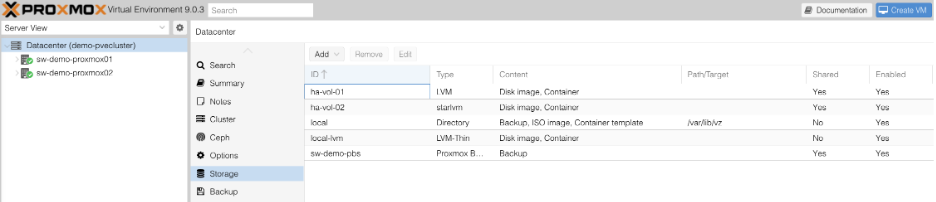
- Create or migrate a VM.
- Select starlvm storage when choosing the disk location.
The VM disks will be created inside dedicated Thin Pools, enabling snapshot functionality while maintaining shared storage compatibility. Please note that starlvm will preallocate full space for the VM disks in the Thin LVM pool. At 80% usage of the thin lvm storage space, starlvm automatically expands storage by 10%.
Conclusion
StarWind x Proxmox SAN Integration Services extends native Proxmox storage capabilities by enabling VM snapshots on shared SAN-based LVM storage through the starlvm plugin (StarLvmPlugin). By creating a dedicated Thin LVM pool for each virtual machine, the plugin allows safe shared storage access across cluster nodes while supporting snapshots and VM migration. This approach combines the advantages of standard LVM shared storage and LVM-Thin snapshot functionality, improving storage flexibility in Proxmox cluster environments.
