


There are many ways that Microsoft has to deliver new features and updates to Windows client and Server operating systems. One of the newer terms you may see floating around with upgrading Windows to later versions is something called an “enablement package.” In particular, Microsoft is using the enablement package approach with the new Windows 11 25H2 upgrade. What are these enablement packages? Let’s take a look at what the Microsoft Windows enablement packages are, how they work, and what they mean for both users and IT admins.
Understanding Windows feature updates
To begin, let’s see how Windows updates are usually delivered to end-user client systems. Microsoft has two types of updates. The first type of update is the quality update. These are delivered monthly to systems. The focus of the quality updates are security fixes, bug patches, and small stability improvements.
The second type of updates is called feature updates. These are usually the updates that have introduced larger new features and capabilities. This includes changes to the UI or more major underneath the hood type improvements.
Basically, in the older model of releases and how these were carried out, feature updates were basically a full in-place upgrade of the OS. When you installed a feature release, you were downloading gigabytes of new data and performing a long installation process. The larger the updates, the more likely you would run into compatibility or other issues. Using this type of update model, Microsoft was able to deliver larger changes. But, the downside is that these were usually very disruptive and led to days if not weeks of headaches for IT departments. Failed upgrades and other problems were usually a result of these monolithic updates.
What changed with Windows 10 and 11
Starting with Windows 10, Microsoft has moved to more of a Windows-as-a-Service model where updates are delivered more frequently. This has meant being able to keep the operating system on devices more secure and up to date.
When first moving to this model, it included two feature updates each year, one in the spring and one in the fall. Over time, Microsoft changed from this stance and realized that not every updated needed to include huge changes. Many of the fall updates were basically small in nature, while the spring updates were the new and exciting features that introduced new functionality.
This is where the concept of the Enablement Package was born. Instead of the thought of shipping massive OS upgrades twice a year, Microsoft has started shipping a major update once per year. However, for the second update that is usually smaller, Microsoft delivers most of the new features ahead of time through cumulative updates. The new features are present on the system but these remain dormant until the Enablement Package (eKB) is installed.
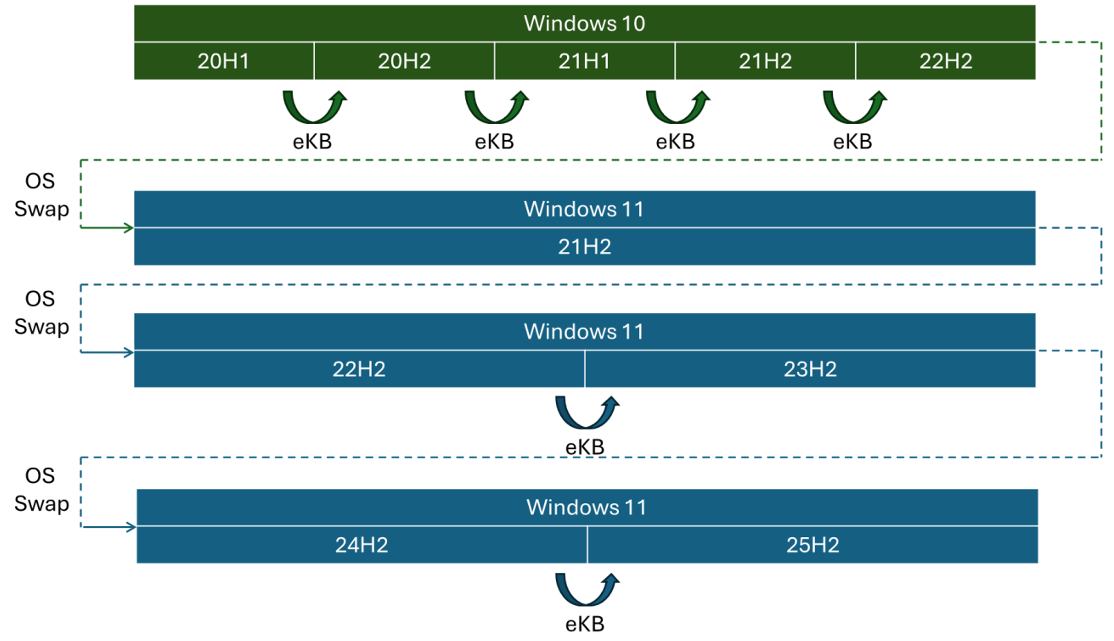
When the Enablement Package gets installed, it flips the switch and activates the new features almost instantly, since in reality, they are already there.
What is an Enablement Package?
So what exactly is in the Enablement Package? Well, this is basically a small update file that serves the purpose of unlocking or activating features that have already been delivered but are just in a dormant state.
The Enablement Package is just a few hundred kilobytes in size. So, instead of downloading and installing large multi-gigabyte files for unlocking new functionality, the Enablement Package does this with a very small install package.
This approach to installing updates allows Microsoft to deliver new features more efficiently. It also reduces the risk of having to troubleshoot large failed code deployments since the code is already there and has been tested as part of previous updates.
Feature flag or feature toggle release model
You may be familiar with the feature flag or feature toggle release model in development. The Enablement Package is very similar to what developers have been doing for years now with these release models. In the feature flag or feature toggle release model, developers deploy new code to production, but the new functionality is disabled by default.
Instead of needing to ship separate versions of code for each new feature, all the code already exists in the same deployment. Developers then just use configuration flags like Booleans or conditional logic to “turn on” or “turn off” features dynamically.
In this approach, developers deploy new code to production, but the new functionality is disabled by default. Instead of shipping separate versions of the software for each feature, all the code lives in the same deployment, and developers use configuration flags (Booleans or conditional logic) to “turn on” or “turn off” features dynamically.
Examples of Windows Enablement Packages
One of the first examples of when Microsoft used the Enablement Package was the Windows 10 version 1909 release. The features of the 1909 release were delivered in cumulative updates through the year. Then, when the Enablement Package was installed, the device moved from version 1903 to 1909 instantly.
For end-users, the upgrade felt like a simple patch instead of a large operating system update that could possibly be problematic.
Since then, other Windows 10 release were made possible using Enablement Packages, these included:
- Windows 10 22H2
- Windows 11 23H2
- Windows 11 25H2
With Windows 11, Microsoft has continued experimenting with this model, and, as we know, the Windows 11 25H2 release was made possible using the Enablement Package with the major new components of the release having been already installed throughout the year with cumulative updates.

How IT administrators benefit
Back in the day, Windows operating system upgrades were often dreaded and postponed as long as possible due to their problematic history. However, it is safe to say Microsoft has gotten much better with operating system updates using tools like the Enablement Packages.
No longer do IT staff have to deal with large downloads, long installation times, and the risk of compatibility issues that made the old monolithic upgrades hard to deploy. Enablement Packages solve many of these issues. Since the code is already there and tested, the Enablement Packages are small and quick to deploy and simple turn on the new features using the feature flag or feature toggle type deployment model.
For IT administrators, Enablement Packages simplify update management. In enterprise environments, feature updates have historically been disruptive. Large downloads, long installation times, and the risk of application compatibility issues made them challenging to deploy.
End user benefits
The benefits are not just limited to IT staff. End users also greatly benefit from the much more seamless updates that are quick to install and rarely present with issues compared to the large monolithic legacy upgrade models.
For users, the Enablement Package installs in minutes and often the only sign an update or upgrade has been installed is a single restart. New features will suddenly appear. However, the update feels no more disruptive than a typical monthly patch cycle.
Support considerations
The Enablement Packages make updates much faster and simpler to deploy. They still change the version of the operating system. So, keep in mind, Microsoft support timelines still apply. Moving a machine from a lower version to a higher version with a simple Enablement Package still means you get the extended support period for that new version of the operating system.
Organizations still need to plan their update cycles according to these support timelines. Even though the process is definitely easier, organizations still need to plan their update cycles aligned with Microsoft support guidance.
The future of Enablement Packages
Microsoft continues to evolve its updates strategy. Windows 11 for instance is leaning into even more frequent incremental updates. These have sometimes been called Moment updates. These are delivered through cumulative updates very much like the staged features that are toggled on with the Enablement Packages.

One thing looks to be true, regardless of what Microsoft calls them, Enablement Packages, or something else, the concept of staging features ahead of time and then enabling them later looks to be a method that is here to stay in regards to Windows upgrades and feature enhancements.
Wrapping up
In many ways, the Enablement Packages are a good solution to delivering new features in a more efficient and more manageable way. Instead of the very large and disruptive feature updates, Microsoft can now stage code ahead of time and then simply flip a switch when the release is ready to go live. It reduces download sizes and drastically speeds up installation times, all for a much better user experience.
IT admins benefit as well with much easier deployment tasks and less downtime for end users. Microsoft also benefits from the more efficient model since they gain more flexibility in how and when they introduce new features. It will be interesting to see as Windows continues to evolve if Enablement Packages and similar approaches remain a key part of the overall update strategy.
