


Introduction
Persistent Memory (PMem), including technologies like Intel Optane PMem and NVDIMM-N, offers near-DRAM performance while retaining data through power cycles. VMware vSphere 8.0 continues to support PMem, allowing virtual machines (VMs) to access this high-speed, non-volatile medium. This article walks through PMem support in vSphere 8.0, performance potential, and how to simulate it in a lab without physical hardware.
Understanding Persistent Memory
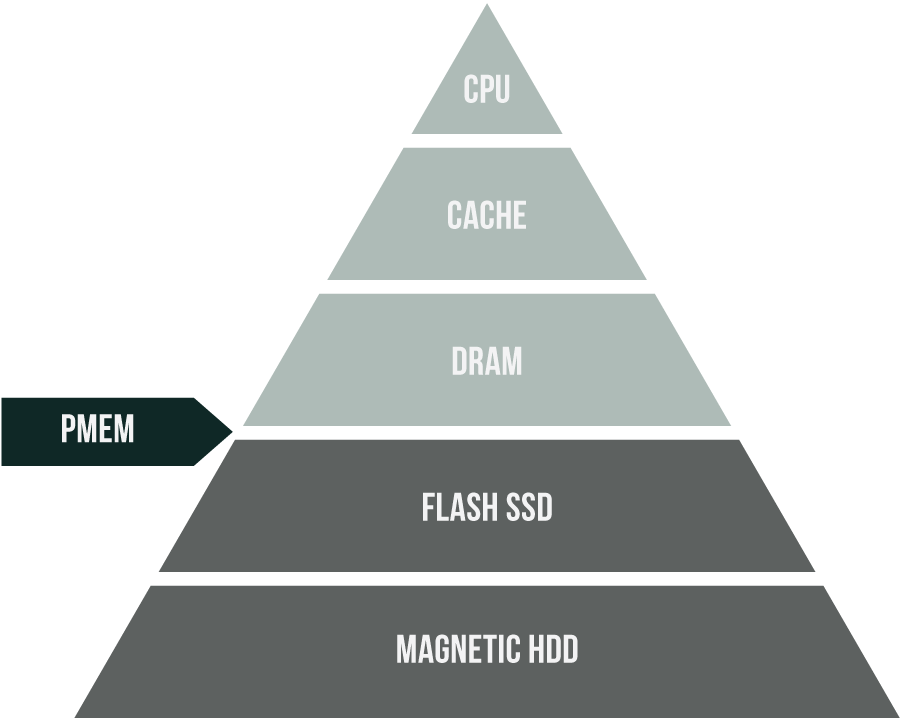
PMem sits between DRAM and traditional storage in terms of latency and bandwidth. Devices such as Intel Optane DC Persistent Memory or NVDIMM-N modules offer byte-addressable memory access with persistence. These modules appear to the OS either as traditional block storage or as memory-mapped regions, depending on configuration.
Key benefits:
- Sub-microsecond latency
- High throughput
- Data persistence across reboots and power loss
PMem Modes in vSphere 8.0
vSphere 8.0 supports two ways to expose PMem to a VM:
- vPMemDisk: Exposes PMem as a virtual SCSI disk. Works out of the box with legacy OSes. No special drivers needed.
- vPMem (NVDIMM): Exposes PMem as byte-addressable memory using a virtual NVDIMM. Requires PMem-aware OS like Windows Server 2016+, RHEL 7.4+, or SLES 12 SP2+.
Note: vPMem requires VM hardware version 14 or higher. Version 20 is recommended for full compatibility.
Configuration Process
- Host Requirements
Install Intel Optane PMem 200 modules and configure them in App Direct Mode. ESXi will detect the modules and create a PMem datastore. - Creating PMem-Backed VMs
- For vPMemDisk: Create or migrate a virtual disk to the PMem datastore.
- For vPMem (NVDIMM): Add a NVDIMM device in the VM settings and allocate the capacity.
- Guest OS Recognition
- In Windows, NVDIMM appears under “Memory Devices.”
- In Linux, check using ndctl or ipmctl.
Test Bench Configuration
Hardware:
- 2 x Intel Xeon Gold 6338 (Ice Lake, 32 threads)
- 256 GB DDR4 ECC Registered RAM @ 3200 MHz
- 2 x 1.92 TB Samsung PM1735 U.2 NVMe SSDs (PCIe 4.0)
- 1 x Intel Optane PMem 200 Series (128 GB, App Direct)
- 1 x 25 GbE NIC
Test VM:
- 16 vCPUs
- 64 GB vRAM (32 GB reserved for PMem)
- 100 GB primary virtual disk
- 32 GB NVDIMM device
- 1 x passthrough NVMe SSD
- 1 x VMXNET 3 adapter
Performance Testing
Tool: FIO
Parameters:
- Threads: 16
- Queue Depth: 16
- Duration: 3 minutes + 1 minute warm-up
Test Patterns:
- 4K Random Read/Write
- 64K Sequential Read/Write
Comparisons were made between an NVMe SSD, vPMemDisk (emulated), and StarWind RAM Disk.
Results Summary
| Pattern | Device | IOPS | Bandwidth (MB/s) | Avg Latency (ms) |
|---|---|---|---|---|
| 4K Random Read | NVMe SSD | 341,000 | 1320 | 0.27 |
| vPMem (emulated) | 891,000 | 3483 | 0.09 | |
| RAM Disk | 884,250 | 3456 | 0.11 | |
| 64K Sequential Read | NVMe SSD | 42,900 | 2695 | 2.94 |
| vPMem (emulated) | 189,000 | 11,812 | 0.41 |
StarWind RAM Disk and PMem both demonstrated a major performance edge over NVMe, especially for low-latency and sequential workloads.
Emulating PMem in the Lab
No PMem hardware? No problem. vSphere 8.0 allows emulating PMem by carving out a portion of system RAM.
esxcli system settings kernel set -s fakePmemPct -v <percentage>
Reboot the host. You’ll now see a fake PMem datastore you can use for virtual NVDIMMs or PMem-backed disks.
Alternative: StarWind RAM Disk
StarWind provides a free RAM Disk utility that creates virtual disks from system RAM. It’s fast and easy to use, giving you performance similar to PMem emulation. Keep in mind that it’s fully volatile and best suited for testing.
Limitations
- No vMotion for VMs using vPMem.
- Snapshots and suspend/resume are not available for PMem-enabled VMs.
- vSphere HA supports failover, but the actual PMem contents aren’t preserved — apps must handle persistence.
Final Thoughts
Persistent Memory in vSphere 8.0 delivers serious performance improvements, especially for latency-sensitive workloads. While Intel Optane hardware may not be widespread, VMware gives engineers the tools to test and simulate PMem easily using RAM or utilities like StarWind RAM Disk. If your apps need speed without sacrificing availability, PMem is still worth a look — whether physical or emulated.
