
The evolution of virtualization technologies continues to drive new approaches to hardware resource optimization. VMware vSphere Memory Tiering is one such innovation, enabling a significant increase in available memory capacity on ESXi hosts by leveraging ultra-fast NVMe storage devices.
In simple terms, Memory Tiering creates a two-tier memory architecture: hot (frequently accessed) data remains in conventional DRAM, while cold (infrequently accessed) data is offloaded to a dedicated NVMe device. This approach allows organizations to substantially expand the effective memory capacity of a server while maintaining acceptable performance levels. In today’s environment, where memory can account for up to 80% of a server’s cost, this technology can reduce infrastructure expenses by approximately 40% while increasing virtual machine density without requiring hardware platform upgrades.
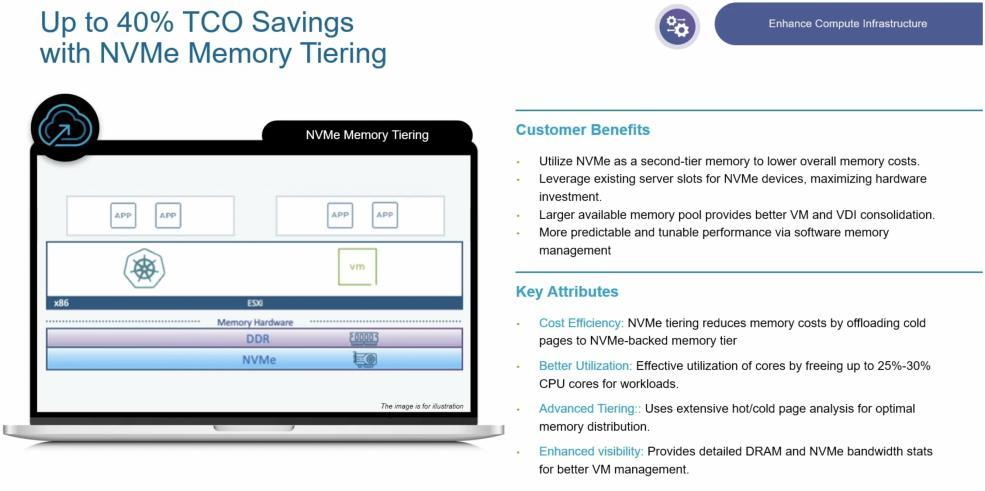
Memory Tiering was first introduced as a tech preview in vSphere 8.0 Update 3 and became a fully supported, production-ready feature in VMware Cloud Foundation (VCF) 9.0, which is built on vSphere 9.0. The technology is designed for organizations seeking to increase memory capacity for their workloads with minimal additional investment. This guide explains how Memory Tiering works, its benefits and limitations, hardware and software requirements, deployment procedures, and available tuning options.
How VMware Memory Tiering works
Solution architecture
Memory Tiering is integrated directly into the ESX hypervisor and transparently implements a two-tier memory hierarchy for virtual machines. Each host gains an additional memory layer (Tier 1) based on a local NVMe device, operating alongside conventional DRAM (Tier 0). When Memory Tiering is enabled, the hypervisor automatically migrates inactive virtual machine memory pages from DRAM to NVMe storage, freeing high-speed memory resources for active workloads. When a virtual machine accesses offloaded data, the corresponding pages are seamlessly returned to DRAM.
A key design principle is that only virtual machine memory is tiered. ESX vmkernel memory and critical hypervisor data structures always remain resident in DRAM, ensuring consistent host performance and stability.
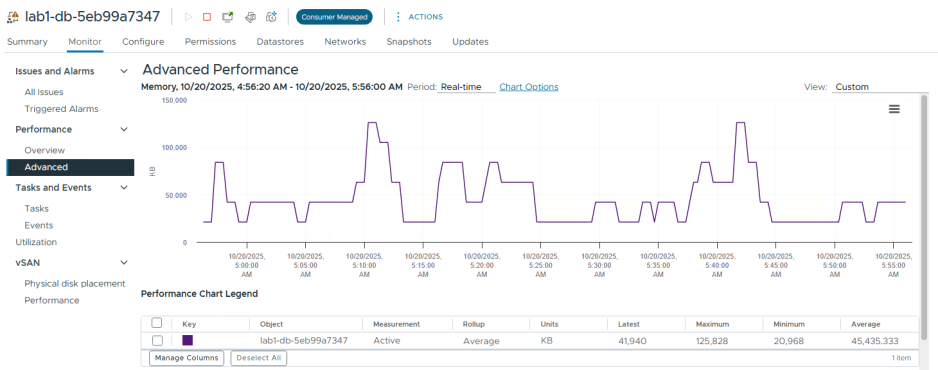
At its core, Memory Tiering resembles the traditional practice of swapping memory pages to disk, but it is implemented in a far more intelligent and efficient manner through the use of high-performance NVMe devices and deep integration with the ESXi memory scheduler. The solution leverages the Active Memory metric for each VM (see Figure 5) to identify which data is “cold” and can be temporarily placed on NVMe without a noticeable impact on performance. This approach makes it possible to significantly increase the total amount of memory available on a host while minimizing the effect on the “hot” data that remains resident in DRAM.
Benefits of Memory Tiering
The primary advantage of Memory Tiering is substantial memory cost reduction. Instead of populating servers with expensive additional DIMMs, administrators can deploy comparatively inexpensive NVMe SSDs and effectively double available memory capacity through a 1:1 DRAM-to-NVMe ratio. For example, a server equipped with 1 TB of DRAM can gain an additional 1 TB of tiered memory capacity using a dedicated NVMe device.
In workloads with relatively low active memory utilization, such as office-oriented VDI environments where only 5-10% of allocated memory is actively used, it may be possible to increase effective memory capacity by 300-400%. This is achievable as long as DRAM remains sufficient to accommodate the workload’s active working set.
Beyond cost savings, Memory Tiering improves infrastructure flexibility. Additional memory capacity can be introduced simply by installing NVMe devices and rebooting hosts, eliminating the need for server replacement or disruptive hardware upgrades. This allows organizations to scale memory resources quickly in response to workload growth.
Naturally, there are trade-offs. Memory pages stored on NVMe devices are accessed more slowly than pages residing in DRAM. While NVMe SSDs offer exceptional throughput and low latency compared to traditional storage media, they remain orders of magnitude slower than system memory. Consequently, accurate identification of cold memory pages is critical. If a workload’s active memory demand exceeds the available DRAM capacity, frequent page migrations between DRAM and NVMe may occur, resulting in increased latency and degraded application performance.
In the following sections, we will discuss workload suitability for Memory Tiering and the limitations that should be considered before deployment.
Requirements and compatibility
Before planning a Memory Tiering deployment, verify that your environment meets the following requirements:
- VMware vSphere version. Memory Tiering requires the latest VMware platform release, specifically VMware Cloud Foundation 9.0. Both vCenter Server and all ESX hosts within the cluster must be upgraded to this version. The feature is considered production-ready beginning with VCF 9.0 and includes improvements in stability, security (including memory encryption support), and integration with vMotion operations.
- Licensing. Memory Tiering is a VMware vSphere feature and requires appropriate licensing. It is typically included with enterprise-level VMware Cloud Foundation editions. Consult the licensing documentation for your specific edition to confirm feature availability.
- Hardware requirements: NVMe. Each ESX host participating in Memory Tiering must have at least one available NVMe SSD dedicated to the feature. The device is used entirely or partially as Tier 1 memory, with support for up to 4 TB of tiered capacity per host. Important considerations: the device must be a locally attached PCIe NVMe SSD; supported form factors include U.2, U.3, M.2, EDSFF (E1.S, E3.S), and similar PCIe-based designs; external storage systems, including Fibre Channel, iSCSI, NFS, SATA SSDs, and SAS SSDs, are not supported. Tier 1 memory must reside on local, high-performance storage.
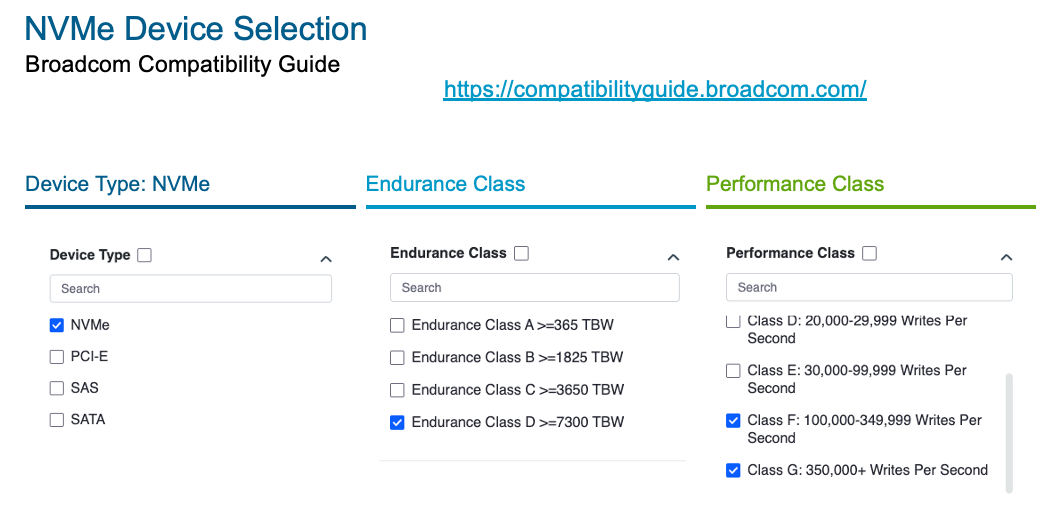
- NVMe performance and endurance requirements. VMware specifies strict requirements for Memory Tiering devices due to the intensive read/write activity associated with memory paging. Recommended minimum specifications include:
- Endurance: Class D or higher according to the vSAN classification system. This corresponds to an endurance rating of at least ~7,300 TBW and typically around 3 DWPD (three full drive writes per day) over the warranty period. Simply put, the drive must be designed to withstand very frequent write cycles.
- Performance: Class F (100K–350K write IOPS) or Class G (more than 350K write IOPS). These performance levels are typically found in enterprise-grade NVMe SSDs, especially those based on PCIe 4.0 or PCIe 5.0 interfaces.
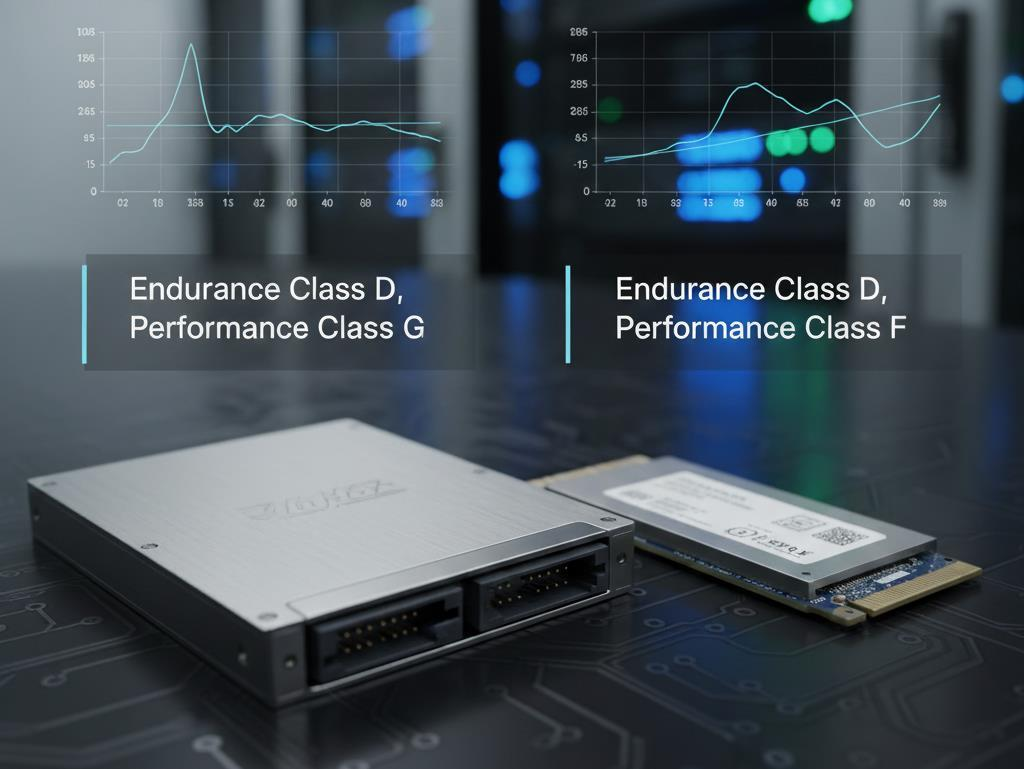
Many storage vendors market such drives as Mixed Use or Enterprise Mixed, indicating balanced, high-performance characteristics for both read and write workloads. As a practical rule of thumb, 3 DWPD or higher should be considered the minimum target when selecting NVMe devices for Memory Tiering.
- NVMe device compatibility. It is recommended to verify the selected NVMe devices against the official VMware compatibility database, such as the Broadcom/VMware vSAN SSD Compatibility Guide. This helps ensure that the drive is supported by ESX drivers and meets the required endurance and performance classifications. Although vSAN itself is not required for Memory Tiering, VMware recommends using the vSAN Compatibility Guide when selecting NVMe devices because the workload characteristics and performance requirements are very similar. Cutting costs on Memory Tiering storage is not advisable – low-end consumer NVMe drives with limited endurance may fail prematurely under the sustained paging workload generated by the feature.
- Supported NVMe form factors. The solution supports a variety of NVMe form factors, including standard 2.5-inch U.2/U.3 drives, modern E3.S modules, and compact M.2 devices – essentially any NVMe form factor that can be installed inside the server. The key requirement is that the device meets the performance and endurance criteria described above. For example, unused M.2 slots on the motherboard can be utilized if all primary drive bays are already occupied.
- Additional requirements. Initial configuration requires access to the ESX shell or SSH because creating an NVMe partition for Memory Tiering is currently performed from the command line using ESXCLI or a PowerCLI script. Administrators should also plan for host reboots, as a restart is required for Memory Tiering to become operational after configuration is completed.
Workload compatibility and limitations
Even when the hardware prerequisites are met, it is essential to evaluate whether your workloads are suitable for Memory Tiering. The primary consideration is the proportion of actively used memory:
- Active memory ≤ 50% of DRAM. Ideally, the combined active memory consumption of all virtual machines on a host should not exceed approximately 50% of the installed DRAM capacity. This recommendation stems from the default Memory Tiering configuration, which provides an additional amount of memory equal to the host’s DRAM capacity (a 1:1 DRAM-to-NVMe ratio). In other words, half of the total available memory remains high-performance DRAM, while the other half resides on the slower NVMe tier. If the active working set fits entirely within DRAM, application performance remains comparable to a traditional memory-only environment. However, if active memory requirements exceed available DRAM capacity, some frequently accessed pages may be forced to reside on the NVMe tier, resulting in increased latency and reduced performance. As a practical rule, keeping active memory utilization below 50% of physical DRAM provides a reasonable margin for maintaining predictable performance. Before enabling Memory Tiering, administrators should collect and analyze Active Memory statistics for their virtual machines.
- Measuring Active Memory. VMware vCenter allows you to monitor this parameter. On the VM page, under Monitor > Performance (Advanced), you can display the Active Memory metric (using the Real-time view). Third-party tools are also commonly used. For example, RVTools collects active memory statistics for VMs (although it too provides only a point-in-time snapshot, so be mindful of workload peaks). It is recommended to measure memory activity during the busiest periods (overnight batch processing, peak business hours) and to account for possible fluctuations with sufficient headroom. Only then can you determine whether Memory Tiering is suitable for a particular cluster or group of VMs.
- Workloads unsuitable for Memory Tiering. VMware explicitly identifies several workload categories that should not be placed on hosts with Memory Tiering enabled because of their sensitivity to memory latency or feature incompatibilities. These include:
- Virtual machines requiring extremely low latency (real-time applications, high-frequency trading systems, and similar workloads).
- VMs using secure isolated memory technologies such as SEV, TDX, or SGX. These technologies typically require all memory to reside in DRAM and often operate on encrypted memory regions.
- Virtual machines protected by Fault Tolerance (FT). FT does not support Memory Tiering because it relies on reserved memory and synchronous replication of VM state.
- Very large “monster VMs” with massive memory footprints (for example, 1 TB or more per VM). Their active working set is usually large as well, making it impractical from a performance perspective to page even part of their memory to NVMe.
- VMs configured with Latency Sensitivity settings or using large memory pages, as these mechanisms fundamentally conflict with the concept of paging memory to secondary storage.
If such critical workloads are present, the best approach is to dedicate hosts to them with Memory Tiering disabled. Mixed environments can be configured more flexibly: the feature can be disabled on specific ESX hosts within a cluster or even selectively disabled for individual VMs (as discussed later in the advanced configuration section). Nevertheless, maintaining a uniform cluster configuration is preferable, as it simplifies management, DRS operation, and workload balancing.
Planning and deployment scenarios
Sizing: How much memory and what kind of NVMe drives are needed?
Proper NVMe sizing is critical to a successful Memory Tiering deployment. Two scenarios are possible:
- Greenfield (new infrastructure): you are designing a VCF/vSphere cluster from scratch with Memory Tiering in mind. In this case, servers can be equipped with less DRAM and compensated with NVMe capacity. For example, if calculations indicate that each host requires 1 TB of memory, you could install only 512 GB of DRAM and add 512 GB of NVMe. The total effective memory capacity would still reach the required 1 TB, with half of it provided by less expensive flash storage. This approach lowers the cost of each node. Naturally, it assumes that the active portion of memory (approximately 256 GB) fits entirely within DRAM. Memory Tiering is a Day-2 operation, meaning it cannot be enabled during the initial deployment of a VMware Cloud Foundation cluster – there is no corresponding option in the deployment wizard. Therefore, the NVMe devices intended for tiering may initially be used by vSAN or remain unused. This topic is discussed later in the section on vSAN integration.
- Brownfield (existing infrastructure): you already have a deployed vSphere or VCF cluster and simply want to add an NVMe memory tier. In this case, the process is straightforward: purchase and install the required NVMe devices and then configure Memory Tiering. If the cluster is already running vSAN, the new drives simply need to be detected by the system and must not be automatically claimed by vSAN. If vSAN is not present, there are no additional prerequisites – install the NVMe drives and proceed with configuration.
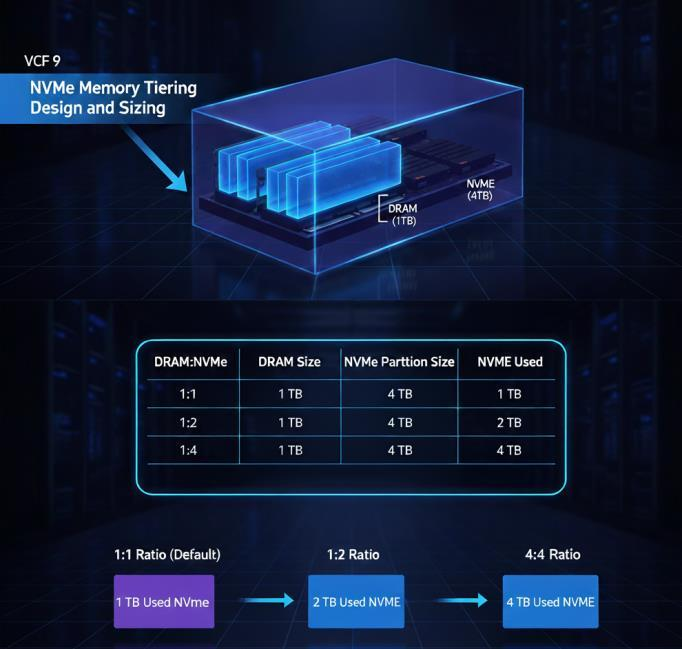
As a sizing rule, the NVMe device should be at least as large as the host’s DRAM capacity if you intend to use the default 1:1 memory expansion ratio. For example, a server with 768 GB of RAM requires at least a 768 GB NVMe drive to double the available memory to approximately 1.5 TB. Larger drives are perfectly acceptable and provide flexibility for increasing the memory ratio later. At present, the maximum supported Memory Tiering NVMe capacity is 4 TB per host. Even if a larger drive is installed, ESX creates a partition no larger than 4 TB and does not utilize capacity beyond this limit.
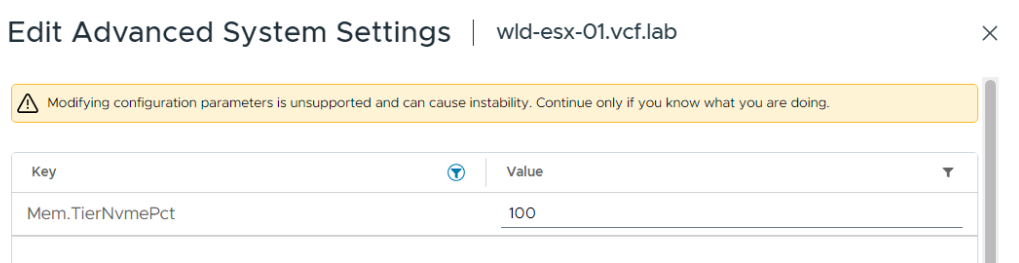
Most importantly, the DRAM-to-NVMe ratio is configurable. The default value of 100% (1:1) is intended as a universal setting suitable for most workloads. However, workloads with very low active memory requirements can benefit from more aggressive ratios. For example, a 1:2 ratio (Mem.TierNvmePct = 200) provides an additional 200% memory capacity via NVMe.
In other words, if a host contains 512 GB of DRAM and a 4 TB NVMe partition, a 1:2 ratio causes 1,024 GB of NVMe to be used as Tier 1 memory, resulting in approximately 1.5 TB of total memory.
A 1:4 ratio (400%) is the maximum supported configuration. With 512 GB of DRAM, ESX would use 2,048 GB of NVMe, increasing total memory capacity to roughly 2.5 TB. The entire 4 TB device would not be consumed, but multiple VMs with a combined memory footprint of about 2.5 TB could be accommodated. Naturally, such an aggressive configuration assumes that less than 20–25% of the total memory is actively used; otherwise, frequent accesses to the NVMe tier will begin to impact performance.
As you can see, having a large NVMe device (up to 4 TB) allows the amount of NVMe memory actually utilized to be adjusted simply by changing the ratio, without repartitioning the drive. This is extremely useful from a future-proof perspective: a larger NVMe device can be purchased upfront, a maximum-size partition (4 TB) created, and the environment initially operated at a 1:1 ratio. If workloads later become even “colder,” the ratio can be increased to 1:2 or 1:4, thereby utilizing more of the already installed NVMe capacity and expanding host memory without purchasing additional hardware.
However, changing the ratio is a serious step and should only be done after confirming that the new active memory requirements still fit within DRAM.
Example: Suppose a host contains 1 TB of DRAM, and measurements show that no more than approximately 300 GB is actively used. In that case, memory expansion via NVMe is perfectly reasonable. Adding a 1 TB NVMe device and using a 1:1 ratio results in 2 TB of total memory. Since the active 300 GB still resides comfortably within the 1 TB DRAM tier, performance remains unaffected. But why stop there? Installing a 2 TB or even 4 TB NVMe device provides additional flexibility. With a 2 TB NVMe device and a 1:1 ratio, only 1 TB of that device is used as tiered memory, so total memory reaches 2 TB (1 TB DRAM plus 1 TB NVMe) and the remaining 1 TB stays in reserve. The active 300 GB remains entirely within DRAM, leaving ample headroom. Increasing the ratio to 1:2 allows the full 2 TB of NVMe to be utilized, producing 3 TB of total memory capacity. A 1:4 ratio, however, is impossible in this example because a 2 TB NVMe device supports only a 1:2 expansion. Achieving a 1:4 ratio with 1 TB of DRAM would require at least a 4 TB NVMe device.
Thus, the maximum achievable memory expansion is constrained either by VM activity levels or by the maximum supported NVMe size. In the current release, that limit is 4 TB per host, which is more than sufficient for most environments, since VMware customers rarely deploy servers with more than 4 TB of DRAM per host.
Integration with vSAN and storage
Memory Tiering is often discussed alongside VMware vSAN because, at first glance, the concepts appear similar: vSAN (especially the original OSA architecture) also relies on fast and slow tiers – cache and capacity. However, there is no direct dependency between Memory Tiering and vSAN. They are independent technologies that can operate concurrently on the same hosts without sharing resources.
It is important to remember that an NVMe device used for Memory Tiering must be dedicated exclusively to that purpose. You cannot configure Memory Tiering on the same drive that hosts a vSAN datastore or local VM storage. Although it is technically possible in a lab environment to split a physical SSD into two partitions – one for vSAN and one for Memory Tiering – VMware strongly discourages this practice in production.
If the same drive is shared between vSAN and Memory Tiering, both subsystems will compete for the device’s I/O resources, negatively impacting both memory and storage performance. It is essentially the equivalent of saying, “The fuel tank is half empty, let’s fill the unused space with water” – clearly not a good idea.
Therefore, when designing a vSAN-based configuration, allocate a separate NVMe device for Memory Tiering on each host, outside of any vSAN disk group. If you are using a ReadyNode configuration with only two NVMe drives dedicated to vSAN ESA and no spare devices, an additional drive will be required.
During a greenfield VCF deployment, if the NVMe device intended for Memory Tiering is installed from the beginning, ensure that it is not automatically claimed during vSAN configuration. By default, when vSAN is enabled on a new cluster, all available drives may be automatically claimed into disk groups. To avoid this, either leave the Memory Tiering NVMe out of the server until vSAN configuration is complete (it can be hot-added later), or disable vSAN auto-claim and manually assign disks while excluding the designated NVMe device.
If vSAN has already claimed all NVMe drives, there is no need to panic. After deployment, the drive can be removed from the disk group (through the UI or ESXCLI), its partitions cleared, and then repurposed for Memory Tiering. These procedures are documented by VMware. Removing a drive from vSAN without data loss requires either replica redistribution or sufficient free capacity within the cluster.
For existing (brownfield) environments, if vSAN has not yet been enabled, simply configure vSAN while excluding the Memory Tiering devices as described above. If vSAN is already operational and new NVMe drives were purchased specifically for Memory Tiering, simply install them in the hosts. Since they were never part of any disk groups, vSAN does not affect them.
It is worth emphasizing that Memory Tiering coexists perfectly with vSAN on the same servers, provided separate devices are used. VMs can simultaneously reside on vSAN (virtual disks) while utilizing NVMe-backed memory (virtual memory). Even encryption features are independent: vSAN datastore encryption and Memory Tiering page encryption can both be enabled without conflict because they protect different data types using separate mechanisms.
If no free NVMe devices are available but Memory Tiering is still desired, one possible compromise is to repurpose existing drives. For example, you may remove one NVMe drive from the storage configuration (in vSAN OSA, from the cache/capacity tier; in ESA, by simply reducing capacity) and dedicate it to Memory Tiering.
To do this:
1. Verify that the drive meets the required specifications (Endurance Class D, Performance Class F, and so on).
2. If the drive belongs to vSAN, initiate a Remove Disk from vSAN operation and wait for data rebalancing to complete.
3. If it hosts a local datastore, migrate or remove all VMs and then delete the datastore.
4. Clear the partition table on the NVMe device so that ESX recognizes it as a blank device without existing file systems.
5. Proceed with creating a Memory Tiering partition and configuring the feature on the host.
To reiterate: do not use the same NVMe device for multiple purposes in production. In lab environments (nested virtualization or test setups), experimentation is possible, but the risks should be fully understood.
Deploying Memory Tiering in test labs
An interesting question is whether Memory Tiering can be evaluated in a nested environment (ESX running inside ESX). Officially, VMware does not support Memory Tiering at the outer layer in nested scenarios – that is, when the physical host is an ESX server without NVMe devices and you attempt to enable tiering for its nested ESX virtual machines. Such a configuration offers no benefit because the outer (physical) ESX host has no visibility into the memory activity of nested VMs.
However, Memory Tiering can be enabled inside virtual ESX hosts, i.e., at the inner hypervisor layer. This requires presenting an NVMe device to the virtual ESX instance. In vSphere, an NVMe virtual disk can be created and attached to the nested ESX host. Inside the guest ESX, the device appears as a standard NVMe drive, allowing partition creation and Memory Tiering configuration just as if it were physical hardware.
Of course, this virtual NVMe device is ultimately backed by a VMDK file on a conventional datastore, so no performance gains should be expected. Nevertheless, the nested approach is ideal for training and experimentation. You can go through the complete configuration process, observe how Memory Tiering effectively “doubles” memory on virtual hosts, and experiment with various settings without requiring expensive physical hardware. Naturally, such configurations are not suitable for production.
Configuring Memory Tiering step by step
After completing the prerequisite tasks – installing hardware, upgrading hosts, and analyzing workloads – you can proceed with Memory Tiering configuration. The process consists of several stages.
1. Preliminary checks
“Measure twice, cut once.” Before making any changes to hosts, verify that everything is ready and all design decisions have been finalized. Appropriate drives should be selected, compatibility confirmed, fault-tolerance requirements (including RAID, discussed later) determined, placement of critical VMs planned, and NVMe devices visible on all hosts without any existing partitions or datastores.
It is recommended to verify this manually in vCenter. Under Storage Devices on each host, the NVMe device should appear with the correct model, an Available status, and no VMFS or vSAN signatures.
If hardware RAID is planned for the NVMe devices (for example, a mirrored pair for redundancy), configure the RAID groups at the controller level beforehand. ESX should ultimately see a single logical NVMe volume, which will be used for Memory Tiering. VMware Cloud Foundation 9.0 supports NVMe RAID configurations, including Intel VROC and Tri-Mode HBAs, but these settings are configured outside of ESX.
Decide which hosts will have Memory Tiering enabled. It may be enabled across the entire cluster or only on selected hosts. Hybrid configurations are fully supported. In practice, most environments either enable it everywhere or nowhere for consistency. However, in an eight-node cluster, for example, two hosts carrying latency-sensitive workloads may remain non-tiered. Those hosts simply continue operating with their physical DRAM capacity. In such mixed environments, DRS should ideally be configured to prevent “special” VMs from migrating to tiering hosts and vice versa.
Once these considerations have been addressed, proceed to the core configuration steps.
2. Creating an NVMe partition
Why is a dedicated partition required? VMware intentionally separates NVMe space used as memory from all other uses. ESX creates a dedicated Memory Tiering Partition and formats it specifically for this purpose. At present, the partition must be created manually. Two methods are available:
6. ESXCLI on each host: esxcli system tierdevice create -d /vmfs/devices/disks/<device>. (Refer to the VMware documentation for the exact syntax, as it may vary between releases.)
7. PowerCLI or PowerShell. A script can connect to vCenter and iterate through all hosts. VMware’s official blog provides a sample script that discovers NVMe drives by model, displays the list, requests confirmation, and executes the equivalent ESXCLI command to create the partition.
Regardless of the method used, the host must be rebooted after creating the partition and enabling Memory Tiering, so plan a maintenance window accordingly.
In vSAN clusters, place hosts into Maintenance Mode (Ensure Accessibility) or use vSphere Configuration Profiles (discussed later) to automate rolling reboots.
Frequently asked questions:
- Can I create Memory Tier partitions on two different drives in the same host for redundancy? Technically yes – ESX does not prohibit it – but there is no practical benefit. ESX can use only one NVMe device for memory tiering at a time. If multiple Memory Tier partitions are present, the host mounts only one of them during boot and may not always choose the same one. The second partition remains unused. No mirroring or aggregation occurs between them. Therefore, if redundancy is required, use RAID1 or another hardware-level solution instead of multiple partitions.
- What if there is no free NVMe device available? Memory Tiering is impossible without NVMe. SATA SSDs or NFS storage cannot be substituted. NVMe support is hard-coded into the feature.
After creating the partition, verify that it exists. In vCenter → Host → Configure → Storage Devices, selecting the NVMe device should show a new partition of the expected size. Typically, it occupies the entire drive, or up to 4 TB, whichever is smaller. Any capacity beyond 4 TB remains unallocated.
3. Enabling Memory Tiering
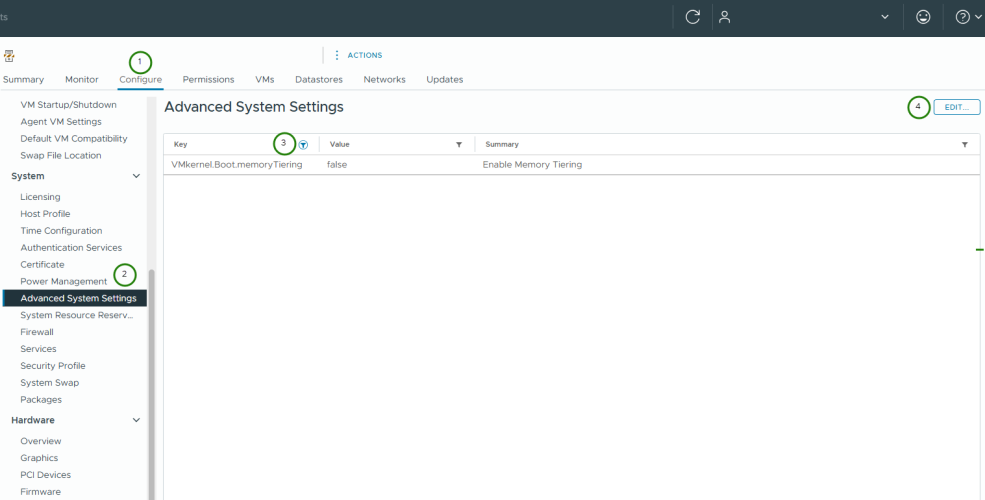
The next step is to activate Memory Tiering at the ESXi level. Even if the NVMe partitions have already been created, the feature remains inactive until the hypervisor starts using them. Memory Tiering can be enabled in several ways:
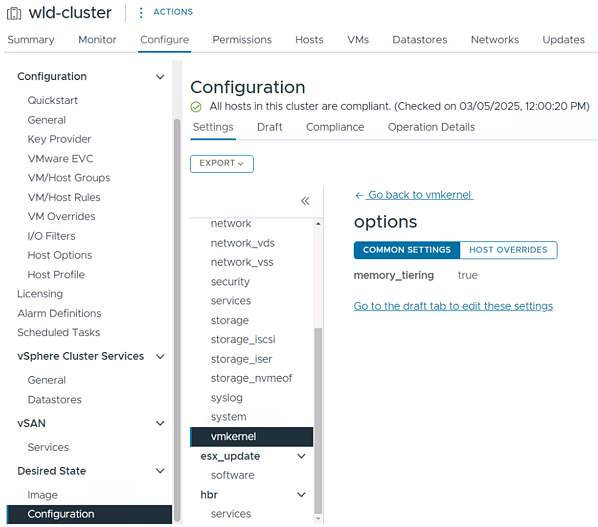
- Via vCenter: either at the cluster level or on individual hosts. Starting with VMware Cloud Foundation 9.0, Memory Tiering management is available directly from the UI – simply select the desired hosts and click Enable Memory Tiering. In VMware Cloud Foundation, this can be done after the initial deployment.
- Via ESXCLI: using the appropriate command (for example, esxcli system settings kernel set -s MemoryTiering -v TRUE; consult the product documentation for the exact syntax).
- Via PowerCLI: using a script similar to the one mentioned earlier, or through vSphere Configuration Profiles, the new vCenter mechanism that replaces Host Profiles and allows a consistent configuration to be applied across a group of hosts.
Enable the entire cluster at once or one host at a time?
Memory Tiering can be enabled on all hosts simultaneously or rolled out gradually. The preferred approach is to use vSphere Configuration Profiles. You define a profile with Memory Tiering = On, apply it to the cluster, and vCenter will automatically remediate the hosts sequentially, rebooting them one at a time while migrating VMs to the remaining operational hosts. This approach ensures that vSAN remains available throughout the process, as vCenter waits for data synchronization and object compliance before proceeding with the next host reboot.
Once Memory Tiering has been enabled and the host has restarted, additional information becomes available under Host > Configure > Memory. For example, the reported memory capacity increases by the expected amount, and the Monitor > Memory view exposes statistics related to Tier0 (DRAM) and Tier1 (NVMe) utilization.
4. Post-deployment validation
After all hosts have been rebooted and the feature has been enabled, verify the following:
- Total memory capacity has increased on each host. For example, if a host originally had 256 GB of DRAM and a 256 GB NVMe memory tier, the reported memory capacity should now be approximately 512 GB.
- The Mem.TierNvmePct advanced setting is present. By default, its value is 100 unless it has been modified. If memory tier encryption has also been enabled (see below), the corresponding setting should appear as well.
- Run a test workload. For example, power on several VMs and allocate more memory than the host’s physical DRAM capacity. If the VMs continue operating normally, this confirms that part of their memory footprint is being served from the NVMe tier. In vCenter, the Memory column for such VMs may show consumption exceeding 100% of the host’s physical memory. Previously, this typically indicated swapping; with Memory Tiering enabled, it reflects NVMe-backed memory expansion instead.
- Inspect memory statistics under Monitor > Memory. The host view displays how many pages reside in DRAM and how many are located on NVMe, along with tier-in and tier-out activity (page migrations between the two tiers). With proper sizing and workload planning, nearly all hot pages should remain in DRAM, and NVMe read activity should stay relatively low.
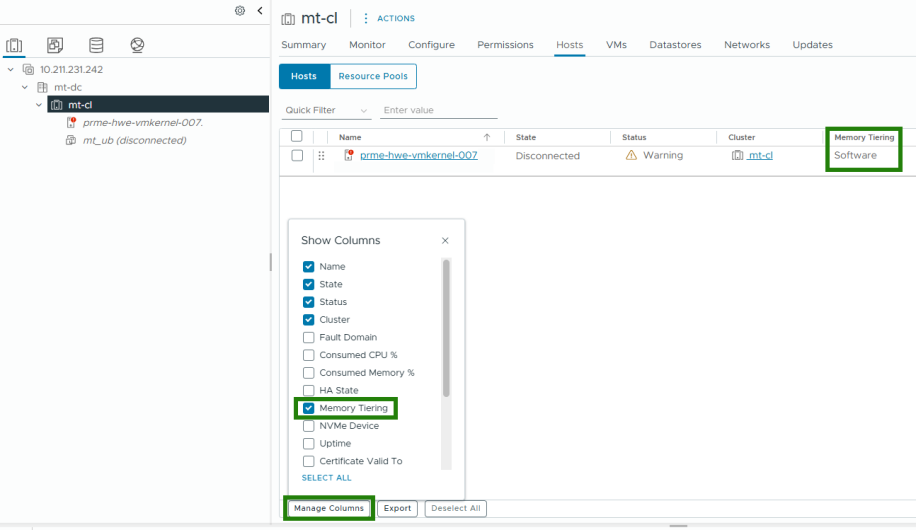
At this point, the basic configuration is complete and Memory Tiering is operational. The next section covers advanced capabilities and fine-tuning options that allow the behavior of the feature to be adapted to specific workload requirements.
Advanced Memory Tiering settings
By default, Memory Tiering is configured conservatively: a 1:1 ratio, page encryption disabled, and all VMs on the host participating in tiering. For most environments, this is sufficient. However, several advanced parameters are available to administrators for optimization purposes. These settings are configured either in the host’s Advanced Settings or in the settings of individual virtual machines.
Adjusting the DRAM:NVMe ratio
As mentioned earlier, Mem.TierNvmePct is the primary parameter that determines the amount of NVMe capacity used as part of the overall memory pool. It is located under Host > Manage > Advanced Settings.
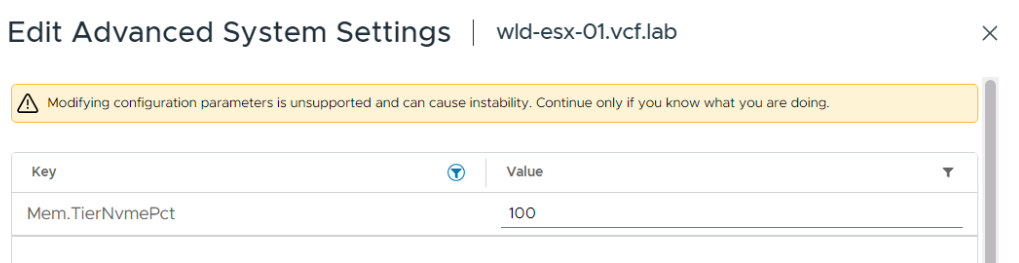
The value is expressed as a percentage of the host’s DRAM capacity:
- 100 (default) means NVMe capacity equals 100% of DRAM (a 1:1 ratio).
- 200 means NVMe capacity equals 200% of DRAM (a 1:2 ratio, resulting in a total memory pool three times the original DRAM capacity).
- 50 means NVMe capacity equals 50% of DRAM (a conservative configuration that adds only 50% more memory, effectively maintaining a 2:1 DRAM advantage).
Changing the ratio simply requires modifying this parameter on the host (or through the API/PowerCLI). However, VMware strongly recommends against changing the ratio without careful analysis. Before increasing Mem.TierNvmePct to 200, for example, you should ensure that the current active memory working set is significantly smaller than the amount of DRAM available (ideally no more than one third of the resulting total memory pool). Otherwise, DRAM may become saturated, leading to page thrashing – continuous page movement between the two tiers.
If a new value is applied, the change takes effect only after a host reboot, since the memory hierarchy must be rebuilt. In a production cluster, the ratio can be adjusted one host at a time using Maintenance Mode to avoid disrupting running workloads.
NVMe memory encryption
Traditionally, RAM has been considered volatile and therefore transient, making memory encryption unnecessary. However, the NVMe tier is persistent, and memory pages may remain on the device across reboots (although ESX attempts to sanitize them). For highly security-conscious environments, VMware introduced Memory Tiering encryption without requiring an external Key Management Server (KMS).
Two levels of encryption are available:
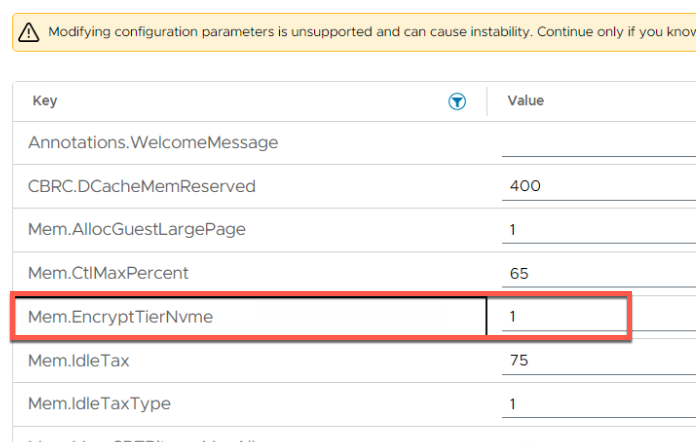
- Host-level encryption: enabled at the host level, meaning that all pages offloaded to the NVMe tier are encrypted. The encryption key is generated by the hypervisor (AES-XTS, 256-bit) each time a VM or the host starts. The corresponding parameter is Mem.EncryptTierNvme = 1 (configured in the host’s Advanced Settings). By default, it is set to 0 (disabled). When set to 1, encryption is enabled for any data that the host writes to the NVMe tier. By enabling this mode, you protect the data of all VMs running on that host from unauthorized access in the event that the NVMe device is physically removed or its contents are accessed outside the server.
- Per-VM encryption: a more granular option that allows encryption to be enabled only for selected VMs. For example, you may have 50 VMs, of which 5 are critical (containing personal or financial data). In that case, page encryption can be enabled for those VMs only, while leaving it disabled for the rest to avoid unnecessary encryption overhead. The setting is configured at the virtual machine level (in the VM’s advanced settings): sched.mem.EncryptTierNVMe = TRUE.
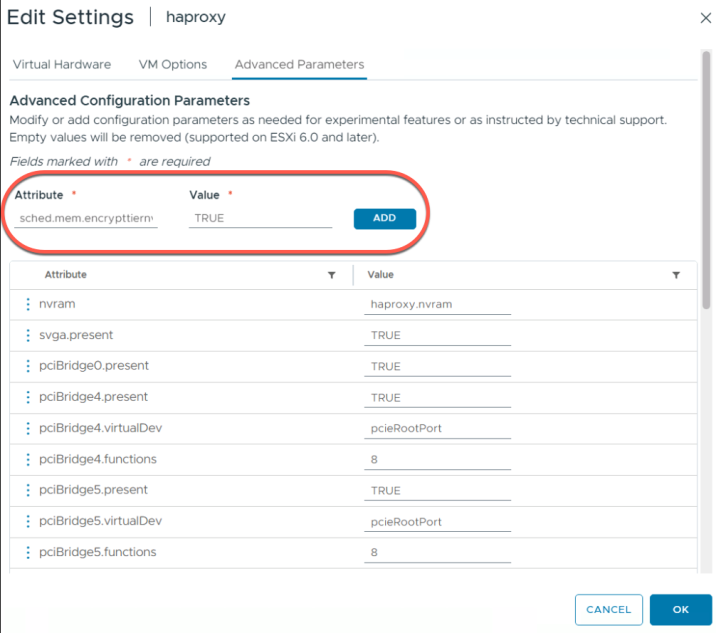
By default, this setting is absent (that is, it is effectively FALSE). When set to TRUE, the hypervisor encrypts only the pages of that particular VM when they are offloaded to the NVMe tier. The mechanism is identical to host-level encryption: the encryption key is generated when the VM powers on, remains valid only for the lifetime of that VM, and never leaves the host. During vMotion, the VM’s encrypted pages are first decrypted, transferred over the secure vMotion channel, and then re-encrypted on the destination host using a newly generated key.
It should be noted that host-level and per-VM encryption are not mutually exclusive – they simply overlap. If host-level encryption is enabled, all VMs are already encrypted, which makes the per-VM setting redundant. Conversely, if host-level encryption is disabled but a specific VM is marked for encryption, only that VM’s pages will be encrypted.
The encryption overhead is minimal: hardware AES-NI acceleration is used, and encryption operations are performed asynchronously during page movement. In practice, the performance impact is barely noticeable, although for extremely heavily loaded systems, encryption can be left disabled (the default setting).
Excluding individual VMs from Memory Tiering
What about workloads for which any migration of memory pages to NVMe is undesirable? Examples include in-memory databases (SAP HANA, Oracle SGA), real-time systems, and latency-sensitive transactional applications. Such workloads should remain entirely within DRAM. For these cases, VMware provides an advanced parameter that disables Memory Tiering for a specific VM: sched.mem.enableTiering = FALSE (in the VM’s settings).
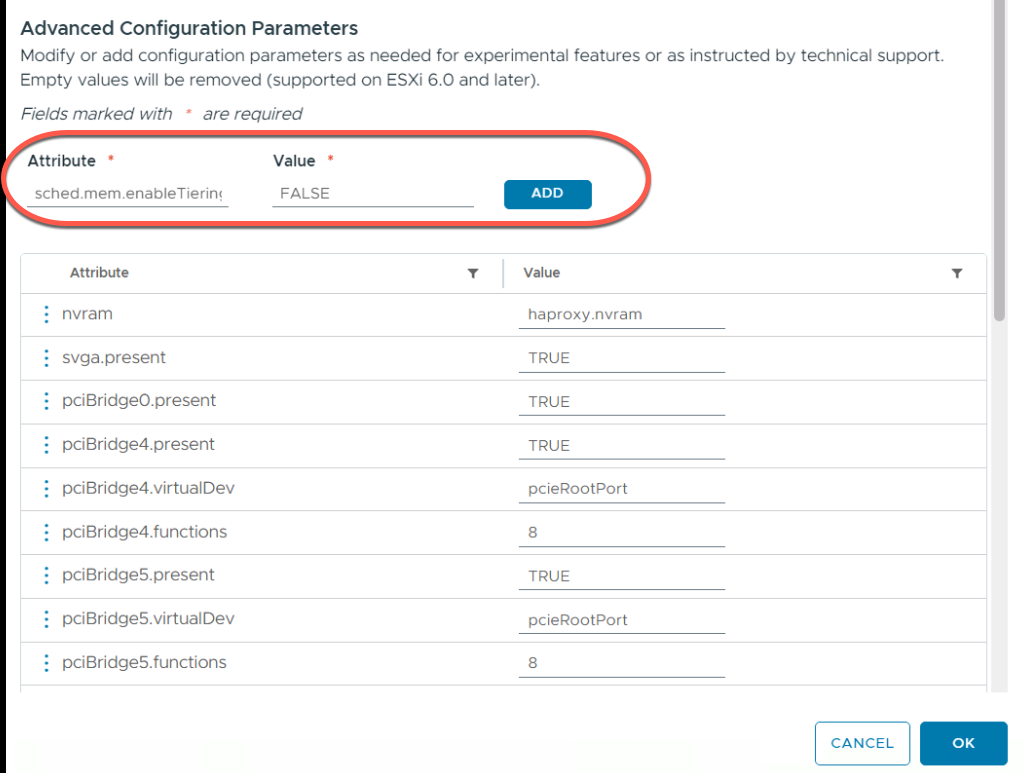
When this parameter is configured, the hypervisor keeps the entire memory footprint of that VM exclusively in Tier0 (DRAM) and never offloads any of its pages to NVMe, even if Memory Tiering is enabled for other VMs on the same host. In effect, Memory Tiering is disabled for that particular virtual machine.
This setting should be used for unsupported or latency-sensitive workload profiles, including: large VMs configured with Latency Sensitivity = High; Fault Tolerance (FT) virtual machines; services with strict latency requirements.
Setting the parameter to FALSE ensures that such VMs continue to behave exactly as they would on a conventional host, even when Memory Tiering is enabled. Keep in mind, however, that if the host’s DRAM becomes fully occupied by these excluded workloads, Memory Tiering itself provides no benefit: the NVMe tier remains unused, and no additional VMs can be consolidated because neither DRAM nor NVMe capacity is available for them.
NVMe redundancy and Fault Tolerance
When discussing Memory Tiering reliability, we mentioned one option: using hardware RAID for NVMe devices to avoid losing memory pages in the event of a drive failure. VMware Cloud Foundation 9.0 supports such configurations (RAID1, RAID5, and similar NVMe RAID layouts). However, the advantages and disadvantages should be carefully weighed:
- RAID1 (mirroring) with two NVMe drives provides protection against the failure of a single device and introduces minimal latency, since writes are performed in parallel. However, it requires twice as many drives and possibly a RAID controller (unless VMD/VROC is used), which increases the overall cost of the solution.
- RAID5/RAID6 offer protection with better capacity efficiency, but their controllers are typically optimized for larger block sizes, and small-page write performance may degrade significantly. In addition, they require a controller and multiple drives, making the solution more complex and expensive.
- Without RAID: if an NVMe device fails, the “cold” pages residing on it are lost. What happens next? In practice, ESX does not crash. From the hypervisor’s perspective, the loss of an NVMe tier resembles a hardware memory failure. Affected VMs may suddenly crash (resulting in a guest operating system crash, such as a BSOD or a kernel panic), while other VMs continue running and the host itself remains online. VMware HA then restarts the failed VMs on other nodes. In other words, an NVMe failure leads to performance degradation and the loss of some VMs, but not the failure of the entire host. If you are willing to accept this risk (the probability of enterprise NVMe failure is relatively low), you can forgo RAID altogether and rely on the standard HA cluster to recover affected workloads.
Ultimately, the choice between the cost and complexity of RAID and the risk associated with running without it is yours. One practical consideration is that if you are using vSAN ESA, cluster nodes typically do not have hardware RAID controllers at all, since ESA requires direct NVMe access through HBA controllers. In such environments, implementing RAID solely for Memory Tiering can be difficult. On more traditional servers equipped with RAID controllers, a two-drive NVMe mirror can be configured using Intel VROC, provided the CPU supports VMD.
Conclusion
VMware Memory Tiering represents a significant step forward in memory management for virtualized environments. Similar to tiered storage architectures, memory itself has become hybrid – a combination of fast but capacity-limited DRAM and slower but more cost-effective NVMe flash. When applied correctly, this technology allows organizations to substantially increase VM density, reduce the cost of new deployments by purchasing less DRAM (which is especially important today), and gain greater flexibility when scaling infrastructure, since adding memory capacity becomes faster and less expensive than before.
However, Memory Tiering is a sophisticated tool. It requires architects to carefully analyze workload characteristics and verify that the active memory footprint fits within physical DRAM. Appropriate hardware – enterprise-class NVMe SSDs – must be selected, and application-specific considerations must be taken into account, as not every workload benefits from running on tiered hosts. Without proper planning, Memory Tiering may fail to deliver the expected results or even cause performance degradation – for example, when attempting to tier “hot” database workloads or when overcommitting hosts beyond reasonable limits.
On the other hand, when deployed according to best practices, Memory Tiering operates almost transparently. Thousands of pages migrate between DRAM and NVMe without administrator intervention, while users continue to run their applications as before, only with access to significantly larger memory capacity. Combined with other vSphere capabilities such as DRS, vMotion, and vSAN, this technology enables the creation of more cost-efficient, scalable, and resilient private cloud infrastructures.
FAQ
Is VMware Memory Tiering supported in production?
Yes. Memory Tiering became a production-ready feature in VMware Cloud Foundation 9.0, built on vSphere 9.0. The earlier implementation in vSphere 8.0 Update 3 was a technical preview.
How much memory can VMware Memory Tiering add?
The default 1:1 DRAM-to-NVMe ratio doubles the host’s effective memory capacity. Configurable ratios up to 1:4 are supported, with a maximum NVMe tier size of 4 TB per host.
Can the same NVMe drive be used for Memory Tiering and vSAN?
No. The NVMe device should be dedicated to Memory Tiering. Sharing it with vSAN or local VM storage creates I/O contention and is unsupported for production deployments.
Which workloads benefit most from Memory Tiering?
It works best for workloads with large allocated memory but relatively small active working sets, such as VDI environments. Latency-sensitive applications, in-memory databases, Fault Tolerance VMs, and very large VMs are poor candidates.
What happens if a Memory Tiering NVMe drive fails?
VMs with memory pages stored on the failed device may crash, but the ESX host can remain operational. VMware HA can restart the affected VMs on another host. Hardware RAID can reduce this risk when the server configuration supports it.