


According to BigPanda’s 2024 analysis of IT outage costs, an enterprise downtime now runs $14,056 per minute on average (the number wildly depends on the company size and business model). Most organizations already run backups, but most have never tested whether those backups actually restore within the time window the business expects.
Ransomware, failed updates, misconfigurations, and human error still cause the majority of outages. Uptime Institute’s 2024 Annual Outage Analysis found human error (including failure to follow established procedures) remains a leading contributor.
Backup and recovery belong in your production architecture. If your backup infrastructure is a background task nobody looks at until something breaks, this guide is for you.
Types of data backup
For most mid-size environments, a weekly full backup with daily incrementals gives the best balance of protection and performance. But the specifics of each strategy determine whether your recovery will actually work when you need it.
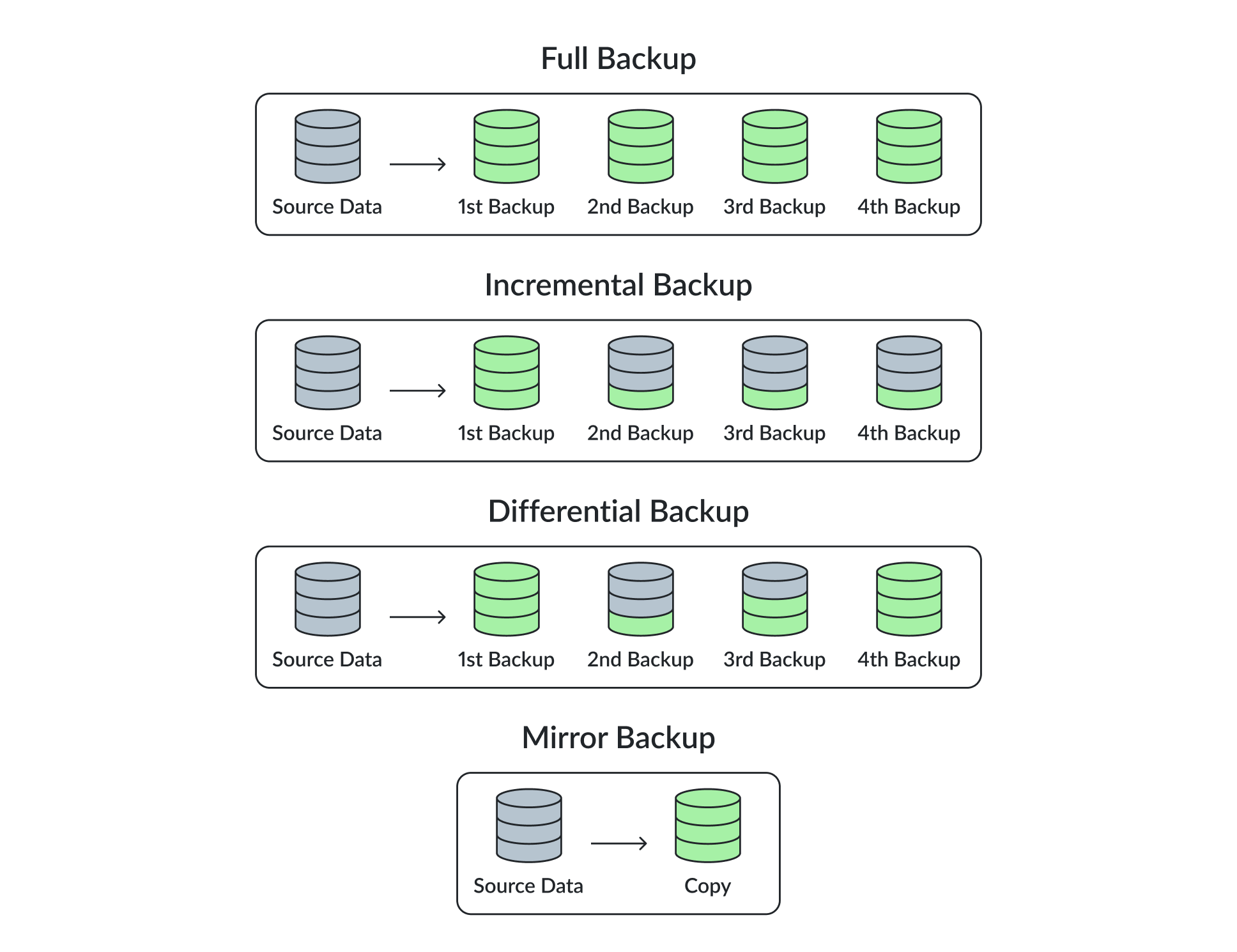
Full backup
A full backup creates a complete copy of your data. Recovery is straightforward since you restore from a single image. The trade-off is backup window length and storage consumption. Running full backups nightly is rarely practical for environments above a few terabytes.
Incremental backup
Incremental backups capture only changes since the last backup of any type, which can cut backup windows by 80% or more compared to full runs. The risk is in the restore chain: if any link in an incremental sequence is corrupted, the entire recovery fails. Modern backup platforms mitigate this with synthetic full backups, automatically consolidating incremental data into a virtual full backup without re-reading the source. If your backup solution doesn’t support synthetic fulls, you’re carrying unnecessary risk in your incremental chains.
Differential backup
Differential backups track all changes since the last full backup. Recovery requires only two images (the last full plus the latest differential), which simplifies restores compared to long incremental chains. Storage consumption grows over the week as each differential accumulates more changes, so these work best with shorter retention cycles between fulls.
Mirror backup
Mirror backups replicate data in real time. They’re useful for availability, but they also replicate corruption, accidental deletions, and ransomware encryption. A mirror is a copy that shares your problems. It does not give you point-in-time recovery and should not be treated as a backup in any recovery planning sense.
Recovery types
The recovery method you need depends on what failed and how fast you need it back. Choosing the wrong one wastes time you don’t have during an incident.
Granular recovery
This handles the most common case: someone deleted or corrupted a specific file, mailbox, or database object. You pull that single item from backup without touching anything else. Speed depends heavily on your backup catalog and indexing. If you can’t search your backups efficiently, even a simple file restore turns into a slow manual process.
Mass recovery and instant VM recovery
These sit at opposite ends of the scale problem. Mass restore is what you need after a ransomware event takes out hundreds of VMs, recovering them in bulk to a known-good point in time. Instant VM recovery takes a different approach: it boots a VM directly from backup storage, getting a workload back into production in minutes rather than hours. The VM runs from backup while data migrates to production storage in the background.
Incident response firms have consistently reported that organizations with immutable off-site backups recover from ransomware in days rather than weeks. The exact timelines vary by environment size and complexity, but the difference between having a clean, immutable copy to restore from and negotiating or rebuilding from scratch is significant.
Volume and VMDK recovery
Volume recovery restores an entire disk volume, useful when a volume is corrupted but the rest of the VM is fine. VMDK recovery does the same for individual virtual machine disks, avoiding a full VM restore when only one disk is affected. Both are more targeted than full VM recovery and faster when the failure is isolated to specific storage.
Bare-metal recovery (BMR)
BMR rebuilds an entire system from scratch – operating system, applications, configuration, and data – onto original or new hardware. This is the slowest recovery path and your last resort after total hardware failure. If your RTO for a system is under an hour, BMR will not get you there. Plan for instant VM recovery or standby replicas instead.
RTO vs RPO: Recovery targets drive everything
Recovery Time Objective (RTO) sets how long systems can be down. Recovery Point Objective (RPO) defines how much data you can afford to lose. These numbers should come from business stakeholders and revenue impact analysis, not from whatever defaults your backup software ships with.
A realistic example: a mission-critical database might carry a 4-hour RTO and 15-minute RPO, which means continuous log shipping or near-continuous snapshots feeding a hot recovery path. A development environment might tolerate 24-hour RTO and daily RPO, where standard nightly backups to cold storage are fine. Treating both workloads the same wastes money in one direction and creates risk in the other.
| Workload Tier | Example RTO | Example RPO | Backup Approach |
|---|---|---|---|
| Tier 1 – Critical | < 1 hour | < 15 min | Continuous replication, instant VM recovery, hot standby |
| Tier 2 – Important | 4 hours | 1 hour | Frequent snapshots, synthetic fulls, warm standby |
| Tier 3 – Standard | 24 hours | 24 hours | Nightly backups to cold storage |
| Tier 4 – Dev/Test | 48+ hours | 24-48 hours | Weekly fulls, minimal retention |
Regulatory pressure is making this mandatory
In 2025-2026, frameworks like DORA (for financial services) and NIS2 (for critical infrastructure across the EU) require companies to demonstrate that they can meet defined recovery targets, not just claim it. Gartner’s recent Magic Quadrant for Enterprise Backup and Recovery has been raising the bar as well, emphasizing immutable data vaults, identity-based data protection, and multi-cloud coverage as increasingly important evaluation criteria. Backup capabilities that were differentiators two years ago are becoming baseline requirements.
The 3-2-1-1-0 rule
The classic 3-2-1 rule (three copies, two media types, one offsite) was designed before ransomware operators started specifically targeting backup infrastructure. The updated 3-2-1-1-0 approach adds two critical elements.
The extra “1” is an immutable or air-gapped copy. This means write-once, read-many (WORM) storage – whether that’s object storage with Object Lock enabled, tape in an offsite vault, or a hardened Linux repository with no network-facing delete capability. The point is that no compromised credential, no rogue admin, and no ransomware process can alter or destroy this copy.
The “0” stands for zero errors – verified recoverability. A backup job completing successfully tells you almost nothing. A backup can report success while the data inside is corrupted, encrypted by malware, or missing critical application components. Automated restore verification – where the backup system actually boots a VM from backup, checks application consistency, and logs the result – is the only way to know your backups work. Run these checks weekly at minimum for critical workloads.
Hot and cold tier architecture
A practical implementation of 3-2-1-1-0 separates backup storage into performance and capacity tiers with clear lifecycle policies governing data movement between them.
Hot tier
The hot tier stores the last 7 to 14 days of backups on fast storage, typically NVMe or high-performance SAN. This is where instant VM recovery runs from, and where your sub-4-hour RTOs get met. Size this tier based on your daily change rate multiplied by your retention window, plus overhead for synthetic full consolidation.
Undersizing the hot tier is one of the most common mistakes in backup architecture. It forces premature data movement to cold storage and kills recovery performance for recent restore points. If your most recent backup is already on slow storage when an incident hits, your instant recovery capability is gone.
Cold tier
The cold tier handles retention from 30 days out to years, depending on compliance requirements. Cost efficiency and durability matter more here than raw throughput.
S3-compatible object storage with Object Lock enforcement is the practical choice for this tier. Platforms like DataCore Swarm Appliance are purpose-built for this role, providing immutable storage that ensures archived backups cannot be modified or deleted before their retention period expires. That immutability directly satisfies the “1” in the 3-2-1-1-0 model and produces the kind of auditable evidence that DORA and NIS2 require for protected backup copies.
When evaluating cold tier storage, the key requirements are: S3 API compatibility (so your backup software can target it natively), Object Lock support at the storage layer (not just application-level soft locks), and data lifecycle policy automation to move backups between tiers without manual intervention.
Lifecycle policies
Data lifecycle policies should automatically move backups from hot to cold storage based on age. A typical policy keeps 14 days hot, offloads to object storage for 90-day to 1-year retention, and archives to tape or deep cold storage beyond that. This keeps the hot tier lean and fast while maintaining a complete, immutable data history at lower cost per gigabyte.
Choosing the right solution
Start with your recovery requirements, not vendor feature sheets. Define RTOs and RPOs for each workload tier, then evaluate whether a solution can actually meet them. Ask vendors for documented restore performance numbers at your data volumes, not marketing benchmarks run on demo environments.
Usability matters more than most teams admit. Your on-call engineer at 2 AM needs to execute a restore without calling senior staff. If the workflow requires deep tribal knowledge or a 40-page runbook, configuration errors will accumulate, and those errors hide until recovery time. The tool with the best feature list is not necessarily the tool your team can operate under pressure.
On security: ransomware operators now specifically target backup infrastructure, hunting for backup admin credentials and attempting to delete or encrypt recovery data before detonating on production systems. Any solution you evaluate should support immutability, encryption at rest and in transit, and hardened administrative access by default. If those capabilities are bolt-on or optional extras, that’s a red flag.
Total cost modeling
Model the total cost over three to five years. Storage growth rates vary significantly by workload. Healthcare imaging and IoT-heavy environments can see 40-50% annual growth, while mature enterprises might run closer to 20-30%. Factor in retention policy expansion from new regulations and the compute costs of running automated restore verification. A solution that looks cheap on day one but charges per-restore or per-VM-protected can become painful at scale.
| Evaluation Area | What to Check | Red Flags |
|---|---|---|
| Recovery performance | Documented restore times at your data volumes, not vendor lab benchmarks | Vendor cannot provide restore timing data for your scale |
| Operational simplicity | Can a junior admin perform a restore at 2 AM without escalation? | Restore requires CLI scripting or multi-page runbooks |
| Security posture | Immutability, encryption at rest/transit, MFA on admin console, hardened repos | Immutability or encryption is a paid add-on or requires manual config |
| Cost trajectory | 3-5 year TCO including storage growth, retention expansion, compute for verification | Per-restore fees, per-VM licensing, or opaque capacity pricing |
What to do next
If you take one thing from this guide: run a full restore test of your most critical workload this month. Time it. If the result doesn’t match your documented RTO, that is the gap you need to close first. Tiering, immutability, and vendor selection all matter, but they build on a foundation of knowing whether your recovery actually works under realistic conditions.
Schedule restore tests quarterly at minimum. Document the results. Make the test conditions as close to a real incident as your change management process allows. The teams that handle major incidents well are the ones that practiced beforehand.
