


Running SQL Server Always On Availability Groups (AG) in a hyperconverged environment (like a Storage Spaces Direct cluster) offers high availability, but are you fully utilizing your secondary replicas? If you haven’t enabled read-only routing (ROR), your secondary server might be sitting idle while your primary does all the work. ROR is a feature that automatically directs read-intent client connections to a readable secondary replica, offloading reporting and analytics queries from the primary. By doing so, you can distribute your workload and prevent the primary node from becoming a bottleneck. Microsoft notes that offloading read activity in this way frees up resources and can achieve higher throughput for your primary OLTP workload, while also delivering higher performance for read-only workloads. In short, read-only routing lets you fully leverage the hardware of both primary and secondary servers, instead of letting one server’s capacity go to waste.
In this article, we revisit the performance impact of enabling ROR in a two-node SQL Server 2022 Always On AG on Storage Spaces Direct (S2D). We’ll explain what ROR is and how to configure it, then share benchmark results comparing AG performance with ROR enabled vs. disabled. The results are compelling – enabling ROR boosted read throughput by up to ~60% in our tests and improved overall transaction processing by ~5-8% under heavy load. Perhaps more importantly, there were virtually no downsides at lower loads. Given these findings (and the ease of implementation), our conclusion is that you should always enable read-only routing on your Always On AGs to maximize performance when it counts.
What is Read‑Only Routing in Always On?
Always On Availability Groups allow you to replicate databases to secondary servers for high availability and read scalability. This feature was introduced in SQL Server 2012 as a successor to database mirroring. In a typical 2-node AG cluster (one primary and one secondary), by default all application traffic goes to the primary, and the secondary is only used for failover. That means both read and write queries hit the primary server, which can lead to contention (CPU load, blocking, deadlocks), while the secondary server’s resources remain underutilized. To address this, SQL Server supports configuring secondaries as readable replicas. If a secondary is set to “Readable Secondary (Read-intent only)”, it will accept read-only workloads when the client’s connection string indicates the intention to run read-only queries.
Read-only routing (ROR) builds on this by letting the AG listener automatically redirect read-intent connections to a secondary. Essentially, if a client connects to the AG’s listener with the parameter ApplicationIntent=ReadOnly in its connection string, the primary will hand off that connection to a designated secondary replica that is configured to allow read-only access. This happens transparently – the application still connects using the AG’s single listener name, but behind the scenes SQL Server routes the session to a secondary node for query execution. ROR requires a bit of one-time setup (we’ll outline the configuration below), but once enabled, it means your reporting or analytic queries can run on secondary servers without changing your application logic.
The benefits of read-only routing are significant for performance and scalability. You effectively split the workload: writes (and any critical reads that must be absolutely up-to-date) stay on the primary, while reporting and read-heavy operations run on the secondary. This leads to better utilization of both servers and prevents the primary from becoming a choke point during read-intensive periods. In addition, offloading reads can reduce contention issues on the primary (fewer read-write locking conflicts) and improve overall throughput of the system. In Microsoft’s terms, using readable secondaries “offloads your read-only workloads from the primary (conserving its resources for mission-critical tasks) and improves your return on investment for the secondary replica systems”. Not only can the primary handle more OLTP work with its freed-up resources, but your secondary hardware (which you’ve paid for!) is actually doing useful work serving queries, rather than sitting idle waiting for a failover.
It’s worth noting that you can have more than one readable secondary. Newer versions of SQL Server support multiple readable replicas (for example, SQL Server 2016+ allows up to 8 secondary replicas in an AG). This means you can scale out read capacity across many servers if needed – often called a “read-scale” architecture. Our test environment uses just one secondary, but the principles (and benefits) of ROR apply regardless of the number of replicas. With multiple readable secondaries, you can even configure a routing list so that read-intent connections are load-balanced or directed to specific replicas in order. The bottom line is that read-only routing enables horizontal scaling of database reads with minimal effort: you simply add secondary replicas and configure the routing, and the AG will automatically route read workloads to those secondaries.
Test Environment and Hardware
To evaluate the impact of read-only routing, we built a lab environment mimicking a real-world high-performance cluster. The setup was a two-node Windows Server 2022 Datacenter failover cluster with Storage Spaces Direct (S2D) for the storage subsystem (i.e. a hyperconverged cluster where each SQL Server node also contributes local storage to a shared pool). Both servers were identical in specs:
- Hardware: Dell PowerEdge R750 servers, each with dual Intel Xeon Ice Lake CPUs (28 cores @ 2.6 GHz per CPU, 56 cores per node total), 256 GB RAM, and 8× NVMe SSDs for storage.
- Networking: Each server had 2× 100 GbE network interfaces (used for S2D storage replication traffic and client access) and a separate 1 GbE interface for cluster heartbeat and management. The 100 GbE links ensured that network bandwidth was not a bottleneck for inter-node communication.
- Storage (S2D): We configured a Storage Spaces Direct pool in a two-way mirror across the NVMe drives. Each node contributed 4 NVMe SSDs to the S2D pool, meeting the minimum of 4 drives per server for S2D. The result was a single clustered volume (virtual disk) with two mirrored copies of the data (one on each server). This volume was formatted with NTFS and used to store the SQL Server database files. In effect, the storage resembles a highly-redundant shared NVMe array, with extremely high I/O throughput and low latency.
All firmware, drivers, and OS updates were current, and the cluster passed the standard Test-Cluster validation suite. We configured a file share witness for cluster quorum (since this was a two-node cluster). In summary, this environment provided a fast, modern hardware base so that we could push SQL Server and the network to their limits and clearly observe the effects of read-only routing on performance.

Deploying the Availability Group
With the Windows cluster and storage in place, the next step was setting up SQL Server Always On and our test database. The high-level deployment steps were:
- SQL Server Installation & Configuration: We installed Microsoft SQL Server 2022 (Database Engine) on both nodes. Through SQL Server Configuration Manager, we enabled the Always On Availability Groups feature on each instance (this adds the SQL Server instance to the Windows Failover Cluster role). A service restart was done to apply this change.


- Creating the AG and Listener: Using SQL Server Management Studio (SSMS), we created a new availability group called “DemoAG”.

We added a test user database to this AG (the database was created on the primary node and then initialized on the secondary). We then created an AG Listener – essentially a virtual network name/IP that clients will use to connect. The listener was given an unused IP address on the network. Both replicas (the two SQL Server instances) were added to the AG with their roles configured.
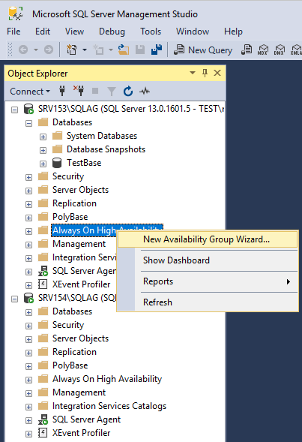
- Readable Secondary Settings: In the AG configuration, we set each replica’s Readable Secondary property to “Read-intent only.” This setting means the secondary will allow read-only connections only if the client explicitly declares the connection as read-intent (it won’t accept generic connections). This is the recommended setting for read scaling, as it ensures normal (non-read-intent) connections don’t inadvertently go to a secondary. Essentially, at this point our AG was set up with one primary and one secondary that is capable of serving read-only queries.

At this stage, without read-only routing configured, a client application could connect directly to the secondary’s instance name to run queries, or use the AG listener with ApplicationIntent=ReadOnly and get connected to the secondary only if that secondary was the current primary (because by default the listener doesn’t redirect). To fully enable transparent routing, we needed to configure the read-only routing lists.
Enabling Read‑Only Routing
Enabling ROR involves telling SQL Server two things: (1) the network address of each replica for read-intent connections, and (2) the routing order to use when this replica is primary. This is typically done via T-SQL commands (though you can also use SSMS or PowerShell). In our case, we executed the following Transact-SQL on the primary replica to set up ROR for the AG:
ALTER AVAILABILITY GROUP [DemoAG]

MODIFY REPLICA ON N'SRV153' -- primary server name

WITH (SECONDARY_ROLE (ALLOW_CONNECTIONS = READ_ONLY,

READ_ONLY_ROUTING_URL = N'TCP://SRV153.contoso.com:1433'));

ALTER AVAILABILITY GROUP [DemoAG]

MODIFY REPLICA ON N'SRV154' -- secondary server name

WITH (SECONDARY_ROLE (ALLOW_CONNECTIONS = READ_ONLY,

READ_ONLY_ROUTING_URL = N'TCP://SRV154.contoso.com:1433'));

ALTER AVAILABILITY GROUP [DemoAG]

MODIFY REPLICA ON N'SRV153'

WITH (PRIMARY_ROLE (READ_ONLY_ROUTING_LIST = ('SRV154','SRV153')));

ALTER AVAILABILITY GROUP [DemoAG]

MODIFY REPLICA ON N'SRV154'

WITH (PRIMARY_ROLE (READ_ONLY_ROUTING_LIST = ('SRV153','SRV154')));
Let’s break down what this does. We have two replicas named SRV153 and SRV154. The first two statements set a READ_ONLY_ROUTING_URL for each server – this is the address SQL Server will use to route read-intent connections to that replica (essentially hostname:port for the instance). We used the default SQL port 1433 and the hostnames in our lab domain. The ALLOW_CONNECTIONS = READ_ONLY part ensures the replica indeed allows read-only connections in the secondary role (which we had also set via the GUI earlier).
The next two statements configure the READ_ONLY_ROUTING_LIST for each replica when it is acting as primary. This list is an ordered preference of where to send incoming read-intent requests. For example, on SRV153 we set the routing list to (‘SRV154′,’SRV153’). This means: if SRV153 is currently the primary replica and a client connects with ApplicationIntent=ReadOnly, the AG will attempt to route that connection to SRV154 first (the secondary). If for some reason SRV154 is not available or cannot take the connection, then it will fall back to connecting to SRV153 (the primary itself). Essentially, we’re prioritizing the secondary for read workloads, but allowing the primary to handle reads as a fallback. Likewise, we set SRV154’s routing list to prefer SRV153 (so if a failover happens and SRV154 becomes primary, it will route reads to SRV153). In an AG with multiple secondaries, the list could contain several entries (and the primary will try them in order), but with just two replicas our lists each contain the other server then itself.
With these settings in place, read-only routing was fully enabled. Any client connecting to the AG listener and specifying the read-only intent would be seamlessly redirected to the secondary node. We tested this quickly using SQL Server Management Studio by connecting to the listener with the ApplicationIntent property and verified we landed on the secondary replica. It’s important to note that the AG listener is required for ROR to work (clients must connect to the listener, not directly to a specific node, for the routing to happen). Also, each replica’s routing URL and list must be configured correctly; otherwise, read-intent connections might still end up on the primary or fail to connect at all. Once configured, though, ROR is automatic and persists through failovers – if the AG fails over, the new primary will use its routing list to continue directing read workloads to the other node.
Performance Testing
With the environment set up, we proceeded to measure the performance differences with read-only routing disabled vs. enabled. We were particularly interested in two aspects: pure read throughput (to see how much offloading reads to the secondary helps when the system is under load) and mixed workload throughput (to see if offloading reads lets the primary handle writes better, boosting overall transactions per minute). We performed a series of benchmarks using industry-standard tools:
- HammerDB (v5.0) – an open-source database benchmarking tool that can simulate the TPC-C workload (OLTP) as well as run custom queries. We used HammerDB both to populate a test database and to run transactional workloads.
- SQLQueryStress – a lightweight open-source tool for stress-testing SQL queries with multiple threads. We used this to simulate many concurrent read-only queries hitting the database.
All tests were run on the same dataset under two scenarios: first with read-only routing off (meaning all connections, even read-intent ones, were effectively served by the primary), and then with read-only routing on (so read-intent connections were served by the secondary). The primary replica remained the same throughout (we did not fail over during tests). The secondary was kept fully synchronized (synchronous commit mode) to ensure it had up-to-date data. We also ensured that the client load was generated evenly from both servers to avoid any bias (for example, in some tests we ran half the threads from the primary node and half from the secondary node, connecting through the listener, to utilize both local and remote connections symmetrically). Between each test run, we cleared caches or restarted SQL Server to keep conditions consistent. Below, we detail the results of three sets of tests.
HammerDB OLAP Read Test (1 Million Row Scan)
First, we evaluated a pure read scenario akin to a data analytics or reporting query (an OLAP-type query). Using HammerDB, we built a TPC-C schema database with 100 warehouses, which resulted in a large Customer table of about 100 million rows. This database was ~50 GB in size. After data generation, we limited SQL Server’s max memory to 32 GB and restarted the SQL service to minimize the chance that the entire data would be cached in memory – we wanted the test to hit disk I/O. For the OLAP test, we executed a single large SELECT query on the primary that scanned 1 million rows from the dbo.Customer table (essentially simulating a reporting query that reads a substantial amount of data). We measured the execution time of this query under two conditions: (a) with the client connecting normally (no read-intent, so the query ran on the primary), and (b) with the client connection marked as read-intent (so with ROR, the query was routed to the secondary).

The performance difference in this single-query test was small but noticeable. With read-only routing OFF (query running on the primary), the 1-million-row select took about 5.1 seconds to complete. With read-only routing ON (query routed to run on the secondary), the same query took about 4.9 seconds. In other words, enabling ROR gave us a slight speedup (~4% faster on elapsed time). Why would reading from the secondary be a bit faster? One likely reason is that in our S2D setup, each node has a local copy of the data (because of the 2-way mirror). When the secondary node executes the read, it can fetch the needed data from its local NVMe storage instead of the primary’s storage, avoiding any extra network hop for data access. In contrast, when the primary executed the query, some of that data might have resided on the other node’s disks (depending on how S2D distributed the mirror), potentially introducing a bit of cross-node traffic. Since the data set mostly fit in memory after the first run, both runs were quite fast and CPU-bound, but the secondary’s local-read advantage likely explains the minor improvement we observed. Overall, with a single large query and ample resources, read-only routing didn’t dramatically change performance – it was about the same, if not slightly better in this OLAP scenario.
SQLQueryStress: Concurrent Read Scalability Test
Next, we wanted to see how read-only routing affects throughput when multiple read-only queries run in parallel. In a real-world application, you might have dozens of reporting queries or user-driven queries hitting the database at the same time. Offloading those to a secondary should increase the total capacity for serving them. We used SQLQueryStress to simulate this. The query we tested was a straightforward read: SELECT COUNT(*) FROM dbo.Customer (essentially a full scan count of the ~100M-row table, which reads a large portion of the data). We ran this query in multiple threads concurrently and measured how long it took to complete a fixed number of iterations, as well as the aggregate throughput (in terms of data read per second). We varied the number of threads (simulated concurrent users) as 1, 2, 4, 8, 10, 12 threads. Each thread executed 1000 iterations of the query in a tight loop before stopping. We then calculated the total time taken and the combined throughput. We did this once with all threads connecting normally (so all queries went to the primary) and once with threads connecting as read-intent (so under ROR, they go to the secondary).

Below is a summary of the results for this concurrent read test:
| Number of Threads | SQL AG Time (sec) | SQL AG MB/s | SQL AG with ROR Time (sec) | SQL AG with ROR MB/s |
|---|---|---|---|---|
| 1 | 0.62 | 1415 | 0.55 | 1350 |
| 2 | 0.59 | 1460 | 0.55 | 1385 |
| 4 | 0.59 | 1410 | 0.56 | 1420 |
| 8 | 0.63 | 1360 | 0.58 | 1325 |
| 10 | 0.70 | 2205 | 0.77 | 3290 |
| 12 | 0.80 | 2585 | 0.90 | 4240 |
A few observations jump out from these numbers:
- For low concurrency (1–4 threads), enabling ROR had little effect on throughput, and query times were very similar in both cases. For example, at 4 threads the average query time was ~0.59s on primary vs ~0.56s with ROR, and throughput ~1410 vs ~1420 MB/s – essentially a wash. This makes sense: with only a handful of queries, the primary alone was not saturated and could handle them fine. Offloading to the secondary doesn’t increase I/O throughput because the workload was not heavy enough to hit hardware limits. (We even see some runs where the primary-only case was marginally faster or higher MB/s than ROR at low thread counts, which could be run-to-run variance or slight overhead from routing, but the differences are tiny.)
- As concurrency increases, read-only routing shows a bigger benefit. At 8 threads, the throughput with ROR (1325 MB/s) is on par with primary-only (1360 MB/s); both nodes are starting to be utilized effectively. Once we hit 10 threads, however, a clear gap appears: the primary-only case leveled out at ~2205 MB/s throughput, whereas with ROR we achieved ~3290 MB/s – roughly a 50% boost in combined throughput. With 12 threads, this gap widened further: ~2585 MB/s vs ~4240 MB/s. That 4240 MB/s figure with ROR is about 64% higher than the 2585 MB/s without ROR. In effect, by using both servers’ I/O capacity, we almost scaled out the read throughput linearly – 12 threads on two servers achieved ~1.64× the throughput of 12 threads on one server. This aligns with expectations: with enough parallel load, the secondary can contribute its full share of disk and CPU power, thus the cluster’s aggregate capacity for read queries nearly doubles.
- It’s worth noting the query latency did increase slightly under ROR at the highest thread counts (e.g. average 0.90s per query at 12 threads with ROR vs 0.80s on primary). This is likely due to the overhead of coordinating and perhaps some queuing on each server. However, the overall work accomplished was much higher with ROR despite each individual query being a hair slower. In other words, ROR’s distributed workload may incur a tiny routing cost per query, but it unlocks far more total throughput by utilizing two machines. For I/O-bound workloads, throughput (queries per second or MB/s) is often more important than single-query latency, especially if those queries are independent. In our case, at 12 threads the throughput gain was so large that it outweighs the minor latency increase.
In summary, this concurrent read test demonstrates that read-only routing can nearly double your read scalability when the system is under heavy read load. Without ROR, adding more concurrent queries past a point just saturates the primary server (throughput flattens out). With ROR, the secondary provides another whole server’s worth of I/O and CPU, allowing significantly more total work to be done. Modern NVMe storage is extremely fast, and in our tests, two servers worth of NVMe and CPU were obviously better than one. This is a strong argument in favor of enabling ROR in any environment where read workloads (reporting, analytics, etc.) might run concurrently with the main workload.
OLTP Workload (HammerDB TPC-C Test)
After testing pure reads, we moved to a mixed OLTP workload to see how ROR impacts the balance of reads and writes. We used HammerDB’s built-in TPC-C benchmark driver to simulate an online transaction processing scenario. TPC-C is a mix of read-write transactions (around 8% SELECTs and 92% updates/inserts by the standard). We set up the TPC-C test on our database with 120 warehouses, and we ran a series of timed tests with varying numbers of virtual users (simulated concurrent users): 1, 2, 4, 8, 10, and 12 users. Each test ran the TPC-C mix for a fixed duration, and HammerDB reported the transactions per minute (TPM) achieved. We conducted each test twice: once with read-only routing disabled (so all transactions, both read and write, were executed on the primary), and once with read-only routing enabled (so the SELECT statements within the transactions could be routed to the secondary). Because TPC-C transactions are a mix, the potential benefit of ROR is less direct – only the read parts of transactions can be offloaded, and those reads still have to compete with the continuous writes and commits happening on both servers. This was a more nuanced test of how ROR helps under typical application conditions.
The results were interesting. We summarize the throughput in TPM (transactions per minute) below for each user count:
| Number of Virtual Users | SQL AG tpm | SQL AG with ROR tpm |
|---|---|---|
| 1 | 200,000 | 125,000 |
| 2 | 400,000 | 375,000 |
| 4 | 800,000 | 775,000 |
| 8 | 1,000,000 | 1,050,000 |
| 10 | 1,100,000 | 1,150,000 |
| 12 | 1,150,000 | 1,200,000 |
At very low concurrency (1–2 users), we actually observed slightly lower throughput when ROR was enabled. For instance, a single user achieved ~200k TPM with ROR off, but only ~125k TPM with ROR on. This is a substantial difference at face value, but when only 1 user is active, both numbers are extremely high (the system is mostly idle, and HammerDB’s measurement might be a bit noisy at that small scale). Essentially, with so little load, the overhead of routing (and maybe the extra network hop for those few read queries) outweighed any benefit – the primary easily handled one user’s transactions by itself, and introducing the secondary just added a bit of latency. With 4 users, the gap was much smaller (800k vs 775k, ROR still slightly behind). Up to 4 virtual users, enabling ROR didn’t help and in fact introduced a tad of overhead, which is not surprising since the primary node was not yet under stress in those cases.
However, once we got to higher concurrency (8+ users), the trend reversed. At 8 users, ROR pulled slightly ahead (about 1.05M TPM with ROR vs 1.00M without). And at 10 and 12 users, the runs with read-only routing consistently achieved the higher transaction rates – e.g. ~1.15M TPM vs ~1.10M at 10 users, and ~1.20M vs ~1.15M at 12 users. In percentage terms, at 12 users (the highest load) we saw about a 4–5% increase in transactional throughput thanks to ROR. This suggests that under heavy load, offloading even some read activity to the secondary freed up just enough headroom on the primary to handle a few more transactions per minute. In TPC-C, the bottleneck can be CPU or disk or lock contention, and the primary has to handle all the writes regardless – but by having the secondary share the burden of serving read requests within transactions, the primary was able to sustain a bit more throughput. The difference isn’t huge (unlike the pure read test, which showed massive gains), because writes still all funnel through the primary. But even a ~5–7% gain at peak load could be very meaningful in a production setting (it might be the difference between meeting a SLA or not when the system is stressed).
At the same time, the latency impact at low threads was minimal – even though TPM was a bit lower with ROR at 1–4 users, the absolute performance at those low concurrencies was so high that no end-user would notice a difference (in fact, at 1 user the ROR test showed longer total run time because it had to wait for that user to complete more transactions, ironically due to the higher TPM of the non-ROR case). The key point here is that enabling ROR didn’t hurt anything significantly when load was light, and it helped when load was heavy, which is exactly what we hoped to see. This matches the expectation that at low utilization, a bit of routing overhead is negligible, and at high utilization, offloading read work improves overall throughput.
Discussion
Our testing confirms the general guideline for high availability groups: if you have readable secondary replicas, you should be taking advantage of them. Enabling read-only routing allows SQL Server to automatically utilize secondary replicas for read-heavy workloads, which in turn boosts the total throughput and capacity of your database environment under load. In our S2D-based two-node cluster, we saw that for purely read-bound workloads, ROR nearly doubled the aggregate read throughput at high concurrency. This makes intuitive sense – we effectively had two servers doing the work that one server was doing before. For mixed workloads (read/write), the gains were more modest but still present, on the order of 5–8% more transactions when the system was pushed to its limits. These improvements align with the benefits cited by both SQL Server experts and Microsoft’s documentation: using secondary replicas for reads offloads work from the primary, allowing it to handle more writes, and fully utilizes secondary server resources that would otherwise sit mostly idle.
Equally important, we found no significant drawbacks to enabling read-only routing. The only scenario where ROR showed a slight negative impact was at very low load (a single-user test) where the overhead of routing and possibly the extra network hop for each query made the run marginally slower. However, in practical terms this overhead is negligible – a single user’s query might take a few milliseconds longer if it gets routed to a secondary vs running on an idle primary. In exchange, with ROR always on, you gain the headroom such that if that user workload grows or if batch reports kick off, the system can seamlessly distribute the load. The performance penalty at low concurrency was so small that it’s not a reason to avoid ROR. In fact, leaving ROR enabled is a sort of insurance policy: most of the time it won’t matter, but when you suddenly have a spike in read activity, the secondary can step in to help without you scrambling to reconfigure anything.
That said, there are a couple of considerations and caveats to keep in mind with read-only routing:
- Synchronous Replication Impact: In an Always On AG, if you are using synchronous commit mode (which we were, to ensure zero data loss), the primary has to wait for the secondary to acknowledge each transaction commit. In theory, a heavily loaded secondary could slow down those acknowledgments – for example, if the secondary is bogged down running a huge reporting query, it might delay sending the commit ACK to the primary, thus the primary’s transaction commits would pause slightly longer. Microsoft’s documentation even notes that if you have a mission-critical read workload that cannot tolerate any latency or staleness, you might choose to run it on the primary. In our tests, we did not observe any noticeable impact on write latency on the primary when the secondary was busy with reads; the primary’s throughput and response times remained solid. This indicates that our hardware and network were robust enough to handle the load. But it’s a reminder that your secondary must be as well-equipped as your primary. As one expert puts it, “for synchronous replicas, every replica must be at least as capable as the primary” in terms of I/O and processing power. If your primary has super-fast SSDs, the secondary needs similar performance disks; otherwise, the primary will end up waiting for the slower secondary on each commit. In short, to get the benefits of ROR without hurting write performance, ensure that secondary replicas (and the network between nodes) can keep up with the primary’s write workload. This is usually the case in a properly designed cluster, but it’s worth verifying. If you find that reporting queries on the secondary are indeed impacting primary transactions in sync mode, you might consider running those particular queries on a secondary configured with asynchronous commit (where commit ACK delay won’t stall the primary) – though then you accept the possibility of slightly stale data on that secondary.
- Application Connection Routing: Enabling read-only routing doesn’t automatically split your workload; your applications need to specify their intent properly. This typically means you use your main connection string (to the AG listener) for regular read-write operations (no special parameter, which results in connecting to primary), and for any connections that will be doing read-only work (reports, etc.), you include ApplicationIntent=ReadOnly in the connection string. Only those connections get routed to secondaries. So, you might need to update some connection strings in your application or reporting tools to take advantage of ROR. The good news is this is a one-time low-effort change, and from that point on, the routing is automatic. If an application cannot easily use two different connection strings, another approach some shops use is to have a dedicated reporting application or service that uses the read-intent connection, or simply direct certain read-only workloads to a separate listener that is defined for read intent (SQL Server allows configuration of read-only vs read-write routing in connection strings). The flexibility is there, but it requires awareness in the client layer.
- Load Balancing Multiple Replicas: Our environment only had one secondary, so any read-intent got sent to that secondary. If you have multiple secondary replicas all set as readable, you can list multiple entries in the read-only routing list. The AG listener will route new connections in a round-robin fashion across the available replicas in the list. However, note that the AG listener does not do intelligent load balancing based on load – it simply cycles through the list for each new incoming connection. In scenarios with many replicas and heavy read scaling needs, you might consider using an external load balancer in front of the SQL instances or distributing read workloads by directing different clients to different listener names that tie to specific replicas. For most cases, though, the built-in routing list (with round-robin) is sufficient to spread out the read workload across secondaries. The key is that all of it is transparent to the end user or application.
Overall, our findings and these considerations strongly indicate that read-only routing is a “best practice” feature to enable in SQL Server Always On deployments that have any appreciable read workload. The cost to enable it is trivial, and as we demonstrated, it can significantly improve throughput when your system is under strain by leveraging the secondary node(s) to process queries. This not only improves performance but also maximizes the value of your hardware investment (those secondary servers aren’t cheap, so you might as well have them earn their keep).
Conclusion
So, should you always enable read-only routing on your SQL Server Always On Availability Group? Based on our analysis: Absolutely yes. In our SQL Server 2022 two-node cluster with Storage Spaces Direct, turning on ROR yielded clear benefits. We observed up to a ~60% increase in aggregate read throughput under high-concurrency read workloads, and around a 5–8% increase in mixed transaction throughput at peak load when using ROR, compared to keeping all activity on the primary. These improvements came with minimal downside – virtually no impact on performance at low loads, and only a minor configuration effort to set up the routing URLs and lists. By default, we recommend configuring your AG replicas to allow read-only connections and setting up a read-only routing list that directs queries to secondary replicas. This ensures that any read-intent workload can automatically be offloaded to a secondary, allowing your primary to focus on writes and critical tasks.
In modern database environments where performance and efficiency are paramount, leaving a secondary server underutilized is a missed opportunity. Read-only routing lets you tap into that extra capacity seamlessly. Even if your workload is small today, enabling ROR means you’re prepared for growth – as your reporting or analytics demands increase, the system will scale out reads across the secondary without changes to your applications. As a final thought, while ROR is great for scaling reads, remember it doesn’t improve write throughput (writes still only occur on the primary). However, by freeing up the primary from serving read queries, it indirectly helps the primary handle more writes, which we saw evidence of in the TPC-C tests. Given all these points, there’s little reason not to enable read-only routing on an Always On AG. It’s a simple tweak that leverages one of the key advantages of having an availability group in the first place – the ability to read scale. So, flip that switch on, update your connection strings with ApplicationIntent=ReadOnly where appropriate, and enjoy the performance boost of having both primary and secondary servers working for you!
