
A solid NAS backup strategy keeps stored data safe and recoverable when the primary hardware fails, a user deletes critical files, or a cyberattack hits the environment. Protecting a NAS takes more than RAID or snapshots. You’ll need independent copies that can be restored when the primary system is no longer trustworthy.
Below, we walk through the core backup methods, practical best practices, and enterprise storage options that help protect network-attached storage environments.
What is NAS backup?
NAS backup is the process of creating one or more additional copies of data stored on a Network Attached Storage (NAS) device so that you can recover it after accidental deletion, corruption, cyberattacks, or hardware failure.
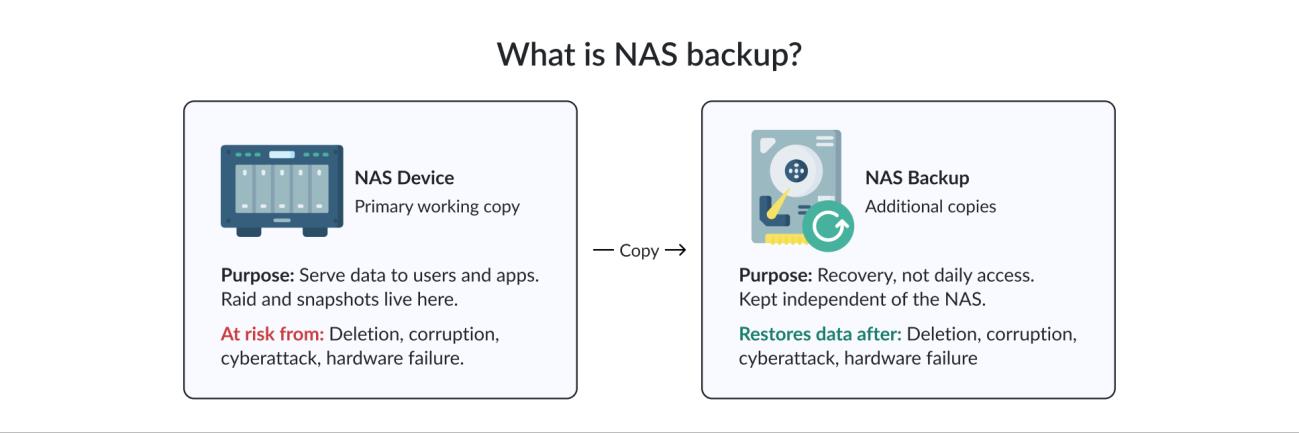
Vendors like Synology, QNAP, and TrueNAS cover most small and mid-sized deployments. Larger organizations tend to run enterprise arrays instead, sometimes NetApp, sometimes Dell PowerScale, sometimes a HyperFlex node that happens to expose NFS. The NAS itself is responsible for serving data. Backup has a different purpose: it creates an independent copy that can be recovered if the primary system is compromised, and that distinction (really, that separation) is what most homegrown plans quietly miss.
RAID keeps an array running through a drive failure, but it does not check whether the data being written is correct. Delete a folder by mistake and RAID preserves that mistake across every disk. You can’t get it back from the array, and worse, you usually can’t tell anything went wrong until you try to open the file. Snapshots offer more real protection by keeping point-in-time versions of the filesystem. They can help you restore a file from yesterday or last week, depending on the retention policy. However, snapshots usually reside on the same NAS as the production data. If the appliance itself is compromised, they’re likely affected as well.
This is exactly what several NAS-targeting ransomware campaigns exploited. DeadBolt, eCh0raix, and Qlocker targeted QNAP and Synology systems between 2019 and 2022 by compromising administrative access, encrypting file shares, and rendering local recovery mechanisms ineffective. RAID kept right on working through every one of those events. The arrays were healthy. The data inside them was already encrypted garbage, and there was no way to roll it back.
Replication copies data to a second NAS in near real time, which protects against hardware failure but faithfully replicates a corrupted file just as fast. That’s why dedicated NAS backup remains necessary. It provides recovery points that are independent of the primary NAS, whether you’re protecting a Synology or QNAP appliance or an enterprise storage array
Why NAS backup is essential
Data loss on a NAS often begins as something other than a storage failure. Accidental deletions and secondary drive failures during RAID rebuilds are common, but ransomware dictates modern backup architecture. According to Sophos’s 2025 report,, backup repositories are targeted in 96% of attacks and compromised in 76%. Groups like Akira actively harvest Veeam credentials from Active Directory before ever touching production data, which means the backup server itself is the first thing attackers go after, not the last. Local-only backups fail immediately against site-wide events like fires, floods, or power outages, and so do local-only anything.
These risks have changed cyber insurance. Underwriters now strictly require immutable backups and documented, evidence-based recovery testing to write or renew a policy, and “documented” is doing more work in that sentence than it looks like. A screenshot from 2021 doesn’t count.
Every NAS backup decision rests on RPO (maximum tolerable data loss) and RTO (maximum tolerable downtime). To meet these targets, the baseline is the 3-2-1-1-0 strategy: three copies of data, two media types, one off-site, one immutable copy, and zero errors confirmed through regular restore verification. The last digit is the one most shops still skip, which is also the first thing an auditor asks about.
NAS backup methods
Different backup methods solve different problems. Most production environments combine at least two of them so that fast local recovery and disaster recovery are handled separately. Picking only one tends to leave a gap you don’t notice until 2 a.m. on a Sunday.
Local backup
Local backup keeps a copy close to the source, which means a fast job and a fast restore. An external drive rotated in and out of the office is the cheapest version, but it depends on someone remembering to swap it, and that step quietly stops happening within a few busy weeks. A secondary NAS or a dedicated backup appliance removes that dependency and adds real throughput, retention management, and deduplication on top.
Whether a nightly backup fits within the available backup window depends on several factors working together: total data volume, the daily change rate, and available network bandwidth. Capacity alone doesn’t determine how long a backup takes. A large archive that changes very little may complete quickly using incremental backups; a much smaller surveillance system that continuously generates new footage may require far more time because its daily change rate is much higher. For that reason, most local backup jobs rely on incremental processing with integrity checks so that each cycle verifies the data instead of simply assuming that a completed job is valid.
Local backup still fails the off-site half of the 3-2-1 rule on its own, no matter how it’s built. A fire, or a NAS-targeting ransomware strain that reaches the local network, can take out the primary NAS and its local backup in the same event. It’s a solid first layer, and it was never meant to be the whole strategy.
Off-site backup without a cloud subscription
Cloud isn’t the only way to get a copy off-site. A second NAS or backup appliance at a branch office, a colocation facility, or another site the organization already operates can serve the same purpose, replicated on a schedule over a VPN tunnel or a straightforward rsync job.
Once the hardware is in place, there’s no recurring subscription, which matters for organizations sitting on tens of terabytes where cloud egress and storage fees add up fast. The tradeoff is that someone’s still got to manage that second box: patch it, monitor it, and make sure its retention and immutability settings actually match the primary site’s. Organizations without a second physical site tend to find cloud or object storage more practical by default. Those that already run more than one location often find replicating to hardware they control cheaper over a few years, especially after the third renewal quote lands in their inbox.
Cloud and object storage backup
Cloud and object storage backup extend protection past the building the NAS sits in. Public cloud platforms provide virtually unlimited capacity without requiring organizations to manage storage hardware. The tradeoff is ongoing storage and data transfer costs, which can be acceptable for businesses with seasonal growth or fluctuating backup requirements. Private cloud environments keep the storage infrastructure under direct organizational control, which can be important for industries with strict data residency or regulatory requirements.
Many organizations adopt a hybrid approach. Local backups provide fast day-to-day recovery, while cloud or object storage provides off-site protection and long-term retention. This combination is common in mid-sized and enterprise NAS deployments because it balances recovery speed with resilience.
S3-compatible object storage has also become a widely supported backup target. Because many backup applications can write to the S3 API, organizations gain more flexibility when selecting storage providers. Compatibility still varies between vendors and backup software, so it’s worth validating supported features before standardizing on a platform – WORM support, specifically, because not every S3-compatible target actually enforces it.
Pricing differs by provider, region, and commitment level, and it changes over time, but standard cloud storage tiers have commonly landed somewhere in the mid-single digits per terabyte per month in recent years. Some providers, such as Wasabi, don’t charge egress fees at all as long as monthly downloads stay within the stored volume, which matters for organizations that actually test restores on a regular basis. Since pricing changes regularly, it’s best to verify current rates directly with the provider.
Immutable storage relies on write-once-read-many (WORM) protection: once a backup is written, it can’t be deleted or modified for a defined retention period, even from a compromised administrator account. It’s one of the most effective technical controls against a ransomware group that’s already inside the network. Off-site protection and NAS disaster recovery follow from there: a copy that’s physically and logically separated from the primary NAS survives whatever takes out the entire primary site, which is the whole point of having the second copy in the first place.
Object storage also scales by adding capacity instead of requiring a redesign of the backup architecture. That’s why it’s become common in enterprise NAS backup environments. S3-compatible immutable storage is now available both as a cloud service and as on-premises infrastructure, including appliances such as DataCore Swarm Appliance for organizations that want to retain direct control of their data.
NAS backup best practices
The technology you choose matters, but the overall backup design is what determines whether you can recover from an incident.
Follow the 3-2-1-1-0 backup strategy
Three copies means the original plus at least two backups. One copy alone is a single point of failure with extra steps. Two different storage media protects against a single technology failure, bad drive firmware, or a faulty batch of disks taking out every copy at once. One off-site copy covers events that take out an entire building: fire, flood, theft, a site-wide ransomware outbreak. One immutable copy is the piece most pre-ransomware backup strategies were missing: data that can’t be encrypted, altered, or deleted even by a compromised admin account, for a defined retention window. And zero errors confirm that backups are recoverable through regular restore testing. The final point is often the most overlooked. A backup job that reports “successful” isn’t the same thing as a backup that has been restored and verified. The only way to know whether your recovery process works is to test it.
It also helps to remember that a NAS used as a backup repository is still a storage system that needs protection. Holding copies of other systems doesn’t make it immune to hardware failure, ransomware, or site-wide incidents. The backup repository itself should have an off-site copy or replication target.
Immutability is a useful security control, but it isn’t the end of the backup strategy. A backup that can’t be deleted is useful, yet you still need to know that it can be restored within the required recovery window. Regular recovery testing validates the entire chain: the backup data, the storage platform, the credentials, the recovery procedures, and the time required to bring systems back online. Immutability protects the copy from being destroyed. Restore testing confirms that the copy can actually return the business to operation when it’s needed.
Tier backups by data criticality
Not every file on a NAS needs the same level of protection. Applying the most expensive backup policy to everything can quickly drive up storage and operational costs without reducing meaningful risk. Financial records, contracts, source files, and original photo or video assets are usually difficult or impossible to replace. These datasets should be versioned, encrypted, and protected with at least one immutable off-site copy.
Other data may have a much lower recovery priority. Archived project renders, licensed stock assets, or old software installers can often be downloaded or regenerated if necessary. A simpler backup tier may be sufficient for this type of content.
The goal is to match the protection level to the business value of the data. Applying the full 3-2-1-1-0 strategy to every terabyte can become unnecessarily expensive, while using the same policy for everything can make it harder to identify what actually needs the strongest protection.
A tiered approach gives you a more practical balance: critical data receives stronger protection and longer retention, while replaceable data uses fewer resources.
Automate and test backups
Scheduled backups exist for a simple reason: manual backups get missed. Automation makes the backup strategy repeatable and ensures jobs continue to run regardless of who’s available to manage them. A successful backup job doesn’t prove that the data can be recovered, though.
Restore testing is one of the steps organizations most often postpone until an incident makes it urgent. Regular testing gives you an opportunity to find problems while there’s still time to fix them. It also provides evidence that your recovery procedures work, which matters more than ever for security audits and cyber insurance requirements.
Many backup failures are surprisingly mundane. A service account password expires and the scheduled job can no longer authenticate. A backup volume reaches capacity and new jobs begin skipping files. A network change interrupts transfers. None of these problems necessarily cause an obvious outage.
This is where monitoring matters most. Your backup environment should alert you to failed or missed jobs, unusual backup durations, storage capacity thresholds, authentication failures, and other conditions that could compromise recovery.
Encryption should cover both data at rest and data in transit, particularly when backup copies leave the organization’s direct control. For off-site and cloud backups, this protects data while it’s being transferred and while it resides on the remote storage platform.
Integrity verification provides another safeguard. Checksums and other validation mechanisms can detect silent corruption in backup data before you actually need to restore it. Automate the backup, monitor the result, and periodically perform a real restore.
Common NAS backup mistakes
Even organizations that understand the difference between NAS reliability and NAS backup fall into a handful of recurring traps. Watching for these often matters more than any specific tool choice.
Treating RAID or snapshots as backup
RAID protects availability when a disk fails. Snapshots provide point-in-time recovery. Neither one provides an independent backup copy. The distinction can be easy to overlook because a healthy RAID array and a working snapshot schedule both create a sense that the data is protected. The gap only becomes visible during an actual incident, which is the worst possible time to find out.
Keeping the only backup on the production site
A local backup is useful for fast recovery, but it shouldn’t be the only copy. A fire, theft, flood, prolonged power incident, or ransomware attack that reaches the local network can affect both the production NAS and its backup target. At least one recovery copy should therefore be kept in a separate location.
Never testing a restore
A backup job reporting “success” doesn’t guarantee a successful restore. Restore testing should cover more than a single sample file. For critical systems, periodically test the recovery of representative datasets and measure how long the process takes. This is the only reliable way to determine whether your RTO is realistic.
Applying the same policy to every file
Treating every dataset identically can create two problems at once: you may spend too much protecting replaceable data while still failing to provide adequate protection for business-critical information. Classifying data by recovery priority, retention requirements, and business impact makes the backup strategy easier to manage as the NAS environment grows.
Leaving the backup repository itself unprotected
A backup repository is still a storage system. If it’s damaged, encrypted, or lost in the same incident as the primary NAS, the copies stored there may disappear with it. Protect the repository with appropriate access controls and, where required, maintain a separate off-site or immutable copy.
Choosing a tool without modeling growth
Backup costs often change substantially as the environment grows. A licensing model that looks attractive at 20 TB may become much less appealing at 100 TB.
Before selecting a solution, model expected data growth, retention requirements, and the resulting licensing and storage costs over several years. This is especially important for capacity-based licensing, where the cost can increase directly with the amount of protected data.
How to choose a NAS backup solution
Once the backup architecture is clear, picking the right technology gets easier. Whether you use NAS-native software, a dedicated backup appliance, enterprise backup software, or a mix of these, the solution has to fit both your current environment and its expected growth.
Several criteria deserve a close look before you commit:
- Scalability The solution should absorb expected data growth without forcing a major migration in the near future. Plan around your actual growth rate, not today’s footprint
- Recovery speed Measure how quickly the platform can restore real workloads, not how fast a backup job reports success. The two numbers can be wildly different
- Immutable storage support Enforce immutability at the storage or repository level so a compromised admin account can’t simply remove the protection
- Cloud and object storage compatibility S3-compatible storage gives you extra options for off-site backups and long-term retention without forcing a different architecture later
- Security features Encryption, access controls, authentication, ransomware protection, and integrity verification all belong in the backup workflow
- Ease of management During an incident, admins need to identify the correct recovery point and start a restore quickly. A complicated interface becomes a serious operational problem under pressure
- Total cost of ownership Weigh software licensing, hardware, storage growth, network costs, cloud storage, egress fees, and the admin effort required to run the platform
- Integration with existing infrastructure A solution that works with your existing backup software, storage protocols, and operational processes is generally easier to introduce and maintain
Capacity-based licensing deserves a closer look during evaluation. Run the numbers at today’s capacity, then again at where you’ll be in three to five years. That math alone can expose a substantial gap between products that initially look similarly priced – the kind of difference that doesn’t show up until year two or three of the contract
With those factors in mind, here’s how the main NAS backup approaches stack up
Comparing NAS backup approaches
No single category wins outright. Each one fits a different combination of scale, budget, and in-house expertise, so the table below lines up the main options (open-source tools and the major enterprise platforms) against the criteria that matter most
| Approach | Examples | Best for | Native immutability | Typical cost model |
|---|---|---|---|---|
| NAS-native backup software | Synology Hyper Backup, QNAP Hybrid Backup Sync | Small deployments already standardized on one NAS vendor | Limited, vendor-dependent | Included with the NAS |
| Open-source tools | restic, rclone, Duplicati | Technical teams that want full control over destinations and scripting | Depends on the target storage | Free software; pay only for storage |
| Enterprise backup platforms | Veeam, Commvault, Rubrik, Cohesity | Larger environments needing centralized policy, reporting, and multi-workload support beyond just NAS | Native, policy-based | Capacity-based licensing, usually the largest line item |
| On-premises S3-compatible object storage | DataCore Swarm | Organizations that need object storage and immutability without a public cloud subscription | Native | Hardware plus software licensing |
| Public cloud object storage | Backblaze B2, Wasabi, AWS S3 | Organizations without a second physical site, or needing effectively unlimited off-site capacity | Native, via object lock | Per-gigabyte storage, plus possible egress fees |
Your data volume, retention period, recovery objectives, existing infrastructure, and operational expertise all influence which approach makes the most sense. There isn’t a single right answer, and plenty of environments end up combining two or three of these tiers
DataCore Swarm Appliance
DataCore Swarm Appliance gives you a local S3-compatible backup repository for environments that need object storage without managing a custom cluster. It ships as an integrated hardware and software unit, and it includes retention locking, cryptographic integrity checks, self-healing via replication and erasure coding, and encryption at rest and in transit. It’s been validated as an S3 target for major backup platforms like Commvault, Veritas, and Rubrik, so it fits scenarios where teams want a dedicated, scalable storage target for long-term retention
Conclusion
NAS reliability and backup aren’t the same thing, even though they get lumped together constantly. RAID, replication, and snapshots can improve availability and give you useful recovery options, but they don’t replace an independent backup strategy. Confusing the two is how organizations end up with a backup that’s been encrypted right alongside the source
If you keep the two ideas separated (independent copies, off-site protection, immutability, appropriate retention, and regular restore testing), you can recover the data you need within the time the business can afford, even when the systems you normally rely on are no longer available. If you don’t, the day you find out won’t be a good one
FAQ
Can I back up a NAS to object storage?
Yes. Most modern backup software supports S3-compatible object storage as a repository, which is why it’s become a common choice for off-site, immutable, and long-term NAS backup retention
What’s the most common reason a NAS backup restore fails when it’s actually needed?
Rarely the backup software itself. Common culprits include expired credentials on the restore target, incorrect immutability or retention settings, and restore procedures that were never tested against a realistic dataset. A small test file can restore fine while a production-scale recovery runs into insufficient capacity, unexpected dependencies, missing permissions, or an RTO the platform can’t meet