
Desired State Configuration (DSC) has always been one of those technologies I kept an eye on, whether it is from Microsoft or other vendors. To be able to configure a host with same set of features/functions is an important factor for mass manage or deploy. With the release of Microsoft DSC v3.2.0 in late April 2026, it’s finally matured into something truly practical for both SMBs and larger enterprises.
DSC v3 is a cross-platform, Rust-based CLI tool (dsc.exe) that feels more like a modern IaC solution – think Terraform or Ansible, but deeply integrated with Windows (and Linux) resources. In this long-form guide, I’ll explain why v3.2.0 matters, what’s new, why it’s useful for real-world admins, and most importantly – how to use it with technical examples you can apply tomorrow.
Why DSC Still Matters
In SMB and enterprise environments, configuration drift is the silent killer. One admin tweaks a firewall rule, another installs a feature manually, a script runs overnight—boom, your servers are inconsistent. This leads to security holes, failed deployments, and endless troubleshooting.
Traditional DSC (v1/v2) relied on PowerShell scripts compiling to MOF files and the LCM for enforcement. It worked, but it was Windows-centric, PowerShell-heavy, and sometimes brittle in mixed environments.
DSC v3 changes the game:
- Declarative configs in YAML or JSON (no more MOF compilation mess).
- Cross-platform (Windows, Linux, macOS).
- Adapter model: Resources can be in any language (PowerShell, Python, etc.).
- CLI-first: Run dsc config set, dsc config test, etc., from CI/CD, cron, or Task Scheduler.
- No always-on agent: Orchestrate via automation—perfect for GitOps workflows.
v3.2.0 builds on this with production-ready enhancements that admins have been waiting for. It’s not just incremental; it adds built-in resources that cover common pain points without hunting for community modules.
Key New Features in DSC v3.2.0
Here’s what stands out for sysadmins:
- New Built-in Windows Resources (Huge win):
- Microsoft.Windows/Service: Manage Windows services (start/stop, startup type, credentials).
- Microsoft.Windows/FirewallRuleList: Bulk firewall rule management.
- OpenSSH resources: Microsoft.OpenSSH.SSHD/sshd_config, Subsystem, SubsystemList—perfect for secure remote management.
- Extended WhatIf Support: dsc resource set –what-if now previews changes safely. No more “oops” moments in production.
- Version Pinning: Lock resources/adapters to specific versions for stability across environments.
- Richer Expression Language + Custom Functions: More powerful configs with logic (arrays, indexing, etc.).
- Experimental Bicep Integration via gRPC: Bicep can now orchestrate DSC resources directly—huge for Azure/hybrid folks.
- Improved PowerShell Adapter: Better logging/trace conversion from PS resources.
These features make DSC v3.2.0 suitable for compliance-heavy environments (PCI, ISO, CIS benchmarks) and automated server builds.
Why It’s Useful for SMB and Enterprise Admins
For SMBs (50-500 servers): You probably don’t have a full SCCM/Intune/Ansible team. DSC v3 lets one or two admins maintain consistency with Git-stored configs, simple scripts, and scheduled tasks. New service and firewall resources mean you can enforce baselines without custom scripting everywhere.
For Enterprises: Integrate with Azure DevOps, GitHub Actions, Jenkins, or existing ConfigMgr. Use for brownfield servers (test/set without full LCM), Linux workloads, and hybrid cloud. Version pinning prevents “it worked in dev” surprises. WhatIf reduces risk during audits or patch cycles.
Real benefit: Idempotency—run the same config multiple times; it only makes necessary changes. Combined with monitoring (DSC traces + your SIEM), you get drift detection and auto-remediation paths.
Installation: Quick and Painless
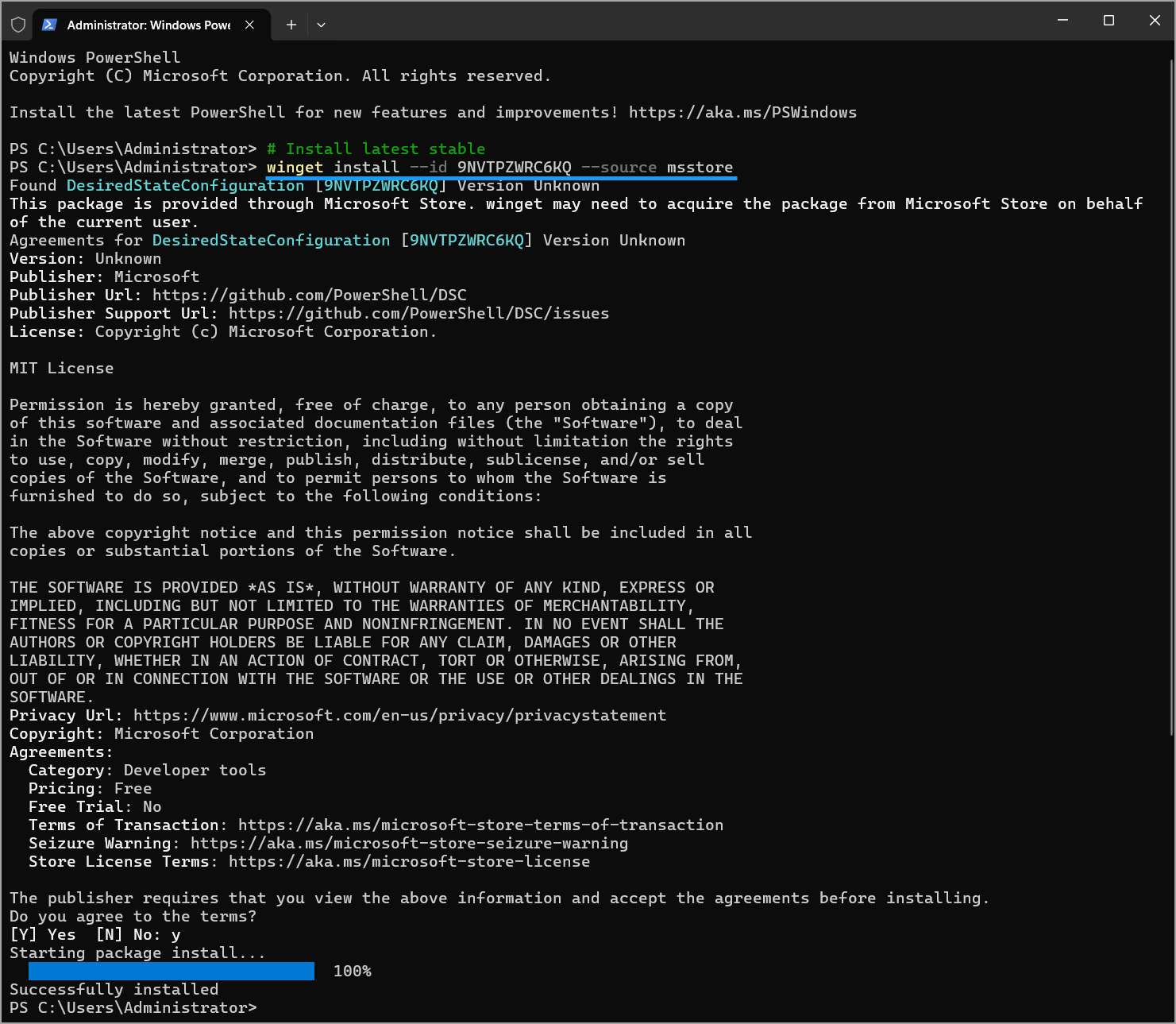
Option 1: WinGet (Recommended for Windows)
powershell
winget search DesiredStateConfiguration --source msstore

winget install Microsoft.DesiredStateConfiguration
or
powershell
# Install latest stable

winget install --id 9NVTPZWRC6KQ --source msstore
Option 2: Manual (for full resources or Linux)
Download the latest ZIP from PowerShell/DSC GitHub releases. Extract and add to PATH.
Verify:
bash
dsc --version

# Should show 3.2.0
On Linux: Similar process; it runs natively.
Discovering resources via DSC
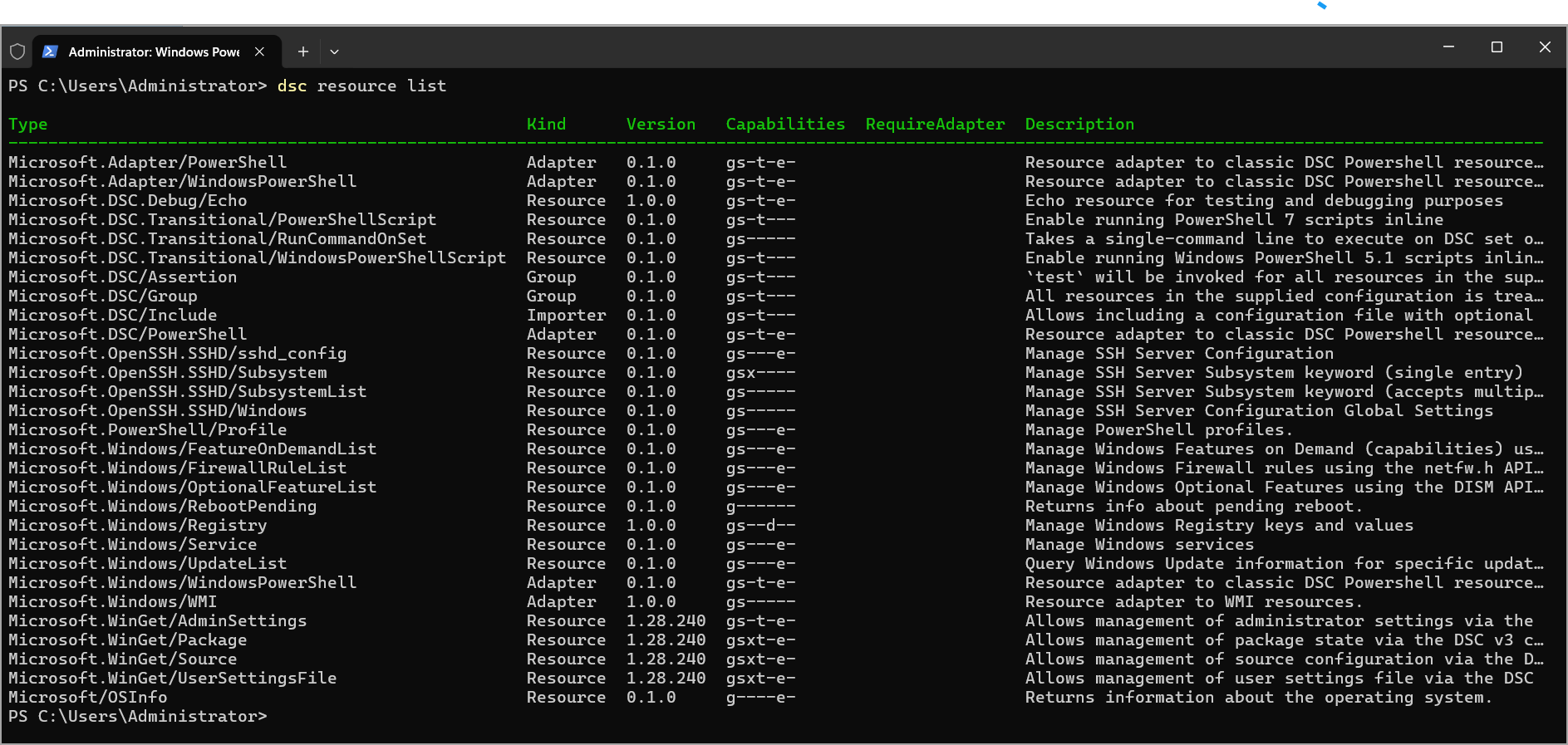
You can use dsc recource list command and enumerate the available DSC resources on a server. DSC will discover those resources by searching the folders in your PATH environment variable.
Files with the .dsc.resource.<extension> suffix are DSC resource manifests. They describe both the settings they enable you to manage and how DSC can invoke them as a command.
You can test it. Open a terminal and run the following command:
PowerShell
dsc resource list
DSC outputs a table showing the available resources and summary information about each resource.
OpenSSH Management – Enterprise Security Win
Many orgs are moving to OpenSSH for Windows. v3.2 makes it easy.
Key DSC v3.2 OpenSSH Resources
- Microsoft.OpenSSH.SSHD/sshd_config: Manages the complete SSH server configuration file.
- Microsoft.OpenSSH.SSHD/Subsystem and SubsystemList: Manage specific SSH subsystem entries.
- Microsoft.OpenSSH.SSHD/Windows: Manages Windows-specific SSH configurations, such as setting the default shell.
yaml
 - name: SSHD Config

 type: Microsoft.OpenSSH.SSHD/sshd_config

 properties:

 Port: 2222

 PermitRootLogin: "no"

 PasswordAuthentication: "no"

 PubkeyAuthentication: "yes"
Subsystem management for SFTP, etc., is straightforward with the List resources. Perfect for hardening jump boxes or admin workstations.
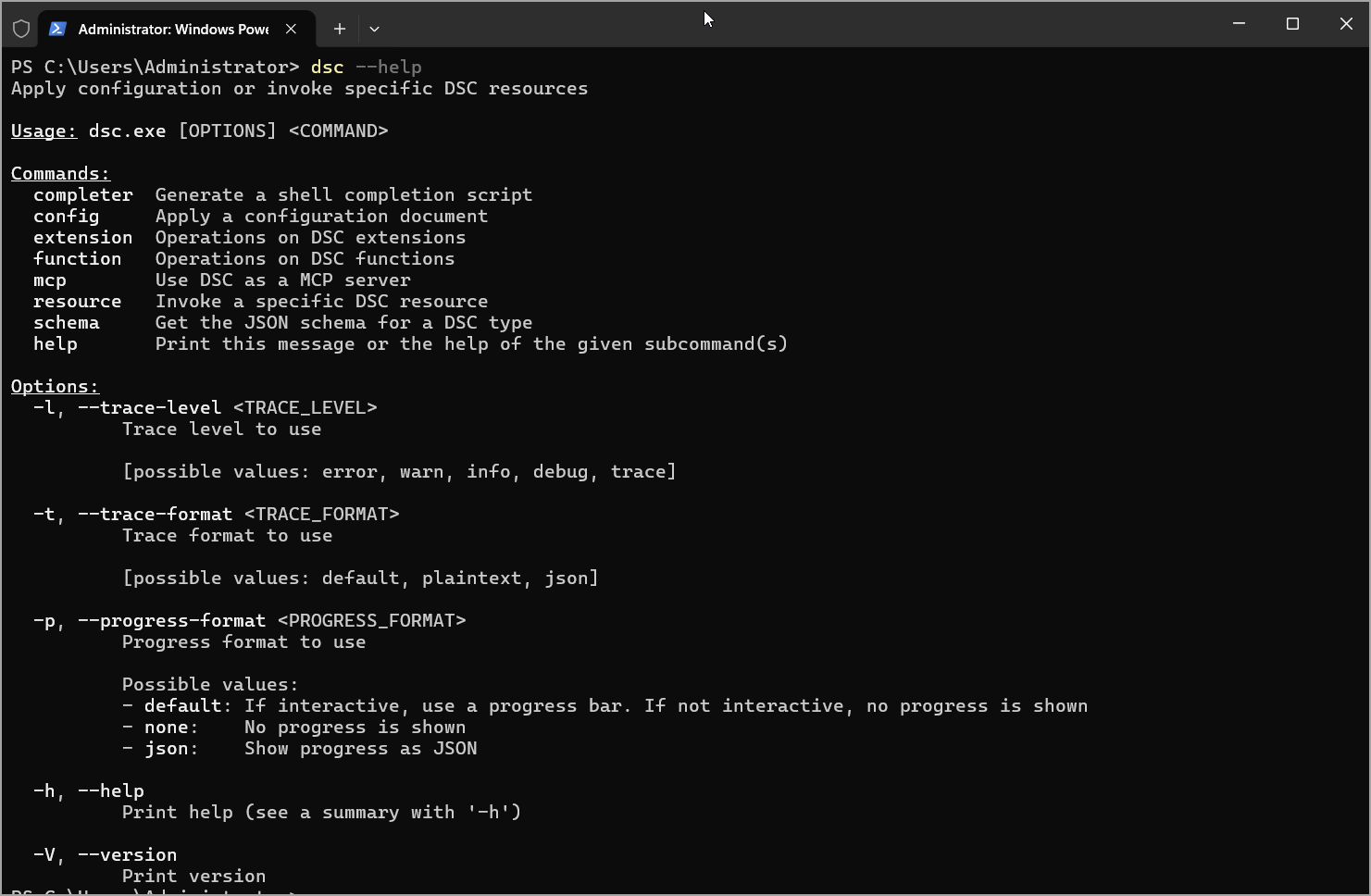
See the available options via dsc.exe –help command.
Advanced: Expressions, Functions, and Bicep
Bicep integration (experimental): Define infrastructure in Bicep and hand off config to DSC via gRPC. Ideal for Azure Arc or hybrid. Example workflows are emerging on GitHub – watch for production patterns.
Integration with Automation and CI/CD
- GitOps: Store YAML in repo → PR validation with dsc config test.
- Scheduled enforcement: Task Scheduler or cron: dsc config set -f prod.yaml.
- Reporting: Pipe output to Log Analytics, ELK, or simple CSV. PowerShell adapter improvements mean cleaner traces.
- Scaling: Use dsc config export (improving) or custom scripts for discovery.
For SMB without heavy DevOps: Simple PowerShell wrapper scripts calling DSC.
Migration Tips from Old DSC
- Existing PS resources still work via adapters.
- Convert MOF/configs gradually.
- Test in non-prod with –what-if.
- Remove LCM dependency—big simplification.
Limitations to note: No built-in pull server yet (use orchestration tools). Some advanced grouping/assertions from v3.0+ requires practice.
Real-World Use Cases
- Patch Baselines: Ensure features + services post-Windows Update.
- Compliance: Firewall + registry + service states for audits.
- Server Builds: Golden image + DSC for final config.
- Linux + Windows fleets: One toolset.
- Security Hardening: Disable unnecessary services, enforce SSH policies.
In one enterprise scenario, teams reduced drift-related incidents by 70%+ after adopting similar patterns.
Final Words
Microsoft DSC v3.2.0 isn’t flashy marketing hype – it’s a solid, technical evolution that delivers what admins actually need: reliable, testable, versioned configuration management without the old baggage.
For SMBs, it lowers the barrier to consistent environments. For enterprises, it fits modern pipelines while supporting legacy resources.
The best is to s
tart small and test in Proof of concept (POC) virtual lab. Install it today, baseline a few services/firewall rules on test servers, and expand. Combine with your existing tools (Group Policy for user settings, DSC for machine config) and then move forward to larger environments.
FAQ
What is Microsoft Desired State Configuration v3.2.0?
Microsoft DSC v3.2.0 is a cross-platform command-line tool for managing system configuration with declarative YAML or JSON files. It helps administrators define, test, and apply a desired server state across Windows, Linux, and macOS environments.
What is new in DSC v3.2.0?
DSC v3.2.0 adds built-in Windows resources for managing services, firewall rules, and OpenSSH settings. It includes extended WhatIf support, version pinning, richer expression language features, custom functions, experimental Bicep integration, and PowerShell adapter improvements.
Why is DSC v3.2.0 useful for system administrators?
DSC v3.2.0 helps reduce configuration drift, standardize server builds, enforce compliance baselines, and automate repetitive configuration tasks. Admins can use it in scripts, scheduled tasks, CI/CD pipelines, or GitOps workflows.
How is DSC v3 different from older PowerShell DSC versions?
Older DSC versions relied on PowerShell, MOF files, and the Local Configuration Manager. DSC v3 uses a standalone CLI, supports YAML and JSON configuration documents, works across platforms, and can use resources written in different languages through adapters.
Can DSC v3.2.0 manage OpenSSH on Windows?
Yes. DSC v3.2.0 includes OpenSSH-related resources for managing SSH server configuration, SSH subsystems, and Windows-specific SSH settings. This is useful for hardening jump boxes, admin workstations, and hybrid environments.
Is DSC v3.2.0 suitable for SMBs and enterprises?
Yes. SMB teams can use it to maintain server consistency without a large automation stack. Enterprise teams can connect it with Azure DevOps, GitHub Actions, Jenkins, ConfigMgr, Azure Arc, or existing compliance workflows.