


GPU clusters cost serious money whether they’re training or waiting. In most production pipelines, storage constraints idle expensive hardware more often than compute limits do. Slow dataset reads and checkpoint write contention compound across every training run, and fragmented data tiers make the problem worse.
Below, we’ll cover where these bottlenecks show up, how you’ll spot them, and which architectural decisions actually help – though I’ll admit up front that not every fix needs new hardware, and some of the worst bottlenecks are self-inflicted (something I wish more teams understood before they started calling vendors).
What counts as a bottleneck
An AI storage bottleneck is any weak point that prevents workloads from getting data fast enough to keep compute busy. Constraints can sit in throughput, latency, IOPS, metadata performance, or network bandwidth. GPU clusters consume power and cooling whether they’re working or not, so the cost of getting this wrong shows up from the first idle cycle. If you’ve ever watched a utilization graph flatline while the SAN LEDs blink happily, you know exactly what I mean.
AI workloads place different demands on storage than traditional enterprise apps. Training repeatedly reads the same large datasets from many parallel workers. Checkpointing writes hundreds of gigabytes in short bursts. Inference needs fast, predictable access to model weights and cached context. A system that’s tuned for one pattern can fail miserably on the others.
Effects compound fast. You add GPUs and see little improvement because the limit sits earlier in the data path. Sad truth – many teams we’ve worked with plan compute carefully and treat storage as an afterthought.
That ordering produces the exact bottlenecks described here. Every time.
Where bottlenecks appear in the pipeline
Where does storage actually choke? AI workloads span several stages, and each creates a different storage demand.
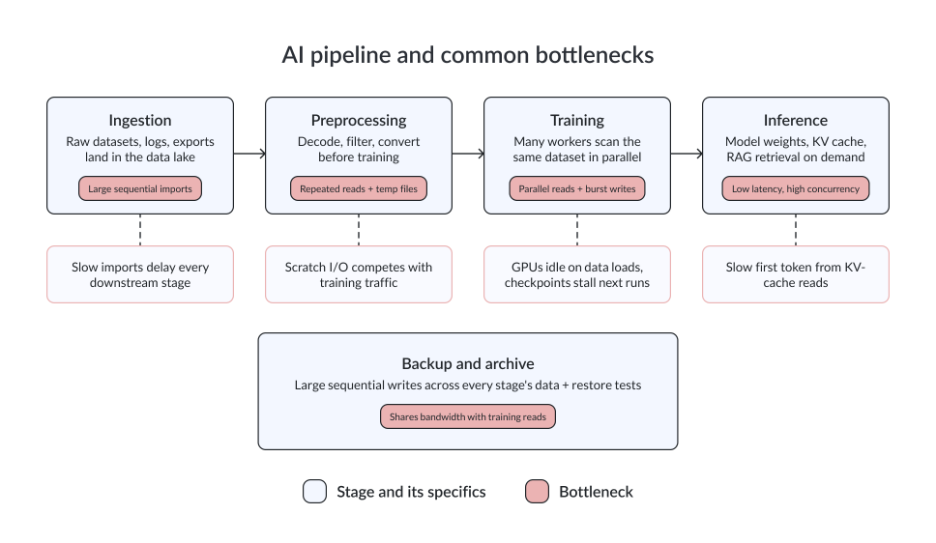
The larger your pipeline becomes, the more these demands overlap. In many cases – ingestion, training reads, checkpointing, and backup all compete for the same throughput and network bandwidth at once.
Meta’s work on ML training data illustrates this at scale. The company trains thousands of models on petabyte-scale datasets using Tectonic, its distributed file system, while a separate preprocessing tier handles decoding and conversion to tensor formats. At that scale, storage and network paths are as much a part of AI performance as the training code itself. Maybe more.
Training reads versus inference latency
Training and inference put different demands on storage, so the diagnostic approach depends on which phase is slow.
Training bottlenecks usually appear in dataset reads or checkpoint writes. When an LLM trains across dozens of GPUs, each worker repeatedly reads from the same shared dataset, and if your storage can’t serve those requests concurrently, workers stall, which means your expensive silicon sits there doing nothing while the clock ticks. Checkpoint I/O creates a separate challenge. Model and optimizer state can reach hundreds of gigabytes per save, and research into LLM checkpointing overhead shows this can eat a large share of total training time when storage isn’t built for burst writes.
Inference behaves differently. KV-cache access speed and model loading latency matter most. Research on dual-path KV-cache architectures (DualPath) has shown that agentic LLM inference workloads can become dominated by cache storage I/O rather than compute. A model that runs efficiently once loaded can still deliver poor user-facing latency if storage retrieves cached context slowly.
Symptoms differ. When debugging training jobs, low GPU utilization during dataset loading is the first thing to check. In inference, it’s high first-token latency even when the model itself performs well.
Additionally, enterprise data often arrives scattered across NAS platforms, databases, and cloud buckets before it ever reaches an ML pipeline. Time spent federating and normalizing that data can become the first bottleneck you hit, before any GPU is involved.
Agentic inference introduces another challenge by generating a persistent write stream of tool calls, trace logs, intermediate state, and telemetry. Teams that don’t account for this when planning inference storage frequently see write queues build up under sustained traffic.
Why storage chokes
Slow shared storage serving multiple GPU jobs simultaneously is one of the most common causes of AI performance issues. When several training jobs compete for the same NAS or SAN, throughput per job drops and latency rises. A 10 GbE storage network (still very common in older racks, unfortunately) feeding a cluster that can consume far more bandwidth becomes the ceiling regardless of the hardware behind it, and no amount of flash on the array side fixes a network pipe that’s simply too narrow, which is a lesson teams seem to relearn every budget cycle.
I’ve seen too many teams start with a good old shared NAS because it’s simple to deploy. That works for early experiments. Once several GPU servers read the same dataset in parallel, the NAS controller or network caps the entire cluster, even when the underlying drives still have capacity to spare. It happens.
Data scattered across tiers creates another bottleneck. Excessive movement between NAS, object storage, local disks, and cloud buckets adds latency at every step. A backup job running during an active training window can consume enough bandwidth to measurably reduce GPU utilization. Teams that haven’t isolated these traffic types encounter this pattern regularly. It’s not subtle.
Small-file datasets introduce their own failure mode. A computer vision training job may involve millions of individual JPEG files. On paper, the storage system’s got more than enough throughput. In practice, the file system spends a disproportionate amount of time locating and opening files. Metadata performance becomes the bottleneck. Bandwidth is rarely the issue, and no amount of sequential read optimization fixes it because the problem isn’t the read – it’s the lookup.
How to tell storage is the problem
Check the basics first. The most obvious signal is low GPU utilization during data loading. If your GPUs spend significant time waiting for data instead of processing it, storage or preprocessing is often the real constraint. Long data loader wait times relative to actual compute time are a common indicator. At the infrastructure level, high storage latency, saturated network links, and elevated queue depth usually point to the same problem.
One reliable test is to stage the active dataset on local NVMe storage and run the same training job again. If performance improves significantly, the bottleneck is likely in shared storage or the network path between compute and storage. Checkpoint write duration provides a useful secondary check. Writes that take minutes instead of seconds almost always indicate storage saturation. No exceptions.
Track metrics together. GPU utilization, storage throughput, latency, IOPS, queue depth, network saturation, data loader time, and checkpoint write duration all tell part of the story. Teams identify bottlenecks faster when GPU idle time and storage performance appear on the same dashboard instead of being treated as separate concerns – well, not necessarily on one screen, but correlated, which is different and honestly most monitoring tools don’t do this well out of the box.
Storage architectures for AI workloads
AI pipelines usually need more than one storage layer. A data lake, a hot training tier, a checkpoint target, and an inference path often have different and sometimes conflicting performance requirements. For a detailed breakdown of storage types designed specifically for AI, see AI storage in 2026: types, benefits, and vendors on the StarWind blog.
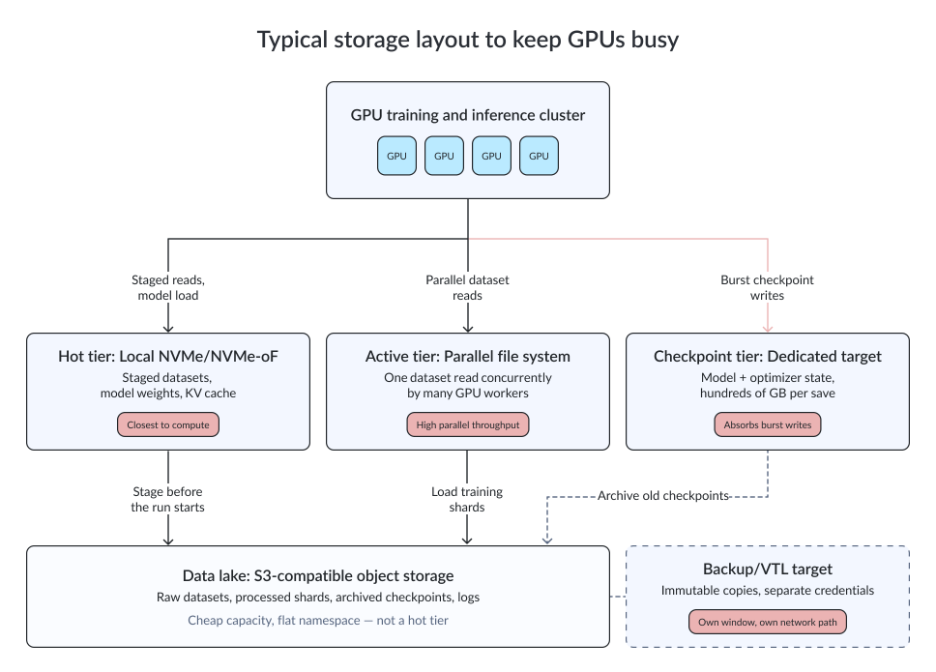
Each architecture solves a different problem, so choosing the right one depends on whether your priority is throughput, latency, scalability, operational simplicity, or cost.
The most common architectural mistake is trying to use one storage platform for every stage of the pipeline. For example, platforms such as WekaFS, VAST Data, and DataCore Nexus are designed specifically for HPC-style access patterns. NVMe storage via NVMe-oF serves the hot tier, whether that means rapid model loading during inference or handling burst checkpoint writes during training.
For edge AI deployments and read-heavy workloads in particular, NVMe-oF makes shared flash accessible across local nodes without requiring a central SAN. StarWind VSAN and DataCore SANsymphony both support this transport layer for compact edge clusters running local inference.
How to reduce AI storage bottlenecks
The right fix depends on where the bottleneck actually exists.
We’ve found that data placement is usually the fastest improvement you can make, and it’s also the cheapest because it often requires nothing more than moving data to a different mount point before the job starts. Stage the active training dataset on local NVMe or a high-throughput shared tier before the job starts, not while it’s already running. Data movement happens once instead of competing with training traffic throughout the run.
For distributed training, avoid routing every GPU worker through a single NAS controller. One overloaded controller caps the entire cluster regardless of what the underlying hardware can do. Parallel file systems and scale-out storage spread the load across multiple nodes and remove that single point of contention.
Checkpoint storage is another area that often receives attention too late, and I’ll admit we’ve missed this ourselves more than once. When checkpoint traffic shares the same path as training reads, training performance usually suffers. Separating checkpoint storage onto its own tier, even a relatively small one, often resolves the problem without requiring a major architectural redesign.
Not every bottleneck requires new hardware. Some just need better configuration. Data loader optimization can be surprisingly effective. Serial file reads and poorly configured loaders create CPU-side delays that look like storage problems but aren’t. Prefetching and parallel loading can significantly reduce wait times. Small-file sprawl is another issue worth addressing early. Packaging datasets into larger shards reduces metadata overhead before it becomes the limiting factor.
Backup traffic deserves special attention as well. Giving backups their own schedule or their own network path is usually more effective than simply adding capacity. More bandwidth doesn’t eliminate contention if competing workloads continue to share the same resources.
Cloud, on-premises, and hybrid AI storage
The right deployment model depends on your workload requirements, data sensitivity, and how much latency your applications can tolerate.
Cloud environments work well for burst training and short-lived experiments. You can provision compute close to managed storage, complete the training run, and release the resources afterward. The issue surfaces at scale. Egress costs for multi-terabyte training datasets can match the compute cost of the training job itself, and staging data near cloud compute before each run is usually more practical than treating storage and compute placement as independent decisions. Painful, but predictable.
On-premises infrastructure remains a strong fit for organizations with sensitive datasets and predictable workloads. For example, a healthcare team keeping regulated imaging data close to local GPU resources avoids both compliance concerns and the cost of repeatedly moving large datasets to the cloud. The same organization may still use cloud GPUs for less sensitive experimentation while keeping primary datasets on-premises.
Edge deployments address situations where round-trip latency to a central location is unacceptable. Storage and compute stay together. Full stop.
Hybrid architectures are where many organizations I’ve talked to usually land. Cold data resides in object storage, active datasets are staged close to GPU clusters, and cloud resources absorb temporary demand spikes. Managing data movement between tiers without introducing new bottlenecks is the hard part.
HCI and software-defined storage at the edge
HCI and software-defined storage are not the primary answer for hyperscale AI training, but they fit several adjacent use cases well. Edge inference and local data preparation are sweet spots, as are compact clusters where operational simplicity matters. Hyperscale training is not.
Consider a factory running local inference on production-line camera feeds. Sending every request to a centralized data center introduces unnecessary latency and creates a dependency on WAN connectivity. A compact hyperconverged cluster keeps compute and storage in the same environment, eliminating the need for a separate storage network. If you’re designing edge AI infrastructure, edge storage deserves consideration as its own architectural category.
StarWind HCI Appliance and StarWind VSAN are designed around this model. They support two-node and small-cluster deployments where compute and storage share the same hardware, high availability remains local, and there’s no dependency on a centralized storage network. StarWind VSAN also provides software-defined fault tolerance without requiring a dedicated witness node. We’ve found this particularly valuable at remote sites where every additional server adds cost and operational overhead, and where shipping a replacement part might take days.
Common AI storage mistakes
Most AI storage problems are predictable. In fact, we see the same mistakes repeatedly, regardless of team size and budget, or the sophistication of the models involved.
Buying GPUs before checking storage throughput is probably the most common. The GPUs arrive, the cluster is deployed, and only then does the team discover that the existing storage system can’t feed them at the required rate. The hardware budget is spent. Not on the actual bottleneck.
Testing with generic benchmarks creates false confidence. Sequential read tests pass, while checkpoint writes and small-file handling still fail. AI-specific workload testing should be part of storage validation before any major hardware investment is made.
Treating object storage as a universal hot tier is a recurring mistake in first-generation AI environments. Object storage scales extremely well for data lakes and archives. It also handles large repositories without issue. But active training workloads typically require lower and more predictable latency than S3-compatible storage can provide. Over long training runs and repeated dataset scans, that gap becomes increasingly visible.
No monitoring of GPU wait time means teams notice slow runs but can’t locate the cause. GPU idle cycles tied to data loading are the most actionable signal of a storage bottleneck, and the metric most commonly missing from AI infrastructure dashboards.
What to check before your next GPU purchase
Storage is rarely the first thing teams investigate when AI jobs run slowly, but it’s frequently where the actual limit sits. Many storage bottlenecks can be resolved without buying additional hardware. Start there.
Before we buy our next GPU, we run a simple test. Stage your dataset on local NVMe, watch the utilization graph, and compare it to your shared storage baseline. If the gap is wide, you don’t have a compute problem. You have a plumbing problem. Fix the storage first. The GPUs can wait. They’re already good at that.
FAQ
What is an AI storage bottleneck?
An AI storage bottleneck is any limitation in throughput, latency, IOPS, metadata performance, or network bandwidth that prevents workloads from receiving data fast enough to keep compute resources fully utilized.
Why do GPUs sit idle during AI training?
GPUs typically sit idle when the data pipeline cannot deliver training samples quickly enough. Common causes include slow shared storage, saturated network links, inefficient data loaders, or datasets that have not been staged close to compute resources.
What storage is best for AI workloads?
Hot training data benefits from NVMe or a parallel file system. The data lake and cold datasets suit S3-compatible object storage. Checkpoints need a tier that absorbs burst writes. The right design is tiered, matched to each pipeline stage.
Is object storage good for AI?
Yes, but it depends on the workload. Object storage works well for AI data lakes, backups, archives, and long-term dataset repositories. It is generally less effective as the primary hot training tier unless additional caching or staging layers are used.
Is NVMe required for AI storage?
Not always, but it is the fastest option for hot datasets, checkpoint writes, and model loading. Many teams use NVMe as a local staging tier with colder data in NAS or object storage behind it.
What is the difference between AI storage for training and inference?
Training needs high sustained throughput for dataset reads and burst write capacity for checkpoints. Inference needs low latency for model loading, KV-cache access, and embedding retrieval.
How do I know if storage is slowing down my AI workloads?
Start by monitoring GPU utilization during data loading and correlating it with storage latency, throughput, and network utilization. A simple validation test is to move the dataset to local NVMe storage and rerun the workload. If performance improves significantly, storage or the network path is likely the bottleneck.
Can HCI help with AI storage bottlenecks?
For edge AI, local inference, and smaller training clusters, yes. For large-scale distributed training, dedicated high-throughput storage is usually more appropriate.
What storage metrics matter for AI workloads?
GPU utilization, storage throughput and latency, IOPS, queue depth, network saturation, data loader time, and checkpoint write duration.
