
If you are still running VMware vSphere 8.x, the support clock is real and the dates are now clear. Broadcom’s focus on VMware Cloud Foundation (VCF) 9.x means classic vSphere environments that do not renew into the full VCF path will lose mainstream support. For vSphere 8.0 (ESXi 8.0, vCenter Server 8.0 and typically vSAN 8.0):
- End of General Support (EoGS): 11 October 2027 — after this date Broadcom/VMware will no longer provide regular product updates, bug fixes or security patches.
- End of Technical Guidance (EoTG): 11 October 2029 — only limited guidance remains; no new security patches or hardware certifications in the normal course.
That leaves roughly 14 months (from today) until the critical “no more patches” milestone. For administrators this creates immediate pressure on backup, recovery testing and migration planning. For CEOs and IT leaders it is a budget, risk and platform-strategy conversation that cannot be postponed much longer.
Veeam Backup & Replication 13.1 (build 13.1.0.411) lands at the right time. On the hypervisor side it adds native support for several new platforms and introduces the Universal Hypervisor API (UHAPI). Combined with the existing portfolio (vSphere, Hyper-V, Nutanix AHV, Proxmox VE, HPE Morpheus VM Essentials, oVirt-based platforms and others), Veeam now covers the large majority of production hypervisors in use.
The practical value is that you can protect the new target with the same console, jobs, repositories and recovery workflows you already know. Cross-platform Instant Recovery and entire-VM restore let you move workloads without first changing your data-protection tool – one of the biggest friction points in any hypervisor migration.
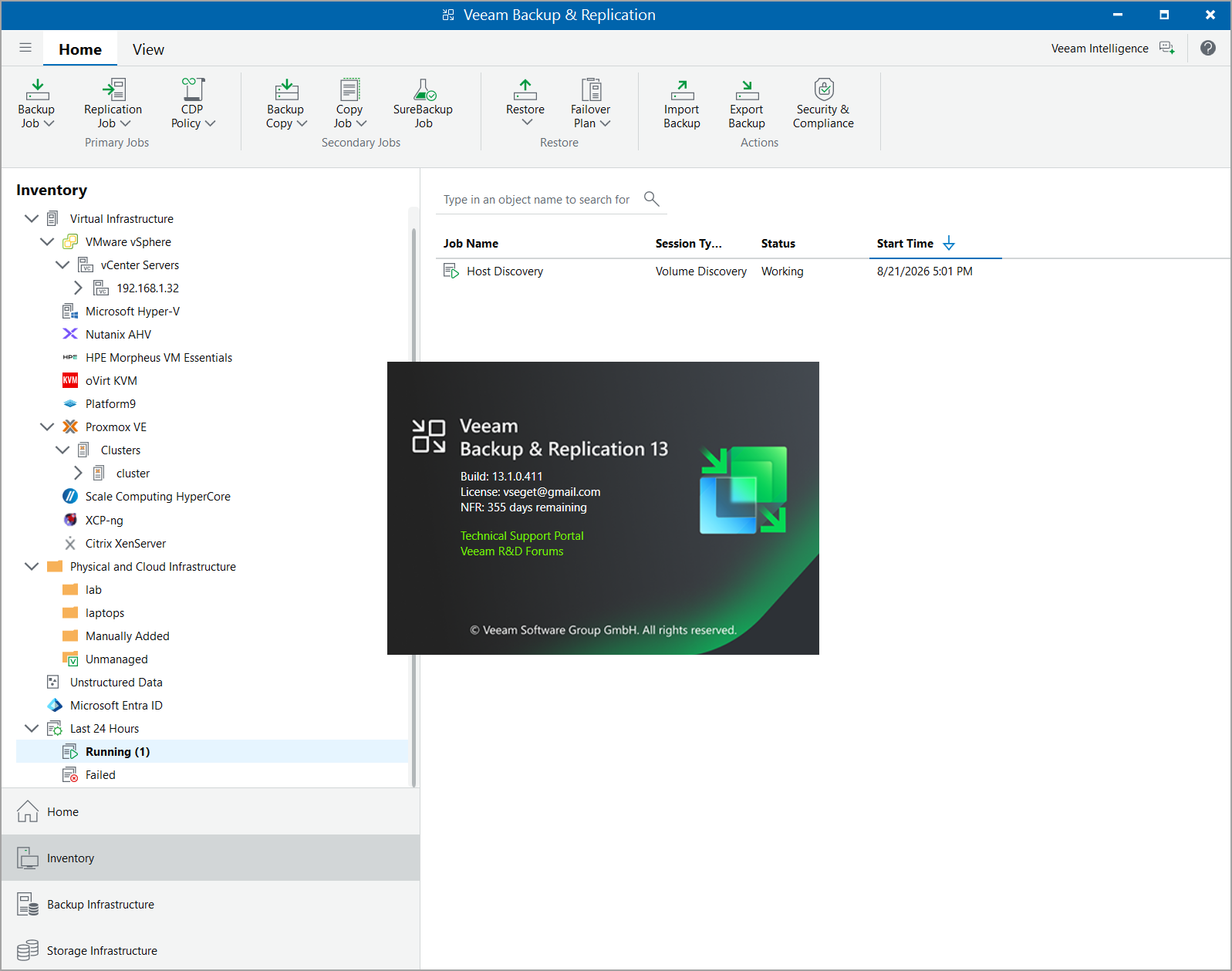
Below is a practical look at the key new platforms Anthony highlights (Sangfor aSV, Citrix XenServer, XCP-ng and Platform9), what Veeam 13.1 delivers, and where each typically fits.
1. Sangfor aSV
To be honest, I never heard about this solution before Veeam started to support it. But hey, this is IT, you learn every day…..
Sangfor aSV is a full-featured enterprise hypervisor, particularly strong in certain regions and with organisations looking for an integrated stack. It comes with a complete feature set aligned to Veeam’s cross-platform standards.
In Veeam 13.1 you get:
- Changed Block Tracking (CBT) for efficient incremental backups
- Snapshot quiescence for Windows VMs
- Backup health checks plus Threat Hunter and YARA content scanning
- Entire VM restore from (and to) any other supported hypervisor, cloud VM (AWS/Azure/GCP) or physical-agent backup
- Instant Recovery to vSphere, Hyper-V, Nutanix AHV and Proxmox VE (Proxmox under experimental support)
- Disk mount (read-only) to Windows or Linux guests, file-level restore, export to VHD/VHDX/VMDK
- Veeam Explorer application-item recovery (SQL, Exchange, SharePoint, Active Directory, Oracle) via heuristics detection
For administrators this means you can stand up Sangfor as a migration target, protect new VMs immediately, and still recover older vSphere backups onto it if required. For leadership it is a viable option when total cost of ownership and regional support matter.
2. Citrix XenServer
Citrix XenServer (the commercial Xen-based platform) returns to full native Veeam support. Many environments still run it for specific workloads or because of long-standing Citrix Virtual Apps and Desktops deployments.
Capabilities match the modern Veeam standard:
- CBT-driven incremental backups
- Full backup scanning (health, malware, YARA)
- Cross-platform entire VM restore and Instant Recovery to the major targets
- Disk mount, file-level restore, backup export
- Application-item recovery through Veeam Explorers
If part of your estate is already on XenServer, or if you are evaluating it as a lower-cost alternative for certain tiers, the 13.1 removes the previous “agent or workaround” discussion. You protect it the same way you protect everything else.
3. XCP-ng
I know and I like XCP-ng, and I have already wrote a blog post on Starwind blog about this French platform by Vates. XCP-ng is the open-source, community-driven continuation of the XenServer lineage. It is popular with organizations that want a free or low-cost Xen-based hypervisor, backed by an active community and commercial support options via Vates. It is very efficient and suitable not only in large enterprises, but also at the ROBO or Edge.
Veeam treatment is essentially identical to Citrix XenServer:
- CBT incremental backups
- Threat scanning and health checks
- Full cross-platform restore and Instant Recovery options
- File-level and application-item recovery
- Disk export flexibility
For administrators who prefer open-source stacks or who already test XCP-ng in labs, this is a clean path. You can migrate selected workloads, keep protecting them with the same Veeam infrastructure, and still fall back to Instant Recovery onto vSphere or Hyper-V during the transition. For CEOs it represents a cost-controlled alternative that does not force an immediate change of backup vendor.
4. Platform9 (via Universal Hypervisor API)
Platform9 is a managed private-cloud / Kubernetes-centric platform that also offers virtualization capabilities. It is one of the first platforms to integrate through Veeam’s new Universal Hypervisor API.
I have written a blog post about the Platform 9 Community Edition (which Is free) on StarWind site.
Supported operations include:
- VM backup jobs
- Backup scanning (health + threat detection)
- Entire VM restore across platforms and to/from cloud or agent backups
- Instant Recovery to the usual set of targets
- Disk mount, file-level restore, export, and Explorer-based application recovery
The advantages are that UHAPI gives hypervisor vendors a defined, certified path to Veeam compatibility rather than requiring a fully bespoke integration every time. Platform9 is the first through that door. This model should improve long-term support quality.
Administrators get a single pane of glass; leadership gets a platform that can sit alongside existing investments without forcing a forklift change of the data-protection layer.
There is also a KubeVirt Proxy (built with the Kasten team) that provides a management interface for the growing set of KubeVirt-based hypervisors. The first plug-in on that layer is expected shortly – useful context for anyone looking at Red Hat OpenShift Virtualization or similar.
Common Capabilities That Matter for Migration
Across these platforms you get the same core Veeam strengths Anthony highlights:
- Image-level backups using native change tracking where available
- Portable recovery—restore a VM originally protected on vSphere onto one of the new hypervisors (or vice versa)
- Instant Recovery to keep RTO low while you decide the final home of the workload
- Integration with existing repositories, including hardened/immutable ones, scale-out backup repositories and object storage
- Application-aware processing and granular recovery for the usual Microsoft and Oracle workloads
On the existing platforms, Nutanix AHV and Proxmox VE also receive full Web UI coverage (matching vSphere and Hyper-V), advanced RBAC, VirtIO driver injection on restore, and (for Proxmox) native VM replication for the first time.
Practical Advice for Administrators and Decision Makers
With the 11 October 2027 End of General Support date now fixed, the window for orderly planning is roughly 14 months. Start by inventorying which workloads are candidates for migration and which must stay on vSphere for application or compliance reasons. Use Veeam’s Instant Recovery and SureBackup capabilities to test recovery of current backups onto a proof-of-concept cluster of one of the new hypervisors. Because the backup format is consistent, you can protect the new environment with the same jobs and retention policies.
From a licensing perspective, Veeam’s Universal License (VUL) model already covers these platforms, so you are not forced into a new SKU conversation just to protect the new hypervisor. That keeps the financial discussion focused on the hypervisor and infrastructure costs rather than on backup tooling.
We can see that hypervisor support went to the next level in this 13.1 release and sets customers up to be covered no matter where they migrate to – platforms fully supported from day one plus a Universal Hypervisor API that keeps the door open for whatever comes next.
For CEOs and CFOs the message is straightforward: after 11 October 2027 there will be no more regular security patches for vSphere 8.x from Broadcom. The migration does not have to include a simultaneous change of backup and recovery platform. Veeam 13.1 reduces that particular risk and gives you a broader set of viable targets.
Veeam Backup & Replication 13.1 is available now. Download it, stand up a lab with one or two of these new hypervisors, and start testing restores from your existing vSphere backups. The data-protection side of the migration is ready; the rest of the project is now mainly about application compatibility, networking, storage performance and operational readiness.
FAQ
What is new for hypervisor support in Veeam Backup & Replication 13.1?
Veeam Backup & Replication 13.1 adds support for Sangfor aSV, Citrix XenServer, XCP-ng, and Platform9. The release also introduces the Universal Hypervisor API, or UHAPI, which provides a standardized path for additional virtualization platforms to integrate with Veeam.
Which new hypervisors are supported in Veeam 13.1?
The article focuses on four platforms: Sangfor aSV, Citrix XenServer, XCP-ng, and Platform9. Platform9 is one of the first platforms to integrate through the new Universal Hypervisor API.
What is the Veeam Universal Hypervisor API?
The Universal Hypervisor API gives hypervisor vendors a defined integration path to Veeam without requiring a completely custom integration for every platform. It is intended to make it easier for new virtualization platforms to add backup and recovery compatibility.
Does Veeam 13.1 support XCP-ng?
Yes. Veeam 13.1 provides support for XCP-ng with CBT-based incremental backups, health and threat scanning, cross-platform restore, Instant Recovery, file-level recovery, application-item recovery, and disk export options.
What Veeam capabilities are available for Citrix XenServer?
Citrix XenServer receives native Veeam support with CBT-driven incremental backups, backup health and malware scanning, cross-platform VM restore, Instant Recovery, disk mounting, file-level restore, export, and application-item recovery through Veeam Explorers.
Can Veeam restore VMware backups to another hypervisor?
Yes. The article highlights cross-platform recovery as one of the main migration benefits. A VM originally protected on vSphere can be restored to another supported hypervisor, helping organizations test or move workloads without first changing their backup infrastructure.
Does Veeam 13.1 support Instant Recovery across hypervisors?
Yes. Instant Recovery is available across supported targets and can be used to reduce recovery time during testing and migration. The article describes this as a way to keep workloads available while teams determine their final virtualization platform.
Why is Veeam 13.1 relevant for VMware vSphere 8.x migrations?
The article links the release to the approaching end of General Support for vSphere 8.x on October 11, 2027. Veeam 13.1 lets organizations protect new hypervisors using familiar backup repositories, jobs, and recovery workflows, reducing the need to replace the data-protection platform at the same time as the hypervisor.
Do organizations need a different Veeam license for the new hypervisors?
According to the article, Veeam Universal License covers these platforms, so organizations do not need to move to a separate SKU solely to protect a new supported hypervisor.