
Education IT infrastructure is the combined set of servers, storage, networking, identity systems, and cloud services that keep a school, college, or university running day to day. It’s the gradebook a teacher opens each morning, the LMS a thousand students log into during exam week (the same LMS that’s been known to fall over the night before finals), and the portal every applicant hits at once on deadline night. Drop any one of these and teaching stops.
A ransomware attack on a Texas school district in September 2025 lost phones, air conditioning, cameras, and visitor management alongside its network in one attack, and schools stayed closed for most of the week. Six months later, another attack at a Texas ISD kept systems down for five days and exposed records on over 26,000 people.
These incidents show how fast an IT failure escapes the server room. The components below aren’t unusual. What trips you up is what they support, the workloads they run, and the design choices that hold up when staff are stretched and budgets won’t stretch.
Core components of education IT infrastructure
The layers look similar across a school district and a university, but at very different scales. Here’s what’s typically in the stack, and where each piece sits in an education environment.
| Component | What it covers | Typical education workload |
|---|---|---|
| Network | LAN/Wi-Fi per building, WAN or SD-WAN linking sites | Student and staff Wi-Fi, inter-campus links, filtering/firewall |
| Compute & virtualization | Hyper-V, VMware vSphere, or Proxmox/KVM hosts running core applications | SIS/MIS, LMS (Canvas, Google Classroom), email, print, file shares |
| Storage | Primary storage where application and user data resides | Student records, grades and transcripts, research data, media libraries |
| Cloud & SaaS platforms | Vendor-hosted services most institutions now depend on daily | Google Workspace or Microsoft 365, cloud-hosted LMS, SIS-as-a-service |
| Identity & access | Authentication, directory services | SSO, Active Directory/Entra ID, student and parent accounts |
| Endpoint management | Provisioning, configuration, and control of user devices | Chromebooks, iPads, staff laptops, BYOD policies |
| Building & physical systems | Network-connected systems that support campus operations | Cameras, door access, visitor check-in, HVAC controls |
| Monitoring & security | Infrastructure visibility, security controls, and threat detection | Content filtering, intrusion detection, backup verification |
A small primary school might run most local services on two servers in a closet and lean heavily on Google Workspace or Microsoft 365. A university spreads the same functions across a central data center, departmental server rooms, campus networks, and several public-cloud environments, and that’s the typical setup for a research university.
That difference changes the failure model. One administrator may be responsible for nearly everything at a small school. A university can have separate teams for networking, storage, identity, security, and research computing. Match the architecture to the workload, and to the staff you’ll have on hand when something breaks (which is rarely the same as the staff you have on a good day).
Use cases from kindergarten to university
Education environments vary widely. Downtime hits differently at each level. A small early-years setting may run on a handful of applications. A university sees thousands of concurrent users and specialized research systems (HPC clusters, genomics pipelines, archival storage) layered on top of the usual admin stack.
The table below maps the typical IT footprint to the services an outage breaks and the priority that follows.
| Segment | Typical IT footprint | What downtime actually breaks | Design priority |
|---|---|---|---|
| Kindergarten / early years | Minimal, often outsourced | Registers, safeguarding tools, parent communications | Simplicity, remote manageability |
| Primary / secondary school | Small IT team, mixed hardware | LMS, gradebook, exams, content filtering | Reliability with near-zero staff time |
| District / multi-academy trust | Centralized IT across sites | All of the above, multiplied across buildings | Standardization, central management |
| College / vocational | Labs and specialized software | Coursework, testing environments, VDI | Flexibility for varied workloads |
| University | Data center + departmental systems | Enrollment, research computing, campus-wide services | Scalability, uptime for research and admin alike |
| Distance / hybrid learning | Cloud-hosted or hybrid platform | The learning experience may depend almost entirely on online services | 24/7 availability, no single point of failure |
These differences matter when you plan for failure. A two-node cluster that fits a small school is overkill for a simple SaaS-based environment, and it’s not enough for a university research cluster with its own SLAs. Start with the workload and its recovery requirements, then decide what infrastructure you actually need.
Predictable peaks in the academic calendar
Education workloads have one advantage most industries don’t get: the major demand peaks are usually predictable. Every school knows when state testing week is scheduled, because the dates are set months in advance. Universities know when registration opens, and that’s the moment thousands of students hit the same services within a window that’s smaller than you’d like.
This makes capacity planning possible, but it doesn’t make it easy. Storage that handles a normal morning login load can start queuing I/O when attendance, gradebook, and testing apps all hit at once. IOPS that look fine on a regular Tuesday can become the bottleneck during exam week.
Budget cycles can make the problem worse. The money for a refresh may have been approved months before anyone spotted the capacity issue, and there’s often little room to respond before the next enrollment period or finals.
That’s why capacity planning should look at the busiest expected workload (not the average one) and at the failed state too. A system that feels comfortable on an ordinary day may behave very differently when thousands of users arrive at once or when one of the infrastructure nodes is down.
What causes downtime in schools and universities
Ransomware remains a major source of prolonged disruption in education, though the numbers vary a lot by segment and reporting period. Comparitech counted 104 attacks against schools and universities worldwide during the first half of 2026, a 13% drop from the second half of 2025. At the same time, attacks on higher-education institutions climbed by more than 8% over that period. Median ransom demands crossed $420,000 in H1 2026, more than 50% higher than six months earlier.
Ransomware gets most of the attention, but everyday infrastructure failures can be just as disruptive to an individual institution. An out-of-warranty server can fail mid-semester. A RAID rebuild can put extra stress on an already degraded array. A network change can isolate an entire building. In a small IT shop, the absence of the one admin who knows the environment can turn a routine failure into a multi-day outage.
The common problem is usually a lack of redundancy, or a recovery process that leans too heavily on one person. If the only person who knows how to restore a service is out sick, having the spare hardware on site doesn’t shorten the outage.
Cloud, connectivity, and Wi-Fi dependencies
So far, the focus has been on infrastructure inside the school or campus. In practice, a growing share of education IT runs outside the building.
Many K-12 districts and universities rely on SaaS for Google Workspace or Microsoft 365, their LMS, and (in some cases) the student information system itself. That moves the location of the infrastructure, but it doesn’t remove the local dependencies. If the school’s internet link drops, a cloud-hosted classroom or identity service can become unreachable even though the provider is fine.
This is why connectivity belongs in the availability plan. Dual WAN connections, independent carriers, or cellular failover can keep a site online when the primary circuit fails. For a district running the same cloud stack across a dozen buildings, redundant connectivity can do more for availability than an extra server in each one.
The same principle applies to campus Wi-Fi. A classroom with 30 students on Chromebooks can put a heavy concurrent-client load on a single AP, especially when many classrooms fire up the same traffic at the start of the day. Wi-Fi 6 and Wi-Fi 6E were built for dense client environments (which is part of why they get recommended here), and that makes wireless capacity a real piece of any infrastructure refresh.
When you review an education environment, look past the server room. A resilient design has to cover the whole path from the user’s device to the app and the data behind it. A highly available server doesn’t help a student who can’t authenticate, reach the LMS, or hold a connection long enough to submit an assignment.
Why backup alone isn’t enough
Backup and high availability solve different recovery problems, but education IT plans sometimes treat them like they’re the same protection.
A backup gives you a way to recover data after a server failure, ransomware attack, accidental deletion, or corruption. The catch is the time. You may have to restore the data, rebuild or provision a server, start the application, and reconnect its dependencies. Depending on the environment and the size of the dataset, that can take hours or longer.
High availability handles a different scenario. If a server fails, another node already has a synchronized copy of the workload’s data and can bring the affected VMs back online. With automatic failover, recovery can land in minutes, though the actual time depends on the hypervisor, the workload, the failure-detection settings, and VM startup time.
The distinction matters when you set recovery targets. Backup decides how you recover after a disruptive event. HA reduces the downtime from failures the cluster is designed to handle.
There’s a limit to synchronous replication, too. It copies committed writes to the other node, including a bad write, an accidental delete, or data that ransomware has encrypted. If the corrupted state reaches both replicas, the cluster has preserved it very efficiently. You still need isolated, immutable, or offline backups, and a recovery procedure that’s been tested, for those scenarios.
That doesn’t mean every education workload needs a full HA design. You can classify services by how quickly they need to come back, then pick the protection level to match.
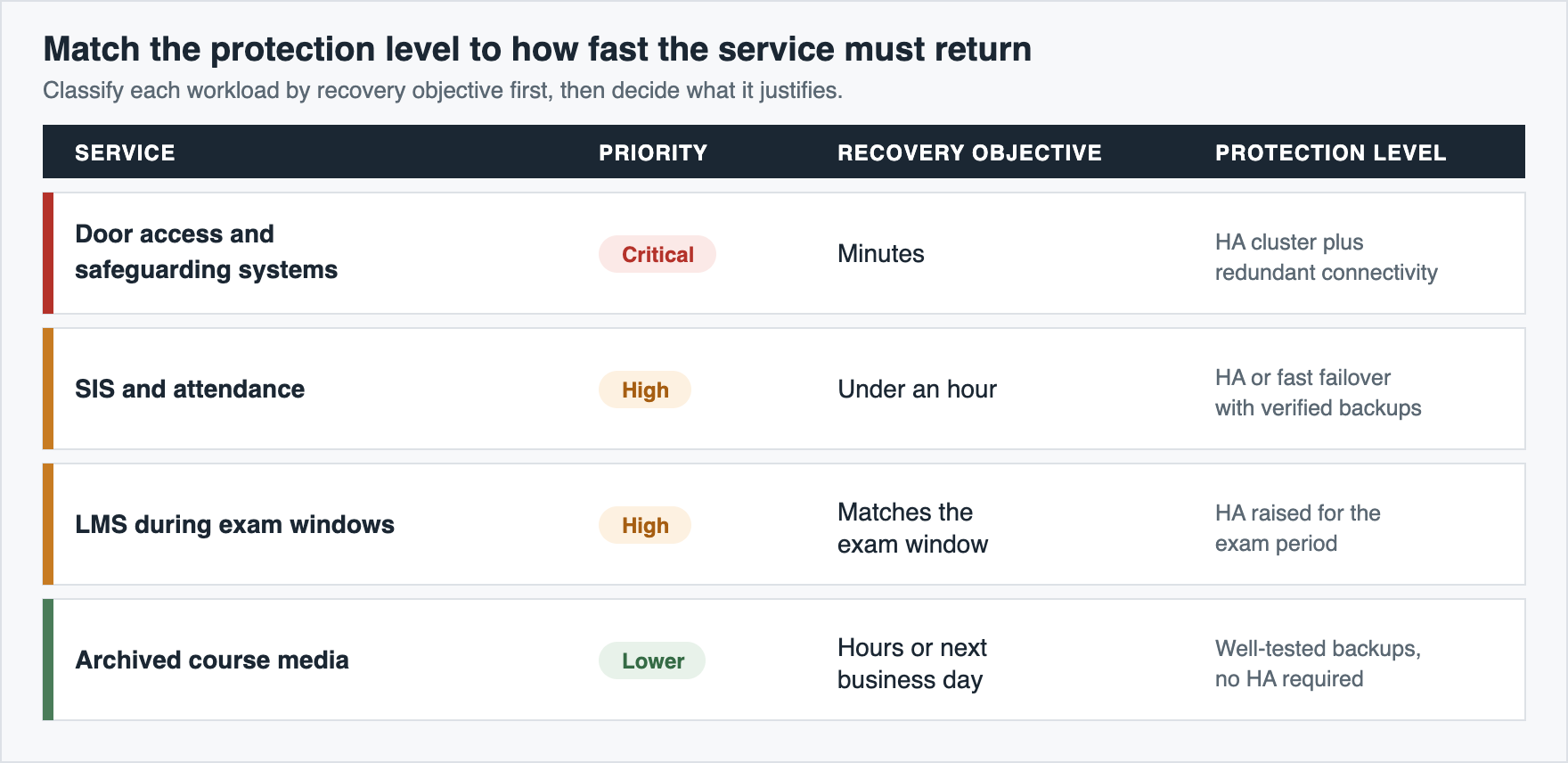
The table can be a starting point. A university may treat its research storage as critical during a funded experiment, while a small school may not have local storage for course media at all. When you assign recovery targets, look at what the service supports and what happens to staff and students while it’s down. Critical workloads may justify HA and redundant connectivity, while less time-sensitive systems can lean on well-tested backups.
Two-node HA clusters for schools, campuses, and multi-site districts
The most common way to get high availability without an enterprise budget is a two-node cluster: two servers replicating storage between them in real time, so that if one fails, the other already has an up-to-date copy of the data.
Where implementations differ is how they handle quorum (the mechanism that decides which node keeps serving I/O if the two lose contact). One approach adds a lightweight witness, a small VM or cloud instance that holds a tie-breaking vote: whichever node can still reach the witness continues. That stops both nodes from independently accepting writes to the same data, a split-brain scenario that would otherwise corrupt the dataset. The alternative is a witnessless heartbeat design, where the two nodes monitor each other directly over dedicated links, avoiding the extra component but leaning more heavily on that link’s reliability. Good news – StarWind VSAN supports both.
That underlying mechanic isn’t specific to one vendor. Microsoft’s Storage Spaces Direct does something similar in Windows Server, though it needs Datacenter edition licensing to get there. Proxmox paired with Ceph is the open-source route and is free to license, but Ceph typically works best with three or more nodes, which makes it less practical for a two-node deployment. VMware vSAN covers the same ground inside vSphere, though since Broadcom’s 2023 licensing overhaul it’s bundled into the pricier vSphere Foundation and Cloud Foundation tiers.
For an education IT team, the platform comparison should come after the recovery requirements. Before picking a technology, walk through a few practical questions:
| Decision factor | Question |
|---|---|
| Recovery | What RPO and RTO does the service need? |
| Performance | What IOPS and latency must the cluster sustain? |
| Failure domains | Must it survive a node, site, circuit, or power failure? |
| Network | Can replication and resynchronization traffic fit? |
| Operations | Can the existing team manage the platform? |
| Hardware | Is the current equipment supported and worth reusing? |
| Growth | What capacity will be needed in three to five years? |
These questions also prevent a common mistake: picking a cluster because it’s technically capable of HA without checking whether the existing infrastructure can support it. For schools already running compatible Hyper-V, VMware, or Proxmox hosts, StarWind VSAN provides a two-node HA option without requiring shared SAN storage. Existing hardware still needs validation against the actual workload before deployment. For a district or multi-academy trust standardizing several sites, a pre-built StarWind HCI Appliance covers the same need without validating hardware at each location individually.
Before deploying any two-node design, verify the fundamentals regardless of vendor. Both servers need sufficient local storage and compute capacity, the replication network needs enough bandwidth for normal writes and resynchronization, and any witness should sit outside the two nodes’ shared failure domain. If a local power failure or network outage can remove a node and its witness at the same time, the witness isn’t providing much protection when you need it.
Security, compliance, and student data protection
Availability is only one part of the design. Education environments also hold student records, staff data, financial information, and administrative files, which makes identity and access controls just as important as redundant hardware.
Credential theft, weak network segmentation, and delayed patching remain recurring security risks. Require MFA for administrative and staff accounts, separate student, guest, administrative, and building-system traffic, and centralize patch deployment and reporting where possible. These controls reduce the number of systems an attacker can reach and make it easier for a small IT team to spot systems that have fallen behind.
The set of requirements you face is also less uniform than in some other sectors. Compliance depends on the country, the type of institution, the data involved, and sometimes the age of the students. In the United States, several federal frameworks can apply:
- FERPA governs access to and disclosure of student education records and applies broadly across K-12 and higher education.
- COPPA applies to operators of websites, apps, and online services directed at children under 13, as well as services that knowingly collect information from children in that age group. It can influence the selection and configuration of online services used by elementary schools.
- CIPA applies to schools and libraries receiving certain E-Rate discounts and requires measures such as internet filtering and policies addressing online safety.
Other countries follow their own frameworks. UK schools operate under UK GDPR and the Data Protection Act 2018, alongside education-sector guidance from the Department for Education. In the EU, GDPR provides the general data-protection framework, while individual member states can impose additional requirements or issue guidance affecting the use of cloud and EdTech services.
The practical consequence is that a multi-site or international education organization may have several sets of requirements applying to the same data. They don’t all translate into the same technical controls. CIPA, for example, addresses internet filtering and online safety; it doesn’t prescribe encryption for every system an institution operates.
Encryption at rest and in transit is still a sensible baseline for systems containing student records and other sensitive information. You should also document where encryption keys are stored, who can access them, and how they can be recovered if a server or cluster becomes unavailable.
Compliance requirements don’t replace a recovery plan. If ransomware reaches the production environment, the recovery copy needs its own security and failure domain. Backups should therefore be isolated from normal production credentials and protected with immutable retention, offline storage, or another mechanism that prevents an attacker with access to the live environment from simply deleting or encrypting the recovery data.
Conclusion
Education institutions don’t need identical infrastructure. A small school, a multi-site district, and a university can have very different recovery requirements even when they use many of the same applications. Start with the services that matter most. Identify how much downtime each one can tolerate, what data loss is acceptable, and what happens if a server, network connection, or entire site becomes unavailable. From there, decide where high availability is justified and where tested backups provide sufficient protection.
The goal is a recovery strategy that matches the way the institution actually operates. When you know which services must return first and which failures the infrastructure needs to survive, the choice of architecture becomes much more straightforward.
FAQ
Is HCI worth it for a small school district?
Mainly a question of node count, staffing, and recovery targets. Districts with limited IT staff running multiple sites on aging, separately managed servers benefit most from consolidating onto one managed platform.
What’s the difference between backup and high availability for schools?
Backup restores data after a failure, with some downtime. High availability keeps the service running through the failure, letting the affected VM restart or migrate within minutes instead of the hours a full restore takes.
Do we still need on-prem infrastructure if we’ve moved to Google Workspace or Microsoft 365?
Not always. A cloud-first school can drop most local application servers, but you’re still on the hook for resilient internet, Wi-Fi, identity, endpoint management, and the network-connected building systems (HVAC, cameras, door access) that don’t live in anyone’s tenant.
How much does school IT downtime actually cost?
Schools rarely track it per minute the way retailers do, but you can ballpark it from affected staff hours plus any breach costs. Ransomware incidents at several districts have stretched recovery out to days.
Do universities need different infrastructure than K-12 schools?
The core building blocks are the same, but universities add research computing and a much larger scale, which pushes them toward more distributed, higher-capacity deployments.
Can we reuse existing servers instead of buying new hardware?
Often yes. Check the CPU generation, RAM, storage endurance, NIC capacity, firmware, and remaining warranty before you commit. Servers that pass can become an HA pair under StarWind VSAN without a full hardware refresh.