


Open your storage console for a minute and look at what’s sitting on the top tier. Odds are at least half of it hasn’t been touched since last quarter: old project folders nobody owns, finished deployment logs, the backup repository from a contract that ended last year, and the file share the legal team “might still need,” all of it living on the same NVMe pool your production SQL cluster is fighting for.
We’ve all been there. That’s exactly the situation data tiering is meant to fix. The idea’s simple: put each piece of data on the storage it actually deserves, with rules you can still defend the next time finance asks why the storage line keeps going up.
What tiering is, and why it matters now
Data tiering is the practice of placing data on different storage tiers based on how often it’s accessed, how important it is, what performance it needs, and how long you’ve got to keep it.
The old rule of “anything older than 90 days moves down” still works for some file shares, but it breaks quickly once you deal with modern workloads: databases under bursty load, AI training datasets, or security logs that stay cold for a year and suddenly become business-critical during the night an incident lands on your desk. Modern tiering looks at access patterns, workload type, retention requirements, recovery objectives, and governance rules. Age becomes one signal, not the policy itself.
Capacity is growing faster than budgets. NVMe got dramatically faster, but not dramatically cheaper. Drive pricing fluctuates constantly, and the old “just buy a larger all-flash array during the next refresh cycle” strategy stops working the moment finance sees the latest quote.
Cloud bills got harder to predict. Object storage pricing looks attractive on paper, right up until someone needs to pull large amounts of data back. Retrieval and egress fees turn into a real operational problem during restores, migrations, audits, or analytics projects. More than one organization has quietly repatriated workloads after the first major recovery invoice landed. We’ve seen teams burn through an entire quarter’s cloud budget in a single restore weekend.
AI changed the definition of cold data entirely. Datasets that nobody had opened in two years suddenly became training inputs or RAG sources, and archives that seemed safely buried became active retrieval targets overnight. Cold data is no longer guaranteed to stay cold.
A well-designed tiering strategy improves latency, backup windows, restore planning, cloud spend, ransomware recovery, and AI readiness. Tiering done badly creates slow VMs, delayed restores, unpredictable cloud bills, and operational blind spots when somebody urgently needs data nobody planned to retrieve quickly. Bad tiering is how you end up buying more flash instead of fixing the policy.
Hot, warm, cold, and archive
Before discussing placement policies, it helps to define what hot, warm, cold, and archive mean. I’ve heard vendors use all four labels in a single slide (half of vendor pitches use them differently), so here’s a working version with the latency and workload bands most teams settle on in practice.
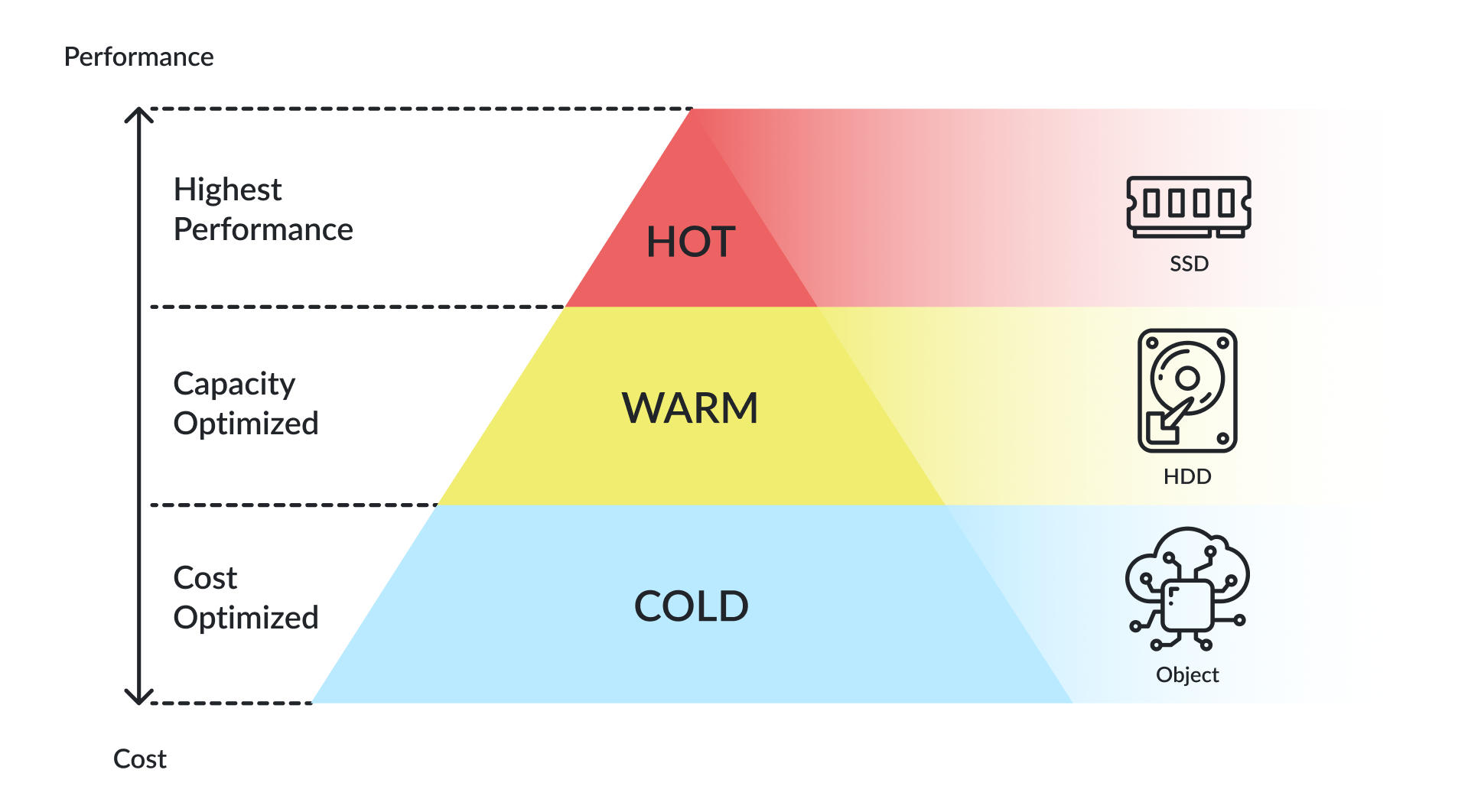
| Tier | Access frequency | Latency target | Typical workloads | Typical media |
|---|---|---|---|---|
| Hot | Constant | Sub-ms to low ms | Production VMs, transactional DBs, ERP/CRM, active VDI, live AI/RAG data | NVMe, SSD on shared storage or HCI |
| Warm | Regular, not constant | Tens of ms | Less active file shares, recent project data, secondary DBs, daily reports | SAS SSD, hybrid arrays |
| Cold | Weeks to months apart | Hundreds of ms+ | Old logs, completed projects, older VM backups, stale shares | High-capacity HDD, on-prem capacity tier |
| Archive | Rarely accessed | Minutes to hours | Compliance retention, legal hold, long-term backups | Object archive, tape, deep archive cloud tiers |
Tiering, storage tiering, and caching are not the same
These three terms get used interchangeably all the time, especially in vendor decks. They’re not the same thing, and mixing them together is how teams end up “solving” tiering by buying more cache. We once watched a team buy NVMe cache for a problem that was actually a policy issue, and they spent six figures before realizing the bottleneck was a retention rule that kept everything on flash.
Data tiering is the policy layer. It decides what data lives where, when it moves, and under what conditions it returns.
Storage tiering is the mechanism underneath: the SSDs, HDDs, object storage buckets, and the software that shuffles blocks or files between them. A setup like Storage Spaces with a performance and capacity tier is doing storage tiering. The decision about what counts as “performance data” wasn’t made by the storage software.
Caching is something else entirely. Caches copy hot blocks onto faster media to accelerate reads, while the authoritative copy remains on the primary storage tier. Caching speeds up the hot zone. Tiering reduces the amount of data that needs to stay there in the first place.
That distinction is importanr during failures. With read-through or write-through caching, losing the cache costs you nothing, but a write-back cache on volatile media (like RAM) can lose acknowledged writes if it dies before flushing. Lose a cold tier when you’ve tiered, and you may have lost the only copy entirely.
What belongs on the hot tier
A useful test for hot-tier placement is the following: imagine demoting each workload to a slower tier for a week and see who notices first. Systems generating complaints within hours belong on the hot tier. Workloads nobody notices for days rarely do.
Hot storage should be reserved for workloads that genuinely need low latency or high IOPS. If a workload doesn’t need those characteristics, keeping it on premium storage usually wastes budget without improving operations. When we mapped actual IOPS to workload importance at a previous site, half the hot tier turned out to be monthly reports that nobody had touched since the first week of the month but stayed pinned to flash because the owner was afraid of the political fallout if the board asked for them during a meeting.
Typical hot tier candidates include production VMs and transactional databases – SQL Server, PostgreSQL, or Oracle when they’re under load. ERP and CRM systems belong there too, along with active VDI pools, especially during boot storms. Current analytics datasets, recent SIEM and observability logs, active AI and RAG datasets, and the file shares users are actively modifying every day round out the list.
This is also the layer where shared storage and HCI platforms make the most sense. Latency-sensitive virtualized workloads need fast, resilient storage close to compute resources, which is exactly the use case StarWind VSAN targets: highly available shared software-defined storage that keeps the hot tier predictable without introducing separate SAN complexity.
What can move down
Data moves down tiers when it stops being latency-sensitive but still has to stay accessible, recoverable, and governed. The mistake many teams make is treating demotion as deletion. It isn’t.
Warm tier is for older logs that occasionally get queried, finished project folders the team might revisit, and overnight reporting jobs. Cold tiers hold older VM backups, stale shares, inactive datasets, and retention copies outside the active recovery window. Archive tiers exist for compliance retention, legal hold, and long-term preservation requirements that must remain recoverable even if access is rare.
We learned this the hard way: cold data isn’t useless data. An old log set turns critical during an audit, and a two-year-old backup becomes the only clean copy after a ransomware hit. Veeam’s 2025 Ransomware Trends Report found that backup repositories are explicitly targeted in most incidents.
Bury data so deeply that retrieval takes a week or costs more than the storage savings, and the tiering strategy has quietly failed.
Common tiering mistakes
The same mistakes show up in environments of every size. If you recognize any of these in your own infrastructure, you’re not alone.
Treating everything as hot because the primary array still has free capacity is a classic. The day the array fills up, that habit becomes an emergency project. Moving data based on age alone is another mistake. A 90-day-old file can be hotter than a 5-day-old one if a team’s actively using it.
On the technical side, confusing archive with backup causes real pain. Archive’s the only copy you’re keeping. Backup is a recoverable copy of data you still have somewhere else. They solve different problems, no matter how aggressively vendor slides blur the distinction. Breaking the backup product by tiering data onto storage it can’t reliably access is equally painful.
Then there’s the policy drift. Tiering without ownership or retention rules means orphan data never gets cleaned up – it just gets quietly more expensive. Building eight storage tiers when three would do is a clear sign that your capacity planning gone wrong. Demoting data so aggressively that users wait 40 seconds for yesterday’s file is how you lose trust and trigger shadow copies back onto the hot tier. And skipping rehydration tests means the first real restore is a bad time to find out cold recovery takes >12 hours.
Cloud and hybrid placement
Cloud is a useful storage tier, but not automatically the default. Long-term object storage, secondary backup copies, archive, data lakes, burst capacity, and content that has to be served across regions all fit well there. The problems start when egress costs, retrieval delays, residency restrictions, or rehydration timelines were never modeled properly in advance.
| Use case | Best fit | Why |
|---|---|---|
| Production VMs, databases, active VDI | On-prem | Latency, predictability, full control of the storage path |
| Tier-2 shares, secondary DBs | On-prem or hybrid | Local capacity tier usually wins on cost and recovery |
| Long-term backup retention | Hybrid (on-prem + cloud) | Local copies for fast restore, cloud copies for offsite and immutability |
| Compliance archive | Cloud archive or tape | Cheap per TB, but factor retrieval cost and rehydration SLAs |
| Analytics or AI training data | Wherever compute lives | Move the smaller thing. Usually that means data, sometimes compute |
| DR copy | Cloud or second site | Distance and isolation matter more than tier speed |
| Multi-region access | Cloud | Easier to distribute than building object replication on-prem |
We usually keep active data on-prem because losing control of the storage path at 2 a.m. isn’t fun. Colder data and secondary copies move to lower-cost tiers, whether on-prem capacity or cloud, only when the rehydration story is real and someone has tested it.
Hybrid is the honest answer. Almost no real environment is fully one or the other anymore. The teams that pretend otherwise generally have a spreadsheet full of exceptions they weren’t maintaining anyway.
Backup and recovery
Tiering and backup design have to work together. If they don’t, the tiering policy will quietly break the backup product, or the backup product will quietly refuse to read the cold tier. You find out for the first time during a real restore, which is the worst possible moment.
A practical design usually looks something like this. Recent recovery points stay on warm storage so restores complete in minutes. Older recovery points roll into colder tiers where storage cost drops, even if recovery times increase. Immutable or air-gapped copies sit outside the normal production blast radius, often using object storage with object lock or isolated credentials. Long-term retention copies move into archive tiers.
Two things sit on top of the design and are non-negotiable.
First, restore testing has to cover every storage tier involved in the recovery chain, not just the hot one. The cold tier is where most unpleasant surprises live. We always test the hot tier first and the cold tier never, which is exactly backwards.
Second, the backup platform must reliably read every storage layer involved in the design, including immutable repositories, object-lock targets, and cloud archive services. That second point matters more every year. The recovery path you assumed was bulletproof can quietly stop working once the cold tier sits behind a different set of credentials, a different network segment, or a vendor API that wouldn’t respond during the restore window.
AI broke the cold tier
AI workloads don’t respect storage tiers the same way the rest of the infrastructure stack does.
A data scientist asks for “the customer interaction dataset from 2022.” The storage team finds it buried in a deep archive tier with multi-hour retrieval and a per-GB egress charge. Retrieval estimates land on someone’s desk, and the project either gets descoped or the team quietly builds a copy on the hot tier and moves on. Either way, the original tiering strategy loses control of the environment.
AI-ready tiering strategies need several things to avoid that outcome. Metadata must survive tier transitions so datasets remain discoverable without rebuilding catalogs from scratch. Search has to work across tiers, and that’s harder than it sounds, because most archive systems index poorly. Ownership and retention policies must follow the data automatically. Access controls can’t silently loosen when something gets demoted into a colder storage layer, because compliance doesn’t care which tier the violation happened on.
The old assumption that cold data stays cold for years is increasingly unreliable in AI-driven environments.
Building a strategy that really works
Building a proper tiering strategy isn’t a six-month project. It’s a sequence of small steps, and most of them you can start today.
Start by inventorying data sources: primary arrays, HCI clusters, file servers, object stores, backup repositories, cloud buckets, and edge locations. You can’t tier infrastructure you haven’t actually mapped. Then measure access patterns using real telemetry rather than assumptions. Backup logs, audit logs, and storage analytics usually expose usage patterns much faster than meetings do. Most teams eventually discover the suspected 80/20 split looks closer to 90/10 in reality. Next, classify data by business value, sensitivity, and retention requirements. A 1 GB compliance record may matter far more than a 1 TB media archive. Define hot, warm, cold, and archive policies explicitly. Placement rules that exist only inside one engineer’s head shouldn’t be expected to survive organizational turnover.
Model cloud and storage costs directly, including retrieval, egress, request, and rehydration costs against real access behavior rather than marketing calculators. (Vendor ROI spreadsheets deserve a second look, but that’s a fight for another day.) Tie every storage tier to a documented backup, DR, and restore process. Automate carefully. Bad automation rules can move terabytes in directions you couldn’t undo in a day.
Review policies on a regular schedule. Workloads change, retention changes, and pricing changes. Annual reviews are enough for most environments. And keep the tier count manageable. Three or four tiers solve almost every practical storage problem. Eight-tier designs trace back to vendor decks rather than workload reality, and the operational cost of maintaining them wouldn’t justify the savings.
One planning question is worth asking for every dataset before you place it: “What happens if this grows 10x, and what happens if we need it back tomorrow?” If both answers are uncomfortable, the placement model is probably wrong.
Where DataCore and StarWind fit
We’ve deployed both in mixed environments, and the operational difference between a platform that handles tiering natively and one that doesn’t is usually a few hours of sleep per quarter. The operational side of tiering gets much easier when the underlying storage platforms were designed around placement flexibility from the start.
Mixed environments that need both performance and capacity are where DataCore SANsymphony with Auto-Tiering monitors access patterns continuously and moves blocks across NVMe, SSD, and HDD pools automatically. Hot data remains on faster media while colder blocks shift toward capacity tiers without manual intervention. It’s the layer that turns a tiering policy into something the storage itself enforces, which matters when you have more than one person setting rules.
Archive and large-scale unstructured storage go to DataCore Swarm and Swarm Appliance for scale-out object storage with S3 compatibility, immutability, and distributed durability. Architectures like this work well for active archive use cases where datasets need to remain searchable and recoverable without living permanently on expensive primary storage.
Conclusion
I always start with three tiers. You can add more later, but only if you can name the exact problem the fourth tier solves. Test your cold recovery before you need it. And build your policies around the assumption that yesterday’s cold data is tomorrow’s training set, because in 2026, that’s exactly what’s happening.
If finance stops asking why the storage bill keeps climbing, you’ve done it right.
FAQ
What is the difference between data tiering and caching?
I’ve explained this difference to every new hire we’ve had for three years running. Caching keeps a fast copy of active data on faster media while the authoritative copy remains somewhere else. Lose the cache and performance drops, but the data still exists.
Tiering moves data itself between storage layers, which means the cold tier may eventually become the only retained copy. The two approaches solve different operational problems, and adding more cache doesn’t eliminate the need for a tiering strategy.
How often should I review my tiering policies?
Once a year is enough for the policies themselves, but the inputs they rely on – retention rules, cloud pricing, and workload mix – should be checked alongside the budget cycle. AI use cases and ransomware playbooks have been pushing more teams to revisit tiering twice a year recently.
Is the cloud always cheaper for cold data?
Not necessarily. Archive tiers often look inexpensive until retrieval, egress, request charges, and rehydration delays enter the calculation. For datasets that are rarely accessed but occasionally needed back quickly, on-premises capacity storage can still win on total operational cost, especially when egress pricing hasn’t been modeled against your actual retrieval patterns.
How does AI change data tiering?
AI workloads break the assumption that cold stays cold. Older datasets frequently become training inputs, RAG sources, or analytics targets with very little warning. AI-ready tiering requires metadata continuity and searchable datasets across tiers, plus access controls that remain consistent after data moves, because a demoted dataset with broken permissions is just an inaccessible dataset.
Do I still need separate backups if I have tiering?
Yes. Tiering moves the only copy of your data between tiers. Backup keeps an independent, recoverable copy that doesn’t depend on the production storage path. The two work together – recent backups on warm, older points on cold, and immutable copies out of reach of production credentials – but neither replaces the other.
How many tiers should I actually have?
Three or four covers almost every environment: hot, warm, cold, and an archive layer for compliance and long-term retention. Eight-tier designs trace back to vendor decks rather than workload reality, and the operational cost of maintaining them outweighs the savings.
