


The Proxmox Datacenter Manager (PDM) beta 0.9 release became available on September 11, 2025, following the alpha in December 2024. This is something that can be very interesting once it is released, but for now, after last year’s Alpha release, it is now in Beta 0.9 and the product’s name is Proxmox Datacenter Manager (PDM).
PDM brings you a centralized UI for managing multiple Proxmox VE nodes or clusters. It enables polling of resource states and basic guest operations via API. Once it will be released as a Generally available (GA), It will simplify cluster and VM management across your entire Proxmox datacenters, with migrations of VMs across clusters and managing Software Define Networking (SDN) zones, vnets and remotes.
The roadmap shows us that after the initial release and more improvements to come, the plan is to integrate Proxmox Backup Server or Proxmox Mail Gateway with details about backup jobs, SDN details, but also the possibility of updating of all of your Proxmox hosts etc. The basic management of all your virtual guest resources will also be possible directly via PDM. Also on the roadmap is a notification and alerting system and possibly become a notification target for your remotes.

Proxmox Datacenter Manager Features
- Remote management – centralized management of multiple Proxmox VE nodes or clusters. (it can connect to Proxmox 8.2+)
- Supports basic virtual machine (VM) and container (CT) operations, including migrations between remotes using Proxmox replication (e.g., ZFS send/receive or Ceph RBD for delta transfers; cold migrations require downtime, live needs shared storage).
- Hierarchical navigation: datacenter > remotes > nodes > resources (VMs, CTs, storage), with links to the remote’s full web interface for advanced tasks like hardware editing.
- VPN configuration for Software-Defined Networking between clusters – allows creation of EVPN Zones and VNets across multiple remote hosts from a single UI.
- Integrates Roles Based Access Control (RBAC) allowing you to manage permissions of PDM users.
- Monitoring – it aggregates resource across remotes, shows metrics for VMs, CTs, storage and nodes status.

- Caches data locally (SQLite database) for offline visibility if a remote is unreachable
- Token-based authentication with scoped privileges (e.g., read-only for monitoring); centralizes logs and task histories from remotes for auditing.
- Basic controls: Start/stop/reboot/shutdown VMs/CTs via API
- CLI tools for scripted operations
The Installation
PDM runs on Debian 13 “Trixie” and requires a 64-bit x86-64 CPU with at least 2 cores, 2 GB RAM (scaling with managed resources), 8 GB disk space, and network access. The beta 0.9 ISO incorporates Linux kernel 6.14 and ZFS 2.3, aligning with Proxmox VE 9.x compatibility. Upgrades from alpha involve standard package updates via the PDM repository, preserving existing configurations.
The Installation can be done via two ways:
For the ISO method – download from the Proxmox enterprise repository and boot on bare metal or a VM; the installer sets up a minimal Debian base with PDM services, accessible at https://<ip>:8006 post-setup.
For Debian integration – add the test repository (deb http://download.proxmox.com/debian/pdm trixie pdm-test), update (apt update), and install proxmox-datacenter-manager and proxmox-datacenter-manager-ui. This deploys the Rust-based backend API server, CLI tools, and web frontend without altering the host OS. Check the details in the documentation page here.
The architecture centers on a Rust implementation for the core services. The backend API server handles remote communications using Proxmox VE’s REST API over HTTPS, authenticating via tokens scoped to read/write operations (e.g., root@pam!pdm-token). No agents install on remotes; interactions proxy through API calls like GET /nodes for resource lists or POST /nodes/{node}/qemu/{vmid}/status/start for VM control.
The frontend, built with the Yew.rs framework and a custom widget toolkit, renders a server-side UI for hierarchical navigation: datacenter > remotes > nodes > resources.
Caching occurs in a local database (SQLite by default), storing polled metrics such as CPU utilization, memory allocation, and storage I/O to maintain visibility if remote server is unavailable.

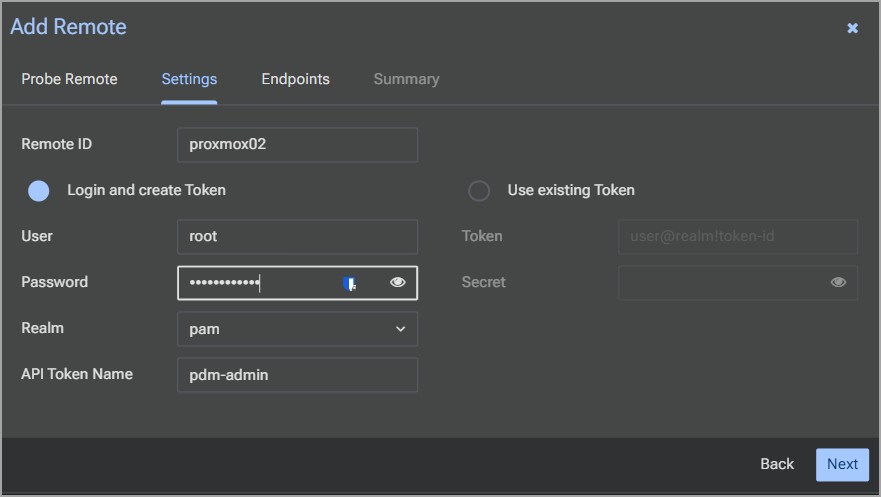
Adding remotes occurs via the dashboard wizard. Specify the remote’s IP (e.g., 192.168.1.41), credentials (user@realm or API token), and TLS fingerprint for self-signed certificates—obtained from the remote’s certificate file (pveproxy-ssl.pem) under the web UI’s Certificates section.

The system probes the connection, auto-creates a dedicated API token with minimal privileges, and begins syncing data. Supported remotes include Proxmox VE 8.2+ standalone nodes or clusters; SDN zones and EVPN routing tables integrate for network overviews, displaying states like available/error/unknown.
Monitoring aggregates resource data across remotes. The panel lists VMs, containers, and storage with status indicators (running/stopped/offline) and metrics polled at configurable intervals (default 30 seconds). For SDN, it pulls zone statuses and aggregated EVPN instances, aiding in cross-cluster network diagnostics without direct access.

Basic management:
- The basic supports start, stop, reboot, and shutdown for VMs and containers via API proxies.
- Console access routes VNC/SPICE sessions through the manager.
- Migrations handle VM transfers between remotes using Proxmox replication protocols—ZFS send/receive for local/ZFS storage or Ceph RBD for distributed setups. Initiate via the UI: select source VM, target node, and storage backend; it sequences API calls for quiescing, delta replication, and resume.
- Cold migrations require downtime
- Live requires needs shared storage.
- Complex edits (e.g., hardware reconfiguration) redirect to the remote’s full web interface.
- Security is encured via the TLS 1.3 enforcement, with fingerprints validating self-signed certs to prevent MITM.
- API tokens limit scopes (e.g., Datastore.Audit for read-only), and logs centralize task histories from remotes.
- No built-in HA in beta (but it is on the roadmap). For now, it’s single-instance, with failover via external tools like Pacemaker on the roadmap.
For datacenter admins on VMware or Hyper-V, PDM goes via an API-centric alternative for multi-site oversight. PDM’s token-based remotes allow gradual integration and conversion from other environments. However, you must use external tools to like StarWind V2V for ESXi exports or VHDX-to-QCOW2 conversions.
Beta 0.9 went out AS IS so outside of the incomplete documentation via current wiki there is no native non-Proxmox support. But for labs, hey, this is a golden nugget! And the upcoming features like centralized backups or full HA will come later down the road.
Final Words
In this little blog post we have just scratched the surface on the upcoming product from Proxmox. It is definitely worth to check out and keep an eye on.
I think many Proxmox (future and current) admins will find this tool very valuable as it allows to scale your infrastructure and have a large number of remote locations, remote clusters, managed via single UI.
Future integrations will be interesting as the product will grow. Will it grow? Yes, and I think the development will be rather fast. Comparing to other alternatives, such as XCP-NG by Vates, Proxmox is catching up here where XCP-NG has already a very viable Xen Orchestra central management including V2V from VMware and Backup! So yes, exciting times when we can see, that after VMware has abandoned the SMB and small enterprise sector, the alternatives quickly taking their chance and making great progress. If you’re VMware/Hyper-V admin in small business you look no further.
