


In 2026, data volumes continue to grow across hybrid environments, while ransomware and strict recovery objectives put pressure on backup strategies. If you are responsible for keeping systems available, traditional backups alone may no longer meet your recovery expectations. Continuous data protection (CDP) offers a more advanced approach by continuously capturing data changes, allowing to recover from almost any point in time and safeguarding against data loss or corruption.
In this article, we will explore concept of continuous data protection and its benefits to your environment. We will also see how it works and how it differs from traditional backup.
What CDP actually captures
Continuous Data Protection (CDP), also known as continuous backup, is a backup technique that continuously captures and saves every change made to data, effectively providing continuous backup capabilities. CDP ensures that all data modifications are recorded in real time; as a result, the system can be restored with little or no data loss.
At its core, CDP is a journal of every write that goes to the storage, timestamped at the moment it occurrs. The journal often lives separately from the primary data – could be a different disk, node, or even site, and gets trimmed according to retention policy. When you need to recover – you point at a base image (a full copy from earlier) and replay or roll back the journal to whatever moment you pick.
That is the textbook definition. In practice there are two flavors people call “CDP,” and the distinction is quite important:
True CDP
Every write is intercepted and logged in real time, either as a block-level change or at the I/O filter driver layer. Recovery granularity is effectively one write, which in database terms is one transaction. Zerto, Veeam CDP for VMware, and Dell RecoverPoint sit here. So does DataCore SANsymphony‘s CDP feature, which keeps a per-volume history log on the server hosting the mirror.
Near CDP
Instead of intercepting every write, the system takes frequent snapshots – typically every few minutes – and treats the chain of snapshots as a recovery timeline. You cannot restore to an arbitrary second, but you can restore to the nearest snapshot. Most storage arrays, ZFS, and VMware snapshot-based backups operate this way. The ergonomics are similar to true CDP, but the math on storage and overhead is very different.
To answer to the popular question people often raise: no, CDP is not the same as snapshots, but snapshot-based products are often marketed as “CDP” anyway. Snapshots are periodic, crash-consistent point-in-times. True CDP gives you a continuous stream, so your recovery point is as precise as the timing of the last write you care about. If a snapshot interval meets your RPO target, near CDP is simpler and cheaper. If it does not, you need the real thing.
How it works under the hood
True CDP needs three things: a way to intercept writes, somewhere to put the journal, and enough metadata to recover deterministically. The interceptor is the interesting part. It can live in several places:
In the storage array (DataCore SANsymphony, Dell RecoverPoint with a SAN-based splitter). The array sees every I/O anyway, so adding a fork to a journal is cheap and transparent to the host.
In the hypervisor (Veeam CDP for VMware uses VAIO filter drivers, Zerto installs a Virtual Replication Appliance per host). Every VM write gets mirrored into the journal before it acks to the guest.
In the host OS (various host-based agents, including older EMC RecoverPoint hosts and some database-specific replicators). Runs as a kernel driver or filter; useful for physical servers or when the array is a black box.
The journal itself is just a log of deltas keyed by timestamp, usually with metadata about the originating host, volume, and offset. Retention is a sliding window: once a change falls outside the window, it is either discarded or folded into the base image. For most real deployments the window is hours to a few days – enough to cover “the developer ran that query yesterday” but not “the developer ran that query last month.”
Recovery is the inverse operation. You pick a timestamp, and the system reconstructs the volume state by applying journal entries on top of the base image (forward replay) or by undoing entries from the current state (reverse replay). For database workloads this gets combined with the application’s own crash-consistency guarantees: you recover the volume to a timestamp that falls between two commits, then let the database’s recovery logic replay or roll back its own redo/undo logs to get to a transactionally consistent state.
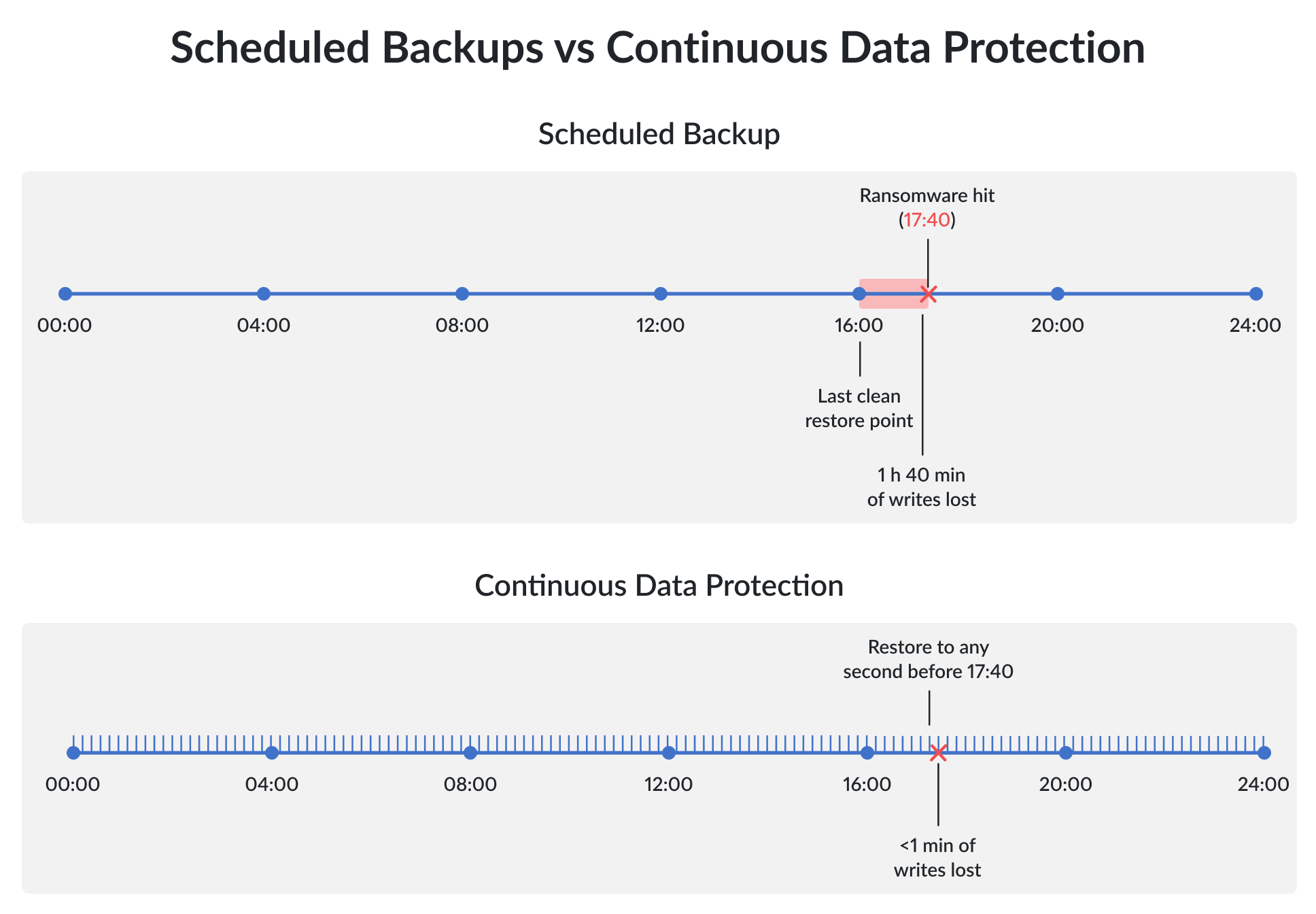
CDP vs. Traditional scheduled backup
Traditional backup and CDP solve overlapping problems from different directions. Scheduled backup gives you a comparatively small set of restore points with predictable storage cost. CDP effectively gives you unlimited restore points within a configured retention window, at the cost of a much “busier” data path.
| CDP | Traditional backup | |
|---|---|---|
| Backup frequency | Every write, as it happens (true CDP), or every few minutes (near CDP) | Typically performed at scheduled intervals (e.g. daily or weekly) |
| Recovery granularity | Any point within the retention window, down to a single transaction | Whatever restore points exist in the backup chain |
| Storage footprint | Base image plus journal, grows with change rate and retention –> more used capacity. | Full plus incrementals, sized predictably against schedule -> usually less capacity usage. |
| Typical RPO | Seconds to a few minutes | Hours to a day, matching the backup window |
| Best fit | Databases, critical VMs, workloads where minutes of data loss hurt | Archival data, low-change file shares, compliance retention |
The two are not alternatives. Most production environments run CDP for the top tier of workloads where the RPO target is tight, and scheduled backups underneath for retention, long-term restore points, and the class of failure CDP cannot help with (see below).
CDP vs. Synchronous replication
These two get confused all the time, mostly because both involve continuous data movement. They solve different problems.
Synchronous replication writes data to two or more sites at the same time and does not ack the write until all copies confirm. If a node dies, the other copy is already there, RPO is zero, and RTO is whatever it takes for the failover mechanism to point traffic at the surviving side – usually seconds. What synchronous replication does not do is protect you from logical corruption. If a bad query, a bad deploy, or ransomware writes garbage to the primary, the secondary gets the same garbage just as fast.
CDP is the opposite lens on the same timeline: it does not keep a live copy at a different location; it keeps a time-machine of the same copy. When you need to go back to 17:39:52 because the encryption started at 17:40, replication gives you nothing and CDP gives you exactly that.
In practice you want both. Synchronous replication for hardware faults and site-level failures; CDP for operator error, application bugs, and malicious writes. In active-active SAN architectures this typically means StarWind Virtual SAN or DataCore SANsymphony doing the replication, with a separate CDP-capable backup layer (Veeam CDP, Zerto, or SANsymphony’s own CDP feature) on top.
What it costs, honestly
CDP is not free, and the marketing rarely spells out what it actually takes. Three things drive the bill:
Journal storage. The journal holds every change for the length of the retention window. If you protect a 2 TB database that writes 40 GB of deltas per hour and you want 24 hours of retention, the journal needs roughly 40 * 24 = 960 GB just for the changes, plus metadata overhead and compression savings (usually 30-50%). A fleet of VMs with unpredictable write patterns makes capacity planning even messier.
Write amplification. Every protected write hits at least two targets: the primary volume and the journal. If the journal lives on a different node or site, that is also network traffic on the synchronous path for true CDP, or bursty traffic every few minutes for near CDP. For latency-sensitive workloads (OLTP databases, VDI) you’ll need to measure the overhead on a representative workload before signing off on the design. A poorly-tuned CDP setup can add 30% or more latency overhead.
Recovery is not instant. This is the one people forget. CDP gives you RPO close to zero, but RTO is still whatever it takes to spin up the recovered volume, remount it, and bring the application back. For a single VM that is minutes. For a 20-node database cluster it can be hours. If you need both near-zero RPO and near-zero RTO, you are looking at CDP plus active-active replication, not CDP alone.
When CDP earns its complexity
CDP pays off in a fairly narrow set of scenarios. Outside them, scheduled backups plus immutable storage get you most of the benefit at a fraction of the cost.
The workloads where we have seen CDP genuinely pay for itself:
- OLTP databases where every minute of lost transactions maps to real money (billing, trading, ticketing).
- VMs running ERP or EHR systems where a single missed restore point forces a multi-hour reconciliation.
- Production file shares in industries where ransomware recovery is a when-not-if question. For these, the storage overhead is obviously worth it – you are insuring against losses that would be X times higher than the infrastructure cost itself.
The workloads where CDP is probably overkill: archival data, read-mostly reference systems, dev/test environments, and anything where a daily snapshot meets the RPO target. Paying for per-write journaling on a nightly-changing data mart is a waste.
Practical notes from the field
A few things worth knowing before you roll your new shiny CDP-enabled backup strategy out:
Size the retention window for the failure pattern you actually worry about. Most people default to 24 hours, but useful window depends on how long it takes you to notice a problem. Ransomware is typically detected within hours. A slow logical corruption from a buggy application can take weeks to surface. If you cannot credibly say you would catch a problem inside the window, the window is too short.
Pair CDP with immutable storage. CDP journals often live on the same platform they protect (for higher storage performance), which means a sufficiently determined attacker can delete the journal along with the primary data. The fix is a second tier of backups written to storage that cannot be modified or deleted for a set period – Veeam Hardened Repository or DataCore Swarm object storage with retention lock, both work for this. CDP is for fast, recent recoveries, while immmutable backup is the fallback when CDP itself is compromised.
Encrypt the journal. Every change to every protected volume is in there, in the clear by default on some products. If the journal storage is network-accessible, encrypt both in flight and at rest. Most enterprise CDP products support this, but not all turn it on by default.
Actually test the restore. CDP dashboards love to show green checkmarks for replication lag and journal health. None of that tells you whether the restore works under pressure. Quarterly restore drills on a real (non-production) target catch the things the monitoring will not.
Where StarWind and DataCore fit
At StarWind we get the CDP question constantly, usually from someone who has just priced out a ransomware incident and want to know what they should have bought last year.
Short version: we recommend a layered setup, and the layers are not interchangeable.
StarWind Virtual SAN is not a CDP product. Our VSAN provides synchronous active-active replication between nodes at the storage layer. That gives you zero-RPO protection against disk, node, or network failure and seconds-long failover for VMs. What it does not give you is point-in-time recovery – if corruption lands on a VSAN volume, it lands on both copies simultaneously. VSAN is the foundation you put CDP on top of, not a replacement for it.
DataCore SANsymphony does both, which is more unusual. The synchronous mirroring layer handles HA the same way VSAN does. On top of that, SANsymphony has a CDP feature that can be enabled per virtual disk: changes to a CDP-enabled volume get written to a history log on the mirror server, and you can restore the volume to any timestamp inside the log’s retention window. The log lives in a pool you size yourself, and retention is driven by pool capacity rather than a fixed time limit. If you are already running SANsymphony, turning on CDP for a handful of critical volumes is often cheaper than adding a separate CDP product.
For VM-level CDP on top of either platform, Veeam is the common pick. Veeam CDP policies (VMware-only today) give you RPOs as low as a few seconds by installing an I/O filter in the hypervisor, and the restore points land in the same Veeam repository you already use for daily backups. Pair it with Veeam’s Hardened Repository and you have CDP, scheduled backup, and immutable storage in one workflow.
Our default recommendation for a mission-critical setup looks like this: active-active VSAN or SANsymphony for storage HA, Veeam CDP or SANsymphony CDP for point-in-time recovery on the top-tier workloads, and an immutable backup repository as the last-resort safety net. That covers hardware failure, logical corruption, and ransomware without any single layer being a single point of failure – the kind of layered defense business continuity planning actually calls for.
Bottom line
CDP is worth the money and complexity when minutes of lost data hurt more than the cost of running a second data path. For the handful of workloads in your environment where that is true – and it is usually a handful, not everything – it turns a four-hour incident into a four-minute one. For everything else, a well-designed scheduled backup with immutable retention does most of the same work for a fraction of the operational weight. The trick is being honest about which workloads are in which bucket, and not letting a vendor talk you into CDP on your archive tier.
