


For years, running GPU workloads in virtualized environments meant making a painful choice: flexibility or performance. If you needed raw horsepower for AI training, machine learning, data science, or 3D rendering, bare-metal was the default. Virtual machines were seen as a compromise – a convenient one, but with noticeable performance penalties.
That’s no longer the case. VMware has quietly transformed how GPU virtualization works. Thanks to improvements across the board – from how GPUs are shared to how they’re passed through – GPU-accelerated VMs can now match bare-metal speeds in most workloads. Whether you’re training a model, running high-fidelity simulations, or powering remote graphics workstations, the gap between virtual and physical GPU performance is essentially gone.
This isn’t just about ticking a performance box. It changes how teams can design their infrastructure. No more silos where GPUs are locked to specific hosts. No more underused hardware. No more being forced to choose between flexibility and power.
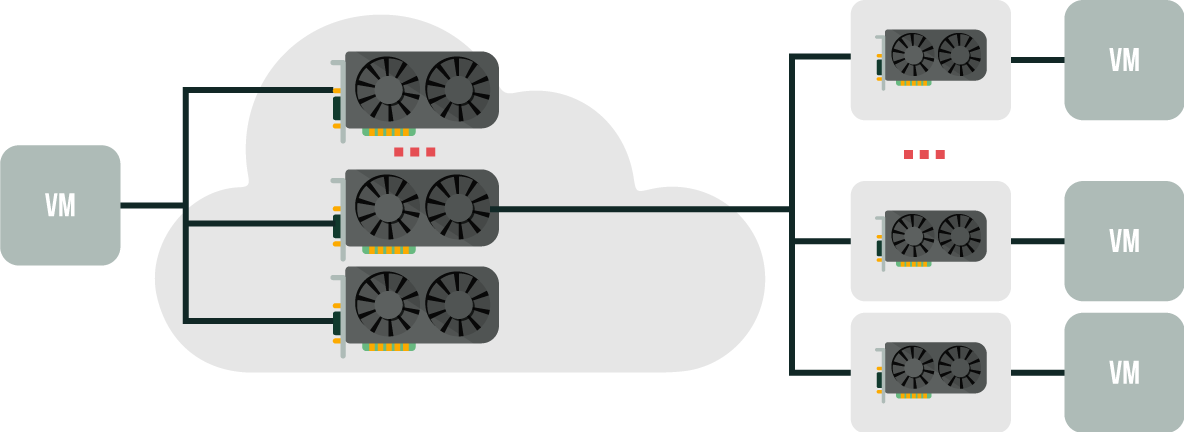
Efficient GPU Sharing Without Sacrificing Performance
GPUs are expensive, and they’re often underutilized. One minute you’re hammering them with model training or rendering, the next they’re sitting idle. Virtualization solves this by letting multiple users or workloads share the same physical GPU without slowing each other down. That means better efficiency, better ROI, and fewer idle resources gathering dust.
Blast Extreme: Smooth Remote Access to Heavy Workloads
Remote access is no longer a compromise. VMware Horizon’s Blast Extreme protocol delivers high-performance graphical sessions over both TCP and UDP, adjusting on the fly based on network conditions. It supports modern codecs like H.264, H.265, and AV1, balancing image quality and bandwidth use while keeping latency low. This makes GPU-accelerated remote desktops feel as snappy as local ones, even for heavy 3D or AI workloads.
DirectPath I/O + Assignable Hardware = Bare-Metal Speed
Need all the horsepower? VMware’s DirectPath I/O lets a VM connect directly to a physical GPU. No hypervisor in the way – just raw, unfiltered GPU power. Perfect for jobs like AI model training, deep learning, and complex simulations where every bit of performance matters.
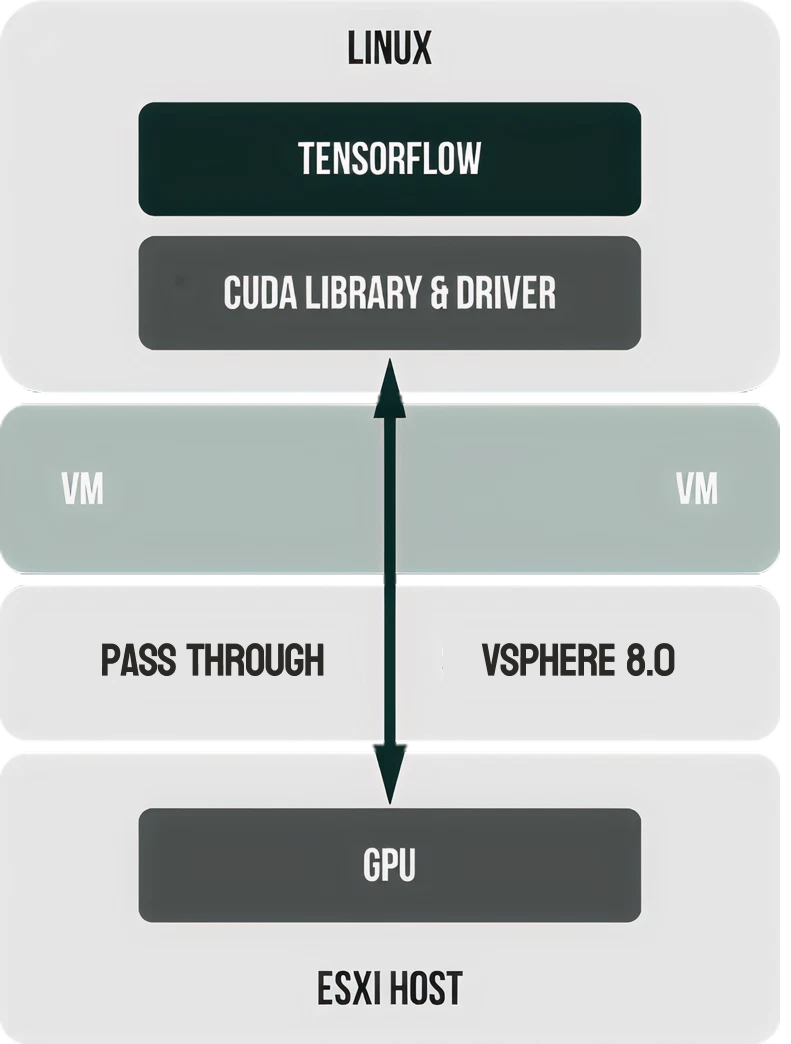
Assignable Hardware, introduced in vSphere 7 and improved in vSphere 8, makes this more flexible than ever. GPUs can be hot-plugged into VMs, and workloads can automatically move to compatible GPUs on other hosts. No downtime. No manual reassignment.
Bitfusion: GPUs When You Need Them
Bitfusion flips the GPU ownership model on its head. Instead of tying GPUs to physical hosts, Bitfusion lets VMs borrow GPU power over the network, on demand. It’s a client-server model: apps send CUDA calls to remote GPU pools.
This is ideal for ML workloads that need occasional, heavy bursts of compute but don’t need a GPU sitting idle the rest of the time. Bitfusion supports popular frameworks like TensorFlow and PyTorch, so it slots right into existing workflows.
NVIDIA vGPU: Slice It How You Like
A Quick Look at the Evolution from GRID to vGPU
NVIDIA’s journey into GPU virtualization started with NVIDIA GRID, which primarily focused on enabling high-performance virtual desktops (VDI) for graphical workloads. GRID allowed multiple users to share a GPU, making 3D CAD and design apps accessible from virtual desktops.
As workloads expanded beyond graphics into compute-heavy tasks like AI and machine learning, NVIDIA evolved the technology. The GRID branding was retired, giving way to a clearer set of offerings:
- NVIDIA Quadro Virtual Data Center Workstation (Quadro vDWS) for professional visualization.
- NVIDIA Virtual Compute Server (vCS) for compute workloads like AI, deep learning, and data science.
- NVIDIA RTX Virtual Workstation (RTX vWS) for modern VDI with RTX capabilities.
Today, it’s all unified under the NVIDIA vGPU umbrella. This streamlined approach supports both graphics and compute use cases with granular profile management and hardware-based isolation.
With NVIDIA’s vGPU technology, a single physical GPU can be split into multiple isolated virtual GPUs. VMware supports this across the latest GPU lineup – including A100, H100, and L40 models.

Admins can allocate GPU profiles based on compute and memory needs. Multi-Instance GPU (MIG) profiles provide better isolation and scalability for AI and data science workloads. Combined with NVIDIA Virtual Compute Server (vCS), vGPU isn’t just for graphics anymore – it’s fully capable of handling AI training, inference, and HPC jobs.
And yes – vGPU-powered VMs can now be live-migrated. That’s a big win for uptime and flexibility.
Near-Native Performance, Verified
Benchmarks consistently show that GPU-accelerated VMs running on vSphere 8.0 Update 3 reach 95% to 100% of bare-metal performance for AI and ML workloads. Whether it’s BERT, ResNet, or custom models, the throughput difference is nearly zero.
Kubernetes and Singularity running inside vSphere push this even further. Combined with Bitfusion, it’s now possible to split GPU workloads across containers without wasting resources or sacrificing speed.
How Others Stack Up
AMD’s MxGPU uses SR-IOV to carve GPUs into multiple virtual functions. Each VM gets direct access to a portion of the GPU with strong hardware-level isolation – ideal for environments where security matters.
Intel is taking a similar approach with its Flex Series GPUs and upcoming Falcon Shores chips, offering GPU SR-IOV for secure multi-tenant GPU sharing aimed at inference, media, and general compute tasks.
Unified CPU-GPU Architectures: The Next Frontier
Unified CPU-GPU architectures are quickly moving from experimental to mainstream. The push toward tightly integrated compute platforms is reshaping how modern workloads, from AI to HPC, run.
AMD’s Instinct MI300A is now shipping widely, combining EPYC CPU cores and CDNA 3 GPU compute units with shared HBM3 memory. This fusion allows CPUs and GPUs to communicate at memory speeds, significantly improving performance for AI inference, scientific simulations, and large language models (LLMs).
NVIDIA’s latest Grace Hopper Superchip pairs an Arm-based Grace CPU with an H200 GPU via NVLink-C2C, offering up to 900 GB/s of coherent memory bandwidth between CPU and GPU. It’s purpose-built for LLM training, generative AI, and HPC workloads where moving data traditionally created massive bottlenecks.
Intel is joining the race with its Falcon Shores XPU, expected to launch later in 2025. This architecture merges x86 CPU cores with GPU blocks and high-bandwidth memory on a single package, aimed directly at AI and HPC workloads.
VMware is aligning its development roadmap to support these hybrid architectures. Expect continued enhancements in VM and container resource scheduling, memory coherency handling, and passthrough optimizations to take full advantage of unified compute platforms.
This shift slashes data transfer bottlenecks and makes these platforms ideal for both high-performance computing and virtualization. VMware is actively developing support for these hybrid architectures, pushing toward even more efficient resource management.
Conclusion
The days of choosing between performance and flexibility are over. VMware’s GPU virtualization stack – whether through DirectPath passthrough, Bitfusion networked GPUs, or NVIDIA vGPU – delivers the same performance you’d expect from bare metal, with all the scalability, portability, and convenience of virtualization.
Virtual GPUs that behave like real GPUs. No compromises. Just results.
