


Introduction
Securing virtual machine data isn’t just a checkbox for compliance anymore – it’s a necessity for protecting sensitive workloads in any virtualized environment. VMware VM Encryption provides protection directly at the hypervisor level, which means encryption is handled independently of the guest operating system. Whether the guest OS is compromised or not, your data stays secure. Let’s break down how this works, what it supports, where it doesn’t, and how to deploy it smartly.
How VMware VM Encryption Works
At its core, VMware VM Encryption uses a layered key system. The actual VM disk data is protected using a Data Encryption Key (DEK) – a strong AES-256 XTS key generated uniquely for each VM or disk. But that key needs protection too. This is where the Key Encryption Key (KEK) comes in. The KEK wraps (encrypts) the DEK and is supplied by either an external Key Management Server (KMS) compliant with KMIP, or by VMware’s built-in Native Key Provider (NKP), which became available in vSphere starting from version 7.0 Update 2.
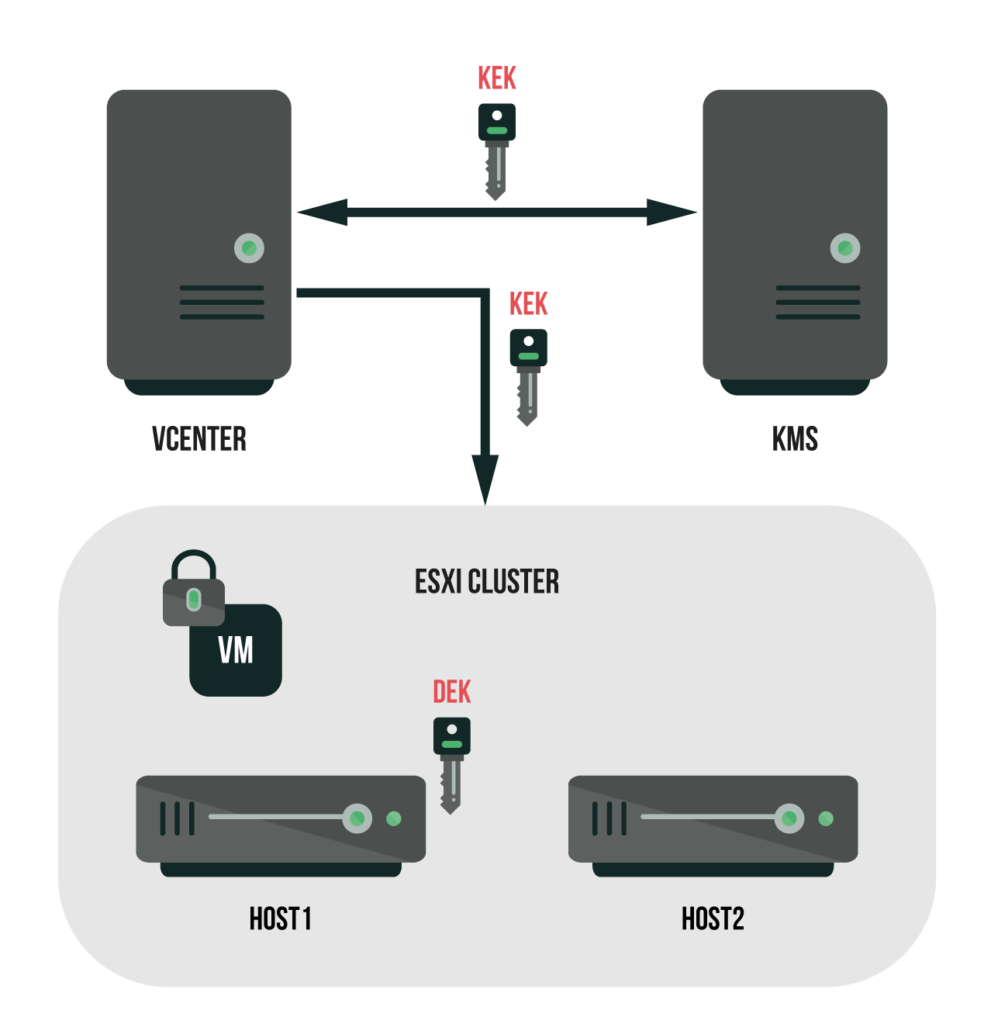
When an admin applies an encryption policy to a VM, vCenter fetches the KEK from the selected key provider and passes it to the relevant ESXi host. The host then generates the DEK, encrypts it with the KEK, and stores the encrypted DEK in the VM configuration file. From there, the DEK lives only in the host’s memory during runtime, ensuring that disk encryption happens on the fly and is completely transparent to the VM itself.
Encryption in Action
The entire encryption process happens under the hood. Whether you’re creating, running, or migrating VMs, the encryption layer sits quietly between the virtual hardware and the physical storage. The guest OS has no idea it’s running on encrypted disks.
When a VM is powered on, the ESXi host pulls the encrypted DEK from the VM config, decrypts it using the KEK, and holds it in memory. If the host is rebooted, the DEK is flushed and has to be reloaded from the key provider. That’s why vCenter and the KMS or NKP must be reachable whenever VMs are powered on, cloned, or moved between hosts.
What Works – and What Doesn’t
VM encryption integrates well with most vSphere features. Live migrations via encrypted vMotion are fully supported, meaning data stays protected during transit between hosts. It’s also compatible with vTPM, which is crucial if you’re running modern guest operating systems like Windows 11. Encryption can be applied flexibly – either at the full VM level or on individual virtual disks – and works seamlessly with vSAN.
But there are limits. Features like Fault Tolerance (FT) and Suspend/Resume don’t play well with encrypted VMs. Some third-party backup solutions may struggle unless they’re specifically designed to handle encrypted workloads. And while VM disks are encrypted, not every file is – logs, VMX configuration files, and metadata remain in plain text.
Here’s a quick snapshot:
| Capability | Supported with VM Encryption |
|---|---|
| Encrypted vMotion | Yes |
| vTPM | Yes |
| vSAN | Yes |
| Per-VM or Per-Disk | Yes |
| Fault Tolerance (FT) | No |
| Suspend/Resume | No |
| Some backup solutions | Vendor dependent |
What You Should Never Do
One common pitfall is encrypting things that should stay unencrypted. A textbook mistake is encrypting the vCenter Server Appliance or your KMS/NKP provider itself. If you do that, you risk locking yourself out of the very infrastructure you need to decrypt your workloads – a circular dependency nightmare.
Best Practices to Keep You Out of Trouble
For starters, all your hosts should have TPM 2.0 modules. TPM secures key caching on the host, making the whole process safer and more resilient.
Backups are critical – not just of your VMs, but of the key management infrastructure itself. If you’re using NKP, exporting keys regularly is a must. Lose those keys, and any encrypted VM data becomes permanently unrecoverable.
Keep your key providers and vCenter out of the encryption scope. Apply role-based access controls so only trusted admins can touch encryption policies or keys.
And before deploying, double-check whether your backup and disaster recovery tools are certified for encrypted workloads. Otherwise, you might find out the hard way that your backups are useless when you need them most.
What Happens When Things Go Wrong?
If an ESXi host goes down or reboots, the DEKs cached in memory are wiped. Once it’s back online, the host reconnects to the key provider, retrieves the KEK, and decrypts the DEKs to get back to work.
But if your key provider is offline, the situation gets stickier. Running VMs keep running – their DEKs are already in memory. But you won’t be able to power on new VMs or migrate running ones until the KMS or NKP is back online.
If vCenter itself crashes, it can be restored as long as the key provider is still functional. But if you lose the KEKs without a backup – that’s game over. The encrypted data is lost permanently.
Wrapping It Up
VMware VM Encryption provides solid, hypervisor-level protection for virtual machines without relying on the guest OS. With modern conveniences like vTPM, encrypted vMotion, and the built-in Native Key Provider, it’s flexible enough for most use cases. But like any encryption setup, its strength is directly tied to how well you manage your keys. Lose the keys, and no technology in the world can get your data back.
