
HCI is still growing in 2026, but what you’re actually buying has changed. Broadcom’s VMware shifts, growing demand for edge infrastructure, on-premises AI, and persistent ransomware pressure are reshaping the market. The result is a much more fragmented HCI market, with organizations comparing platforms, licensing models, hardware choices, and lifecycle costs instead of just picking an appliance built around one hypervisor.
The HCI market in 2026
Mordor Intelligence sizes the HCI market at $19.62 billion in 2026, rising to $43.59 billion by 2031 at a 17.31% CAGR. Treat those figures as a direction, not a precise reading – research firms don’t always define HCI the same way. Some count only certified appliances; others include software and managed services. What’s worth noting is the segment data: HCI software and managed services are growing faster than the overall category, which means more value is migrating from boxes to subscription and service delivery.
VMware is the other half of the story. CloudBolt’s survey (a vendor survey, for context) found 86% of companies actively reducing their VMware footprint, while 54% still run it and cut dependence in phases. This is a phased, multi-platform transition, and most organizations will run mixed environments for years.
So, is HCI dead? No. The eight trends below show how these changes affect platform design and procurement.
Not every trend is yours, though. An MSP or hosting provider will probably start with licensing, operating cost, and service delivery. Distributed retailers and manufacturers, by contrast, may care more about small edge clusters and cyber recovery. Anyone piloting AI cares about independent scaling and inference. A mid-market shop staring at a VCF renewal is watching licensing and lifecycle cost above all.
The market signals help put those differences in perspective:
| Market signal | Current evidence | What it means |
|---|---|---|
| HCI keeps growing | Mordor: $19.62B (2026) to $43.59B (2031), 17.31% CAGR | The category is growing, but its composition is changing |
| Software and services grow fastest | Mordor: HCI software and managed services outpace the total category | Value shifting from appliances to software and service |
| VMware dependence easing | CloudBolt (vendor survey): 86% reducing VMware, 54% still on it | A phased, multi-platform transition |
| Edge spending climbing | IDC: ~$261B (2025) to $380B (2028), 13.8% CAGR | There is a strong market driver for small-footprint infrastructure |
| Ransomware pressure high | Sophos 2026: 56% of attacks encrypted data; avg recovery $1.7M | Separate cyber recovery from replication |
| Power is now a constraint | IEA: data-center electricity ~945 TWh by 2030 (about 2x 2024) | Energy consumption is becoming part of HCI TCO |
With that broader picture in mind, let’s look at the architectural changes behind the numbers.
1. The end of one-hypervisor HCI
Broadcom ended perpetual VMware licensing and moved VMware’s portfolio toward subscription-based offerings, including VMware Cloud Foundation. That changed the economics of the vSAN-on-an-appliance model that had defined HCI for much of the previous decade. For many organizations, the practical response is a gradual reduction in VMware usage, not an overnight exit. VMware can still make sense where its integrations and operational maturity justify the cost – and every alternative brings its own storage architecture, backup workflows, networking model, and skills requirements.
The difficult part of a hypervisor migration usually isn’t moving the VMs themselves. It’s everything connected to them. Before you switch platforms, you’ll want to inventory the vSphere APIs your backup software calls, the NSX features your security tools assume, and the automation tied to vCenter. Those dependencies often set the migration schedule. VM conversion is usually the easier piece once you’ve mapped the surrounding ecosystem.
The financial pressure isn’t even, either. MSPs and hosting providers feel it quickly because VMware Cloud Service Provider changes and subscription minimums can directly squeeze rental margins. Budget-constrained sectors – public services, education, healthcare – may have less room to absorb a large licensing increase during a fixed multi-year budget cycle. Organizations operating many small sites face a different problem: the licensing cost has to make sense at ROBO scale, where even a modest per-site increase adds up fast.
In each case, cost is usually the trigger for the discussion. The technical dependencies decide how hard the change will be.
Backup is one dependency that teams often discover late. Incremental backup mechanisms differ between platforms: vSphere uses Changed Block Tracking, Hyper-V uses Resilient Change Tracking, and Proxmox VE can use QEMU dirty bitmaps, most directly through its integration with Proxmox Backup Server. Before you commit to a target platform, verify that your backup vendor supports it, and test both incremental backup and restore workflows. Don’t skip this step – it may not seem the most important at the first glance, but gets critical very soon.
The migration sequence is of high priority too. Moving fast helps only as long as you can still recover from a mistake. Here’s the path that tends to burn the fewest teams:
- Inventory the dependencies. Identify every tool that touches vSphere, vCenter, or NSX – backup, monitoring, automation, and security included. These dependencies usually set the timeline.
- Pilot the target platform. Run non-critical VMs on the new environment for a few weeks before committing anything to production.
- Rebuild and test backup. Prove that backups and restores work on the target platform before you migrate a single important workload.
- Recreate networking and security. Segmentation, firewall rules, and load balancers rarely port one-to-one between platforms. Rebuild them and test the resulting configuration.
- Migrate in waves. Start with low-risk workloads while the existing environment stays available. Validate each wave before moving to the next.
- Decommission last. Retire the old platform only after restores, monitoring, automation, and operational runbooks have been proven on the new environment.
This approach takes some discipline, but it also gives you several points at which to stop and correct course.
2. Compute and storage stop scaling in lockstep
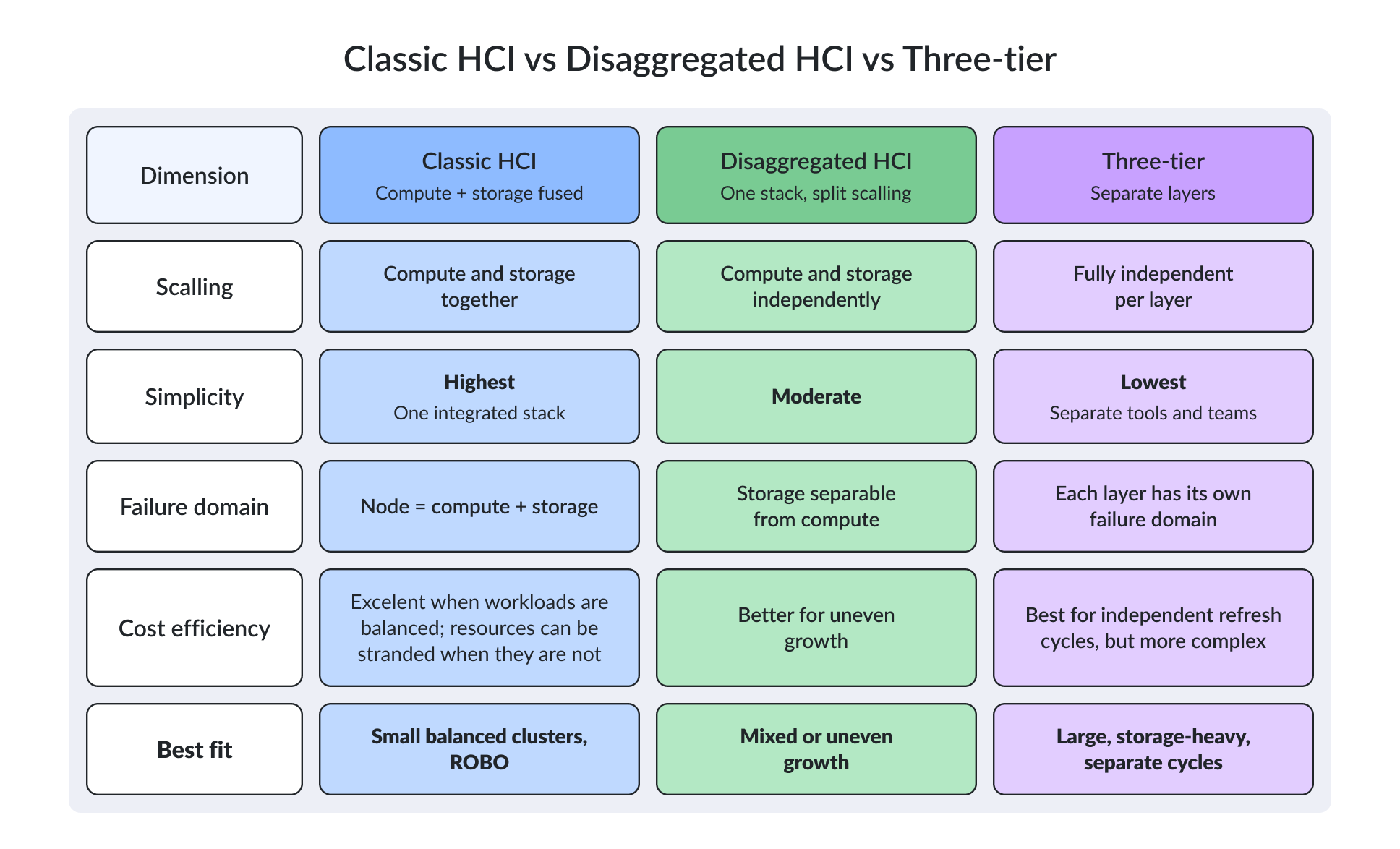
Traditional HCI has always had a simple scaling model: add a node and you add compute, memory, and storage at the same time. That’s one of its strengths, especially for small and medium-sized clusters. It gets less attractive when workload growth is uneven. AI inference wants GPU-dense nodes; VDI wants memory; backup archives want cheap dense capacity. Forcing all of those onto a uniform node profile leaves one of them under-served.
A storage-heavy workload may force you to buy extra CPU and memory just to get more capacity. Compute-heavy workloads, by contrast, can leave expensive storage sitting mostly idle. Over several hardware refresh cycles, that imbalance quietly eats a noticeable slice of the infrastructure budget, and the bigger the cluster, the louder it gets. It’s a slow leak, and most teams don’t notice it until the next refresh.
Disaggregation is one answer to that problem in 2026. Technologies like vSAN Max and HCI Mesh, storage-only nodes, external NVMe arrays, and software-defined storage platforms that pool resources across different hardware let compute and storage grow on separate schedules. DataCore SANsymphony and StarWind VSAN are examples of software-defined storage approaches that fit this model.
That doesn’t kill traditional HCI. If your workloads are reasonably balanced, conventional nodes are still hard to beat for simplicity. Disaggregation starts to pay off when compute and storage needs begin moving in different directions, and not before.
Once you separate those resources, the network gets a lot more important. Networking deserves attention even in a conventional HCI cluster, honestly. As all-flash storage gets faster, a 10GbE link can quickly become the bottleneck for storage traffic and east-west traffic. For new deployments, 25GbE is a sensible baseline for many performance-oriented environments. 100GbE becomes more relevant for high-performance NVMe, GPU, and heavily consolidated workloads.
Keep storage traffic properly isolated and build redundancy into the switching layer. Jumbo frames help in environments where they’re consistently configured and validated end to end. RDMA can cut CPU overhead and latency, but the implementation matters: RoCE, for example, needs careful congestion and loss management, so treat it as an architectural decision rather than something you simply flip on at the NIC.
The three models stack up like this:
3. HCI shrinks to two nodes at the edge
IDC put global edge spending near $261 billion in 2025, heading for $380 billion by 2028. That’s a driver for small-footprint HCI well beyond classic ROBO consolidation. Picture a supermarket that needs its self-checkout systems and pricing database to stay online during an ISP outage, or a factory that needs local access to PLC and MES data when the WAN link to headquarters goes down. Retail, manufacturing, healthcare, surveillance, and logistics all have versions of the same requirement: keep critical workloads running at the site even when connectivity to the central environment is interrupted.
That makes availability the main design problem for small clusters. One node can’t provide HA. Two nodes can, but the architecture needs a mechanism to decide which node should stay active if the communication link between them fails. A witness placed independently of both nodes is a common approach (sometimes called an arbiter or tiebreaker, depending on the vendor). On some platforms that witness runs at a third site. On others, it runs in the cloud. The point is to verify exactly how the platform handles quorum, witness placement, and split-brain protection before you commit to it.
The hardware itself can stay modest. A two-node edge cluster may only need a few CPU cores, 64 to 128 GB of RAM, and NVMe storage per node, depending on the workload. And there are cases where HCI is overkill entirely. If a site can tolerate a short outage and same-day intervention, one well-backed-up server may give you a better balance of cost and operational simplicity, and that’s a perfectly defensible answer.
That distinction matters because edge infrastructure is often deployed in dozens or hundreds of locations. A small amount of unnecessary complexity multiplied across every site turns into a heavy operational burden, and edge teams feel it first.
4. AI on HCI means inference
For HCI, the most practical AI workloads to plan for in 2026 are inference workloads. Computer vision on a production floor, retrieval-augmented generation over private documents, predictive maintenance, and smaller private models are realistic use cases for infrastructure teams that want to keep AI close to their existing data instead of dragging it across the WAN to a public endpoint.
Nutanix’s 2026 Enterprise Cloud Index,, which is based on its own survey and should be read in that context, reports that 85% of respondents say AI is accelerating container adoption, while 82% say their infrastructure isn’t fully ready for on-premises AI.
The real question is what “AI-ready” actually means for your infrastructure. GPUs alone don’t make a cluster AI-ready. Inference gets throttled as often by NVMe throughput, metadata operations, memory capacity, east-west networking, and data locality as by the accelerator. GPU-enabled nodes plus high-speed Ethernet or RDMA help, and coupled scaling bites here too: pin a GPU to a node and you can strand its storage or CPU. HCI is the wrong tool for large training runs, multi-petabyte datasets, or anything needing specialized GPU fabrics and parallel file systems. Those belong on purpose-built systems. Treating a cluster as a substitute is how AI projects stall out at the proof-of-concept stage.
Two design details decide whether an inference workload runs well. The first is the data path. A RAG service or a vision pipeline reads far more than it writes, and its latency is set by how fast vectors, embeddings, and model weights move from NVMe into GPU memory, so an all-flash tier and enough east-west bandwidth matter as much as the card itself.
The second is GPU sharing. A single accelerator is often idle between requests, so features like NVIDIA MIG partitioning and time-slicing let several VMs or pods share one card. That changes the sizing math entirely: instead of one GPU per workload, you can consolidate a handful of light models onto one node and keep utilization up. Both depend on the hypervisor exposing GPU passthrough or vGPU cleanly, which is one more line to confirm on the platform you’re comparing.
For a rough gauge, a quantized 7B-8B model fits in about 8 to 16 GB of GPU memory (roughly the footprint of a mid-range consumer card), so one mid-range card can serve a couple of light models at once. Keep the vectors and embeddings behind them on the NVMe tier, not in GPU memory, and size that tier for reads.
5. One platform for VMs and containers
Containers have changed what teams expect from HCI. The platform is increasingly becoming a common operating environment for VMs and Kubernetes together, mostly because teams want fewer places to manage policy, backup, security, and governance across core, cloud, and edge environments.
The requirements are fairly practical. Stateful containers need CSI drivers and persistent storage. Backup has to cover both VMs and container workloads. Management needs to remain usable at remote or offline sites. VDI can run on the same infrastructure, although that’s a mature HCI use case by now, not a new trend.
Several platforms have arrived at this model from different directions. VMware runs Tanzu and vSphere Kubernetes Service on top of vSphere. Nutanix offers Nutanix Kubernetes Platform (NKP). Red Hat runs virtual machines inside OpenShift through KubeVirt, while Proxmox combines VMs with LXC containers (the lightweight container format built into the Linux kernel, not the same thing as Kubernetes pods).
The important question is what happens underneath those workloads. A Kubernetes cluster can run perfectly well on an HCI platform, but that doesn’t automatically make the storage layer suitable for production containers.
Stateful containers need persistent volumes with capabilities such as snapshots and cloning, together with a CSI driver that the Kubernetes cluster can use reliably. If the same storage infrastructure can serve both VM datastores and container volumes, the operational argument for a unified platform gets much stronger. You can apply the same storage policies, monitor the same infrastructure, and manage capacity from one place.
Data protection is another practical test. A backup platform that can protect VMs and persistent volumes under coordinated policies is much easier to operate than two separate backup systems the team has to stitch together. Before you call a platform “unified,” check what happens when you actually need to restore something.
There’s a limit to this model, though. A unified infrastructure stack doesn’t make workloads automatically portable. Data gravity, egress costs, licensing, and platform-specific integrations can still keep applications tied to their current environment. And if you only run a few stateless containers, a managed Kubernetes service may be considerably simpler than building an on-premises platform around them.
So before committing to convergence, look at your actual workloads. Verify that the target platform supports the backup, networking, storage, and multi-site workflows you already depend on, including persistent container volumes.
6. Cyber recovery earns its own line item
Synchronous replication does exactly what it’s designed to do: every write is copied to the second system immediately. If ransomware encrypts the primary workload, that encrypted data can be replicated just as faithfully as everything else. That’s why HA and replication can no longer be treated as the complete resilience strategy.
Cyber recovery has become its own design and procurement consideration. Many organizations use the 3-2-1-1-0 approach: three copies of the data, stored on two different media types, with one copy off site, one copy immutable or offline, and zero errors confirmed through recovery testing.
The immutable copy is particularly important. HA keeps services available when hardware fails. Replication keeps another copy synchronized. Neither one gives you a clean historical recovery point after an attacker has compromised the environment. An object-locked backup can remain protected even when an attacker has gained significant access to the production domain.
Around that immutable copy, you may also need an air-gapped copy that an online attacker can’t reach and an isolated recovery environment where workloads can be restored safely. Otherwise, there’s a real risk of restoring compromised systems and immediately reinfecting the environment you’re trying to recover.
HCI introduces another consideration: the shared management plane. Centralized management reduces configuration drift and makes fleet-wide operations easier, but it also creates concentration of risk. If an attacker compromises the management layer, they may gain access to many clusters at once.
Design the recovery architecture so that management credentials, snapshots, and online backups can’t all be destroyed through the same control path. Keep at least one recovery copy outside that administrative boundary. The security controls themselves are familiar: MFA, RBAC, network segmentation, secure boot, vulnerability management, and timely patching all matter. They still don’t replace a recovery test.
Run a restore exercise with the assumption that your normal platform credentials are unavailable. Measure how long it actually takes to recover the workload and document what went wrong. An annual recovery exercise is much more useful than a backup dashboard showing green status every morning. An untested backup is a hope, not a recovery plan.
7. You’re buying the operating model
When skilled infrastructure staff are in short supply, operational effort becomes part of the purchasing decision. Uptime Institute’s 2025 survey found nearly two-thirds of operators struggling to hire or retain staff. That’s the case for integrated HCI: prevalidated firmware, drivers, hypervisor versions, storage components, rolling upgrades, and centralized fleet management can remove a lot of routine integration work from a small infrastructure team.
The real value shows up on day two. Someone still has to maintain a combination of firmware, drivers, hypervisor versions, and storage software that the vendor has actually tested together. Security patches have to be applied without turning every update into a weekend maintenance project. If an upgrade fails halfway through, the team needs a supported rollback path.
An integrated appliance can simplify that process because the vendor maintains the compatibility matrix and provides the upgrade tooling. You also have one support channel for the integrated stack, including the hardware: one number to call, one escalation path. For a two-person infrastructure team managing dozens of sites, that can be more important than the hardware specification itself.
The trade-off is cost and flexibility, and flexibility matters most when you actually need it. Integrated platforms generally come with higher licensing costs and tighter hardware constraints. A DIY stack based on Proxmox and Ceph gives you more freedom to choose hardware and software components, but your team takes responsibility for compatibility testing, upgrade sequencing, rollback procedures, and support across each layer.
Neither model is automatically better. Integrated HCI tends to make more sense for small teams responsible for many locations. Open platforms are attractive when you already have strong Linux, virtualization, and storage expertise and want more control over the stack.
The real trade is between control and operational ownership. One vendor owning the stack can mean fewer 3 a.m. arguments about whether the problem is firmware, storage, networking, or the hypervisor. An open stack gives you more freedom, but you need the engineering capability to make all those pieces work together.
And if a vendor promises “one-click upgrades,” treat that as something to validate. Before you sign the contract, get one answer in writing: if the cluster fails halfway through an upgrade, who owns the incident from firmware through storage and the hypervisor?
8. The bill that arrives in year four
The argument that “HCI is cheaper because it uses fewer boxes” has been incomplete for years. A realistic TCO model includes hardware, per-core or per-node licensing, support renewals, network upgrades, backup software, staff time, migration work, power, rack space, refresh cycles, and eventual decommissioning.
The initial quote tells you very little about several of those costs. Start with the software around the HCI platform. Monitoring, backup systems, security tools, and management software may all need new licenses or integrations when you change hypervisors. Then there’s training. Certification costs are easy to put into a spreadsheet, the less visible cost is the productivity dip while administrators learn a new API, CLI, management model, and troubleshooting workflow.
Migration also temporarily increases infrastructure costs. During a platform transition, you’ll often need to run old and new environments side by side. A move from three-tier infrastructure to HCI can also change the number and type of nodes you need, which affects the initial hardware investment.
Renewals are where an apparently attractive quote can become expensive. Model the cost of node four and year four, not just the first invoice. You’ll want to include expected support increases, additional capacity, hardware expansion, and licensing changes – the items vendors are most likely to gloss over in the original quote.
Exit costs deserve the same attention. Data export, professional services, migration tooling, temporary dual-running, and application changes all carry a price. Define those requirements before signing the contract, and you’ve got a much better chance of avoiding an unpleasant surprise later. Ideally you’ve already priced a realistic exit before you commit – not in anger six months before the renewal.
Power consumption now belongs in the same conversation. The IEA projects data-center electricity near 945 TWh by 2030 (roughly double 2024), which has buyers watching watts per workload and per usable terabyte rather than rack counts. That also changes what you should negotiate. Price protection at renewal, license portability, hardware flexibility, data export rights, and migration assistance can carry as much long-term value as a discount on the initial purchase. It’s not unusual for the energy line over five years to outweigh the hardware line.
None of this means HCI is inherently expensive. For workloads that fit its scaling model, HCI is still a very efficient way to run infrastructure – cheaper than the alternatives, even after you’ve accounted for all of the above.
Conclusion
The HCI decision has moved from consolidation to platform choice: which hypervisor, how it scales, and what it costs to run and eventually leave. Weigh those three upfront and the year-four surprise mostly disappears.
Whatever lands on your shortlist, test it against your own availability, support, and migration requirements before you commit. A datasheet can tell you what a platform supports. Only a test can tell you what it’ll be like to operate.
FAQ
How many nodes does an HCI cluster need?
Three is the common production starting point, so the cluster survives losing one node and still holds quorum. Two-node designs work when a separate witness breaks ties, and single-node deployments exist for edge sites that can tolerate a short outage. Scaling up means adding nodes; the practical ceiling is the hypervisor’s cluster limit.
What is disaggregated HCI (dHCI)?
It’s HCI that keeps single-pane management but lets compute and storage grow on separate curves, using storage-only nodes or external software-defined storage instead of adding both resources in every node. Teams reach for it when workloads are lopsided and lockstep scaling would strand CPU or disk.
Which hypervisor should replace VMware vSphere?
There’s no single answer; it depends on your workloads and in-house skills. Hyper-V and Azure Local suit Microsoft-centric shops, Nutanix AHV offers a managed route, Proxmox VE and XCP-ng appeal to teams wanting open-source control, and OpenShift Virtualization fits container-heavy estates. Match the surrounding ecosystem – backup, networking, and automation – before the hypervisor itself.
Can you mix different hypervisors in one HCI environment?
Usually not within the same cluster, but you can run different hypervisors across separate clusters. This is common during phased migrations from VMware.