To start working with StarWind, establish a connection to the host running StarWind Service where an iSCSI target has to be created.
To connect to a StarWind host:
1. Perform one of the following actions:
- Select a StarWind server and click Connect on the toolbar.
- Right-click a StarWind server and select Connect.
- Select a StarWind server from the Console tree and click Connect on the main Management Console area.
- Select a StarWind server from the Console tree. Then, click Host in the menu bar and select Connect.
- Double-click a StarWind server to connect it.
2. Unless the connection is configured to support anonymous logins, a pop-up message will prompt for a username and password.
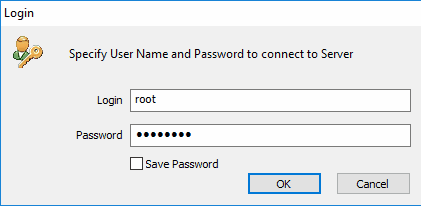
Please provide your login and password.
Note: The default login and password are root and starwind, accordingly.
Please refer to the StarWind Service Management Interface section to learn more about changing the authentication policy.
If the connection is established successfully, the connection icon in the Console tree becomes active: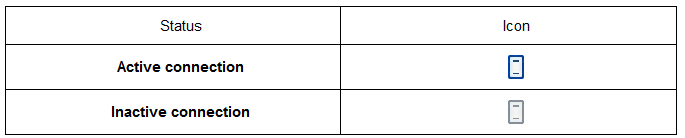
To disconnect a StarWind Server:
- Click Disconnect on the toolbar.
- Select Disconnect from the shortcut menu of the host.
- Select the StarWind server from the Console tree and click Disconnect on the main Management Console area.
- Select the StarWind server from the Console tree. Then, click Host in the menu bar and select Disconnect.